
Online gaming lives and dies by latency and connection stability, which is exactly where the choice between Wi-Fi and a wired Ethernet cable matters most. Wi-Fi is convenient and, on modern standards, surprisingly capable, but a cable still wins on the metrics competitive players care about. This guide compares them fairly so you can decide whether to run a cable or optimize the wireless you already have.
As an Amazon Associate we earn from qualifying purchases at no extra cost to you.


Our Top Picks
 Netgear MK73-100NAR Nighthawk Dual-Band AX3000 3-Pack 3Gbps WiFi12 x 22 x 12 inches1 PoundsCheck on Amazon


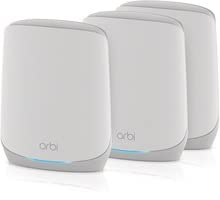
Top 3 picks at a glance
The Metrics That Matter for Gaming
Raw download speed barely affects gaming; a match uses very little bandwidth. What matters is latency (ping), jitter (how much that ping varies), and packet loss (dropped data). Ethernet excels at all three because it is a direct electrical path with no interference. Wi-Fi shares airwaves with neighbors, microwaves, and every other device in your home, which introduces variability even when the average speed looks fine.
| Metric | Ethernet | Wi-Fi (modern 5GHz/6GHz) |
|---|---|---|
| Average ping | Lowest, very stable | Low, occasional spikes |
| Jitter | Minimal | Higher, varies with congestion |
| Packet loss | Rare | More likely with interference |
| Setup | Needs a cable run | Instant, wire-free |
When Ethernet Clearly Wins
For competitive shooters, fighting games, and anything where a single dropped packet costs you a round, a cable is worth it. The advantage is not usually a lower average ping, it is consistency: fewer sudden spikes and near-zero packet loss, which translates to fewer rubber-banding moments and hit-registration frustrations. If your gaming PC sits near the router, a cable is the single best free upgrade to your online experience.
Also Better For Large Downloads
Game libraries now run to tens or hundreds of gigabytes. Ethernet delivers your full plan speed reliably, so patches and installs finish faster and do not choke when Wi-Fi congestion hits.
When Wi-Fi Is Fine
Modern Wi-Fi on the 5GHz or 6GHz band, with a strong signal and low household congestion, is perfectly playable for most single-player and casual online games. If running a cable is impractical, you can close much of the gap: use 5GHz or 6GHz instead of crowded 2.4GHz, position the PC within clear line of sight of the router, reduce the number of competing devices, and enable QoS to prioritize gaming traffic. A quality mesh node or a powerline/MoCA adapter can also bring near-wired stability without a long cable run.
Rule Out Wi-Fi Problems
If your wireless gaming stutters, test on the 5GHz band close to the router before blaming the game or server. High jitter and packet loss on Wi-Fi mimic server-side lag but are entirely local and fixable.
Closing the Gap When You Must Use Wi-Fi
Not everyone can run a cable, and modern wireless can get remarkably close to wired if you address its weak points. Force your PC onto the 5GHz or 6GHz band, which is far less congested than the crowded 2.4GHz band that neighbors and smart-home gadgets clog. Position the PC with a clear line of sight to the router, since walls and floors sap signal and add jitter. Reducing the number of active devices during your session also frees airtime.
Where a full cable run is impractical, a MoCA adapter over existing coaxial wiring or a modern powerline adapter can deliver near-wired stability without drilling holes, and a well-placed mesh node dedicated to your gaming room helps too. Enabling QoS to prioritize gaming traffic smooths things further on a busy household network. These steps will not quite match a direct cable’s consistency, but they can turn a spiky, frustrating wireless connection into one that is perfectly competitive for most online play.
FAQ
Will Ethernet lower my ping?
Sometimes slightly, but its bigger benefit is consistency. Ethernet reduces jitter and packet loss, so your ping stays stable instead of spiking mid-match. Even if the average number looks similar to Wi-Fi, the smoother, spike-free connection feels noticeably better in fast online games.
Is Wi-Fi 6 good enough for competitive gaming?
For many players, yes, when you have a strong signal, use the 5GHz or 6GHz band, and keep congestion low. It can rival wired for average latency. However, a cable is still more consistent under a busy household, so the most latency-sensitive competitive players should prefer Ethernet when possible.
Bottom Line
Ethernet wins on the metrics that decide online gaming, latency consistency, jitter, and packet loss, so run a cable if your PC is near the router, especially for competitive play. If Wi-Fi is your only option, use 5GHz or 6GHz with a strong signal, cut congestion, and enable QoS to get most of the way there.






