
A 43-inch computer monitor is a different kind of screen. It is large enough to replace two smaller monitors side by side, with room for four windows at once, and it doubles as a television when the working day ends. The best 43 inch computer monitors pair that huge 4K panel with USB-C docking, multi-input modes, and a stand or mount that can hold a screen of this size.
This guide compares four 43-inch computer monitors, judged on panel type, 4K resolution, USB-C features, multi-input modes, smart features, and ergonomics. Every pick below is a 43-inch monitor with a 3840 x 2160 panel sold on Amazon US, and each one is a complete monitor rather than a television.
How to Choose
Panel type
Panel type decides how the huge screen looks from the desk. IPS panels keep colours steady from wide angles, which suits a desk where more than one person looks at the screen, while VA panels give deeper blacks for films and dark games. Check the panel type in the listing, because a 43-inch screen is viewed from closer than a television, and a narrow viewing angle shows up quickly at this size.
4K resolution
A 43-inch monitor needs 4K resolution, because a lower resolution on a screen this size looks coarse at desk distance. The 3840 x 2160 panel gives sharp text and fine detail, with room for four windows at once or two large windows side by side. Check that the computer can drive 4K at 60 Hz over the available outputs, because some older laptops cannot.
USB-C features
A USB-C port turns a huge monitor into a docking station, carrying video, data, and laptop charging over one cable. Check the charging wattage, because a laptop that needs 65W or more will charge slowly from a lower-wattage port. A monitor with USB-C and several HDMI inputs can serve a laptop, a desktop, and a console without swapping cables.
Multi-input modes
A 43-inch screen is large enough to show two sources at once, and picture-by-picture mode makes that possible. Look for picture-in-picture and picture-by-picture support, with the ability to choose which input goes where. These modes suit a desk where a work laptop and a second computer need to sit side by side on one screen.
Smart features
Some 43-inch monitors run streaming apps on their own, so the screen works as a television when the computer is off. Smart features add convenience for a living-room desk, but they also add setup steps and a second interface to learn. Decide whether the monitor should be a pure computer screen or a hybrid, because a plain monitor is simpler to live with.
Ergonomics and mounting
A 43-inch monitor is heavy and wide, so the stand and mounting options matter more than on a smaller screen. Check the weight, the VESA mount pattern, and whether the desk can hold the screen safely. A wall mount or a heavy-duty arm suits a desk that cannot take the weight, while a tilt-only stand is adequate when the screen sits at the right height already.
Top Picks
LG 43UN700-B
The LG 43UN700-B is a 43-inch 4K IPS monitor with four HDMI inputs and a USB-C port, which suits a desk where several computers and consoles share one huge screen. The IPS panel keeps colours steady from wide angles, and the 60 Hz refresh rate suits work, films, and casual games. The screen is large enough to replace two smaller monitors side by side.
Key specifications:
– 43-inch 4K UHD IPS panel, 3840 x 2160
– USB-C with 60W power delivery
– Four HDMI inputs
– HDR10 support
Who it is for: Desks where one huge 4K screen replaces a pair of smaller monitors.
Caveat: The panel has no DisplayPort input, so check the available outputs on the connected computer.
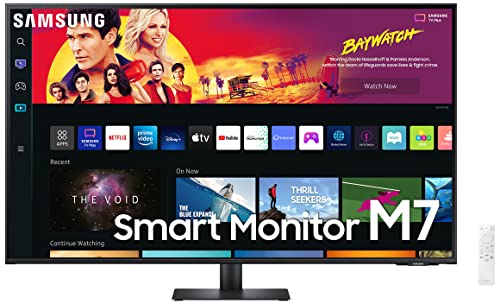
Samsung Smart Monitor M70B 43-Inch
The Samsung M70B is a 43-inch 4K smart monitor that runs streaming apps on its own, so it works as a television when the computer is off. The USB-C port carries 65W of charging to a laptop, and wireless display support lets a phone or laptop mirror its screen without a cable. The VA panel delivers strong contrast for films, and the slim design suits a living-room desk.
Key specifications:
– 43-inch 4K UHD VA panel, 3840 x 2160
– USB-C with 65W power delivery
– Smart TV apps and voice assistants built in
– Wireless display support
Who it is for: Desks where the monitor must double as a streaming screen after work.
Caveat: The smart features add setup steps, and the VA panel has narrower viewing angles than IPS.
ASUS ROG Strix XG438Q
The ASUS ROG Strix XG438Q is the gaming pick in this guide, with a 43-inch 4K VA panel running at 120 Hz and DisplayHDR 600 certification. The wide colour gamut reaches 90 percent DCI-P3, and FreeSync Premium Pro keeps frames smooth on compatible graphics cards. Two 10W speakers and a remote control suit a desk set back from the screen, and the non-glare surface helps in bright rooms.
Key specifications:
– 43-inch 4K VA panel, 3840 x 2160
– 120 Hz refresh rate
– DisplayHDR 600 and 90 percent DCI-P3
– FreeSync Premium Pro support
Who it is for: Gamers who want a huge 43-inch 4K screen with a 120 Hz refresh rate.
Caveat: The model is an older design, so confirm current availability on the listing before buying.
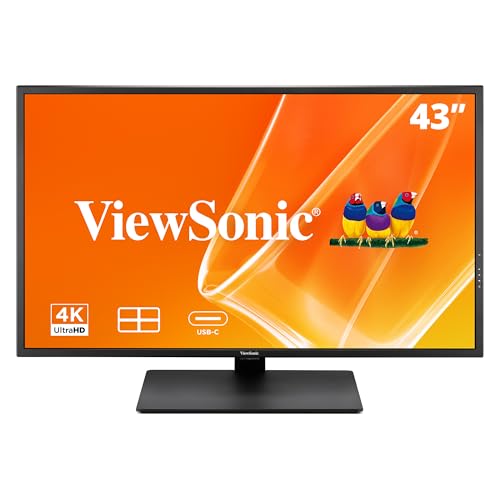
ViewSonic VX4381U-4K
The ViewSonic VX4381U-4K is a 43-inch 4K monitor with picture-in-picture and picture-by-picture modes, which let two sources share the huge screen at once. The USB-C port carries 65W of charging to a laptop, and HDR10 support adds brighter highlights in compatible content. The design suits a desk where a work laptop and a second computer need to sit side by side on one screen.
Key specifications:
– 43-inch 4K UHD panel, 3840 x 2160
– USB-C with 65W power delivery
– Picture-in-picture and picture-by-picture modes
– HDR10 support
Who it is for: Desks where two computers must share one huge 4K screen at the same time.
Caveat: The model is a newer listing, so confirm the exact specifications on the product page.
Comparison Table
| Product | Panel / Wireless | Key strength | Best for |
|---|---|---|---|
| LG 43UN700-B | 43-inch 4K UHD IPS panel, 3840 x 2160 | USB-C with 60W power delivery | Desks where one huge 4K screen replaces a pair of smaller monitors. |
| Samsung Smart Monitor M70B 43-Inch | 43-inch 4K UHD VA panel, 3840 x 2160 | USB-C with 65W power delivery | Desks where the monitor must double as a streaming screen after work. |
| ASUS ROG Strix XG438Q | 43-inch 4K VA panel, 3840 x 2160 | 120 Hz refresh rate | Gamers who want a huge 43-inch 4K screen with a 120 Hz refresh rate. |
| ViewSonic VX4381U-4K | 43-inch 4K UHD panel, 3840 x 2160 | USB-C with 65W power delivery | Desks where two computers must share one huge 4K screen at the same time. |
Common Mistakes to Avoid
Buying for a desk that is too shallow
A 43-inch screen needs a deep desk, because sitting too close makes the edges hard to see without turning the head. A desk at least 30 inches deep suits a screen this size, and a wall mount can help by pushing the screen further back. Measure the desk depth before buying, because a huge screen on a shallow desk is uncomfortable within an hour.
Accepting a low resolution at 43 inches
A 43-inch screen with a 1080p panel looks coarse at desk distance, because the pixels are large enough to see. A 4K panel is essential at this size, giving sharp text and fine detail across the huge canvas. Check the resolution in the listing rather than the size alone, because size without pixels is a poor trade.
Ignoring weight and mounting
A 43-inch monitor is heavy and wide, and not every desk or arm can hold it safely. Check the weight, the VESA mount pattern, and whether the desk can take the load before buying. A wall mount or a heavy-duty arm suits a desk that cannot hold the screen, while a tilt-only stand is adequate when the screen already sits at the right height.
Forgetting to check the inputs
A huge monitor is only useful when it connects to the computers on the desk, and some 43-inch models lack a DisplayPort input. Check the available outputs on the computer against the inputs on the monitor, and confirm that the computer can drive 4K at 60 Hz over the chosen connection. An adapter can fix a mismatch, but a direct connection is always simpler.
Which One Is Right for You?
For a huge 4K work screen with several inputs, start with the LG 43UN700-B, because its IPS panel and four HDMI inputs suit a desk with several computers. A desk where the monitor must double as a streaming screen should favour the Samsung M70B, with its smart TV apps and USB-C charging. Gamers who want a 120 Hz refresh rate on a huge screen should pick the ASUS ROG Strix XG438Q, while a desk where two computers must share one screen should choose the ViewSonic VX4381U-4K for its picture-by-picture modes.
Frequently Asked Questions
Is a 43-inch monitor too big for a desk?
It depends on the desk depth. A 43-inch screen needs a deep desk, because sitting too close makes the edges hard to see without turning the head. A desk at least 30 inches deep suits a 43-inch monitor, and a wall mount can help by pushing the screen further back. Measure the desk before buying.
Can a 43-inch monitor replace two monitors?
Yes, and that is its main strength. A 43-inch 4K screen has enough pixels for four windows at once, which covers most dual-monitor workflows and more. Picture-by-picture mode can even show two computers side by side on the same screen, which a pair of smaller monitors cannot do as neatly.
What is picture-by-picture mode?
Picture-by-picture mode shows two video sources side by side on one screen, each in its own half. It suits a desk where a work laptop and a second computer need to be visible at the same time. Picture-in-picture mode is similar but shows the second source in a smaller window over the main picture.
Do 43-inch monitors work as televisions?
Some do, because smart monitors run streaming apps on their own and carry speakers and a remote control. A plain 43-inch monitor needs a connected computer or streaming device to show films. Decide whether the screen should be a pure computer monitor or a hybrid before choosing, because the two kinds behave differently.
Disclosure: As an Amazon Associate, we may earn from qualifying purchases.
Related guides
More from Amazon
Programs that pair well with the guide above. Offers and eligibility are set by Amazon and may change.
Free shipping on eligible items, Prime Video and more. Eligible new members can start with a free trial.
Start a Prime free trialAd-free music streaming. Eligible new subscribers can start with a free trial.
Try Music Unlimited freeA Prime membership for ages 18-24 with a trial period. Eligibility is set by Amazon.
See Prime for Young AdultsAudiobooks and podcasts to listen to on the go. Eligible new members can start with a free trial.
Try Audible freeAs an Amazon Associate we earn from qualifying purchases.









