Mac owners have a quirky webcam problem: the built-in camera on many laptops is decent in good light and mediocre everywhere else, while a Mac mini, Mac Studio, or an iMac paired with an external monitor often has no good camera at all. An external USB webcam fixes both situations, but the shopping question is narrower than it looks. You want something that is recognized without special drivers, offers a wider or sharper picture than the built-in option, and works with the apps you actually use for calls, streaming, and recording.
This guide is for Mac users in 2026 who want to upgrade their video presence on a mid-range or premium budget tier, or simply to replace a weak built-in camera. It covers 4K webcams with larger sensors and AI framing, a conference-style 2K model, and several 1080p plug-and-play units. Some titles name Mac compatibility directly; others describe a generic USB webcam, so the choosing section explains how to double-check before ordering.
Our Top Picks


Top 3 picks at a glance
Quick Picks
As an Amazon Associate we earn from qualifying purchases at no extra cost to you.


| Product | Best for | Key spec from the title |
|---|---|---|
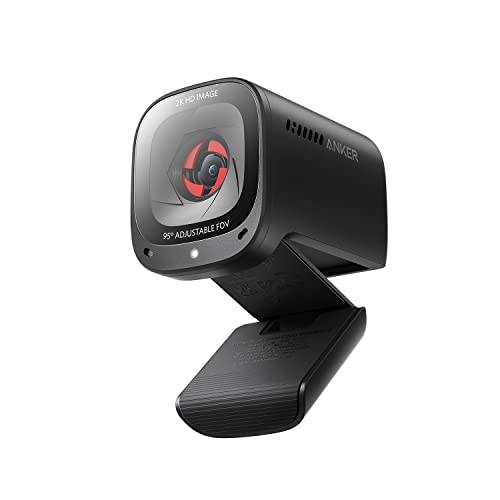
| Anker PowerConf C200 | Home-office calls with good audio | 2K, low-light correction, conference mic |
| Insta360 Link 2C | Creators wanting a compact 4K option | 4K, 1/2-inch sensor, auto framing, HDR |
| Acer 4K Webcam | Metal build and sharp 4K calls | 4K, Sony 1/2-inch sensor, PDAF, 2 mics |
| Insta360 Link 2 Pro | Premium tracking and low light | 4K PTZ, 1/1.3-inch sensor, AI tracking |
| Insta360 Link 2 | Gesture control and PTZ framing | 4K PTZ, 1/2-inch sensor, gesture control |
| TRAUSI 1080P Webcam | Basic budget upgrade | 1080P, noise-canceling mic, privacy cover |
| 1080P HD Webcam (generic) | Simple plug-and-play use | 1080P, noise cancellation, privacy cover |
| Gohero Full HD 1080P | Budget calls and classes | Full HD, wide-angle, auto light correction |
How to Choose
Compatibility and driver-free setup
Modern Macs recognize UVC webcams automatically, which is why plug-and-play USB models work without installers. Still, check the connection: many Macs only offer USB-C or Thunderbolt ports, so a USB-A webcam may need a small adapter or hub. If a title states “for PC/Mac,” as the Anker, Insta360, and Acer listings do, that is a good sign. For the generic 1080P items, look at the full listing for Mac or macOS language before buying.
Resolution and sensor size
1080p is enough for most calls. 4K helps if you record content, crop in post, or want extra sharpness on a large display. Sensor size matters more than resolution in dim rooms; a 1/2-inch sensor, like those on the Insta360 Link 2C and Acer, and the 1/1.3-inch sensor on the Link 2 Pro gather more light than the tiny sensors on basic webcams. That translates to cleaner video in a living room at night.
Framing, tracking, and focus
Auto framing and AI tracking keep you centered as you move, which is useful for presenters and teachers. PTZ models can pan and tilt electronically or physically; check how the camera handles it. PDAF autofocus, listed on the Acer, locks onto faces quickly. Fixed-focus budget models work fine for a seated desk setup but struggle if you lean forward or hold up objects.
Audio, privacy, and mounts
Built-in microphones range from basic to AI noise-canceling. A privacy cover, offered on several listings, blocks the lens when not in use. Check that the clip fits a thin laptop lid or a slim external display, and that there is a tripod thread if you plan to use a stand. Ignore marketing promises about “studio quality” and compare sensor size, framing tools, and software support instead.
The 8 Best Options
Anker PowerConf C200
The C200 offers 2K video for PC, laptop, and Mac, with low-light correction, a conference-style microphone, 360-degree voice coverage, and smart voice enhancement. It is geared to remote workers who want better audio and a sharper image than a built-in camera without paying for 4K. Its feature list reads as meeting-first, not content-creator-first. A Mac mini owner with an external display, or a MacBook user who docks the laptop closed, will find that a dedicated camera placed at eye level looks far better than one hidden in a lid.
- Strength: a 2K picture is a clear step up from a typical laptop camera.
- Strength: microphone features make it friendly to quiet home offices and small rooms.
- Trade-off: it does not offer 4K or advanced tracking.
Skip it if you need sharper video for recording or premium framing tools.
Insta360 Link 2C
The Link 2C is a 4K webcam for PC and Mac with a 1/2-inch sensor, auto framing, HDR, an AI noise-canceling microphone, and gesture control. It is aimed at streamers, teachers, and professionals who want a compact camera that reacts to their movement. Gesture control also lets you start tracking without touching the mouse. Because it is a compact body, it pairs well with a slim monitor on a small desk, which suits people who work from a shared apartment or a corner of the living room.
- Strength: a larger sensor and HDR improve difficult lighting.
- Strength: auto framing keeps you in view as you move.
- Trade-off: a 4K camera with extra features sits at a higher budget tier.
Skip it if basic 1080p calls are all you need.
Acer 4K Webcam
The Acer webcam combines 4K video, an all-metal unibody, a Sony 1/2-inch sensor, PDAF autofocus, two noise-reduction microphones, and a privacy cover, with support for Zoom and Teams. It targets professionals who want a sturdy, minimalist camera that sits well on a desk display. Sales teams, consultants, and anyone presenting to clients will appreciate a camera that looks understated on camera and on the desk, without an obvious gaming-style design.
- Strength: PDAF autofocus helps lock onto faces quickly.
- Strength: the metal build and privacy cover feel considered for office use.
- Trade-off: it lacks the AI tracking features of the Insta360 cameras.
Skip it if you want auto framing or gesture control.
Insta360 Link 2 Pro
The Link 2 Pro is a 4K PTZ webcam for PC and Mac with a 1/1.3-inch sensor, low-light performance, AI tracking, HDR, directional noise-canceling microphones, and Stream Deck support. It is the premium option in this list, built for creators who record, stream, and present in rooms with less-than-ideal lighting. Podcasters filming episodes, course creators, and live-stream hosts who switch scenes with a Stream Deck are the people who benefit from the extra sensor area and the control options.
- Strength: the 1/1.3-inch sensor is the largest listed here.
- Strength: Stream Deck support suits streamers who automate their setups.
- Trade-off: it sits at the top of the budget range for webcams.
Skip it if you only join occasional video calls.
Insta360 Link 2
The Link 2 is a PTZ 4K webcam with a 1/2-inch sensor, AI tracking, HDR, an AI noise-canceling microphone, and gesture control, aimed at streaming, calls, gaming, and work. It is a middle step between the 2C and the Pro for people who want PTZ movement without the largest sensor. Teachers who walk around a whiteboard, trainers who demonstrate products, and gamers who like a hands-free camera will get the most from the tracking and gesture options.
- Strength: AI tracking and PTZ movement follow your position.
- Strength: gesture control makes quick adjustments without the keyboard.
- Trade-off: the sensor is smaller than the one on the Pro model.
Skip it if you want the best possible low-light performance.
TRAUSI 1080P Webcam
TRAUSI is a straightforward 1080P webcam with a noise-canceling mic, auto light correction, a privacy cover, a wide-angle lens, and plug-and-play USB. It is a budget upgrade for Mac owners with a weak built-in camera, or none at all. For a student, a retiree who video calls family, or a household that wants a spare camera for a second desk, a simple model like this covers the need at a modest budget tier.
- Strength: a privacy cover and wide-angle lens add practical value.
- Strength: setup is simple, with no drivers to install.
- Trade-off: the visible title does not state Mac compatibility, so confirm it in the listing.
Skip it if you need 4K or advanced tracking.
1080P HD Webcam with Privacy Cover
This generic 1080P HD webcam lists a microphone, noise cancellation, a privacy cover, a wide-angle lens, auto light correction, and plug-and-play USB for laptop and desktop use. It sits at the entry-level budget tier for simple calls and classes. If you choose it, read the full product page for macOS language and return terms, since the visible title does not mention Apple computers at all.
- Strength: the feature list covers the basics at a low budget tier.
- Strength: plug-and-play behavior suits quick setup.
- Trade-off: the unnamed brand offers little in the way of support information.
Skip it if you want clear Mac compatibility in the title or a recognized brand.
Gohero Full HD 1080P
Gohero is a Full HD webcam with noise cancellation, a privacy cover, a wide-angle lens, auto light correction, and plug-and-play USB for laptop and desktop. It is similar to other entry-level cameras and suits students, remote learners, and casual video chatters. Treat it as a practical stopgap or a second camera for a guest room, and expect basic image quality rather than anything that competes with the larger-sensor 4K models above.
- Strength: Full HD resolution is enough for everyday calls.
- Strength: a privacy cover and light correction are both included.
- Trade-off: the visible title does not state Mac support, so verify it first.
Skip it if you want advanced autofocus or tracking.
Which One Fits Your Situation
You work from home and want better calls
The Anker PowerConf C200 improves picture and audio without the cost of a 4K creator camera.
You record content or present often
The Insta360 Link 2 Pro or Link 2 gives AI tracking, HDR, and large sensors, with the Pro better for low light.
You want a sturdy desk camera for meetings
The Acer 4K Webcam offers a metal body, PDAF, and a privacy cover.
You need a cheap fix for a missing camera
The TRAUSI, generic 1080P, or Gohero webcam gets you on screen quickly, after you confirm Mac compatibility.
Common Mistakes
- Forgetting that a USB-A webcam may need an adapter on a USB-C-only Mac.
- Paying for 4K when meetings only use 1080p.
- Ignoring sensor size, which matters most in dim rooms.
- Skipping a clip check, then finding it will not grip a thin display.
- Assuming every generic webcam works perfectly with macOS without confirming.
Related guides
- Windows Macos Linux Gaming Performance Comparison Strengths Weaknesses
- Desktop Operating Systems Gaming Performance Strengths Weaknesses
- 5G Home Internet Wifi Modem Settings Low Latency Gaming
Frequently Asked Questions
Do webcams work with a Mac without drivers?
UVC webcams are generally recognized automatically. Extra software unlocks features like tracking on some models.
Is 4K necessary for video calls?
No. Most meeting apps downscale video, so 1080p is enough for calls, while 4K helps with recording and large displays.
Do I need a USB-C adapter?
If your Mac only has USB-C or Thunderbolt ports and the webcam uses USB-A, yes. A compact hub or adapter solves it.
What does a privacy cover do?
It physically blocks the lens when the camera is not in use, which gives peace of mind between calls.