- Top Pick: Sony INZONE M9 II 27-Inch 4K Gaming Monitor
- Runner-up: LG UltraGear 27GR93U 27-Inch 4K Gaming Monitor
- Also consider: ASUS ROG Swift OLED PG27UCDM 27-Inch 4K Gaming Monitor
A 4K gaming monitor is the single upgrade that changes how every game looks, but the spec sheets are easy to misread. Two monitors can both claim 4K and high refresh rates while behaving very differently once a PC or console is plugged in, because port versions, panel type and HDR hardware decide what signal the screen can actually accept. A display limited to older HDMI inputs cannot take a 4K 120Hz feed from a current console.
This guide compares five 4K gaming monitors that cover the main ways people buy in this category: two IPS models with strong all-round value, and three QD-OLED models for buyers who want the fastest response and deepest contrast. Every pick below runs at 144Hz or higher and carries HDMI 2.1, so each one can show a console at 4K 120Hz as well as drive a gaming PC. The right choice comes down to screen size, panel technology and which extras, such as USB-C docking or built-in speakers, matter at your desk.
As an Amazon Associate, we earn from qualifying purchases.
Top 3 picks at a glance
Quick Answer
For most buyers, the LG UltraGear 27GR93U is the sensible default: a 27-inch 4K IPS panel at 144Hz with HDMI 2.1 and both major adaptive sync systems. The Sony INZONE M9 II adds full array local dimming and console-focused picture modes. Players who want the fastest motion and true blacks should look at the three QD-OLED picks from ASUS, MSI and Samsung, which run 4K at 240Hz.
Sony INZONE M9 II 27-Inch 4K Gaming Monitor

Sony builds the INZONE line alongside its consoles, and the M9 II shows it. The 27-inch 4K IPS panel runs at 160Hz with full array local dimming, which gives it far better control over dark scenes than a standard edge-lit IPS screen. DisplayHDR 600 certification backs that up, and the monitor carries PS5-specific features: Auto HDR Tone Mapping and Auto Genre Picture Mode, which the console applies automatically over HDMI 2.1. It suits a mixed desk where a PS5 and a PC share one screen.
Specs
- Screen size: 27 inches
- Resolution: 3840 x 2160 (4K UHD)
- Panel: IPS with full array local dimming
- Refresh rate: 160Hz
- Response time: 1ms GtG
- HDR: DisplayHDR 600
- Ports: 2 x HDMI 2.1, DisplayPort 2.1, USB (confirm port layout on the listing)
- Adaptive sync: NVIDIA G-SYNC Compatible, VRR over HDMI 2.1
- Extras: built-in speakers, PS5 Auto HDR Tone Mapping and Auto Genre Picture Mode
LG UltraGear 27GR93U 27-Inch 4K Gaming Monitor

The 27GR93U is the straightforward IPS option in this group: a 27-inch 4K panel at 144Hz with a 1ms GtG response time and support for both NVIDIA G-SYNC Compatible and AMD FreeSync Premium, so it pairs cleanly with either graphics card camp. LG rates the color gamut at up to 95 percent of DCI-P3, and the stand adjusts for tilt, height and pivot. Its DisplayHDR 400 rating is entry-level HDR without local dimming, so it is best treated as a sharp, fast SDR gaming screen first. For a desk that splits time between PC gaming, console play and everyday work, it is the least complicated recommendation here.
Specs
- Screen size: 27 inches
- Resolution: 3840 x 2160 (4K UHD)
- Panel: IPS
- Refresh rate: 144Hz (up to 120Hz support on current consoles over HDMI 2.1)
- Response time: 1ms GtG
- HDR: VESA DisplayHDR 400, HDR10
- Color: up to 95 percent DCI-P3 (confirm on the listing)
- Ports: HDMI 2.1, DisplayPort, 4-pole headphone out with DTS HP:X
- Adaptive sync: NVIDIA G-SYNC Compatible, AMD FreeSync Premium
- Stand: tilt, height and pivot adjustment
ASUS ROG Swift OLED PG27UCDM 27-Inch 4K Gaming Monitor
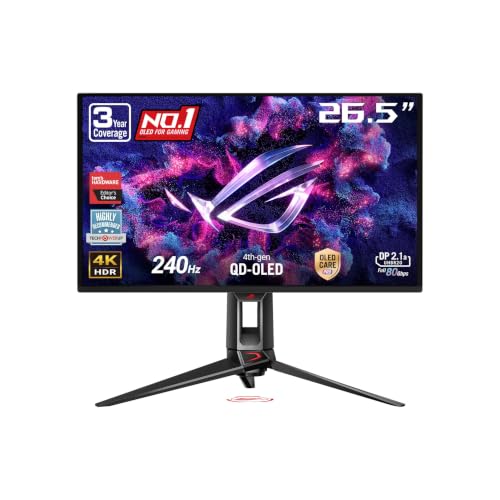
The PG27UCDM is the premium 27-inch option: a fourth-generation QD-OLED panel that pairs 4K resolution with a 240Hz refresh rate and a 0.03ms response time, so motion stays clean even in fast shooters. ASUS rates color coverage at 99 percent of DCI-P3 with true 10-bit color, and the monitor supports HDR10 and Dolby Vision. Connectivity is a strength, with DisplayPort 2.1a, two HDMI 2.1 ports and USB-C. The OLED Care Pro suite and a Neo Proximity Sensor that dims the screen when you step away target burn-in risk during long desktop sessions. Buyers paying this much should still confirm the exact port layout and warranty terms on the listing before ordering.
Specs
- Screen size: 26.5 inches viewable (27-inch class)
- Resolution: 3840 x 2160 (4K UHD)
- Panel: QD-OLED, fourth generation
- Refresh rate: 240Hz
- Response time: 0.03ms GtG
- HDR: HDR10, Dolby Vision
- Color: 99 percent DCI-P3, true 10-bit
- Ports: DisplayPort 2.1a UHBR20, 2 x HDMI 2.1, USB-C with power delivery (confirm wattage on the listing)
- Adaptive sync: G-SYNC Compatible, FreeSync Premium Pro
- Extras: OLED Care Pro, Neo Proximity Sensor, custom heatsink
MSI MPG 321URX QD-OLED 32-Inch 4K Gaming Monitor

MSI’s MPG 321URX moves the same QD-OLED formula up to a 31.5-inch panel, suiting players who sit further back or want 4K to double as a big workspace. It runs at 240Hz with a 0.03ms response time and carries DisplayHDR True Black 400 certification, the tier that reflects OLED’s per-pixel blacks. A USB Type-C port with 90W power delivery lets a laptop drive the screen and charge over one cable, and HDMI 2.1 inputs handle current consoles at 4K 120Hz. MSI lists a three-year manufacturer warranty for this model. The larger panel spreads the same pixels over more area than the 27-inch models, so text is less dense; confirm dimensions on the listing if your desk is shallow.
Specs
- Screen size: 31.5 inches (32-inch class)
- Resolution: 3840 x 2160 (4K UHD)
- Panel: QD-OLED
- Refresh rate: 240Hz
- Response time: 0.03ms
- HDR: DisplayHDR True Black 400
- Ports: HDMI 2.1, DisplayPort, USB Type-C with 90W power delivery (confirm port counts on the listing)
- Adaptive sync: VRR over HDMI 2.1 (confirm sync certifications on the listing)
- Warranty: three-year manufacturer warranty per the listing
Samsung Odyssey OLED G8 G81SF 27-Inch 4K Gaming Monitor
Samsung’s Odyssey OLED G8, model G81SF, takes a stripped-back approach: a 27-inch QD-OLED panel at 240Hz with a 0.03ms response time, and almost nothing spent on extras. There are no built-in speakers and no smart TV platform, keeping the focus on the panel itself. It supports AMD FreeSync Premium Pro and G-Sync compatibility, carries DisplayHDR True Black 400, and connects over two HDMI 2.1 ports and DisplayPort 1.4. The ergonomic stand adjusts for comfortable positioning at a desk. If you already own good speakers or a headset and want OLED contrast without paying for features you will never open, this is the leanest route into 4K 240Hz.
Specs
- Screen size: 27 inches
- Resolution: 3840 x 2160 (4K UHD)
- Panel: QD-OLED
- Refresh rate: 240Hz
- Response time: 0.03ms GtG
- HDR: DisplayHDR True Black 400
- Ports: 2 x HDMI 2.1, DisplayPort 1.4
- Adaptive sync: AMD FreeSync Premium Pro, G-Sync compatible
- Model number: LS27FG810SNXZA
- Note: no built-in speakers (confirm full port layout on the listing)
How to Choose the Best 4K Gaming Monitor
Start with the signal your hardware can send. A current console outputs up to 4K at 120Hz, and only over HDMI 2.1, so that port is non-negotiable if a PS5 or Xbox shares the screen. PC players should check the DisplayPort version against their graphics card: the highest 4K refresh rates need either a modern DisplayPort connection or HDMI 2.1 with enough bandwidth, and some models reach their top rate only with display stream compression enabled.
Panel type is the next decision. IPS models like the LG and Sony here are bright, hold their color at wide angles and carry no burn-in concerns, which suits mixed gaming and desktop work. QD-OLED panels answer much faster and switch pixels off completely for true blacks, which is why all three 240Hz picks use them, but static desktop elements shown for hours a day are a long-term consideration, so use the panel care features and a screen saver.
Size changes how 4K feels. At 27 inches the pixel density is very high and text stays crisp at normal desk distances. At 32 inches the same resolution is easier to read without scaling and more immersive for single-player games, but the screen needs a deeper desk. Finally, weigh the extras honestly: USB-C with power delivery matters if a laptop docks at the same desk, and built-in speakers only matter if you will actually use them instead of a headset.
Who Should Skip a 4K Gaming Monitor
Skip 4K if your graphics card is an entry-level model. Driving 3840 x 2160 at high frame rates takes a powerful GPU, and a 1440p high-refresh monitor will usually deliver smoother play on modest hardware. Competitive players chasing the highest frame rates in esports titles may also prefer a smaller 1440p or 1080p screen at 240Hz or beyond, where their hardware can actually feed the panel.
A 4K monitor is also the wrong buy if the screen will mostly show a static desktop all day and you are worried about OLED care, or if your viewing distance is long. From a couch, a television with HDMI 2.1 is often the better console display. If your budget covers the whole setup, money spent on the GPU first will improve more games than resolution your hardware cannot drive.
FAQ
Do I need HDMI 2.1 on a 4K gaming monitor?
Yes, if a current console is involved. The PS5 and Xbox Series X and S only send 4K at 120Hz over HDMI 2.1. On PC, DisplayPort can carry the same signals, but HDMI 2.1 keeps your options open for both machine types.
Is 27 inches or 32 inches better for 4K gaming?
Both work well at a desk. A 27-inch 4K screen gives very sharp text and suits closer seating and competitive play. A 32-inch screen feels more immersive and is easier to read without scaling apps, but it needs more desk depth.
Are OLED monitors risky for gaming PCs?
OLED panels can retain static images over long periods, so a screen showing the same taskbar and HUD elements for many hours daily needs some care. The OLED models here include protection features such as pixel cleaning and, on the ASUS, a proximity sensor that dims the display when you leave. Using those features keeps the risk low for typical gaming use.
Can these monitors run a PS5 at 4K 120Hz?
Yes. Every monitor here has HDMI 2.1 and a refresh rate of at least 144Hz, so each can display the 4K 120Hz signal a PS5 sends in supported games. The game itself must offer a 120Hz mode; the console falls back to 60Hz in titles that do not.
Final Verdict
The LG UltraGear 27GR93U is the easiest 4K gaming monitor to recommend for a mixed PC and console desk, with the Sony INZONE M9 II as the step up for local dimming and console-specific picture modes. If motion clarity and contrast come first, the three QD-OLED models are the performance picks: the ASUS PG27UCDM for its connectivity and panel care features, the MSI MPG 321URX for the bigger screen and USB-C power delivery, and the Samsung Odyssey OLED G8 for a focused, no-extras design. Check the port layout, stand adjustments and warranty terms on the listing before ordering.
Related guides
More from Amazon
Programs that pair well with the guide above. Offers and eligibility are set by Amazon and may change.
Free shipping on eligible items, Prime Video and more. Eligible new members can start with a free trial.
Start a Prime free trialAd-free music streaming. Eligible new subscribers can start with a free trial.
Try Music Unlimited freeA Prime membership for ages 18-24 with a trial period. Eligibility is set by Amazon.
See Prime for Young AdultsAudiobooks and podcasts to listen to on the go. Eligible new members can start with a free trial.
Try Audible freeAs an Amazon Associate we earn from qualifying purchases.