A 360mm all-in-one liquid cooler is the step up many gaming builds eventually need. Flagship processors from both AMD and Intel can pull serious power during long sessions, and a three-fan radiator gives that heat far more surface area to escape through than a 240mm unit or a mid-size air tower. The result is steadier boost behavior and, in most cases, a quieter system under load.
The five coolers below all use a 360mm radiator, but they take different paths from there. Some chase low noise, some add LCD screens and lighting ecosystems, and one keeps things deliberately simple. Fit comes first, though: a 360mm radiator is roughly 400mm long once fans are mounted, so confirm your case supports one at the front or top before anything else on this page matters.
As an Amazon Associate, we earn from qualifying purchases.
Top 3 picks at a glance

Quick answer
For most gaming PCs, the Corsair iCUE Link Titan 360 RX RGB is the 360mm cooler to recommend, with strong fan specs, tidy single-cable control and a six-year warranty. The ASUS ROG Ryujin III 360 ARGB White Edition suits showcase builds, the be quiet! Pure Loop 3 360mm favors quiet running, and the Thermaltake TH360 V2 Ultra ARGB Sync and Cooler Master MasterLiquid 360 Atmos round out the picks.
1. Corsair iCUE Link Titan 360 RX RGB

Corsair’s Titan 360 RX RGB is built around the iCUE Link system, which chains the three radiator fans and the pump through a single hub instead of a nest of separate power and lighting cables. For a gaming build that already uses other iCUE Link parts, that tidiness is a genuine quality-of-life gain, and the RX120 RGB fans carry solid headline numbers for a 360mm unit.
The cold plate is copper, the radiator is aluminum, and socket coverage spans current Intel and AMD platforms, including LGA1851 for the newest Intel chips. A six-year warranty matches the longest coverage in this group.
Specs:
– Radiator: 360mm, aluminum
– Cold plate: copper
– Fans: 3 x RX120 RGB, 300 to 2,100 RPM
– Airflow: 73.5 CFM
– Noise level: up to 36 dB
– Sockets: Intel LGA1851 and LGA1700; AMD AM5 and AM4
– Control: iCUE Link hub included
– Warranty: 6 years
2. ASUS ROG Ryujin III 360 ARGB White Edition
The Ryujin III 360 ARGB White Edition is the display pick of this group. Its pump cap carries a 3.5-inch LCD that can show system stats or custom graphics, and an embedded fan inside the block blows air across the motherboard’s voltage regulator area, a detail aimed at boards running high-end processors for long stretches.
Under the screen sits an eighth-generation Asetek pump, and the three magnetic fans daisy-chain together to cut down on cable runs. The white finish makes it a natural centerpiece for a white-themed build. Radiator dimensions run slightly long and thick, so measure your mounting space with care.
Specs:
– Display: 3.5-inch LCD on the pump cap
– Pump: 8th generation Asetek, 800 to 3,600 RPM, embedded VRM fan
– Radiator: 399.5 x 120 x 30 mm, aluminum
– Tube length: 400 mm
– Fans: 3 x 120mm magnetic ARGB, 600 to 2,200 RPM
– Airflow: 70.07 CFM; static pressure 3.88 mmH2O; noise 36.45 dB(A)
– Sockets: AMD AM5 and AM4; Intel LGA 1851, 1700, 1200 and 115x
– Warranty: 6 years
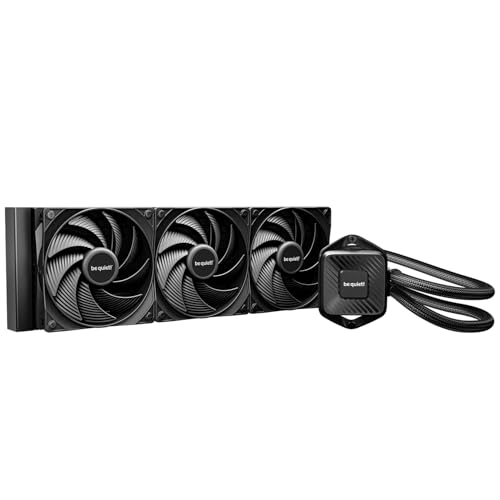
3. be quiet! Pure Loop 3 360mm
The Pure Loop 3 360mm takes the opposite approach to the screen-heavy models: no display, restrained styling, and a design brief centered on keeping noise down. Its three Pure Wings 3 fans are high-speed PWM units tuned for static pressure, and the pump runs at a fixed high speed with decoupling intended to keep vibration out of the case.
This is the cooler for a gaming PC that sits on the desk next to the monitor, where fan tone matters as much as raw cooling. Socket support covers current Intel and AMD platforms, and the radiator is a standard slim profile that fits a wide range of cases. That slim 27mm radiator also helps in cases where a thicker radiator would crowd the motherboard’s top edge or tall memory heatsinks.
Specs:
– Radiator: 397 x 120 x 27 mm
– Fans: 3 x Pure Wings 3 120mm PWM high-speed
– Fan speed: up to 2,100 RPM
– Airflow: 59.6 CFM
– Noise level: up to 37.2 dB(A)
– Pump speed: 5,500 RPM
– Sockets: Intel 1851, 1700, 1200, 1151, 1150 and 1155; AMD AM5 and AM4
– Warranty: confirm on the listing
4. Thermaltake TH360 V2 Ultra ARGB Sync

Thermaltake’s TH360 V2 Ultra ARGB Sync puts a 2.1-inch TFT-LCD on the water block, smaller than the ASUS screen but still able to show system information or a custom image through Thermaltake’s software. The pump speed is PWM controlled across a wide range, and the copper water block sits under a cap with an industrial look that suits blacked-out builds.
The three CT120 ARGB fans sync with major motherboard lighting software, so the cooler can join an existing lighting setup rather than demanding its own ecosystem. The screen connects through an internal USB header, per the listing’s display support notes, so make sure your motherboard has one free. Note that the listing’s socket list tops out at LGA1700 on the Intel side, so builders on the newest Intel platform should look at the other picks here.
Specs:
– Display: 2.1-inch TFT-LCD, 480 x 480 resolution
– Pump: PWM, 1,500 to 3,300 RPM
– Water block: copper
– Fans: 3 x CT120 ARGB, 500 to 1,800 RPM
– Airflow: 57.05 CFM; static pressure 2.23 mmH2O; noise 25.8 dB(A)
– Radiator: 396 x 120 x 27 mm, aluminum
– Tube length: 460 mm
– Sockets: Intel LGA 1700, 1200, 115x and older; AMD AM5 and AM4
5. Cooler Master MasterLiquid 360 Atmos

The MasterLiquid 360 Atmos keeps the formula straightforward: a dual chamber pump with addressable RGB lighting, three SickleFlow Edge fans, and a pump top that can be customized or swapped for a printed cover if you want a personal touch. The fans spin faster than most rivals here, which gives the radiator plenty of airflow headroom for hot-running processors.
Cooler Master lists support for current AMD sockets and Intel’s LGA1851 and LGA1700 platforms, which covers the processors most gaming builds use today. There is no screen and no proprietary hub, so it drops neatly into builds that control lighting from the motherboard. With no hub or display to wire up, installation stays close to a basic air cooler in complexity: mount the radiator, seat the block, and connect the pump and fan headers.
Specs:
– Pump: dual chamber design, ARGB lighting
– Fans: 3 x SickleFlow Edge PWM, up to 2,500 RPM
– Airflow: 70.7 CFM
– Noise level: 25 dB per the listing
– Radiator: 360mm, aluminum
– Sockets: AMD AM5 and AM4; Intel LGA 1851 and 1700
– Warranty: confirm on the listing
How to choose a 360mm AIO cooler
Start with the case. A 360mm radiator plus fans needs roughly 400mm of clear mounting length and enough depth that the assembly does not collide with the motherboard, tall memory, or GPU power cables. Top mounting is usually simplest; front mounting works too, but check tube reach to the CPU socket before committing.
Next, match the socket list to your processor, and pay attention to the newest platforms. Most current gaming chips sit on AMD AM5 or Intel LGA1700 and LGA1851, and not every cooler here covers all three. If you plan to keep the cooler through a platform change, wider socket support and a long warranty are worth real weight in the decision.
Then decide how much ecosystem you want. Screen-equipped models like the Ryujin III and TH360 V2 Ultra need a USB header and vendor software. Hub-based systems like Corsair’s iCUE Link simplify cabling but work best when the rest of the build joins the same system. Plain designs like the Pure Loop 3 and the Atmos ask the least of you after installation.
Finally, read noise figures as a rough guide rather than a promise. Ratings are measured under controlled conditions, and fan curves you set yourself will shape the sound of the finished PC more than any single spec line.
Mounting orientation matters as well. Air collects at the highest point of a loop, so avoid layouts that leave the pump block as that highest point. A top-mounted radiator, or a front mount arranged so the radiator’s top sits above the pump, keeps air away from the pump and helps it run quietly for longer.
Who should skip a 360mm AIO
Skip this size entirely if your case only fits 240mm or 280mm radiators, or if your processor is a mid-range chip that a good air cooler already handles quietly; the extra radiator buys little there. Builders who dislike vendor software should also pass on the screen and hub models and choose a plain pump-and-fans design instead. And if your build travels often, an air cooler avoids the small but real risks that come with moving a liquid loop. Compact cases deserve a mention too: some technically accept a 360mm radiator yet leave no comfortable room for fans, tube bends and a long graphics card once it is installed.
FAQ
Will a 360mm AIO fit in my case?
Only if the case lists 360mm radiator support at the front or top. The radiator bodies here run from about 396 to 402mm long before fans, so check the case maker’s stated clearance, including room for tubes and memory height, rather than relying on the headline fan size alone.
Is a 360mm cooler better than a 240mm cooler for gaming?
It offers more radiator surface, which generally means lower fan speeds for the same cooling and steadier temperatures on high-power processors. On mid-range chips the practical difference during gaming is small, so the jump matters most for flagship CPUs and long sessions.
Do these coolers need refilling or maintenance?
No. All five are sealed, closed-loop units that arrive pre-filled and are not designed to be opened. Normal upkeep is limited to dusting the radiator and fans and checking that the pump and fan headers stay connected. If temperatures climb over time, clear the dust from the radiator first before suspecting the loop itself.
Which socket matters most for a new gaming build?
Most new builds use AMD AM5 or Intel LGA1700 or LGA1851. Check the exact socket list for the cooler you pick, because coverage varies: the Thermaltake model here, for example, lists Intel support up to LGA1700, while the others include LGA1851.
Final verdict
The Corsair iCUE Link Titan 360 RX RGB is the most rounded choice for a gaming PC, with clean cabling, current socket coverage and a six-year warranty. Choose the ASUS ROG Ryujin III 360 ARGB White Edition for a showcase build with a big screen, the be quiet! Pure Loop 3 360mm when quiet matters most, the Thermaltake TH360 V2 Ultra ARGB Sync for a smaller display with motherboard lighting sync, or the Cooler Master MasterLiquid 360 Atmos for a simple, fast-spinning setup with no extra ecosystem.
Product and ASIN Reference
| Product | ASIN |
|---|---|
| Corsair iCUE Link Titan 360 RX RGB | B0D6BFBLTK |
| ASUS ROG Ryujin III 360 ARGB White Edition | B0CBJRZ2Y7 |
| be quiet! Pure Loop 3 360mm | B0FLWMYX2F |
| Thermaltake TH360 V2 Ultra ARGB Sync | B0CCX93N83 |
| Cooler Master MasterLiquid 360 Atmos | B0CK57N22Q |
Related guides
More from Amazon
Programs that pair well with the guide above. Offers and eligibility are set by Amazon and may change.
Free shipping on eligible items, Prime Video and more. Eligible new members can start with a free trial.
Start a Prime free trialAd-free music streaming. Eligible new subscribers can start with a free trial.
Try Music Unlimited freeA Prime membership for ages 18-24 with a trial period. Eligibility is set by Amazon.
See Prime for Young AdultsAudiobooks and podcasts to listen to on the go. Eligible new members can start with a free trial.
Try Audible freeAs an Amazon Associate we earn from qualifying purchases.