A USB-C gaming monitor does two jobs over a single cable: it carries the video signal from a laptop or small PC through DisplayPort Alt Mode, and it sends power back the other way to charge the machine while you play. That makes these panels the natural center of a clean gaming desk, especially for anyone who games on a laptop, splits time between a desktop and a work machine, or simply wants fewer cables behind the desk.
Not every USB-C port on a gaming monitor is equal, though. Power delivery ranges from a modest trickle that only keeps a phone topped up to wattage figures high enough to run a gaming laptop under load, and some models add a KVM switch and USB hub so one keyboard and mouse can serve two computers. This guide compares five gaming monitors with USB-C video input, looking at the panel specs that decide gaming performance and the connection details that decide whether the one-cable idea actually works.
As an Amazon Associate, we earn from qualifying purchases.
Our Top Picks
 GIGABYTE M27Q2 27" SuperSpeed IPS QHD AMD Freesync27" QHD7.56 x 24.09 x 20.26 inches18.1 poundsCheck on Amazon

Top 3 picks at a glance
Quick Answer
For most laptop gaming setups, the GIGABYTE M27Q2 is the balanced pick: a 27-inch 1440p panel at 200Hz with a Type-C KVM for switching between two machines. If charging power matters most, the MSI MPG 274URDFW E16M pairs a 4K Mini-LED panel with 98W USB-C power delivery. The three ASUS ROG Strix models cover curved 1440p, a 32-inch dual-mode 4K panel, and a compact 24.5-inch esports option.
The Five USB-C Gaming Monitors Compared
GIGABYTE M27Q2
The M27Q2 is built around the problem of two computers sharing one desk. Its Type-C KVM lets a single keyboard, mouse and headset setup switch between a gaming PC and a laptop, with the USB-C input carrying video from the laptop side. The panel itself is a 27-inch SuperSpeed IPS at 2560 x 1440, running 200Hz with a stated overclock to 210Hz and a 1ms GTG response time, which is fast enough for competitive play at a resolution most mid-range graphics cards can drive well.
Specs
- Panel: 27-inch SS IPS, flat
- Resolution: 2560 x 1440 (QHD)
- Refresh rate: 200Hz, overclockable to 210Hz
- Response time: 1ms GTG
- Adaptive sync: AMD FreeSync Premium, G-SYNC Compatible
- USB-C: DisplayPort Alt Mode video with Type-C KVM
- USB-C power delivery: confirm on the listing
- Other ports: 2 x HDMI, 1 x DisplayPort, USB hub ports
- Brightness: 350 cd/m2 per the listing
- Stand: height and tilt adjustable
The honest limitation is charging: the listing does not headline a power delivery figure, so treat the USB-C port primarily as a video and KVM connection and confirm the wattage on the listing if laptop charging is essential.
MSI MPG 274URDFW E16M
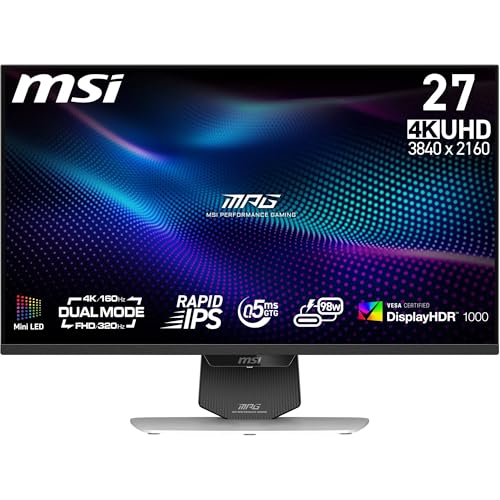
MSI’s entry is the power delivery leader here. Its USB-C port supplies up to 98W, which is enough to run and charge most gaming laptops while the same cable carries a 4K picture. The panel is a 27-inch Rapid IPS with Mini-LED backlighting and 1,152 local dimming zones, certified to DisplayHDR 1000, so HDR games get far more contrast control than a standard edge-lit screen can offer.
Specs
- Panel: 27-inch Rapid IPS, Mini-LED backlight
- Resolution: 3840 x 2160 (4K UHD)
- Local dimming: 1,152 zones
- HDR: DisplayHDR 1000
- Response time: 0.5ms per the listing
- Refresh rate: dual-mode panel; confirm the exact rates on the listing
- USB-C: DisplayPort Alt Mode with 98W power delivery
- Other ports: HDMI 2.1, DisplayPort 1.4a
- Stand: height and tilt adjustable
- Color: white finish
This is the pick for a single-monitor desk where the monitor also replaces a laptop dock. Desktop-only players who never connect a laptop pay for charging hardware they will not use.
ASUS ROG Strix XG27WCS
The XG27WCS is the curved option in this group, wrapping a 27-inch Fast VA panel at a 1500R curve around a 2560 x 1440 resolution. It runs at 180Hz with a 1ms response time and DisplayHDR 400 support, and ASUS lists color coverage at 95 percent DCI-P3 and 125 percent sRGB, which suits players who also edit video or photos on the same screen.
Specs
- Panel: 27-inch Fast VA, 1500R curved
- Resolution: 2560 x 1440 (QHD)
- Refresh rate: 180Hz
- Response time: 1ms
- HDR: DisplayHDR 400
- Color: 95 percent DCI-P3, 125 percent sRGB per the listing
- Adaptive sync: FreeSync, with ELMB Sync
- USB-C: DisplayPort Alt Mode with power delivery; wattage confirm on the listing
- Other ports: DisplayPort 1.4, HDMI 2.0
- Extras: tripod socket, DisplayWidget support, 3-year warranty per the listing
The USB-C port supports video and power delivery for a laptop, though ASUS does not headline the wattage in the listing title, so check the full listing if your laptop needs a specific figure to charge at full speed.
ASUS ROG Strix XG32UCG

The XG32UCG is a 32-inch 4K Fast IPS panel built around a dual-mode trick: it runs 3840 x 2160 at 160Hz for detailed single-player games, then switches to Full HD at 320Hz for competitive titles where frame rate matters more than resolution. Response time is listed at 0.3ms, and the monitor is G-SYNC Compatible with ELMB Sync for motion clarity.
Specs
- Panel: 32-inch Fast IPS, flat
- Resolution: 3840 x 2160 (4K UHD)
- Refresh rate: 160Hz at 4K, 320Hz at Full HD (dual mode)
- Response time: 0.3ms
- HDR: DisplayHDR 400
- Adaptive sync: G-SYNC Compatible, ELMB Sync
- USB-C: DisplayPort Alt Mode with power delivery; wattage confirm on the listing
- Other ports: DisplayPort 1.4, HDMI
- Extras: tripod socket, 3-year warranty per the listing
Size is the trade-off: at 32 inches it needs a deep desk, and the one-cable laptop connection shares the same confirm-the-wattage caveat as the other ASUS models here. For a player who alternates between a story-driven game at night and ranked matches after, though, the dual-mode panel removes the need to own two different monitors for those two jobs.
ASUS ROG Strix XG259CS

The XG259CS shrinks the formula to 24.5 inches, the size competitive players tend to prefer because the whole screen sits inside peripheral vision. The Fast IPS panel runs 1920 x 1080 at 180Hz with a 1ms response time, and the USB-C port still carries DisplayPort Alt Mode video plus power delivery, which makes it a tidy second screen for a gaming laptop or a compact main display for a small desk.
Specs
- Panel: 24.5-inch Fast IPS, flat
- Resolution: 1920 x 1080 (Full HD)
- Refresh rate: 180Hz
- Response time: 1ms
- HDR: HDR support per the listing
- Adaptive sync: G-SYNC Compatible, ELMB Sync
- USB-C: DisplayPort Alt Mode with power delivery; wattage confirm on the listing
- Other ports: DisplayPort 1.4, HDMI 2.0
- Extras: tripod socket, DisplayWidget support, 3-year warranty per the listing
At 1080p it is the easiest panel here for a modest GPU or laptop to drive at full refresh, but creators who want screen space for timelines and editing will find it tight.
How to Choose a USB-C Gaming Monitor
Start with power delivery, because it decides whether the one-cable promise holds. A gaming laptop under load can draw more than a low-wattage USB-C port supplies, in which case the battery drains slowly during play even while plugged in. If the listing states a figure such as 65W or 98W, match it against your laptop’s charger rating; if the listing does not state a figure, assume the port is meant for video first and confirm before buying.
The cable matters too: use a full-featured USB-C cable rated for video and high-wattage charging, because a basic charge-only cable can silently limit both the picture and the power.
Next, check that your source device actually sends video over USB-C. The port on the laptop or handheld must support DisplayPort Alt Mode; a charge-only USB-C port will not produce a picture. After that, choose resolution and refresh rate the way you would for any gaming monitor: 1440p at 180 to 200Hz is the current sweet spot for mid-range hardware, 4K rewards a high-end card, and 1080p at high refresh remains the esports default. Finally, look at the extras that make a monitor act as a hub: a KVM switch if you run two machines, downstream USB ports for peripherals, and a height-adjustable stand so the single screen sits at eye level.
Who Should Skip USB-C Gaming Monitors
Desktop players with a full-size tower and no laptop have little to gain here, since a standard DisplayPort cable already carries the fastest signal and the charging hardware adds cost. Players chasing the very highest refresh rates should also compare carefully, because some panels cap the refresh rate over USB-C below what DisplayPort allows; check the per-port limits in the listing. And if your laptop lacks DisplayPort Alt Mode entirely, a USB-C monitor input will not work for video at all, so a conventional gaming monitor plus a separate dock is the better route.
FAQ
Does USB-C carry the same refresh rate as DisplayPort on a gaming monitor?
It can, because USB-C video uses DisplayPort Alt Mode, but the cap depends on the monitor and the cable. Some models reach their full refresh rate over USB-C while others limit it, so confirm the per-port refresh figures in the listing before assuming the headline rate applies to every input.
How much USB-C power delivery does a gaming laptop need?
It depends on the laptop’s own charger rating. Light gaming laptops may run well on 65W, while larger models ship with much stronger adapters and can drain their battery under load on a lower-wattage port. The safest approach is to match or exceed the wattage printed on the laptop’s original charger.
What is a KVM switch on a monitor used for?
A KVM lets one keyboard, mouse and set of USB peripherals control two computers through the monitor. Pressing the KVM control switches the peripherals and the picture between, for example, a desktop PC on DisplayPort and a laptop on USB-C, which is why the GIGABYTE M27Q2 suits mixed work and gaming desks.
Can a USB-C gaming monitor charge a phone or handheld console instead?
Yes, within the port’s power delivery limit. A handheld or phone will draw only what it accepts, so the same port that charges a laptop can top up smaller devices, though it will not charge a laptop and a handheld at full speed at the same time from a single port.
Final Verdict
USB-C is worth having on a gaming monitor whenever a laptop shares the desk. The GIGABYTE M27Q2 is the most complete all-rounder here thanks to its KVM and fast 1440p panel, while the MSI MPG 274URDFW E16M is the one to pick when 98W charging and Mini-LED HDR matter most. The ASUS trio splits cleanly by taste: curved 1440p, a big dual-mode 4K screen, or a compact esports panel. Whichever you choose, confirm the USB-C power delivery figure and per-port refresh limits on the listing, and the single-cable setup will work the way it should.
Product and ASIN Reference
| Product | ASIN |
|---|---|
| GIGABYTE M27Q2 27-inch QHD 200Hz Gaming Monitor with Type-C KVM | B0GKFQXR3R |
| MSI MPG 274URDFW E16M 27-inch 4K Mini-LED Gaming Monitor | B0FGJ9RMTC |
| ASUS ROG Strix XG27WCS 27-inch QHD Curved Gaming Monitor | B0CV21WBRJ |
| ASUS ROG Strix XG32UCG 32-inch 4K Dual Mode Gaming Monitor | B0F23BB8TW |
| ASUS ROG Strix XG259CS 24.5-inch Full HD Gaming Monitor | B0D6C9MXPZ |
Related guides
More from Amazon
Programs that pair well with the guide above. Offers and eligibility are set by Amazon and may change.
Free shipping on eligible items, Prime Video and more. Eligible new members can start with a free trial.
Start a Prime free trialAd-free music streaming. Eligible new subscribers can start with a free trial.
Try Music Unlimited freeA Prime membership for ages 18-24 with a trial period. Eligibility is set by Amazon.
See Prime for Young AdultsAudiobooks and podcasts to listen to on the go. Eligible new members can start with a free trial.
Try Audible freeAs an Amazon Associate we earn from qualifying purchases.