Thin and light gaming laptops exist for one reason: a full gaming rig is useless if it stays on a desk while you are in an airport, a dorm, a hotel room, or a friend’s living room. The five machines below all keep the weight near or under four pounds, yet each one carries a dedicated NVIDIA GeForce RTX graphics card, a fast display, and enough memory and storage to run a modern game library without constant juggling.
The trade-offs in this category are honest ones. Slim chassis have less room for cooling, so GPU wattage is usually lower than in a thick desktop replacement. Memory is often soldered, which means the configuration you buy is the configuration you keep. Read the specs blocks carefully, pay attention to weight and thickness first, and then compare graphics power, screen quality, and battery size in that order.
As an Amazon Associate, we earn from qualifying purchases.
Top 3 picks at a glance


Quick Answer
The Razer Blade 14 is the thinnest and lightest pick here at 0.62 inches and 3.59 pounds, while the ASUS ROG Zephyrus G14 counters with a stronger RTX 5070 Ti. The ASUS TUF Gaming A14 is the value play with a 165Hz screen, the HP OMEN Transcend 14 adds Thunderbolt 4 and a 3K OLED panel, and the Zephyrus G16 stretches the formula to a slim 16-inch body.
The Picks
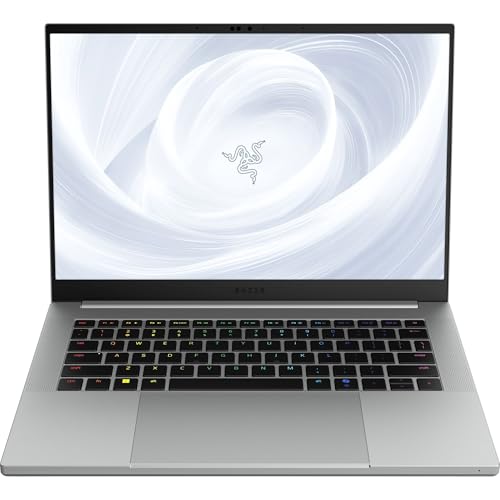
Razer Blade 14 (2025) with RTX 5070
The Blade 14 is the machine that defined this category, and the 2025 version is the thinnest Blade Razer has ever made. At 0.62 inches thick and 3.59 pounds, it slips into a backpack sleeve like an ultrabook, yet it still packs a GeForce RTX 5070 laptop GPU running at up to 115 watts, an AMD Ryzen AI 9 365 processor, and a vapor chamber cooling system. The 3K OLED display runs at 120Hz with a 0.2ms response time, so it covers fast esports titles and color-sensitive creative work in the same panel.
Specs
- Display: 14 inches, 2880 x 1800 OLED, 120Hz, 0.2ms response
- Processor: AMD Ryzen AI 9 365
- Graphics: NVIDIA GeForce RTX 5070, up to 115W TGP
- Memory: 32GB LPDDR5X (soldered)
- Storage: 1TB SSD
- Weight and size: 3.59 pounds, 0.62 inches thin
- Battery: rated up to 11 hours in the listing
- Extras: CNC aluminum unibody, Chroma RGB keyboard, Mercury finish
Choose this one if the carry itself is the priority and you still want current-generation graphics and a premium metal build.
ASUS ROG Zephyrus G14 (2025) with RTX 5070 Ti
The Zephyrus G14 is the power pick of the 14-inch group. This configuration pairs an AMD Ryzen AI 9 HX 370 with a GeForce RTX 5070 Ti carrying 12GB of GDDR7 memory, which is the strongest graphics setup in this roundup. The 14-inch ROG Nebula OLED screen offers a 2880 x 1800 resolution at 120Hz with full DCI-P3 coverage, and the 73Wh battery is large for the class. Wi-Fi 7, a USB4 port, and an SD card reader round out a spec sheet aimed at gamers who also edit video or photos on the road.
Specs
- Display: 14 inches, 2880 x 1800 OLED, 120Hz, 500 nits, 100 percent DCI-P3
- Processor: AMD Ryzen AI 9 HX 370
- Graphics: NVIDIA GeForce RTX 5070 Ti, 12GB GDDR7
- Memory: 32GB LPDDR5X (onboard)
- Storage: 1TB PCIe NVMe SSD
- Battery: 4-cell 73Wh
- Connectivity: Wi-Fi 7, USB4 Type-C, HDMI, SD card reader
- Weight: confirm on the listing
Pick the G14 if frame rates matter more to you than the last few millimeters of thickness, and you want the most graphics headroom a 14-inch chassis can offer.
ASUS TUF Gaming A14 (2024) with RTX 4060
The TUF Gaming A14 brings the thin and light formula down to a friendlier tier without giving up the essentials. It weighs about 3.22 pounds and measures roughly 16.9mm at its thinnest point, numbers that rival the premium picks above. Inside, an AMD Ryzen AI 9 HX 370 drives a GeForce RTX 4060 with a dedicated MUX switch, and the 14-inch 2560 x 1600 IPS display refreshes at 165Hz, the fastest panel in this roundup. A 73Wh battery and dual 89-blade fans handle long sessions and long days away from an outlet.
Specs
- Display: 14 inches, 2560 x 1600 IPS, 165Hz, G-SYNC support
- Processor: AMD Ryzen AI 9 HX 370
- Graphics: NVIDIA GeForce RTX 4060, 8GB, with MUX switch
- Memory: 16GB LPDDR5X (soldered)
- Storage: 1TB PCIe Gen 4 SSD
- Battery: 73Wh, with 100W Type-C charging support
- Connectivity: Wi-Fi 6E
- Weight: about 3.22 pounds (1.46 kg)
This is the sensible buy for 1080p and 1440p play at high refresh rates, especially if the laptop also has to survive daily commuting duty.
HP OMEN Transcend 14 with RTX 5060

HP’s OMEN Transcend 14 is the Intel-flavored alternative in this group. It runs a 16-core Intel Core Ultra 7 255H with a GeForce RTX 5060 and 8GB of GDDR7 memory, and it matches the OLED theme with a 14-inch 3K panel at 120Hz, full DCI-P3 coverage, and HDR 500 brightness. At 3.6 pounds with a 71Wh battery, it stays firmly in carry-on territory. Thunderbolt 4 is the differentiator here, opening up single-cable docks and fast external drives that the AMD machines in this list handle through USB4 instead.
Specs
- Display: 14 inches, 2880 x 1800 OLED, 120Hz, 100 percent DCI-P3, HDR 500 nits
- Processor: Intel Core Ultra 7 255H, 16 cores
- Graphics: NVIDIA GeForce RTX 5060, 8GB GDDR7
- Memory: 32GB LPDDR5X
- Storage: 1TB SSD
- Battery: 71Wh
- Ports: Thunderbolt 4, USB Type-C, 2 x USB Type-A, HDMI 2.1
- Weight: 3.6 pounds
Consider the Transcend 14 if your desk setup already leans on Thunderbolt accessories, or if you prefer Intel’s platform with a generous 32GB of memory as standard.
ASUS ROG Zephyrus G16 (2025) with RTX 5070 Ti

Some players want the slim idea without the small screen, and that is exactly the Zephyrus G16’s brief. This 16-inch model keeps the CNC-milled aluminum chassis and low-profile design of the G14 but stretches the canvas to a 2.5K ROG Nebula OLED display with G-SYNC and a 0.2ms response time. The configuration listed here runs an Intel Core Ultra 9 285H, a GeForce RTX 5070 Ti, 32GB of memory, and a roomy 2TB SSD under Windows 11 Pro, making it the natural pick for anyone who edits, streams, and games on one machine.
Specs
- Display: 16 inches, 2560 x 1600 OLED, G-SYNC, 0.2ms response
- Processor: Intel Core Ultra 9 285H
- Graphics: NVIDIA GeForce RTX 5070 Ti laptop GPU
- Memory: 32GB LPDDR5X
- Storage: 2TB SSD
- Operating system: Windows 11 Pro
- Build: CNC aluminum chassis, Platinum White finish
- Weight and refresh rate: confirm on the listing
Choose the G16 if you mostly move between two desks rather than living out of a backpack, and the bigger screen is worth a modest weight increase.
How to Choose a Thin and Light Gaming Laptop
Start with the scale, not the spec sheet. Every machine here sits between roughly 3.2 and 4.1 pounds, and that gap is noticeable over a full day of carrying. Next, look at GPU wattage rather than the GPU name alone, because the same RTX badge can perform very differently in a slim chassis; the listings above note TGP where the seller states it, and anything unstated is worth confirming on the listing before you buy.
Display choice splits the group cleanly. OLED panels on the Blade 14, Zephyrus G14, Transcend 14, and Zephyrus G16 deliver deep contrast and fast response times, while the TUF A14’s 165Hz IPS screen favors raw refresh rate. Memory is soldered on all five, so treat 32GB as the safer long-term choice if you keep laptops for years, and check battery size in watt-hours if you plan to work away from outlets. Finally, match the ports to your gear: Thunderbolt 4 on the HP, USB4 on the G14, and card readers vary more than the marketing suggests.
Who Should Skip These Laptops
Skip this entire category if your laptop never leaves one desk. A thicker gaming laptop or a desktop will give you more graphics power, better cooling, and easier upgrades for the same commitment. Skip it as well if you need user-replaceable memory or a second internal drive bay, since thin designs trade that flexibility away. Players who chase maximum settings at 4K on an external monitor should also look at heavier machines with higher-wattage GPUs, and anyone who games for long stretches on battery alone should reset expectations, because every laptop here performs best while plugged in.
Frequently Asked Questions
Are thin and light gaming laptops powerful enough for AAA games?
Yes, within limits. The RTX 5070 Ti, RTX 5070, and RTX 5060 configurations in this roundup are built for high settings at 1080p and 1440p, and the RTX 4060 TUF A14 handles 1080p and its native 1600p screen well with upscaling. Settings and frame rates will sit below a thick desktop replacement, so treat these as portable-first machines rather than maximum-performance ones.
Why does GPU wattage matter in a slim laptop?
Two laptops can carry the same graphics chip and perform differently because the slim one may feed the GPU less power to control heat. A stated TGP figure, such as the Blade 14’s up to 115 watts, tells you how much headroom the cooling system allows. When a listing does not state wattage, check the manufacturer’s page for that exact model before assuming performance.
Can the memory or storage be upgraded later?
On all five picks here, the memory is soldered LPDDR5X and cannot be upgraded, so buy the capacity you need on day one. Storage is a standard M.2 SSD on these models and is generally replaceable, though opening any laptop should follow the maker’s guidance and warranty terms. If long-term upgradability is essential, a thicker gaming laptop is the better route.
How long do these laptops last on battery?
Battery life depends heavily on the task. The listings cite figures such as up to 11 hours for the Blade 14 under light use, and the 71Wh to 73Wh batteries in this group are sized for a workday of browsing, documents, and video. Gaming draws far more power and drains any of these machines quickly, so plan to play plugged in and treat battery figures as productivity estimates.
Final Verdict
For the lightest carry with current-generation power, the Razer Blade 14 is the standout, while the ASUS ROG Zephyrus G14 answers with the strongest GPU in a 14-inch frame. The TUF Gaming A14 is the smart value pick, the HP OMEN Transcend 14 suits Thunderbolt-based setups, and the Zephyrus G16 stretches the same slim idea to 16 inches. Weigh the bag first, then the GPU, and any of the five will travel as well as it plays.
Product and ASIN Reference
| Product | ASIN |
|---|---|
| Razer Blade 14 (2025), RTX 5070, Ryzen AI 9 365, 32GB, 1TB | B0DYLFH8G2 |
| ASUS ROG Zephyrus G14 (2025), RTX 5070 Ti, Ryzen AI 9 HX 370, 32GB, 1TB | B0GDVPD2D8 |
| ASUS TUF Gaming A14 (2024), RTX 4060, Ryzen AI 9 HX 370, 16GB, 1TB | B0DNJJPF6Q |
| HP OMEN Transcend 14, RTX 5060, Core Ultra 7 255H, 32GB, 1TB | B0G4R61DH2 |
| ASUS ROG Zephyrus G16 (2025) GU605CR, RTX 5070 Ti, Ultra 9 285H, 32GB, 2TB | B0G1W7V6VP |
Related guides
More from Amazon
Programs that pair well with the guide above. Offers and eligibility are set by Amazon and may change.
Free shipping on eligible items, Prime Video and more. Eligible new members can start with a free trial.
Start a Prime free trialAd-free music streaming. Eligible new subscribers can start with a free trial.
Try Music Unlimited freeA Prime membership for ages 18-24 with a trial period. Eligibility is set by Amazon.
See Prime for Young AdultsAudiobooks and podcasts to listen to on the go. Eligible new members can start with a free trial.
Try Audible freeAs an Amazon Associate we earn from qualifying purchases.