Disclosure: As an Amazon Associate, I earn from qualifying purchases. If you buy through links in this article, I may earn a commission at no extra cost to you.
Our top pick: Plugable USB2-MICRO-250X. Runner-up: Celestron Handheld Digital Microscope Pro.
Soldering modern electronics means working with parts you can barely see. Surface-mount resistors the size of a grain of sand, hairline bridges between pins, cracked joints on a board you are trying to save — all of it sits at the limit of unaided eyesight, and a magnifying lamp only gets you so far. A digital USB microscope puts a camera where your eye would be and shows the image on a monitor or a built-in screen, leaving both hands free for the iron and tweezers.
The catch is that this category is full of inflated numbers. Headline magnification figures are usually calculated against a large monitor, sensor resolutions are often interpolated, and two scopes with identical headline claims can perform very differently. This guide compares five real, verifiable models across the main styles — USB-only handhelds and stand-mounted scopes with their own LCD screens — and reports each one’s specifications exactly as the listing states them, flagging where a listing gives no true optical figure at all.
Top 3 picks at a glance

How to Choose a USB Microscope for Electronics Work
Understand the magnification numbers first. Almost every digital microscope’s headline figure is a screen magnification: the size of the image on a display compared with the object itself. That is why a scope can claim 1000x while its lens enlarges the subject only a fraction of that optically. What matters is the working range: roughly 20x to 200x of screen magnification covers nearly everything, from reading component markings to spotting solder bridges. When a listing gives no true optical figure — several budget models do not — treat the headline number as a relative guide between that brand’s own models, not a laboratory measurement.
Working distance decides whether you can solder under it. A handheld scope resting almost on the board leaves no room for an iron. If you plan to solder or probe while you look, choose a stand model that holds the camera several centimetres above the board. For pure inspection and photography, a small handheld is fine.
Sensor resolution beats interpolated resolution. Stills quoted at very high megapixel counts on cheap scopes are commonly upscaled from a much smaller sensor. A genuine 2MP or 5MP sensor produces noticeably cleaner images, which matters when you photograph a board to document a repair.
Decide between USB-only and a built-in screen. USB-only scopes are cheaper and show the image on your existing monitor, ideal for capture and measurement software. LCD models cost more but free up your PC screen and start instantly. HDMI output, offered by the Andonstar below, drives a big monitor with no computer at all.
Lighting is not a detail. Adjustable brightness matters because LED glare off solder joints can wash out exactly the detail you are hunting. Gooseneck fill lights rake light across a board at an angle, which makes cracks and bridges far easier to see.
1. Plugable USB2-MICRO-250X — The Simple, Reliable USB Scope

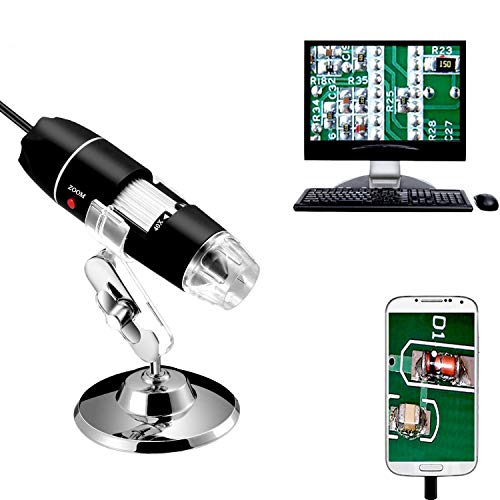
Plugable’s microscope has been a bench staple for years because it behaves like a standard webcam: plug it into a USB port and it appears as a camera on Windows, macOS, Linux, ChromeOS and even iPadOS with USB-C, no special drivers needed. Use it handheld for a quick look at a connector or board marking, or drop it into the included flexible-arm stand when you need both hands free. The 2MP sensor captures 1600 x 1200 stills and video — modest on paper but honest, with no interpolation padding. Listed magnification runs up to 250x, screen magnification at closest focus, comfortably covering solder-joint inspection and component reading. An LED halo light around the lens, diffused by a polymer cover, gives even illumination. For gamers building or repairing their own hardware, this is the low-friction pick, though the flexible arm suits quick checks more than long soldering sessions, where it can drift if knocked.
Specs
- Brand: Plugable
- Type: Handheld, USB-only, with flexible-arm stand
- Magnification: Up to 250x as listed (screen magnification)
- Camera resolution: 2MP sensor, 1600 x 1200 stills
- Screen size: None — uses your computer display
- Lighting: Built-in LED halo light with diffuser
- ASIN: B00XNYXQHE
2. Celestron Handheld Digital Microscope Pro — Real 5MP Sensor and Measurement Software
Celestron comes from the optics world, and its Handheld Digital Microscope Pro is built around a true 5MP sensor capturing stills at 2592 x 1944, behind a five-element glass lens rather than the plastic optics common in this category. The magnification range is a comparatively honest 20x to 200x, and Celestron notes plainly that the final figure depends on monitor size. The included Micro Capture Pro software for Windows and Mac adds the feature electronics work benefits from most: on-screen measurement with calibration, so you can check a pad or trace width against a known scale instead of guessing. An adjustable stand with sample clips is in the box, and the eight-LED illuminator ring has a brightness wheel on the body. It is USB-only with no screen of its own, so it suits a bench where the PC is always on and documentation matters — photographing a damaged board before and after a repair is exactly its strength.
Specs
- Brand: Celestron
- Type: Handheld, USB-only, with adjustable stand included
- Magnification: 20x to 200x as listed (final figure depends on monitor size, per the maker)
- Camera resolution: 5MP sensor, stills up to 2592 x 1944
- Screen size: None — uses your computer display
- Lighting: Adjustable 8-LED illuminator ring
- ASIN: B00CMJ1I08
3. Jiusion 40x–1000x USB Microscope — The Ultra-Budget Starter
The Jiusion shows up on countless beginner benches and classroom kits for a simple reason: it is a working USB microscope with a metal stand at an entry-level cost. It connects over USB 2.0, works with Windows, Mac, Android and Linux (not iPhone or iPad), and includes an OTG adapter in the box. Eight adjustable LEDs ring the lens. Now the honest part: the 40x to 1000x headline is a screen magnification claim, and the listing gives no true optical figure and no clearly stated native sensor resolution, so treat the numbers as marketing scale rather than measurement. Image quality is a clear step below the Plugable and Celestron above, but it does the basics well — finding a bridged pin, reading a faded component label, checking whether a joint looks cracked — which can be enough for a first scope or a toolbox spare.
Specs
- Brand: Jiusion
- Type: Handheld, USB-only, with metal stand
- Magnification: 40x to 1000x as listed (screen magnification; no true optical figure stated)
- Camera resolution: Not stated in the listing
- Screen size: None — uses your computer or phone display
- Lighting: 8 adjustable LEDs
- ASIN: B06WD843ZM
4. TOMLOV DM9 — 7-Inch Screen and Room to Work

The TOMLOV DM9 moves you into the stand-and-screen category: a 7-inch LCD on a metal stand, so the scope runs on its own while your PC stays free for schematics and datasheets. It captures 12MP photos and 1080P video to a memory card, and it can also connect to a Windows or Mac computer as a PC-view camera when you want a bigger image. The listed magnification range is 50x to 1200x — again screen magnification; in practice you will work at the low and middle end of that range, where the working distance under the lens leaves space for inspection and light rework. Lighting is a strength: the listing describes ten LEDs in total, the ring around the lens plus two adjustable gooseneck fill lights, and raking light from the goosenecks is genuinely useful for spotting lifted pads and hairline cracks. The metal base keeps the rig steadier than the plastic stands typical at this level.
Specs
- Brand: TOMLOV
- Type: Stand with built-in LCD, plus USB PC view
- Magnification: 50x to 1200x as listed (screen magnification)
- Camera resolution: 12MP photos, 1080P video as listed
- Screen size: 7 inches
- Lighting: 10 LEDs total — lens ring plus 2 gooseneck fill lights
- ASIN: B08G4Y6C65
5. Andonstar AD407 Pro — HDMI Output for Serious Bench Work

The Andonstar AD407 Pro is the pick for a dedicated repair bench. Its 4MP sensor feeds a 7-inch IPS LCD on a pro metal boom-arm stand, and — the feature that sets it apart — an HDMI output that can drive an external monitor, reaching up to 270x magnification as listed on a 27-inch display. It records UHD video and captures photos at up to 12MP (4032 x 3024) to a microSD card, and it also connects over USB for PC use. The boom arm and metal construction hold position far better than the light stands on cheaper scopes — what you want when the camera has to stay put above a board for a long rework session — and the included UV filter protects the lens from flux fumes and solder splashes. Adjustable LED lighting and a remote control round out a package aimed squarely at phone, console and PCB repair. It is the largest option here, and for a gaming hardware enthusiast who regularly solders, also the most capable.
Specs
- Brand: Andonstar
- Type: Stand with built-in LCD, HDMI output and USB
- Magnification: Up to 270x as listed (with a 27-inch HDMI monitor)
- Camera resolution: 4MP sensor; photos up to 12MP (4032 x 3024) as listed
- Screen size: 7 inches
- Lighting: Adjustable built-in LED lighting
- ASIN: B0B7MDHJ96
Quick Comparison
| Model | Type | Magnification (as listed) | Camera | Screen | ASIN |
|---|---|---|---|---|---|
| Plugable USB2-MICRO-250X | Handheld, USB-only | Up to 250x | 2MP | None | B00XNYXQHE |
| Celestron Handheld Digital Microscope Pro | Handheld, USB-only | 20x–200x | 5MP | None | B00CMJ1I08 |
| Jiusion 40x–1000x | Handheld, USB-only | 40x–1000x | Not stated | None | B06WD843ZM |
| TOMLOV DM9 | Stand with LCD | 50x–1200x | 12MP / 1080P | 7 in | B08G4Y6C65 |
| Andonstar AD407 Pro | Stand with LCD + HDMI | Up to 270x | 4MP sensor | 7 in | B0B7MDHJ96 |
FAQ
Can I actually solder while looking through a USB microscope?
Yes, with the right style of scope. A stand model that holds the camera well above the board — the TOMLOV DM9 or the Andonstar AD407 Pro — leaves room for an iron and tweezers, though there is a learning curve: you watch the screen instead of your hands. Handheld scopes like the Jiusion are better for inspection before and after soldering than for working under directly.
Why does a 1000x scope show less detail than a 200x one?
Because the headline number is screen magnification, not optical resolving power. Enlarging a low-resolution image makes it bigger, not sharper. The Celestron’s honest 20x to 200x range with a real 5MP sensor shows finer real detail than a budget scope claiming 1000x from a small, unspecified sensor.
Do these work for checking a GPU or motherboard before buying used parts?
They are ideal for it. A quick pass at moderate magnification reveals bridged pins, missing components, corrosion and previous rework — nearly invisible to the naked eye, and easy to photograph as evidence.
Do I need special software?
Not usually. The Plugable works as a standard webcam with built-in camera apps on every major operating system. The Celestron includes Micro Capture Pro for measurement. The LCD stand models record to a memory card with no computer at all.
Conclusion
For most people setting up a bench for gaming hardware repairs and builds, the Plugable USB2-MICRO-250X is the sensible default: honest specs, universal compatibility and a stand in the box. Choose the Celestron if you document your work or need calibrated measurement, and the Jiusion for the cheapest way to see a solder joint up close. If inspection turns into regular rework, step up to a screen model — the TOMLOV DM9 for value and working room, or the Andonstar AD407 Pro for HDMI output and a stand that stays where you put it. Judge any scope by sensor, working distance and lighting, not the biggest magnification number on the box.
Related guides
More from Amazon
Programs that pair well with the guide above. Offers and eligibility are set by Amazon and may change.
Free shipping on eligible items, Prime Video and more. Eligible new members can start with a free trial.
Start a Prime free trialAd-free music streaming. Eligible new subscribers can start with a free trial.
Try Music Unlimited freeA Prime membership for ages 18-24 with a trial period. Eligibility is set by Amazon.
See Prime for Young AdultsAudiobooks and podcasts to listen to on the go. Eligible new members can start with a free trial.
Try Audible freeAs an Amazon Associate we earn from qualifying purchases.