Wet filament is one of the most common causes of prints that come off the bed looking rough. Most 3D printing plastics absorb moisture from the air, and when that water reaches the hot end it flashes to steam. The result is popping and sizzling during extrusion, stringing between features, hazy or bubbled surfaces, and layers that bond weakly and peel apart under stress. PLA tolerates a bit of neglect, but PETG, TPU, and especially nylon can pick up enough moisture in days to ruin a long print.
Disclosure: As an Amazon Associate, I earn from qualifying purchases. If you buy through links in this article, I may earn a commission at no extra cost to you.
A filament dryer is a heated, ventilated box that holds a spool at a controlled temperature long enough to drive the absorbed water out again. The five dryers below cover the range of home and small-workshop setups: a budget single-spool box, a two-spool chamber, a dock-and-storage-box system, a four-spool box for multi-color printing, and a dual-chamber unit hot enough for engineering materials. What separates them is capacity, temperature ceiling, how honestly they report humidity, and whether you can keep printing while a spool dries.
Top 3 picks at a glance

How to Choose a Filament Dryer
Temperature range comes first. Each material gives up its moisture at a different temperature. PLA typically dries at 45–55°C, PETG at 55–65°C, ABS and ASA at 60–70°C, and nylon at 70–80°C or higher, with polycarbonate higher still. Most desktop dryers top out at 70°C, which covers the everyday materials well but only partly conditions nylon. If engineering filaments are in your future, the ceiling matters more than any other number here; if you print PLA and PETG only, a 70°C box is all you need.
Spool capacity should match how you actually print. One spool at a time is fine for a single printer and occasional drying. Two-spool chambers suit a working pair of materials you rotate between. Four-spool units earn their keep with multi-color machines and small print farms, where drying a full set of colors together saves hours. Check the physical envelope too, not just the headline capacity: measure your widest spool’s diameter and width, because a spool that cannot rotate freely will not dry evenly.
A humidity display tells you whether the cycle worked. A numeric readout of chamber humidity lets you confirm the air around the spool actually got dry instead of guessing from the timer. Treat the cheapest sensors with some skepticism, since their numbers can lag behind reality, and remember that even a good reading describes the chamber air, not the water content inside the plastic itself. Some systems skip the numeric display entirely and use a color-change desiccant indicator, which suits judging storage conditions but says little about a cycle in progress.
Feed-while-printing support matters for thirsty materials. Most dryers include at least one outlet with a PTFE tube guide so filament can run straight from the warm, dry box into your printer. For nylon or TPU on a long print, that closed path is the difference between a spool that stays dry and one that re-absorbs moisture on the way to the hot end. Check the outlet count and the tube path before you buy.
1. SUNLU FilaDryer S2
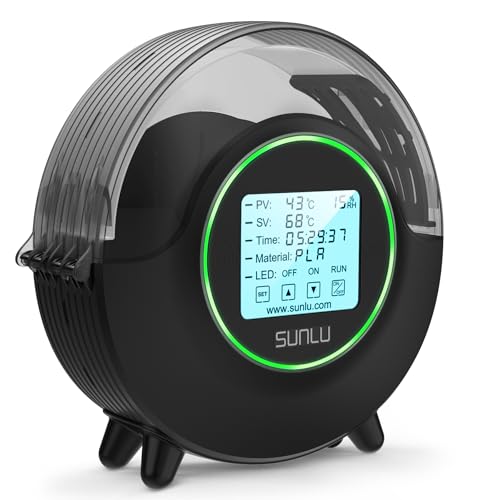
The FilaDryer S2 is the default first dryer, and it earns that spot by covering the basics properly. It holds one spool, heats from 35–70°C with fan-assisted circulation around the spool, and runs from a touch display with one-key presets for common materials. A feed outlet lets you print straight from the box, and between jobs it doubles as a sealed storage holder with the spool already loaded.
The honest caveats are capacity and feedback. One spool at a time means a backlog forms quickly if you rotate materials, and the built-in humidity readout is widely regarded as optimistic, so a small standalone hygrometer is a worthwhile companion. Neither flaw stops it drying PLA, PETG, TPU, and most nylons effectively.
Specs
- Brand: SUNLU
- Spool capacity: 1 spool (up to 210 mm diameter by 85 mm wide)
- Temperature range: 35–70°C
- Timer: 0–99 hours
- Display: Touch display with temperature, humidity, and timer readouts
- ASIN: B0G4T7N4VQ
2. Creality Space Pi Plus
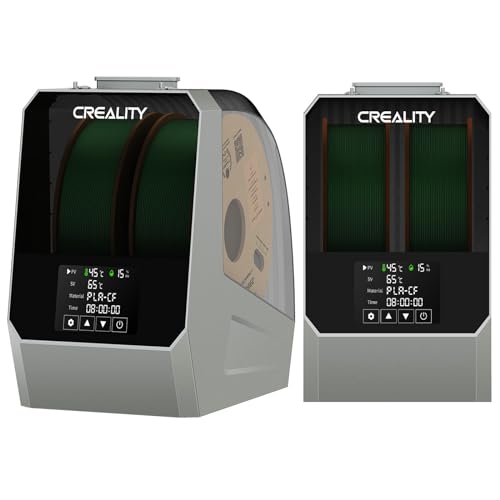
The Space Pi Plus doubles the working set: two spools sit side by side in one chamber, heated by dual PTC elements that circulate hot air around both. Temperatures adjust from 45–70°C, a 3.7-inch touch screen runs the controls, and one-key presets cover a dozen filament types, so you are not looking up recipes every time. Four outlets on the lid give you flexible routing options to one printer or two.
The trade-off is built into the design. Both spools share a single temperature, so you cannot dry nylon and PLA at their ideal settings in the same cycle; the pair has to want roughly the same heat. For two everyday materials in rotation, that is rarely a real limitation, and the Plus is the tidy answer for anyone who outgrows a single-spool box.
Specs
- Brand: Creality
- Spool capacity: 2 spools
- Temperature range: 45–70°C
- Timer: 0–48 hours
- Display: 3.7-inch LCD touch screen
- ASIN: B0CYH2W6KS
3. Polymaker PolyDryer
The PolyDryer takes a different approach from every heated box here. It splits the job in two: a powered Dry Dock that heats and circulates air, and a sealed PolyDryer Box that clips onto it. Dry a spool on the dock, then lift the box off, close its airlocks, and put it on the shelf, where desiccant inside keeps it dry. When the spool goes back into service, it feeds to the printer through the box’s outlet without the seal ever being broken.
Control is simple. Instead of a thermostat you get three dock power levels, roughly 50°C, 60°C, and 70°C at the outlet, and there is no numeric humidity display; a color-change desiccant indicator shows the storage state. Extra boxes share one dock, one at a time. If your spools go damp on the shelf between jobs, this is the design aimed at you.
Specs
- Brand: Polymaker
- Spool capacity: 1 spool per box (standard box fits spools up to 205 mm diameter by 78 mm wide)
- Temperature range: Three dock power levels (about 50°C, 60°C, and 70°C at the outlet)
- Timer: Not stated
- Display: No numeric display; color-change desiccant humidity indicator
- ASIN: B0CK1BX9G2
4. SUNLU FilaDryer S4
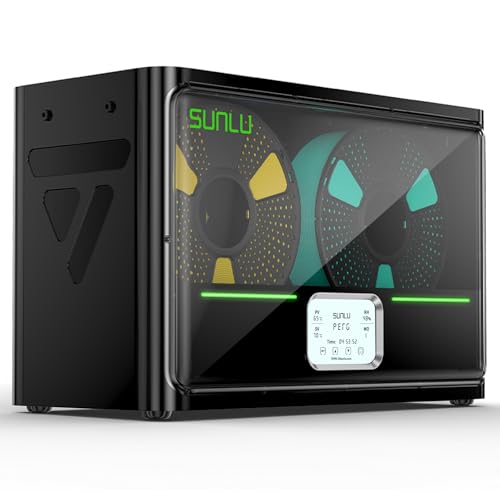
The S4 is SUNLU’s answer for multi-color printers and small farms: four spools in one box, a 350W PTC heater that heats up quickly, and three circulation fans keeping the heat even across all four rolls. Its standout feature is an automatic humidity mode. Set a target band and the dryer stops heating once the chamber air is dry enough, then kicks back on when humidity climbs again, so a set of colors can sit ready for days.
You pay for that in size and running cost: a 350W draw is a big step up from a small single-spool box, and the footprint suits a shelf beside the printer rather than a crowded desk. Follow the material maker’s temperature guidance rather than leaning on the highest presets, and the S4 becomes the set-and-forget center of a multi-spool setup.
Specs
- Brand: SUNLU
- Spool capacity: 4 spools
- Temperature range: Up to 70°C
- Timer: Not stated
- Display: Digital display with temperature and humidity readouts
- ASIN: B0FFGXJXQ5
5. Creality Space Pi X4

The Space Pi X4 is the specialist of this group, built for the materials the 70°C boxes cannot properly dry. It holds four standard spools in two independent heating chambers, so two pairs can run at different temperatures at the same time, and its 200W PTC heaters reach 85°C, enough for nylon, polycarbonate blends, and other engineering filaments. Active dehumidification moves moist air out instead of relying on passive venting, and a touch interface handles settings for each chamber.
None of that headroom is free, and none of it helps a spool of PLA. If your printing is all everyday materials, the Plus above does the same job for less. But the moment carbon-fiber nylon or polycarbonate enters your material shelf, the X4’s ceiling and dual chambers stop being luxuries and become the whole point.
Specs
- Brand: Creality
- Spool capacity: 4 standard 1 kg spools (or 2 large 2 kg spools) in two independent chambers
- Temperature range: Up to 85°C
- Timer: Not stated
- Display: Touch screen with temperature control and drying status
- ASIN: B0FKMVGCSC
Quick Comparison
| Dryer | Spools | Max temperature | Timer | Humidity feedback |
|---|---|---|---|---|
| SUNLU FilaDryer S2 | 1 | 70°C | 0–99 hours | Numeric display |
| Creality Space Pi Plus | 2 | 70°C | 0–48 hours | Numeric display |
| Polymaker PolyDryer | 1 per box | About 70°C (top power level) | Not stated | Desiccant indicator |
| SUNLU FilaDryer S4 | 4 | 70°C | Not stated | Numeric display, auto humidity mode |
| Creality Space Pi X4 | 4 | 85°C | Not stated | Numeric display |
FAQ
How long does filament take to dry?
Most everyday materials need four to six hours at their recommended temperature. Very moisture-hungry filaments such as nylon can need eight to twelve hours, and a spool that has sat open for months will take longer than one that was only briefly exposed. When in doubt, start lower and dry longer rather than pushing the temperature up.
Can I print while filament is drying?
Yes, on any dryer with a feed outlet. Route the PTFE tube from the box to your printer without tight bends, confirm the spool turns freely, and the filament stays in warm, dry air until the moment it is extruded. This is the single best setup for long nylon or TPU prints.
Is a dry storage box the same thing as a filament dryer?
No. A sealed box with desiccant slows moisture down and keeps an already-dry spool dry, but it cannot pull significant water out of a soaked spool. A powered dryer applies controlled heat to remove moisture that is already in the plastic. Many setups use both: dry actively, then store sealed.
Does a low humidity reading prove my filament is dry?
Not by itself. The sensor measures the air around the spool, and that air dries out faster than the plastic does. Use the reading as a progress check, follow the material maker’s documented time and temperature, and confirm with a short test print before committing to a long job.
Conclusion
For a single printer and everyday materials, the SUNLU FilaDryer S2 is the sensible starting point. Step up to the Creality Space Pi Plus if two spools in rotation is your normal pattern, or to the SUNLU FilaDryer S4 when a multi-color machine needs a full set dried and held ready. Choose the Polymaker PolyDryer if shelf storage is where your spools actually get wet, and reserve the Creality Space Pi X4 for engineering filaments that demand real heat. Match the box to the thirstiest material you print, and moisture stops being a variable in your print quality.
Related guides
More from Amazon
Programs that pair well with the guide above. Offers and eligibility are set by Amazon and may change.
Free shipping on eligible items, Prime Video and more. Eligible new members can start with a free trial.
Start a Prime free trialAd-free music streaming. Eligible new subscribers can start with a free trial.
Try Music Unlimited freeA Prime membership for ages 18-24 with a trial period. Eligibility is set by Amazon.
See Prime for Young AdultsAudiobooks and podcasts to listen to on the go. Eligible new members can start with a free trial.
Try Audible freeAs an Amazon Associate we earn from qualifying purchases.