
Our Short List of 3

- Best for: General home-office use in bright rooms.
- 24-inch screen
- Full HD 1920 x 1080 resolution
- VA panel
- 75Hz refresh rate as listed
- Best for: Reading-heavy work such as writing, research and admin.
- 24-inch screen
- Full HD IPS panel
- 75Hz refresh rate
- AMD FreeSync as listed
- Best for: Modern laptops and docks that output DisplayPort.
- 23.8-inch screen
- Full HD IPS panel
- 75Hz refresh rate
- Adaptive-Sync / FreeSync as listed
All 3 Picks at a Glance
| Product | Specs | Action |
|---|---|---|
| Dell SE2422HX |
| Check price on Amazon |
| LG 24MP400-B |
| Check price on Amazon |
| ASUS VA24DQ |
| Check price on Amazon |
Nobody needs to sell you on a modest refresh-rate bump, because 75Hz earns its keep quietly: documents scroll with less judder, windows drag more cleanly, and casual games feel a touch smoother than they do on the ageing 60Hz screen most desks still carry. What actually separates the candidates below is not the headline number — every listing here states 75Hz — but the panel underneath it, the legacy inputs your computer may still need, and the small comfort details that decide whether a screen is pleasant to face for eight hours.
Readers replacing a tired 1080p monitor for home-office work are the core audience, joined by students, family-PC users and light gamers who fancy one careful step up from 60Hz. Rather than leaning on brand names, the shortlist was built from what each Amazon product page itself prints: screen size, panel type, the stated refresh rate, sync support and the input list, checked model by model.
Our Top Picks
Top 3 picks at a glance
Quick Picks
As an Amazon Associate we earn from qualifying purchases
| Product | Best for | Key spec from title |
|---|---|---|
| Dell SE2422HX | Everyday office work on a glare-prone desk | 24-inch VA panel with anti-glare coating |
| ASUS VA24EHE | Wall-mounted setups and older PCs with DVI | 23.8-inch frameless IPS panel, VESA mountable |
| LG 24MP400-B | Long reading and document sessions | 24-inch IPS panel with Reader Mode |
| ASUS VA24DQ | Desks that need a DisplayPort connection | 23.8-inch IPS panel with DisplayPort input |
How to Choose
Understand What 75Hz Changes — and What It Does Not
Moving from 60Hz to 75Hz adds a quarter more frames each second, and the difference shows up as smoother scrolling, cleaner cursor movement and slightly steadier motion in games. It does not turn a general-purpose monitor into an esports display, and anyone chasing competitive play should be shopping in a different category entirely. For mixed work and light gaming, though, 75Hz is a genuine quality-of-life step that asks nothing extra of a typical office PC or laptop, which is exactly why these four listings lead with it.
Decide Between VA and IPS Panels
Three of the finalists use IPS panels and one, the Dell SE2422HX, uses VA. IPS is the forgiving option: colours stay consistent when you lean back, slouch or share the screen with someone beside you, which is why the two ASUS models and the LG suit collaborative desks. VA panels are known for deeper contrast in darker content, and Dell pairs its panel with an anti-glare coating, a combination that works well for solo work under bright ceiling lights. Neither technology is wrong here; your seating and lighting decide.
Audit Your Computer’s Outputs Before Ordering
Legacy connections are where 75Hz purchases quietly go wrong. Every model lists HDMI, but beyond that the sets diverge sharply: the Dell and the ASUS VA24DQ include VGA, the LG offers D-Sub, the ASUS VA24EHE covers DVI-D as well as D-Sub, and only the VA24DQ adds DisplayPort. Dig out your PC or laptop’s port list first, especially if the machine is a few years old, because the cheapest adapter workaround usually costs more hassle than picking the monitor whose inputs already match.
Weigh the Comfort Features You Will Actually Use
Long hours make small features matter. ASUS lists Eye Care features on both of its models, LG builds its pitch around a Reader Mode aimed at document-heavy days, and Dell counters with that anti-glare finish for bright rooms. Physical flexibility counts too: the VA24EHE’s frameless design and VESA wall-mount support suit arms and brackets that free up desk space. Rank these by your own routine rather than by the length of a feature list, because the best monitor is the one whose comfort tricks match your working day.
The 4 Best Options
Dell SE2422HX
- Best for: General home-office use in bright rooms.
- 24-inch screen
- Full HD 1920 x 1080 resolution
- VA panel
- 75Hz refresh rate as listed
General home-office use in bright rooms.
There is no DisplayPort on the listing, so check your computer’s outputs if you were counting on that connection.
Dell’s candidate takes the straightforward route: a 24-inch VA panel, Full HD resolution and a listed 75Hz refresh, wrapped in an anti-glare finish that earns its place in sunlit rooms and under harsh office lighting. AMD FreeSync appears on the listing for smoother light gaming, while the input pairing of HDMI and VGA keeps one foot in the present and one in the recent past, handy for households running an older desktop. Households wanting one dependable screen for spreadsheets by day and undemanding games by night will find little to argue with here.
ASUS VA24EHE
Flexibility is the VA24EHE’s whole argument. Its 23.8-inch IPS panel sits in a frameless body that the listing says is VESA wall-mountable, so it disappears onto a monitor arm more gracefully than most budget-class screens. The connection set is the widest of the four for older hardware — HDMI, D-Sub and DVI-D — which rescues ageing desktops that newer monitors would strand. Adaptive-Sync and FreeSync support plus listed Eye Care features round out a package aimed squarely at mixed-age setups and tidy desks.
Specs
- 23.8-inch screen
- Full HD IPS panel
- 75Hz refresh rate
- Adaptive-Sync / FreeSync as listed
- HDMI, D-Sub and DVI-D inputs
- Eye Care features as listed
- Frameless design
- VESA wall-mountable as listed
Best for: Wall-mounted or arm-mounted desks and older PCs.
Watch out for: DisplayPort is absent from the input list, so DisplayPort-only devices will need a different pick.
ASIN: B07Z8TC28F
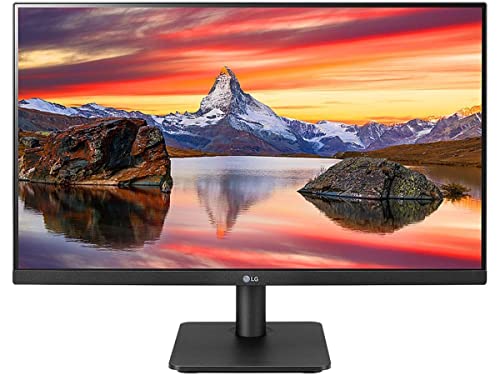
LG 24MP400-B
- Best for: Reading-heavy work such as writing, research and admin.
- 24-inch screen
- Full HD IPS panel
- 75Hz refresh rate
- AMD FreeSync as listed
Reading-heavy work such as writing, research and admin.
The input list stops at HDMI and D-Sub, so DVI or DisplayPort sources are not covered.
Anyone whose working day is mostly reading should look hardest at LG’s entry. The 24-inch IPS panel carries the usual 75Hz and FreeSync pairing, but the distinguishing entry on its listing is Reader Mode, a feature aimed at long stretches of text. Inputs run to HDMI and D-Sub, which covers modern laptops and a good many older desktops without adapters. Nothing about the specification chases gamers; instead it is a calm, document-first monitor that still smooths everyday motion better than the 60Hz screen it would replace.
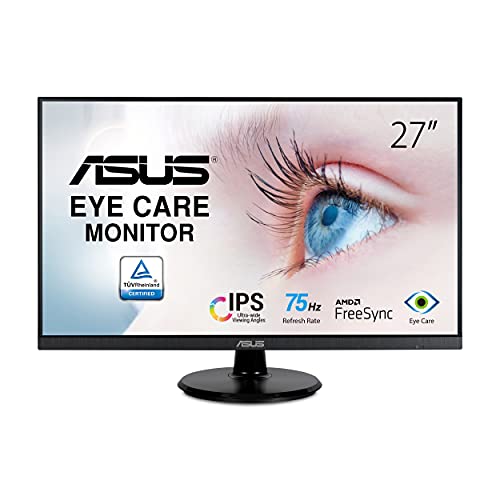
ASUS VA24DQ
- Best for: Modern laptops and docks that output DisplayPort.
- 23.8-inch screen
- Full HD IPS panel
- 75Hz refresh rate
- Adaptive-Sync / FreeSync as listed
Modern laptops and docks that output DisplayPort.
Do not confuse it with the near-identically named VA24EHE when ordering; the model names differ by two letters and the inputs differ with them.
The VA24DQ exists for the buyer whose computer speaks DisplayPort. On paper it shadows its VA24EHE sibling — same 23.8-inch IPS panel, same 75Hz refresh, same listed Adaptive-Sync, FreeSync and Eye Care features — but the input set swaps DVI-D for DisplayPort while keeping HDMI and VGA. That single change makes it the natural partner for modern laptops and docking stations that the other three cannot serve directly. If your desk runs recent hardware and you want the ASUS formula without an adapter in the chain, this is the version to buy.
Which One Fits Your Situation
Your Desk Faces a Window or Bright Lights
Take the Dell SE2422HX. Its listed anti-glare coating is the only finish among the four aimed directly at reflections, and the VA panel’s contrast holds up well for solo work. Everyone else on this list will have you tilting the screen or closing blinds to fight glare that the Dell simply shrugs off.
The Family PC Is Older and Full of Legacy Ports
Reach for the ASUS VA24EHE. Between HDMI, D-Sub and DVI-D it covers the widest span of ageing hardware here, so the old desktop under the desk connects without a shopping trip for adapters. Its VESA mount support is a bonus if the same upgrade is meant to clear desk space with an arm or wall bracket.
You Read and Write All Day
The LG 24MP400-B was practically specified for you. Reader Mode is the headline feature on its listing, the IPS panel keeps text looking consistent as you shift in your chair, and the 75Hz refresh softens the endless scrolling that document work involves. Pair it with the HDMI input for a modern laptop or the D-Sub port for an older machine.
A Docking Station Drives Your Setup
Only one finalist accepts DisplayPort, and it is the ASUS VA24DQ. If your laptop or dock outputs DisplayPort and you want a direct cable run with no adapters, the choice makes itself. The VGA port it also carries is a useful spare for the occasional legacy machine a colleague or relative brings to the desk.
Common Mistakes
- Expecting 75Hz to feel like a high-refresh gaming monitor; it is a smoothness step, not a transformation.
- Ordering before checking which video outputs your computer actually has, then discovering the monitor lacks the one you need.
- Mixing up the ASUS VA24EHE and VA24DQ, which look alike on paper but carry different input sets.
- Assuming FreeSync helps with every graphics card and connection; it depends on your hardware supporting it, so verify before counting on it.
- Planning a wall mount or monitor arm without checking the listing; only the ASUS VA24EHE here states VESA wall-mount support.
Frequently Asked Questions
Is 75Hz noticeably smoother than 60Hz?
Yes, though the improvement is measured rather than dramatic. Scrolling text, dragging windows and panning across a spreadsheet all look steadier, and light gaming gains a little fluidity. Because the step adds a quarter more frames per second, most people notice it most during the first week, then simply enjoy a screen that feels less strained in everyday motion.
Will my existing computer drive a 75Hz monitor properly?
Almost certainly, provided the connection matches. All four listings include HDMI, and integrated graphics in typical office PCs and laptops handle Full HD at 75Hz without drama. The real risk is physical, not computational: older machines may only offer VGA, DVI or DisplayPort, so confirm your port against the monitor’s input list before buying.
Does FreeSync on these monitors help with console gaming?
Not in the way the listing might suggest. FreeSync is listed on all four models, but it is a PC graphics feature; consoles simply send their normal signal and the monitor displays it at the rate received. Buy one of these screens for a console because the size and panel suit you, and treat FreeSync as a benefit reserved for PC use.
Which panel type is better for office work, VA or IPS?
For most desks, IPS has the edge because text and colours stay consistent as you move in your chair, which is why three of the four picks use it. The VA-based Dell makes its case with contrast and an anti-glare coating, so if your room is bright and you work alone, its trade-off can be the smarter one.
Related guides
More from Amazon
Programs that pair well with the guide above. Offers and eligibility are set by Amazon and may change.
Free shipping on eligible items, Prime Video and more. Eligible new members can start with a free trial.
Start a Prime free trialAd-free music streaming. Eligible new subscribers can start with a free trial.
Try Music Unlimited freeA Prime membership for ages 18-24 with a trial period. Eligibility is set by Amazon.
See Prime for Young AdultsAudiobooks and podcasts to listen to on the go. Eligible new members can start with a free trial.
Try Audible freeAs an Amazon Associate we earn from qualifying purchases.









