
Our Short List of 3

- Best for: Recording vocals, guitar or a stereo keyboard at home while listening back on powered monitors.
- 2-in / 2-out USB-C interface, bus powered
- 2 mic preamps with up to 69 dB gain
- 2 XLR/TRS combo inputs with independent 48V phantom power
- Air mode with Presence and Harmonic Drive

- Best for: Streamers and podcasters who monitor on speakers and need loopback for desktop audio.
- 2-in / 2-out USB-C interface, bus powered
- 2 mic/line/instrument combo inputs with individual 48V phantom power
- ESS Sabre32 Ultra DAC, 120 dB dynamic range
- Mic preamp EIN stated as -129 dBu in listing copy
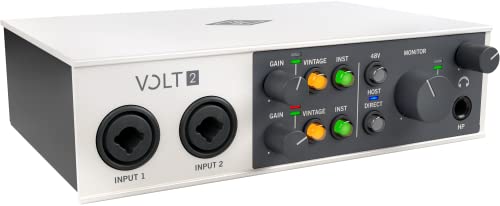
- Best for: Vocalists and guitarists who want preamp character and tablet compatibility in a two-input box.
- 2-in / 2-out USB interface (USB-C connection, bus powered)
- 2 combo XLR/TRS inputs
- Mic preamps with switchable Vintage mode, a tube preamp emulation based on the UA 610 console preamp
- Instrument (INST) switches and 48V phantom power
All 5 Picks at a Glance
| Product | Specs | Action |
|---|---|---|
| Focusrite Scarlett 2i2 (4th Gen) |
| Check price on Amazon |
| MOTU M2 |
| Check price on Amazon |
| Universal Audio Volt 2 |
| Check price on Amazon |
 PreSonus Studio 24c |
| Check price on Amazon |
 Behringer U-PHORIA UMC404HD |
| Check price on Amazon |
Choosing an audio interface for studio monitors is mostly a decision about the output path, not the inputs. The interface has to feed your speakers a clean, balanced signal, give you a volume control you can reach without opening software, and let you hear yourself while recording without the round-trip delay of your computer. Two interfaces with identical input counts can behave very differently once a pair of powered monitors is connected, which is why the monitor outputs, the monitoring controls and the headphone feed deserve more attention than headline converter numbers.
This guide is for home-studio recordists, songwriters who track vocals and guitar, and streamers who work on nearfield speakers rather than headphones alone. Every pick below was chosen from the product names and specification lists on its Amazon page, with priority given to balanced monitor or line outputs, a stated direct-monitoring feature and a headphone output, so the shortlist reflects what each listing actually promises instead of brochure claims repeated from elsewhere.
Our Top Picks
- MOTU M2 USB-C Audio Interface7.5 x 4.25 x 1.75 inches7.5 x 4.25 x 1.75 inches1.3 poundsCheck on Amazon
Top 3 picks at a glance
Quick Picks
As an Amazon Associate we earn from qualifying purchases
| Product | Best for | Key spec from title |
|---|---|---|
| Focusrite Scarlett 2i2 (4th Gen) | Solo recordists tracking one or two sources at a time | 2-in/2-out USB-C with balanced line outputs |
| MOTU M2 | Streamers who need loopback and on-unit metering | Balanced TRS monitor outputs plus RCA outputs |
| Universal Audio Volt 2 | Singers who want a vintage-flavoured mic preamp | Direct monitoring via HOST/DIRECT switch |
| PreSonus Studio 24c | Beginners who want recording software in the box | Balanced line outputs, 24-bit/192 kHz conversion |
| Behringer U-PHORIA UMC404HD | Small bands recording several microphones at once | 4-in/4-out with main XLR outputs |
How to Choose
Start with the outputs, not the inputs
Monitor speakers reward a balanced connection. A balanced TRS or XLR output rejects the interference a cable picks up on its way across a desk full of power bricks and computer leads, so read the exact wording on the listing before anything else. The Scarlett 2i2 and the Studio 24c both state balanced line outputs, the M2 names balanced TRS monitor outputs, and the UMC404HD offers main XLR outputs. Unbalanced RCA outputs, such as the M2’s secondary pair, are fine over short runs to a second device but are the wrong choice for your main speakers. If a listing never uses the word balanced, treat the output type as an open question.
Decide how you will hear yourself while recording
Singing or playing along to a backing track falls apart when your own signal arrives late, and routing everything through the computer adds exactly that delay. The listings here answer the problem in three different ways. The Volt 2 fits a HOST/DIRECT switch, so you flip between computer playback and the direct input signal. The Studio 24c uses a mixer knob that blends input against playback, which feels natural when you are still learning levels. The M2 lists hardware monitoring outright. Whichever style you pick, confirm the listing states a direct or hardware monitoring feature, because a headphone socket alone does not guarantee one.
Match inputs and preamp gain to your microphones
Two inputs cover most solo work: one microphone and one guitar, or a stereo keyboard. Sessions with a drum kit, a string quartet or a four-person podcast table need the four combo inputs of the UMC404HD instead. Gain matters as much as count. The Scarlett 2i2 listing quotes up to 69 dB of preamp gain, while the Studio 24c quotes up to 50 dB, and a quiet dynamic microphone will expose that gap. Condenser microphones need phantom power, so check how it is switched: the 2i2 offers independent 48V per input, the M2 individual 48V per channel, and the others switchable 48V as listed.
Check power, the headphone feed and the extras
Four of these five interfaces are bus powered and draw everything from the USB connection, which keeps a portable setup simple. The UMC404HD is the exception: it uses an external power supply, so it belongs on a fixed desk near a wall socket. Every listing here includes a headphone output, and the Volt 2 states its own headphone level control, which matters when your monitors stay on while a singer cues in headphones. Extras separate otherwise similar boxes: MIDI in and out appear on the M2, Volt 2, Studio 24c and UMC404HD for older keyboards and modules, while loopback is an M2 feature aimed at streamers.
The 5 Best Options
Focusrite Scarlett 2i2 (4th Gen)
- Best for: Recording vocals, guitar or a stereo keyboard at home while listening back on powered monitors.
- 2-in / 2-out USB-C interface, bus powered
- 2 mic preamps with up to 69 dB gain
- 2 XLR/TRS combo inputs with independent 48V phantom power
- Air mode with Presence and Harmonic Drive
Recording vocals, guitar or a stereo keyboard at home while listening back on powered monitors.
There is a single pair of monitor outputs, so switching between two sets of speakers is not covered; a refurbished listing of this model also circulates, so confirm the page you order from is the new unit.
Solo musicians and podcasters who record one or two sources at a time are the natural audience here. The listing pairs two mic preamps with up to 69 dB of gain, independent phantom power on the combo inputs and Focusrite’s Air mode, which adds Presence or Harmonic Drive colour at the preamp stage. Auto Gain and Clip Safe address the two mistakes beginners make most, while the balanced line outputs feed powered monitors without the hum that unbalanced cabling can pick up. A headphone output covers cue monitoring, and the whole unit runs from the USB connection, so a spare mains socket is never part of the setup.
MOTU M2
- Best for: Streamers and podcasters who monitor on speakers and need loopback for desktop audio.
- 2-in / 2-out USB-C interface, bus powered
- 2 mic/line/instrument combo inputs with individual 48V phantom power
- ESS Sabre32 Ultra DAC, 120 dB dynamic range
- Mic preamp EIN stated as -129 dBu in listing copy
Streamers and podcasters who monitor on speakers and need loopback for desktop audio.
Seller bundles that add cables are sold under separate listings, so make sure the page you order from is the standalone interface.
Streamers and detail-focused recordists get the most from the M2, because its listing leans on measurement and monitoring rather than effects. A full-colour LCD shows level metering on the unit itself, hardware monitoring keeps your voice or instrument in your ears without software delay, and loopback folds computer audio back into a recording or broadcast. The monitor path is the strongest paperwork here: balanced TRS outputs for your speakers, RCA outputs as a second feed, and an ESS Sabre32 Ultra DAC section with 120 dB of dynamic range. MIDI in and out keeps older keyboards and modules in the setup.
Universal Audio Volt 2
- Best for: Vocalists and guitarists who want preamp character and tablet compatibility in a two-input box.
- 2-in / 2-out USB interface (USB-C connection, bus powered)
- 2 combo XLR/TRS inputs
- Mic preamps with switchable Vintage mode, a tube preamp emulation based on the UA 610 console preamp
- Instrument (INST) switches and 48V phantom power
Vocalists and guitarists who want preamp character and tablet compatibility in a two-input box.
The listing describes a 2-out configuration without separately detailing the monitor output connectors, so check the rear-panel layout on the product page if your speakers need a specific plug type.
Singers who find most budget preamps a little plain should start with the Volt 2. Its listing centres on a Vintage mode that emulates the tube sound of Universal Audio’s 610 console preamp, switchable per channel, alongside instrument switches for plugging a guitar or bass straight in. Monitoring is handled by a HOST/DIRECT switch, so you choose between the computer’s playback and the direct input signal without menu diving. The headphone output has its own level control, MIDI in and out are fitted, and the listing states compatibility with Mac, PC, iPad and iPhone, which suits musicians who sketch ideas on a tablet before moving to a desktop.
PreSonus Studio 24c
- Best for: Beginners building a first monitor-based setup who want recording software included in the box.
- 2×2 USB-C interface, bus powered
- 2 XMAX-L mic/instrument preamps with up to 50 dB gain
- Combo mic/instrument/line inputs
- 24-bit / 192 kHz converters, sample rates from 44.1 to 192 kHz as listed
Beginners building a first monitor-based setup who want recording software included in the box.
Preamp gain tops out at 50 dB as listed, lower than some rivals here, so a very quiet dynamic microphone may need an inline booster to reach a healthy level.
First-time buyers who own nothing yet — no software, no interface, no routine — are the Studio 24c’s audience. PreSonus bundles Studio One Artist and Ableton Live Lite in the listing, so recording can start the day the box arrives. Its two XMAX-L preamps feed combo inputs that accept microphones, instruments or line sources, and a mixer knob on the front blends input against playback, which is a friendlier way to manage monitoring than a hard switch when you are still learning levels. Balanced line outputs run to your monitors, a headphone output is fitted, and MIDI in and out leave room for a controller keyboard later.
Behringer U-PHORIA UMC404HD
- Best for: Multi-microphone sessions — bands, drums or panel podcasts — feeding one pair of monitors.
- 4-in / 4-out USB audio/MIDI interface
- 4 Midas-designed mic preamps with switchable 48V phantom power
- Combo XLR/TRS inputs with Line/Inst switches and pads
- 24-bit / 192 kHz converters
Multi-microphone sessions — bands, drums or panel podcasts — feeding one pair of monitors.
It needs its own power supply, so it is a poor fit for recording away from a mains socket; confirm the listing is the 4×4 unit before ordering.
The UMC404HD is the pick for anyone whose sessions outgrow two inputs: a small band tracking together, a drummer with several microphones, or a podcaster recording a four-person table. Four Midas-designed preamps sit behind combo inputs with Line/Inst switches and pads, and the output section is the most flexible in this group — main XLR outputs for your monitors, plus playback outputs and channel inserts as listed. The trade-off is power: this unit uses an external power supply rather than drawing everything from USB, so it suits a fixed desk where a wall socket is always within reach.
Which One Fits Your Situation
You record alone and mix on speakers
Either two-input Focusrite or Universal Audio box will serve you, and the choice is about workflow. Pick the Scarlett 2i2 if you want Auto Gain and Clip Safe guarding your takes and the highest listed preamp gain. Pick the Volt 2 if you would rather have the Vintage preamp mode colouring vocals and a direct-monitoring switch you can flip without thinking. Both feed monitors from balanced or stated outputs and run from USB power alone.
You stream or record your screen
Take the MOTU M2. Loopback is the feature your setup actually turns on: it folds game sound, call audio or a backing track into the same feed as your microphone, and the listing states it plainly. The full-colour LCD metering helps you hold levels steady on speakers mid-stream, and the balanced TRS monitor outputs keep the desk quiet electrically. No other interface in this group lists loopback, so the decision makes itself.
You track more than two microphones at once
Go straight to the UMC404HD, the only four-input unit here. Four Midas-designed preamps with pads cover a drum kit or a full podcast table, the main XLR outputs run your monitors, and the extra playback outputs give you routing options the two-input boxes cannot match. Accept the external power supply as the cost of the extra channels and park the unit permanently on the desk.
You are starting with a completely empty desk
The Studio 24c removes the most friction. Studio One Artist and Ableton Live Lite are included in the listing, the blend knob makes monitoring easy to learn, and balanced line outputs mean your first monitors connect the right way from day one. Its 50 dB of preamp gain is the one ceiling to remember if you later buy a very quiet dynamic microphone.
Common Mistakes
- Buying a playback-only DAC or a gaming sound card, then discovering it has no microphone inputs and no proper monitor outputs.
- Running monitors from unbalanced RCA outputs over long cables and chasing the resulting hum through the rest of the setup.
- Ignoring the preamp gain figure in the listing, then finding a quiet dynamic microphone cannot reach a usable recording level.
- Forgetting that condenser microphones need 48V phantom power, and ordering an interface whose listing never states it.
- Assuming every interface is bus powered, then finding the one unit that needs its own supply has nowhere to plug in at a mobile session.
Frequently Asked Questions
Do studio monitors really need balanced outputs?
For short desktop runs they are not strictly required, but balanced outputs are the safer default and every interface here states them in some form. A balanced TRS or XLR connection rejects interference picked up along the cable, which matters when leads cross power bricks and computer cables. If your speakers accept balanced inputs, use them.
Can I listen on monitors and headphones at the same time?
Yes, on the units listed here, because each one pairs its monitor or line outputs with a separate headphone output. The Volt 2 goes further and states a dedicated headphone level control, so the singer’s cue volume can be set independently of the speakers. Check the listing for your chosen model if independent headphone level matters to you.
What does direct monitoring actually do?
It routes your microphone or instrument signal straight to the outputs inside the interface, before the computer processes it, so you hear yourself with no perceptible delay while the backing track plays. The Volt 2 implements it as a HOST/DIRECT switch, the Studio 24c as a blend knob, and the M2 lists it as hardware monitoring.
Is a two-input interface enough for a home studio?
For one person recording vocals, guitar or keys, yes — two inputs cover a microphone plus an instrument, or a stereo source, and all four two-input models here add balanced outputs and headphone feeds for monitor work. Step up to the four-input UMC404HD only when your sessions genuinely record three or more microphones at the same time.
Related guides
More from Amazon
Programs that pair well with the guide above. Offers and eligibility are set by Amazon and may change.
Free shipping on eligible items, Prime Video and more. Eligible new members can start with a free trial.
Start a Prime free trialAd-free music streaming. Eligible new subscribers can start with a free trial.
Try Music Unlimited freeA Prime membership for ages 18-24 with a trial period. Eligibility is set by Amazon.
See Prime for Young AdultsAudiobooks and podcasts to listen to on the go. Eligible new members can start with a free trial.
Try Audible freeAs an Amazon Associate we earn from qualifying purchases.









