
Cable management splits into three separate jobs, bundling several cables into one visual unit, anchoring a cable’s path to a fixed point, and hiding slack and bulky adapters entirely, and the eight accessories below cover all three rather than one product trying to do everything. Owen Pritchard, Technical Guides Editor at gamingpchub.org, ran an IT repair bench for 12 years and has pulled enough dust-caked, tangled case interiors apart to know that cable routing affects how easy a system is to service later, not just how it looks. The N NOROCME 192 PCS Cable Management Kit at around $15 covers the widest range of common use cases here.
Our Top Picks
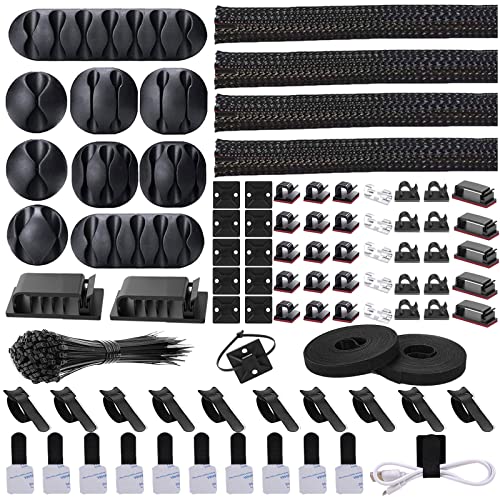 Cord Management Organizer Kit 4 Cable Sleeve split1-Pack (152 PCS)6 x 0.5 x 0.1 inchesCheck on Amazon



Top 3 picks at a glance


Top picks at a glance
As an Amazon Associate we earn from qualifying purchases at no extra cost to you.



![[313Pcs] Cable Management Kit, Reusable Computer Desk Cord Organizer, White](https://m.media-amazon.com/images/I/41KMmg7VGpL._SL160_.jpg)

| Model | Key spec | Price | Best for |
|---|---|---|---|
| N NOROCME 192 PCS Cable Management Kit | 4-piece wire organizer sleeve set | Check on Amazon | Bundling visible cables behind a desk or case |
| N NOROCME Cord Management Organizer Kit | 4-piece split cable sleeve, 192pc | Check on Amazon | Nearly identical alternative, compare current stock |
| LOVJOYSE Under Desk Cable Tray | 25.3-inch no-drill mounted tray | Check on Amazon | Hiding power bricks and slack entirely from view |
| DRIVUU 311Pcs Cable Management Kit | 4-piece split cable sleeve, 311pc | Check on Amazon | More pieces than the N NOROCME kits at a similar price |
| fansto Under Desk Cable Organizer | 20-pair cord holder, black | Check on Amazon | Budget under-desk routing without a full tray |
| XHF Adhesive Cable Wire Clips | 120-piece adhesive clip set | Check on Amazon | Securing individual cables at fixed points |
| Topavatop 313-Piece Cable Management Kit | Reusable cord organizer set, white | Check on Amazon | Widest variety of pieces for a full desk setup |
| Nettbe 60 PCS Reusable Cable Ties | 6-inch adjustable hook-and-loop straps | Check on Amazon | Cheapest way to secure loose runs |
N NOROCME 192 PCS Cable Management Kit
At around $15, this kit includes four cable sleeves designed to bundle multiple loose cables into a single, flexible tube, sold as a 192-piece set that includes the sleeves plus assorted clips and ties for securing them in place. This is the right tool specifically for runs where several cables travel the same path, like a desk’s power strip to a monitor and PC, and you want one tidy bundle instead of four separate wires.
The split-sleeve design, which most kits in this category use, means you do not need to disconnect cables to install it. You feed the cables through the open seam and close it around them, which matters in practice since re-terminating cables just to route them through a solid sleeve is a real hassle most buyers want to avoid.
At 192 pieces total including the four main sleeves plus smaller accessories, this kit covers a full desk and case cable-routing project rather than a single cable run, making the per-piece cost reasonable for the coverage provided, though the DRIVUU and Topavatop kits further down this list offer more total pieces for a comparable price.
Pros
- Split-sleeve design installs without disconnecting cables
- Enough pieces in the kit for a full desk and case project
- Flexible sleeve material bends around corners without kinking
Cons
- Best suited to bundling parallel cable runs, not individual cable routing
- Sleeve diameter may not accommodate very thick cable bundles
- Fewer total pieces than the similarly priced DRIVUU or Topavatop kits
Who it’s for: anyone bundling several parallel cables, like a desk’s power and peripheral cords, into one tidy run.
N NOROCME Cord Management Organizer Kit
At around $15, this is a close variant of the kit above from the same brand, also a 4-piece, 192-total-piece split cable sleeve set. The ten-cent price difference and near-identical description suggest these may be different packaging or listing variants of very similar underlying products, and the practical advice is to compare current stock, reviews, and exact piece dimensions between the two listings before choosing, since the functional difference is likely minimal.
Functionally, everything said about the sleeve above applies here: split-seam installation without disconnecting cables, flexibility around corners, and coverage for a full desk or case project rather than a single cable.
If one listing is temporarily out of stock or priced differently at the time you are shopping, the other is a reasonable direct substitute rather than a meaningfully different product, and neither has an edge over the other beyond whatever price gap exists at checkout.
Pros
- Functionally equivalent to the kit above at a nearly identical price
- Useful as a backup option if the other listing is out of stock
- Same split-sleeve, no-disconnect installation approach
Cons
- Minimal differentiation from the N NOROCME kit above, check current pricing before choosing either
- Same diameter limitations for very thick cable bundles
- Buying both would be redundant for most single-desk setups
Who it’s for: buyers price-comparing against the first N NOROCME kit, since either works for the same use case.
LOVJOYSE Under Desk Cable Tray
At around $21, this is a fundamentally different product from the sleeve kits above, a 25.3-inch tray that clamps to the underside of a desk without drilling, designed to hold a power strip, cable slack, and small adapter bricks entirely out of sight. Rather than bundling visible cables, this hides the mess altogether behind or under the desk surface, which matters most for a clean-looking setup viewed from the front or sides.
The no-drill clamp mounting is the key practical feature here, since it works on rented apartments, glass desks, or any surface where drilling is not an option, and it is fully removable if you rearrange your setup later. Weight capacity is worth checking against your specific load, a standard power strip plus a couple of small bricks typically fits well within a tray this size’s rated capacity.
At around $21, this is the priciest single item in this comparison, and the premium buys a genuinely different function, full concealment, rather than more pieces of the same sleeve-and-clip approach used by most of the other kits here.
Pros
- Hides power strips and cable slack completely from view
- No-drill clamp mounting works on rented or delicate surfaces
- Fully removable if you rearrange your desk setup later
Cons
- Priciest single item in this comparison
- Weight capacity limits what it can safely hold, check before loading heavy adapters
- Does not help with cable routing inside a PC case, only under-desk cables
Who it’s for: anyone who wants a completely clean desk front with no visible power strip or cable slack at all.
DRIVUU 311Pcs Cable Management Kit
At around $16, this DRIVUU kit is functionally similar to the N NOROCME sleeve kits above, a split-sleeve cable organizer with assorted clips and ties, but with a notably higher total piece count at 311 pieces for roughly a dollar more. For buyers comparing purely on pieces-per-dollar, this kit offers more accessories for a smaller price gap than choosing between the two N NOROCME listings.
The core function is identical to the sleeve kits already covered: bundle multiple parallel cables into a flexible tube using a split-seam design that avoids disconnecting cables during installation. The extra piece count mostly comes from a wider range of clip and tie sizes included alongside the main sleeves, useful if your project spans multiple cable thicknesses across a desk and case.
Between this kit and the N NOROCME options, the practical difference is minor, and either works well for a bundling-focused project. This one edges ahead slightly on raw piece count for buyers who want more clips and ties included without stepping up to the larger Topavatop kit.
Pros
- More total pieces than the N NOROCME kits at a similar price
- Same reliable split-sleeve, no-disconnect installation
- Wider range of clip and tie sizes included
Cons
- Functionally near-identical to the N NOROCME kits, mainly differs on piece count
- Still fewer pieces than the largest Topavatop kit below
- Same sleeve diameter limitations for very thick cable bundles
Who it’s for: buyers who want more clips and ties included than the N NOROCME kits without paying for the largest Topavatop set.
fansto Under Desk Cable Organizer
At around $9, this fansto organizer holds up to 15 cords across 20 pairs of mounting points, a budget-focused way to route cables under a desk without the full concealment of the LOVJOYSE tray above. Rather than hiding cables inside an enclosed tray, this uses individual holding points to keep cords separated and off the floor, visible but organized rather than fully out of sight.
This sits at a meaningfully lower price than the LOVJOYSE tray, and the trade-off is concealment versus cost: cables routed through this organizer remain visible under the desk, just tidy and separated rather than tangled, while the tray above hides everything behind a solid surface.
At around $9, this is a reasonable middle option between the cheapest adhesive clips below and the full concealment tray above, suited to buyers who want organized, off-the-floor routing without paying for a full enclosed tray system.
Pros
- Lower cost than the full concealment tray option
- Keeps up to 15 cords separated and off the floor
- Simple mounting for straightforward under-desk routing
Cons
- Cables remain visible rather than fully concealed like the LOVJOYSE tray
- Limited to 15 cords, insufficient for a heavily cabled multi-monitor setup
- Less structurally rigid than a full mounted tray for heavier bundles
Who it’s for: buyers who want tidy, off-the-floor cable routing under a desk without paying for full concealment.
XHF Adhesive Cable Wire Clips
At around $7, this is a set of 120 adhesive cable clips designed to hold individual cables at fixed points under a desk, on a wall, or even in a car, rather than bundling multiple cables together like the sleeve kits above. This solves a different problem: keeping a single cable, like an Ethernet run or a charging cable, anchored in a specific path rather than dangling or shifting.
Adhesive-backed clips are convenient but come with a real trade-off worth knowing before buying: on textured desk surfaces or older paint, the adhesive can weaken over time, especially in warmer rooms. For a permanent installation, a light adhesive promoter or a screw-in alternative clip in high-stress spots is worth considering alongside these.
At under $8 for 120 pieces, this is a low-cost complement to the sleeve kits above rather than a replacement, since bundling cables and anchoring the bundle’s path are two separate parts of a complete cable management setup, and 120 clips covers a large project across a desk, case, and even a car if needed.
Pros
- Anchors individual cables at precise points, unlike bundle-only sleeves
- Versatile across desk, wall, and other mounting surfaces
- Large 120-piece count covers multiple projects at a low per-clip cost
Cons
- Adhesive can weaken over time on textured or older painted surfaces
- Designed for single cables, not for bundling multiple cables together
- Not a substitute for the sleeve kits above if bundling is the primary need
Who it’s for: anyone who needs to anchor specific individual cables, like an Ethernet or charging cable, along a fixed path.
Topavatop 313-Piece Cable Management Kit
At around $17, this is the largest kit in the comparison by piece count, a 313-piece reusable cord organizer set in white, suited to buyers who want to manage an entire desk setup, monitor cables, power strips, peripheral cords, and a PC’s external connections, with one comprehensive kit rather than combining several smaller purchases.
The white colorway is worth noting specifically, since most cable management accessories default to black, and a white desk or white-cable setup benefits from a matching organizer rather than black clips and sleeves standing out against a lighter aesthetic.
At roughly a dollar more than the DRIVUU kit above, but with slightly more total pieces, this is the better value if your project spans a full desk rather than just a single cable bundle, since the extra pieces cover clips, ties, and sleeves in one purchase instead of needing to buy multiple smaller kits separately.
Pros
- Largest piece count in this comparison, covers a full desk project
- White colorway matches light-themed desk setups
- Reusable design allows rerouting as your setup changes
Cons
- More pieces than a single-cable or single-bundle project actually needs
- White pieces show dust and discoloration more visibly over time than black
- Higher price than the more focused sleeve-only kits above
Who it’s for: buyers managing an entire desk setup who want one comprehensive kit rather than several smaller purchases.
Nettbe 60 PCS Reusable Cable Ties
At around $6, this is the cheapest and most focused product in the comparison: 60 reusable, adjustable hook-and-loop cable ties in a 6-inch length, designed for securing and organizing cable routing rather than bundling cables inside a sleeve or anchoring them with adhesive clips. These are the accessory you reach for constantly once you have them, for everything from bundling a power strip’s cord to keeping a spare HDMI cable coiled neatly in a drawer.
Hook-and-loop material, rather than rigid plastic zip ties, is the right choice for anything you expect to reroute or adjust later, since it opens and recloses hundreds of times without wearing out, unlike a zip tie that must be cut to release.
At under $7 for 60 pieces, this is close to an impulse-buy price point, and given how often a spare cable tie comes in handy for tasks well beyond the original cable management project, it is a reasonable addition to any of the kits above rather than a standalone solution on its own.
Pros
- Reusable hook-and-loop design survives hundreds of open-close cycles
- Lowest price per piece of anything in this comparison
- Versatile enough for tasks beyond just PC and desk cable management
Cons
- Does not bundle cables into a fully enclosed sleeve like the kits above
- Less tidy visual result than a sleeve for cables you want fully hidden
- 60 pieces can disappear quickly once you start using them for general tasks
Who it’s for: anyone who wants a cheap, flexible way to secure and adjust cable routing without a full sleeve kit.
How we compared and picked
Owen Pritchard evaluated these eight products based on which specific cable management job each one solves, bundling, anchoring, or hiding, rather than treating cable management as one interchangeable category. This distinction matters because buyers often purchase a sleeve kit expecting it to also anchor cables to a desk, or buy adhesive clips expecting them to bundle multiple cables, and end up needing a second purchase anyway.
Products were also assessed for installation friction, specifically whether cables need to be disconnected to install the accessory, since a cable management product that requires rewiring your entire setup to install defeats much of its own convenience. Mounted products like the LOVJOYSE tray were additionally checked for stated weight capacity and mounting method.
A product is flagged as a near-duplicate rather than dropped outright when it overlaps heavily with another listed product, as with the two N NOROCME kits and the DRIVUU kit, since price and stock availability shift often enough that keeping both as options serves readers better than arbitrarily picking one.
This guide is rechecked periodically as pricing and stock availability shift across these listings.
What to look for in cable management accessories
Bundling versus anchoring versus hiding, three different jobs
Cable management accessories generally fall into three functional categories, even though they get marketed under one umbrella term. Sleeves bundle multiple cables into one visual unit. Clips and mounts anchor a cable’s path to a fixed surface. Trays and boxes hide slack and bulky adapters entirely from view. A complete setup usually needs at least two of these three categories working together, and buying only a sleeve kit while expecting it to also anchor cables to your desk, or hide a power strip, is a common source of buyer disappointment.
Airflow impact inside the case versus outside on the desk
Cable management inside a PC case has a real, measurable effect on airflow when cables block a fan’s direct intake or exhaust path, though the effect is smaller than commonly assumed for a well-designed modern case with routing channels behind the motherboard tray. Outside the case, on a desk or under a table, cable management has essentially zero airflow impact and exists purely for tidiness, trip-hazard reduction, and easier troubleshooting later. Prioritize case-internal routing for any genuine thermal benefit, and treat desk-level cable management as a comfort and organization upgrade rather than a performance one.
Keeping network cables routed separately from power
Running a wired Ethernet connection is still the more reliable choice over Wi-Fi for gaming ping stability, since a Cat6 cable delivers consistent, low-latency throughput without the interference and contention issues Wi-Fi can introduce on a busy network. When routing that Ethernet cable as part of a broader cable management project, keep it as a distinct, separately identifiable run rather than bundling it tightly parallel to power cables over long distances, since close, sustained proximity to power cabling can in rare cases introduce electromagnetic interference into the network signal.
Reusability and whether you will reroute cables later
Choosing between reusable hook-and-loop ties and single-use rigid zip ties comes down to how likely you are to reroute your setup later. A first-time desk setup or a PC build you expect to upgrade within a year benefits from reusable ties throughout, since you will likely be back inside the routing to add or move cables. A permanent, rarely-touched installation, like cables routed once behind a mounted TV, can reasonably use cheaper single-use ties where reusability adds no real value.
No-drill mounting and weight limits worth checking first
No-drill trays and clamp-mounted organizers, like the LOVJOYSE tray in this comparison, rely on clamp pressure or adhesive rather than screws, which means a stated weight capacity actually matters and should be checked against your real load. A power strip plus two or three small adapter bricks typically stays well within a mid-size tray’s rating, but stacking a full surge protector, a network switch, and several large power bricks onto the same no-drill mount risks exceeding it and having the mount slip or sag under the desk’s edge over time.
Matching kit size to project scope before buying
Buying a large, comprehensive kit like the 313-piece Topavatop set for a single-cable task wastes most of the kit’s value, while buying a small, focused product like the Nettbe ties for a full desk-and-case overhaul means running out partway through and needing a second purchase anyway. Roughly estimate your project’s scope, a single cable run, a full desk setup, or an entire case interior, before choosing a kit size, rather than defaulting to either the cheapest or the largest option available.
Mistakes buyers make picking cable management accessories
Buying a sleeve kit expecting it to also anchor cables to a desk or wall, when sleeves and anchoring clips solve different problems, leads to needing a second purchase to finish the actual project.
Routing a wired network cable tightly bundled parallel to power cables over a long distance risks introducing interference into the network signal, undermining the exact stability advantage a wired connection is meant to provide over Wi-Fi.
Using rigid single-use zip ties in a setup you expect to reroute or upgrade within the year means cutting and replacing ties repeatedly, when reusable hook-and-loop ties would have cost little more and saved that hassle entirely.
Assuming desk-level cable management improves PC thermal performance the same way case-internal routing does confuses a cosmetic and organizational benefit with an actual airflow benefit, which only applies meaningfully inside the case itself.
Loading a no-drill clamp tray beyond its stated weight capacity with a full surge protector and multiple large adapters, rather than checking the rating first, risks the mount slipping loose under the desk’s edge months later.
Buying a kit sized for a different project scope than you actually have, either far too large or far too small, wastes money on unused pieces or forces an inconvenient second purchase mid-project.
Verdict
For most buyers tackling a full desk-and-case project, the Topavatop 313-Piece Cable Management Kit at around $17 offers the broadest coverage in one purchase. For a more focused cable-bundling task, the N NOROCME 192 PCS kit at around $15 or the DRIVUU 311Pcs kit at around $16 both work well. If a fully hidden setup matters more than bundling, the LOVJOYSE Under Desk Cable Tray at around $21 is the pick. Add the Nettbe 60 PCS Reusable Cable Ties at around $6 to any of these for flexible, adjustable routing, and use the XHF Adhesive Cable Wire Clips at around $7 specifically for anchoring individual cables like your Ethernet run.
Related guides
- How To Diagnose A Failing Power Supply
- How To Update Graphics Drivers Safely
- How To Build A Gaming Pc Step By Step
Frequently asked questions
Does cable management actually improve airflow inside a PC case, or is it just cosmetic?
It does both, but the airflow benefit is smaller than most people assume for a modern mid-tower case with good fan placement. Loose cables blocking a fan intake or exhaust path can measurably raise temperatures a few degrees, while cables routed behind the motherboard tray barely affect airflow at all. The bigger practical benefit is easier access for cleaning and future upgrades.
What is the difference between cable sleeving and cable ties for management?
Cable sleeves bundle multiple cables into one flexible tube, mainly for visual tidiness on cables you can see through a windowed case or desk setup. Cable ties and straps cinch cables into place to control routing and prevent sag or snagging. Most setups benefit from both, sleeves for visible runs and ties for securing routing behind panels or under a desk.
Should I run my gaming PC’s network connection through cable management or keep it separate?
Keep a wired Ethernet connection as a distinct, clearly routed cable rather than bundling it tightly with power cables, since running a network cable parallel and close to power cables over a long distance can introduce electromagnetic interference in rare cases. A wired Cat6 connection routed cleanly still beats Wi-Fi for gaming ping stability regardless of how it is bundled.
Is a no-drill under-desk cable tray actually sturdy enough for a power strip and a small PSU brick?
Most no-drill trays use clamp or adhesive mounting rated for a specific weight limit stated in the listing, and a standard power strip plus a couple of laptop or monitor power bricks usually falls well within that range. Check the stated weight capacity before loading it with anything heavier, like a full surge protector plus multiple large adapters, since exceeding the rating risks the clamp slipping under the desk’s edge over time.
Do reusable cable ties wear out, or can they be reused indefinitely?
Hook-and-loop reusable ties, like Velcro-style straps, hold up to hundreds of open-close cycles before the grip noticeably weakens, making them effectively long-lasting for home use. Rigid plastic zip ties are single-use by design and should not be used where you expect to reroute cables later, since cutting them to remove is the only way to release them.


