
Our Short List of 3
All 4 Picks at a Glance
| Product | Specs | Action |
|---|---|---|
 JBL 308P MkII | Check price on Amazon | |
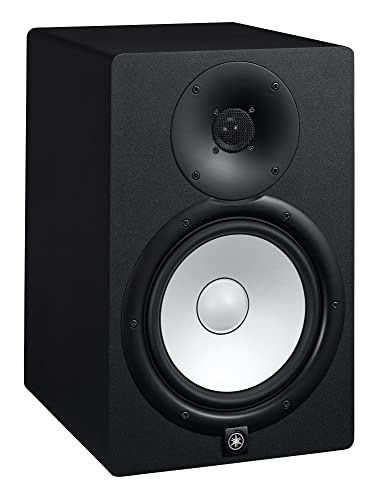 Yamaha HS8 | Check price on Amazon | |
 ADAM Audio T8V | Check price on Amazon | |
 PreSonus Eris Studio 8 | Check price on Amazon |
An 8-inch nearfield monitor is a studio speaker built for listening at arm’s length, with a woofer eight inches across. That woofer size is the point of this guide: it reaches deeper into the bass than a five-inch monitor, so a mix’s low end can be judged without a subwoofer, while the cabinet stays small enough for a desk or a pair of stands. The best 8 nearfield monitors keep their sound flat and honest, so a mix that sounds right on them translates to headphones, a car, and a phone, instead of flattering the music in the studio and falling apart everywhere else.
Nearfield means the listening distance as much as the speaker. These monitors are designed to be heard from roughly an arm’s length to a few feet away, with the listener forming a triangle with the two speakers, and that short distance keeps the room’s reflections from colouring the sound as much as a far-field speaker would allow. An 8-inch model suits a medium room or a desk where the speakers sit on stands behind the console, and it is the size where a studio monitor starts to stand on its own for bass without help from below.
This guide compares four 8-inch active nearfield monitors, each one sold as a single unit with its own amplifiers built in. Every pick below is a complete studio monitor sold on Amazon US, and each one is judged on bass reach, tweeter character, amplifier design, inputs, room tuning controls, and whether the listing covers one speaker or a pair, because that detail decides the real cost of a stereo setup.
Our Top Picks
Top 3 picks at a glance
How to Choose
Woofer size and bass reach
The woofer decides how deep a monitor plays, and an 8-inch woofer reaches noticeably deeper than a five-inch one, which is why this size is popular for mixing without a subwoofer. Check the stated frequency response and, more importantly, the low-end figure: a monitor that reaches into the mid-thirties in hertz covers the bass of most instruments, while one that stops in the forties leaves the lowest notes to guesswork. A front port suits a desk where the back of the speaker sits close to the wall, while a rear port needs clearance behind the cabinet to breathe. Remember that a bigger woofer also needs a bigger cabinet, so measure the desk or the stands before ordering.
Tweeter type and top end
The tweeter decides the top end of the sound, and the two common designs have different characters. A dome tweeter, usually silk, gives a smooth top end that suits long listening sessions, while a ribbon tweeter gives a fast, detailed top end that reveals small problems in a mix, such as harshness in a vocal or a cymbal. Neither is better in every case: the ribbon suits a mixer who wants detail above all, while the dome suits a listener who spends all day in front of the speakers. Check the tweeter size and material on the listing, and remember that the crossover between the woofer and the tweeter decides how smooth the transition sounds.
Amplification and bi-amp design
Every monitor in this guide is active, with amplifiers built into the cabinet, and most use a bi-amp design, with one amplifier for the woofer and another for the tweeter. Bi-amping matters because it lets each driver get exactly the power it needs, and it keeps the crossover working at line level, where it is more accurate than a passive crossover. Check the power figures for each driver rather than a single total, since a monitor with a strong woofer amplifier and a modest tweeter amplifier is built for bass headroom. Class D amplifiers run cool and efficient, while Class AB amplifiers are the traditional choice for studio monitors, and both can sound excellent when the design is right.
Inputs and the source
A studio monitor needs a balanced connection from the audio interface or mixer, and the standard inputs are XLR and quarter-inch TRS, which reject interference over longer cable runs. Some monitors add an unbalanced RCA input, which suits a direct connection from a computer or a media player, but keep the cable short on an unbalanced input, since it picks up interference more easily. Check that the monitor’s inputs match the outputs of the interface or mixer, and buy balanced cables to match, because an unbalanced cable into a balanced input wastes the noise rejection the monitor was built to use.
Room tuning controls
No room is flat, so a monitor needs controls to adapt to the space it sits in. Room control and high-frequency trim switches let the owner cut the bass when the speaker sits against a wall, or soften the top end when the room is bright and reflective. Boundary compensation, which adjusts the bass for a speaker near a wall or a corner, is the most useful control of all for a desk setup, since a monitor on a desk almost always sits near a wall. Set the controls by ear with familiar music, one switch at a time, rather than by guesswork, and leave them alone once the sound is right.
Single unit or pair
Studio monitors are usually sold singly, not as a pair, and the listing’s unit count decides the real cost of a stereo setup. A single-unit listing means two must be ordered for a stereo pair, while a pair listing covers both speakers at once, so check the listing title and the “what is included” section before ordering. The four picks below are all single-unit listings, which is the norm for this class, so plan on ordering two units and a pair of balanced cables. A single monitor can serve as a mono reference or a centre speaker, but mixing needs a pair, and the two units should be the same model.
Top Picks
JBL 308P MkII
The JBL 308P MkII is the workhorse of this guide, with an 8-inch woofer and JBL’s waveguide design that keeps the sound even across a wide listening area. Its boundary EQ lets the owner cut the bass when the speaker sits against a wall, and the high-frequency trim softens the top end for a bright room, so it adapts to a desk setup without acoustic treatment. Two Class D amplifiers, one per driver, give it headroom for loud passages, and the front port means it can sit close to the wall behind the desk without choking the bass.
Key specifications:
– 8-inch woofer with a 1-inch soft dome tweeter
– 56 watts for the woofer and 56 watts for the tweeter, Class D bi-amp
– Frequency response from 37 Hz to 24 kHz
– XLR and quarter-inch TRS balanced inputs
– Boundary EQ and high-frequency trim controls, front port
– Sold as a single unit
Who it is for: a home studio that wants a flat, forgiving 8-inch monitor for mixing, with room controls that adapt to a desk against a wall.
Caveats: it is sold singly, so two units are needed for stereo, and its top end is smoother than the ribbon tweeter below, so a mixer who wants maximum detail may prefer the ADAM T8V.
Yamaha HS8
The Yamaha HS8 is the flat-accuracy pick, and the monitor most often found in professional studios at this size. Its 8-inch cone woofer and 1-inch dome tweeter are driven by a 75-watt woofer amplifier and a 45-watt tweeter amplifier, and the sound is deliberately unflattering, so problems in a mix are easy to hear. Room control and high trim switches adapt it to the space, and its reputation for translation is the reason it appears in so many studios: a mix that sounds right on the HS8 tends to sound right everywhere else.
Key specifications:
– 8-inch cone woofer with a 1-inch dome tweeter
– 75 watts for the woofer and 45 watts for the tweeter, bi-amp
– Frequency response from 38 Hz to 30 kHz
– XLR and quarter-inch TRS balanced inputs
– Room control and high trim switches, rear port
– Sold as a single unit
Who it is for: a mixer who wants the flattest, most honest 8-inch monitor in this guide, and who values translation to other systems above all.
Caveats: its rear port needs clearance behind the cabinet, so it suits stands better than a desk pushed against a wall, and its unflattering sound can feel dry for casual listening.
ADAM Audio T8V
The ADAM Audio T8V is the detail pick, with a U-ART ribbon tweeter that reveals small problems in a mix faster than a dome tweeter. Its 8-inch polypropylene woofer reaches down to 33 Hz, the deepest low end in this guide, and the rear port and wide cabinet give the bass room to breathe. A 70-watt woofer amplifier and a 20-watt tweeter amplifier drive the two drivers, and the rear-panel controls adjust the high frequencies and the low end for the room. It is the largest cabinet here, so measure the stands before ordering.
Key specifications:
– 8-inch polypropylene woofer with a 1.9-inch U-ART ribbon tweeter
– 70 watts for the woofer and 20 watts for the tweeter, bi-amp
– Frequency response from 33 Hz to 25 kHz
– XLR and unbalanced RCA inputs
– High-frequency and low-frequency controls on the rear panel, rear port
– Sold as a single unit
Who it is for: a mixer who wants a detailed ribbon top end and the deepest bass in this guide, and who has stands with room for a larger cabinet.
Caveats: the rear port needs clearance behind the cabinet, the cabinet is the widest here, and its only balanced input is XLR, so a TRS-only interface needs an adapter cable.
PreSonus Eris Studio 8
The PreSonus Eris Studio 8 is the flexible pick, with the most input options and the most tuning controls in this guide. Its 8-inch woven composite woofer and 1.25-inch silk dome tweeter are driven by a 140-watt Class AB bi-amp design, and the front port suits a desk where the back of the speaker sits close to the wall. XLR, TRS, and RCA inputs cover an interface, a mixer, and a direct computer connection, and the acoustic tuning controls adjust the low end, the midrange, and the top end separately.
Key specifications:
– 8-inch woven composite woofer with a 1.25-inch silk dome tweeter
– 140 watts total Class AB bi-amp, 75 watts for the woofer and 65 watts for the tweeter
– Frequency response from 35 Hz to 20 kHz
– XLR, quarter-inch TRS, and RCA inputs
– Low, mid, and high acoustic tuning controls, front port
– Sold as a single unit
Who it is for: a studio that wants one 8-inch monitor to cover an interface, a mixer, and a computer, with tuning controls for each band and a front port for desk use.
Caveats: it is sold singly, so two units are needed for stereo, and its 20 kHz top end is the lowest here, which matters only to listeners who work with very high frequencies.
Comparison Table
| Model | Woofer | Amplification | Inputs | Tuning Controls | Port |
|---|---|---|---|---|---|
| JBL 308P MkII | 8-inch | 56 W + 56 W Class D | XLR, TRS | Boundary EQ, HF trim | Front |
| Yamaha HS8 | 8-inch | 75 W + 45 W bi-amp | XLR, TRS | Room control, high trim | Rear |
| ADAM Audio T8V | 8-inch | 70 W + 20 W bi-amp | XLR, RCA | HF and LF controls | Rear |
| PreSonus Eris Studio 8 | 8-inch | 75 W + 65 W Class AB | XLR, TRS, RCA | Low, mid, high tuning | Front |
Which One Is Right for You?
Start with the room, because the port decides the placement. If the speakers will sit on a desk against a wall, choose a front-ported model, the JBL 308P MkII or the PreSonus Eris Studio 8, since a rear port needs clearance that a desk against a wall cannot give. If the speakers will sit on stands with space behind them, the Yamaha HS8 and the ADAM Audio T8V open up, and the choice turns on the sound.
For the flattest, most honest mix decisions, the Yamaha HS8 is the default, with a reputation for translation that the others do not match. For the most detail in the top end and the deepest bass, the ADAM Audio T8V is the pick, provided the stands have room for its wide cabinet. For the most flexible setup, the PreSonus Eris Studio 8 covers three input types and three tuning bands, which suits a studio that connects an interface, a mixer, and a computer to the same pair. The JBL 308P MkII sits in the middle of all of this: forgiving, adaptable, and easy to place, which is why it is the safest first 8-inch monitor for a home studio. Whichever pick fits, plan on ordering two units and a pair of balanced cables, since all four are sold singly.
Frequently Asked Questions
Do 8-inch monitors need a subwoofer?
For most mixing, no. An 8-inch monitor reaches into the mid-thirties in hertz, which covers the bass of most instruments, including the low end of a bass guitar and a kick drum. A subwoofer adds the lowest octave for film work or electronic music with very deep bass, but it also adds a crossover and a level to manage, so most home studios are better served by a good 8-inch pair alone.
Are studio monitors sold singly or as a pair?
Studio monitors are usually sold singly, and all four picks in this guide are single-unit listings, which is the norm for this class. Two units are needed for a stereo pair, so check the listing title and the included-items section before ordering, and plan on ordering two units plus a pair of balanced cables. A single monitor can serve as a mono reference, but mixing needs a pair of the same model.
How far should I sit from an 8-inch nearfield monitor?
Nearfield monitors are designed for listening at roughly an arm’s length to a few feet away, with the listener and the two speakers forming a triangle. Sit with the tweeters at ear height, angle the speakers toward the listening position, and keep the distance to each speaker equal, so the stereo image stays centred. An 8-inch monitor suits a medium room or a desk with stands, and it should not sit so close that the woofer and tweeter fail to blend.
Can I use studio monitors for everyday music listening?
Yes, and many owners do, but the sound is flatter than a home speaker, because a studio monitor is built to reveal problems rather than flatter the music. A mix that sounds good on a flat monitor sounds good everywhere, which is the point, but casual listening can feel dry at first, especially on the Yamaha HS8. The PreSonus Eris Studio 8 and the JBL 308P MkII are the friendlier picks for mixed use, since their tuning controls let the owner warm the sound for listening and flatten it again for mixing.
Disclosure: As an Amazon Associate, we may earn from qualifying purchases.
Related guides
More from Amazon
Programs that pair well with the guide above. Offers and eligibility are set by Amazon and may change.
Free shipping on eligible items, Prime Video and more. Eligible new members can start with a free trial.
Start a Prime free trialAd-free music streaming. Eligible new subscribers can start with a free trial.
Try Music Unlimited freeA Prime membership for ages 18-24 with a trial period. Eligibility is set by Amazon.
See Prime for Young AdultsAudiobooks and podcasts to listen to on the go. Eligible new members can start with a free trial.
Try Audible freeAs an Amazon Associate we earn from qualifying purchases.









