An external SSD for a gaming PC is really a decision about where your library lives. Internal bays fill up fast, and deleting a 100-gigabyte install to make room for the next one gets old quickly. A portable drive lets you park finished games, move a library between a desktop and a laptop, or keep everything installed and playable without opening the case. The catch is that the port you plug into matters as much as the drive itself.
This guide suits three kinds of buyers: desktop players adding overflow storage, laptop gamers with no spare internal bay, and anyone who carries games between two machines. Every pick below comes from Amazon listings and their published specifications, with the interface, rated speed and capacity taken from the product title or listing details. Check those figures against your own ports before ordering, because a fast drive on a slow port gives you the slow result.
Our Top Picks
Top 3 picks at a glance
Quick Picks
As an Amazon Associate we earn from qualifying purchases
| Product | Best for | Key spec from title |
|---|---|---|
| Samsung T9 Portable SSD 1TB | Desktop rigs with a 20Gbps USB-C port | USB 3.2 Gen 2×2, reads up to 2,000MB/s |
| Crucial X10 Pro 1TB Portable SSD | The fastest rated transfers in this roundup | Reads up to 2,100MB/s, writes up to 2,000MB/s |
| SanDisk Extreme PRO Portable SSD 1TB | Drives that ride in a gear bag to LAN nights | IP65 water and dust resistance, up to 2,000MB/s |
| Kingston XS2000 1TB Portable SSD | A full library that fits in a jacket pocket | Pocket-sized body, up to 2,000MB/s |
| Crucial X9 2TB Portable SSD | Big libraries on machines with 10Gbps ports only | 2TB capacity, reads up to 1,050MB/s |
How to Choose
Match the drive to your fastest USB port
The port sets the ceiling, not the box. USB 3.2 Gen 2 runs at 10Gbps, which caps real transfers near the 1,050MB/s class, while USB 3.2 Gen 2×2 doubles the link to 20Gbps and unlocks the 2,000MB/s ratings printed on flagship drives. Many gaming laptops and older motherboards offer USB-C ports that are Gen 2 only, even though the connector looks identical. Check your board or laptop specification sheet for the exact wording before paying for a Gen 2×2 drive, because a 20Gbps drive on a 10Gbps port simply runs at the lower speed.
Size the capacity to the library you actually keep
Modern action and role-playing installs routinely take the space of several older titles combined, so a small drive fills faster than buyers expect. Count the games you genuinely rotate through, then add the two or three large releases you know are coming this year. For most players, 1TB works as an overflow drive next to an internal SSD, while 2TB suits a portable-only library or a shared family machine. Buying one size up usually beats buying a second small drive later, since a single larger drive is simpler to keep backed up and labelled.
Look at sustained writes, not just headline reads
Advertised speeds describe short bursts under ideal conditions. Installing a game is a long, heavy write, and some portable drives slow down once their cache fills partway through a hundred-gigabyte copy. Reviews and listing details that mention sustained write behaviour are worth more than a peak read figure. Thermals matter too: slim metal shells shed heat differently, and a drive that feels hot during a long install may throttle. If you move libraries weekly rather than monthly, favour the models with stronger write ratings and leave space around the drive while it works.
Weigh ruggedness, encryption and the included cable
A drive that lives on a desk needs little protection, but one that travels to LAN sessions should shrug off drops and dust. Ingress ratings such as IP55 and IP65, plus stated drop heights, tell you how the maker rates the shell. Hardware encryption suits anyone carrying work files beside the game library. Finally, look at the cable in the box: some drives include both USB-C and USB-A leads, while others ship a single short cable that may not reach from a rear port to your desk, so confirm the length before ordering.
The 5 Best Options
Samsung T9 Portable SSD 1TB

The T9 is the straightforward flagship choice for a desktop that already has a fast USB-C port. Its USB 3.2 Gen 2×2 interface and sequential read rating up to 2,000MB/s suit players who install, patch and shuffle large titles often, and the 1TB size works well as overflow next to an internal boot drive. Samsung pitches this line at gaming alongside study and professional use, and the listing keeps the specification simple: one drive, a stated speed class, and a model number that is easy to match when ordering or claiming warranty support later.
Specs
- Capacity: 1TB
- Interface: USB 3.2 Gen 2×2 over USB-C
- Sequential read speed: up to 2,000MB/s, per the listing title
- Model: MU-PG1T0B/AM
Best for: Desktop players with a 20Gbps port who move big installs often
Watch out for: Confirm your port is Gen 2×2; on a Gen 2 port this drive runs at the slower class
ASIN: B0CHFSWM2P
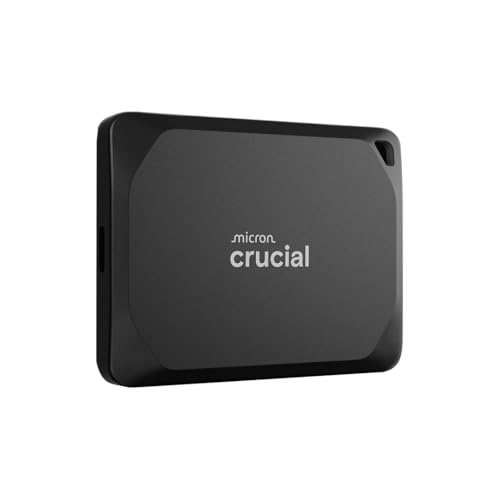
Crucial X10 Pro 1TB Portable SSD
Crucial rates the X10 Pro a step above the other drives here, with reads up to 2,100MB/s and writes up to 2,000MB/s, which makes it the pick for players who copy entire libraries between machines and hate waiting. The 1TB capacity fits an active rotation of current titles rather than a full archive, and the maker aims the model at professional creators as well as gamers, so the listing focuses on throughput and durable storage for PC and Mac. Pick it when transfer time, not pocket space, is your main frustration with external storage.
Specs
- Capacity: 1TB
- Read speed: up to 2,100MB/s, per the listing title
- Write speed: up to 2,000MB/s, per the listing title
- Model: CT1000X10PROSSD902
Best for: Players who copy whole libraries between a desktop and a laptop
Watch out for: The headline speeds need a Gen 2×2 host; check the port specification, not just the connector shape
ASIN: B0C9WGGZT9
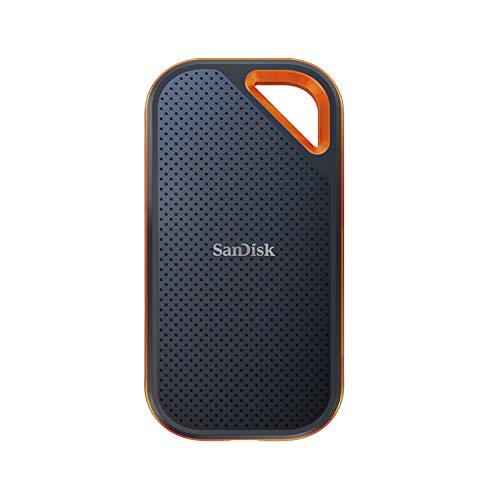
SanDisk Extreme PRO Portable SSD 1TB
This is the drive for a bag that gets thrown in a car boot on the way to a friend’s place. SanDisk rates it up to 2,000MB/s on read and write over USB 3.2 Gen 2×2, and the shell carries an IP65 rating for water and dust resistance, with the listing also noting updated firmware for this version. The 1TB size covers a healthy rotation of current games, and the forged body style suits players whose gear travels weekly. If your external drive lives a harder life than your desk, start here.
Specs
- Capacity: 1TB
- Transfer speeds: up to 2,000MB/s read and write, per the listing
- Interface: USB-C, USB 3.2 Gen 2×2
- Resistance rating: IP65 water and dust resistance
- Model: SDSSDE81-1T00-G25
Best for: LAN regulars and anyone whose drive travels in a gear bag
Watch out for: Check the listing shows the updated-firmware G25 version before ordering
ASIN: B08GV9M64L
Kingston XS2000 1TB Portable SSD

The XS2000 is built around one idea: flagship-class speed in a body closer to a thumb drive than a hard disk. Kingston lists up to 2,000MB/s over USB 3.2 Gen 2×2, and the drive ships with a removable rubber sleeve that the maker ties to its IP55 rating and drop protection. At 1TB it holds a solid set of current titles while disappearing into a pocket or a controller case. Choose it when the drive will be carried daily, plugged into whichever machine is nearest, and never given a permanent desk spot.
Specs
- Capacity: 1TB
- Interface: USB 3.2 Gen 2×2 over USB-C
- Speed: up to 2,000MB/s, per the listing title
- Rating: IP55 with the removable rubber sleeve fitted
- Model: SXS2000/1000G
Best for: Daily carry between home, office and a second gaming machine
Watch out for: The protective ratings assume the rubber sleeve is fitted; keep it on when the drive travels
ASIN: B09F5YHQ1K
Crucial X9 2TB Portable SSD

The X9 trades peak speed for room and simplicity. Its USB 3.2 Gen 2 interface reads at up to 1,050MB/s, which matches the 10Gbps ports found on most gaming laptops and consoles, and the 2TB capacity holds the kind of library that overflows a 1TB drive within a year. Crucial lists compatibility across Windows, Mac and Android, and the shell is rated for drops, so it doubles as a backup target for save files and recordings. For a single drive that simply holds everything, this is the sensible end of the lineup.
Specs
- Capacity: 2TB
- Read speed: up to 1,050MB/s, per the listing title
- Interface: USB 3.2 Gen 2 over USB-C
- Model: CT2000X9SSD902
Best for: Laptop gamers who need one roomy drive on a 10Gbps port
Watch out for: Gen 2 is the ceiling here; a Gen 2×2 port will not make this drive any faster
ASIN: B0CGW18S6Y
Which One Fits Your Situation
Your motherboard has a 20Gbps USB-C port
You are one of the few buyers who can use the fastest tier, so take it. The Samsung T9 and Crucial X10 Pro both run in the 2,000MB/s class on Gen 2×2, and the Crucial holds a small edge on rated write speed for long installs. Either turns library moves into a coffee break instead of an evening chore.
Your drive rides along to LAN nights and friends’ houses
Protection matters more than the last slice of speed. The SanDisk Extreme PRO pairs its 2,000MB/s rating with an IP65 shell, so dust and splashes are less of a worry in transit. If pocket space is tighter than your backpack, the Kingston XS2000 keeps similar speed in a far smaller body with its sleeve fitted.
Your laptop only offers 10Gbps USB-C ports
Skip the Gen 2×2 tier entirely, because your ports cap every drive at Gen 2 speeds. The Crucial X9 gives you 2TB at that full 1,050MB/s class for the price tier of smaller flagship drives, which means more games installed and fewer hard choices about what to delete before a trip.
You archive finished games but replay them later
Cold storage still benefits from solid state, since downloads and patches apply far faster than on a spinning disk. Park completed titles on the Crucial X9 2TB and keep your internal drive for the current rotation, or use the Kingston XS2000 as the shuttle that moves one big install at a time between archive and machine.
Common Mistakes
- Buying a Gen 2×2 drive for a machine whose USB-C ports are Gen 2 only, then blaming the drive for 10Gbps speeds
- Filling a drive completely, which leaves no room for patches and can slow large writes
- Judging a drive by its peak read figure while ignoring sustained write behaviour during long installs
- Forgetting that console and PC formatting differ, then reformatting a drive that already holds a library
- Leaving the only copy of save files and recordings on a portable drive with no backup elsewhere
Frequently Asked Questions
Can I play PC games directly from an external SSD?
In most cases, yes. Storefronts such as Steam let you create a library folder on an external drive and launch games from it, and load times on a USB 3.2 drive are far closer to an internal SSD than to a hard disk. A small number of titles with strict anti-cheat or streaming-asset demands still behave better installed internally, so keep your current favourite on the internal drive.
Is USB 3.2 Gen 2×2 worth it for a gaming drive?
Only when your computer actually has a Gen 2×2 port. That 20Gbps link is what unlocks the 2,000MB/s ratings on the Samsung T9, Crucial X10 Pro, SanDisk Extreme PRO and Kingston XS2000 in this guide. On a Gen 2 machine every one of them falls back to the 10Gbps class, where the cheaper Crucial X9 performs the same while offering more capacity.
Should I buy an external SSD or a larger internal NVMe drive?
An internal NVMe drive is faster, tidier and usually the better upgrade for a single desktop. The external drive wins when the same library must move between a desktop and a laptop, when a laptop has no spare bay, or when you want overflow storage without opening the case. Many players end up with both: internal for current games, external for the archive.
How much capacity does a gaming library really need?
Count your active rotation honestly. A handful of large modern releases can pass half a terabyte on their own, and patches keep growing installs over time. One terabyte suits an overflow drive beside an internal SSD, while 2TB is the safer single-drive choice for laptop players or anyone who keeps a dozen or more big titles installed and ready.
Related guides
More from Amazon
Programs that pair well with the guide above. Offers and eligibility are set by Amazon and may change.
Free shipping on eligible items, Prime Video and more. Eligible new members can start with a free trial.
Start a Prime free trialAd-free music streaming. Eligible new subscribers can start with a free trial.
Try Music Unlimited freeA Prime membership for ages 18-24 with a trial period. Eligibility is set by Amazon.
See Prime for Young AdultsAudiobooks and podcasts to listen to on the go. Eligible new members can start with a free trial.
Try Audible freeAs an Amazon Associate we earn from qualifying purchases.