A gaming PC setup can have the right monitor, keyboard and chair and still look unfinished on camera or in person. The wall behind the desk is usually the missing piece, and an LED neon sign is the fastest way to fill it: one glowing gamepad, wordmark or icon turns a plain backdrop into a focal point, and it doubles as soft ambient light for evening sessions and stream backgrounds.
Modern gaming neon signs are not glass neon at all. They are LED flex strips mounted on acrylic backboards, so they run cool, sip power from a USB port and hang from a couple of hooks. This guide compares five signs built for game rooms, covering wordmarks, character icons and controller shapes, with the details that actually differ between them: panel size, dimming control, power source and mounting hardware.
As an Amazon Associate, we earn from qualifying purchases.
Top 3 picks at a glance

Quick Answer
For most PC game rooms, the Kavaas Game On sign in blue is the safest first pick: a mid-size wordmark panel with a long USB cord and pre-drilled mounting holes. The Lumoonosity controller sign suits players who want app and remote control with animated color modes. The JIARODEY controller sign adds a remote dimmer, the Kavaas mushroom is the smaller accent pick, and the BEFIR gamepad is the widest panel here for big empty walls.
The Picks
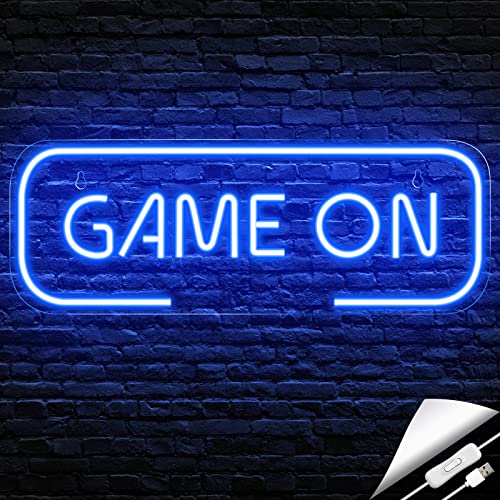
Kavaas Gaming Neon Sign, Game On Neon Sign (Blue)
The Game On wordmark is the most direct way to theme a wall: two stacked words in blue LED flex that read clearly from across the room and show up well on a webcam. At 15.35 by 13.1 inches the panel is big enough to anchor the space above a monitor without crowding shelves beside it, and the lettering suits almost any game room theme rather than tying the wall to one franchise or console.
Power comes from a 5.9-foot USB cord, long enough to reach a PC tower, a powered hub or a wall adapter behind most desks. Kavaas rates the neon flex for 50,000 hours of use; it runs quiet and stays cool to the touch, which matters if the panel hangs near curtains or foam panels. The backboard has pre-drilled holes for hanging. One catch: the USB power adapter is not included, so you need a spare port or adapter ready before it goes on the wall.
Specs
- Design: Game On wordmark, blue
- Size: 15.35 x 13.1 inches
- Light type: LED neon flex
- Power: USB cord, 5.9 feet (1.8 m); adapter not included
- Mounting: pre-drilled holes, wall mount
- Weight: 12 ounces
- Model: KNS-GOB
Lumoonosity Gaming LED Light, Controller Neon Sign (Dream Color)
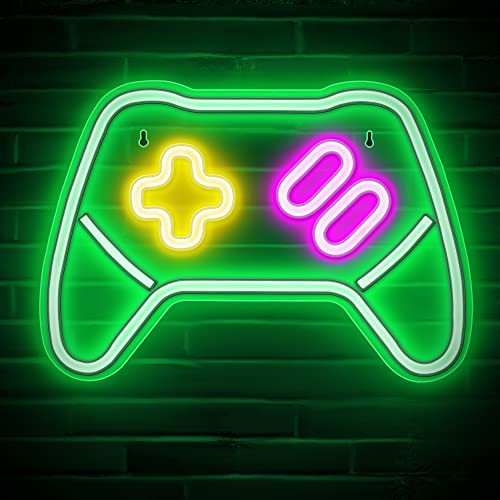
The Lumoonosity sign trades a wordmark for a full game controller outline, and it is the most controllable light in this group. It ships with a remote control and works with a mobile app, so brightness, color and effects can be changed from the chair. The Dream Color system runs animated multi-color effects across the controller shape, a strong fit for streamers who want a backdrop that moves, and a timer function can switch the sign off automatically after late sessions.
At 15.75 by 11.02 inches it has a wide, low profile that sits neatly above an ultrawide monitor. Unlike the USB-powered signs here, this model runs on a 12-volt supply, so it needs a wall outlet rather than a spare PC port; mounting hardware is included. It is also the heaviest pick at 0.93 kilograms, so use the supplied hardware rather than light adhesive hooks.
Specs
- Design: game controller outline, Dream Color multi-color effects
- Size: 15.75 x 11.02 inches
- Light type: LED
- Power: 12V supply (confirm adapter details on the listing)
- Control: remote control and mobile app included; timer function
- Mounting: mounting hardware included, wall mount
- Weight: 0.93 kilograms
- Model: CTR Colorful
JIARODEY Gamer Neon Sign (Blue Game Controller)
JIARODEY’s controller sign is built from silicone LED strips on an acrylic backing, a combination the brand pitches as sturdy and bright without getting hot. The controller outline glows blue, and a remote control is included for switching and dimming, which is not a given at this size: several similar signs only offer an inline switch. Dimming matters in a PC room because a sign set for a party is often too bright behind a monitor during a dark game.
The acrylic backing is pre-drilled for hanging and the box includes hooks, so installation takes a few minutes. Power is USB at 5 volts DC, and like the Kavaas signs the wall adapter is not included. The listing states the sign is not water resistant, so keep it to indoor walls. At 1.23 pounds it is light enough for the included hooks on painted drywall.
Specs
- Design: game controller outline, blue
- Construction: silicone LED strips on acrylic backing
- Light type: LED, dimmable
- Power: USB, 5 volts DC; adapter not included
- Control: remote control included
- Mounting: pre-drilled backing, hooks included, wall mount
- Weight: 1.23 pounds
- Model: FS-SWSB
Kavaas Gaming Neon Sign, Mushroom Neon Sign (Red)

Not every game room wall needs a slogan. This red mushroom icon nods to classic platform games without naming one, and at 11.8 by 11.2 inches it is the most compact sign in the group, sized for the gap between a monitor and a shelf or a small bedroom setup where a 16-inch panel would dominate. It also works as a second accent sign paired with a larger wordmark.
The hardware story matches the other Kavaas pick: neon flex construction, pre-drilled holes for hanging, and a 5.9-foot USB cord that can run from a PC, console or power bank. The brand rates the flex for 50,000 hours and notes it stays cool and quiet in use. As with its sibling, the USB power adapter is not in the box. Other color variants share the same listing, so confirm the color selected before ordering if you want the red version shown here.
Specs
- Design: mushroom icon, red
- Size: 11.8 x 11.2 inches
- Light type: LED neon flex
- Power: USB cord, 5.9 feet (1.8 m); adapter not included
- Mounting: pre-drilled holes, wall mount
- Model: KNS-MSR
BEFIR Gamer Neon Sign, Gamepad Shaped LED Neon Sign

The BEFIR sign is the widest gamepad outline in this roundup at 16.3 by 11.4 inches, with a slim 0.8-inch profile that sits close to the wall. The full controller silhouette, complete with button details, reads instantly as gaming decor even when switched off, which makes it a good choice for rooms that double as a home office during the day. It is made by Ethereal Lomoer and sold under the BEFIR storefront name.
Power is USB, keeping installation to a single cable run down to the PC or a nearby adapter. The listing is lighter on published detail than the picks above it: dimming method and included mounting hardware are not stated clearly in the material reviewed, so check those fields on the listing if a remote dimmer or a specific hanging kit matters to you.
Specs
- Design: gamepad outline
- Size: 16.3 x 11.4 x 0.8 inches
- Light type: LED neon
- Power: USB powered
- Mounting: Confirm on the listing
- Dimming: Confirm on the listing
- Manufacturer: Ethereal Lomoer
How to Choose
Start with size against your wall space. Measure the gap you want to fill: compact icons around 12 inches wide suit gaps beside a monitor, while wordmarks and gamepads in the 15 to 17 inch range anchor a whole wall. A sign that is too small looks lost above an ultrawide setup, and one that is too large crowds shelves and acoustic panels.
Next, decide how you will power it. USB signs are the easiest for PC rooms because they run from the tower, a monitor’s USB hub or a power bank. A 12-volt model like the Lumoonosity needs its own outlet but supports richer effects. Either way, check the cord length against the drop from the sign to the power source; most USB cords here are about 5.9 feet.
Control is the third decision. An inline switch only turns the sign on and off. A remote adds dimming from the desk, and app control adds timers and animated scenes. Dimming is worth having: full brightness suits photos and parties, but a lower setting works better as everyday backdrop light that does not fight the monitor. Finally, check the mounting hardware; heavier panels deserve the supplied hardware rather than adhesive strips.
Who Should Skip
Skip neon signs entirely if your setup faces a window you game beside in daylight, since the glow washes out and adds little. Players building a home theater corner may prefer bias lighting or light bars that sync with the screen instead of a static wall graphic. If your walls are rented and cannot take hooks or screws, look for a sign light enough for removable adhesive strips, and confirm the weight first. And if you want lighting that reacts to gameplay or music in real time, a fixed-design sign is the wrong tool; addressable light strips are built for that job.
FAQ
Are gaming neon signs made of real neon glass?
No. The signs in this guide use LED flex, a silicone or PVC tube with an LED strip inside, mounted on an acrylic backboard. LED flex copies the look of glass neon but runs cool, uses far less power, and contains no gas or fragile glass tubing, which is why most models can run from a USB port.
Do gaming neon signs need a wall outlet?
Most run on USB power and can plug into a PC, a console, a powered hub or a power bank, although the USB wall adapter itself is often not included. A minority of models, including the Lumoonosity controller sign here, use a 12-volt supply and need a wall outlet.
Can I dim a gaming neon sign?
Many models can, but the method varies. Some use an inline dimmer on the cord, some include a remote control, and app-controlled models adjust brightness from a phone. Not every listing states the dimming method clearly, so if brightness control matters for your room, confirm it on the product page before ordering.
How do I hang a gaming neon sign without drilling?
Most signs have pre-drilled holes in the acrylic backboard and ship with hooks or a hanging chain. For a no-drill option, removable adhesive hooks rated for the sign’s weight work on smooth painted walls; most of these panels weigh between about half a pound and two pounds. Avoid adhesive strips on textured paint or wallpaper, where they tend to peel.
Final Verdict
The Kavaas Game On sign is the easiest recommendation for a first gaming neon sign: a readable wordmark, a sensible mid-range size and simple USB power. Choose the Lumoonosity controller for app control, animated color and a timer, or the JIARODEY controller for remote dimming in a smaller footprint. The Kavaas mushroom is the accent pick for tight spaces, and the BEFIR gamepad is the widest controller graphic here. Whichever design you pick, confirm the power adapter situation and mounting hardware on the listing, since those details differ more between models than the glow itself.
Product and ASIN Reference
| Product | ASIN |
|---|---|
| Kavaas Gaming Neon Sign, Game On Neon Sign (Blue) | B09SZBVQ1Y |
| Lumoonosity Gaming LED Light, Controller Neon Sign (Dream Color) | B09KB2FHWH |
| JIARODEY Gamer Neon Sign (Blue Game Controller) | B0CNVZKGMG |
| Kavaas Gaming Neon Sign, Mushroom Neon Sign (Red) | B09SZD2T3K |
| BEFIR Gamer Neon Sign, Gamepad Shaped LED Neon Sign | B0BLVC4MXK |
Related guides
More from Amazon
Programs that pair well with the guide above. Offers and eligibility are set by Amazon and may change.
Free shipping on eligible items, Prime Video and more. Eligible new members can start with a free trial.
Start a Prime free trialAd-free music streaming. Eligible new subscribers can start with a free trial.
Try Music Unlimited freeA Prime membership for ages 18-24 with a trial period. Eligibility is set by Amazon.
See Prime for Young AdultsAudiobooks and podcasts to listen to on the go. Eligible new members can start with a free trial.
Try Audible freeAs an Amazon Associate we earn from qualifying purchases.