
Our Short List of 3
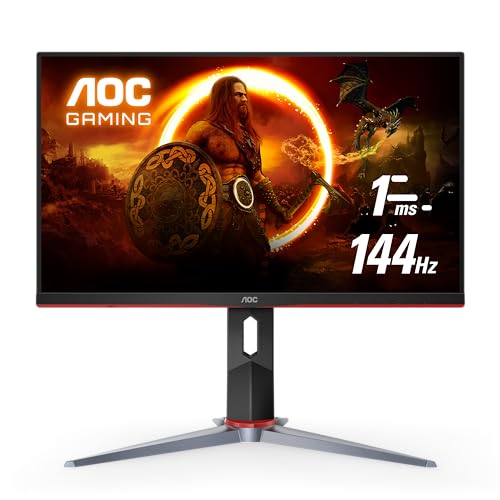
- 24-inch Full HD 1920 x 1080 IPS panel
- 144Hz refresh rate, 1ms response time
- DisplayPort and HDMI inputs
- FreeSync support

- 24-inch Full HD 1920 x 1080 TN panel
- 144Hz refresh rate, 1ms response time
- DisplayPort and HDMI inputs
- DyAc motion clarity technology

- 27-inch QHD 2560 x 1440 IPS panel
- 170Hz refresh rate, 1ms response time
- DisplayPort and HDMI inputs
- FreeSync Premium support
All 5 Picks at a Glance
| Product | Specs | Action |
|---|---|---|
| AOC 24G2 24-Inch 144Hz IPS Gaming Monitor |
| Check price on Amazon |
| BenQ ZOWIE XL2411K 24-Inch 144Hz Gaming Monitor |
| Check price on Amazon |
| Acer Nitro XV272U Vbmiiprx 27-Inch 170Hz QHD IPS Gaming Monitor |
| Check price on Amazon |
 ASUS TUF Gaming VG27AQ 27-Inch 165Hz IPS Gaming Monitor |
| Check price on Amazon |
 Dell S2721DGF 27-Inch 165Hz QHD Gaming Monitor |
| Check price on Amazon |
The best 144hz monitors rx 480 start from what the card can actually drive. The RX 480 is an AMD Polaris card with DisplayPort 1.4 and HDMI 2.0b, which means it can push 144Hz at 1080p comfortably and 144Hz at 1440p in lighter games, and it supports FreeSync, AMD adaptive sync technology, which keeps the monitor refresh in step with the card output. The monitor that suits it best is therefore a 144Hz screen with FreeSync, a DisplayPort input for the full refresh rate, and a resolution the card can sustain.
This guide compares five 144Hz monitors that fit the RX 480. Three are 1080p screens where the card holds its frame rate most easily, and two are 1440p screens for players who accept lower settings in heavier games in exchange for sharper detail. Every pick carries FreeSync support and a DisplayPort input, and the guide below explains how to set the refresh rate and sync in the AMD software.
Our Top Picks
- ASUS TUF Gaming VG27AQ 27 Inch QHD 165Hz27” 2K WQHD IPS19.96 x 24.41 x 8.31 inches12.8 poundsCheck on Amazon
Top 3 picks at a glance
How to Choose
Refresh rate and the RX 480 output
The RX 480 drives 144Hz at 1080p in most games and at 1440p in lighter ones, so match the monitor resolution to the games played. A 1080p 144Hz screen is the safe pairing for competitive and heavier titles, because the card holds its frame rate there, while a 1440p 144Hz screen suits slower and older games where the card has headroom. DisplayPort carries the full refresh rate at either resolution, while HDMI 2.0b also carries 144Hz at 1080p.
FreeSync and adaptive sync
FreeSync is the feature that matters most for this card, because it keeps the monitor refresh in step with the card output when frame rates move. Check that the monitor supports FreeSync over DisplayPort, which every pick here does, and enable it in the AMD software after connecting. A monitor without FreeSync tears when the frame rate dips below the refresh rate, which is exactly what happens with an older card in a heavy scene.
Resolution: 1080p or 1440p
A 1080p monitor lets the RX 480 hold high frame rates in most games, which is the point of a 144Hz screen. A 1440p monitor shows more detail but asks the card for roughly three-quarters more pixels, so frame rates fall and settings must drop. At 24 inches the difference between the two resolutions is small, and at 27 inches it is easy to see, so size and resolution should be chosen together.
Panel type and response time
Panel type decides how the picture holds up in motion. IPS panels keep colours steady across wide angles and suit shared rooms, TN panels are the fastest and the most affordable but wash out off-axis, and VA panels give the deepest blacks with slower dark transitions. Response time matters for fast games: a 1ms figure keeps motion clean, while slower figures can smear fast movement. For the RX 480 at 144Hz, a fast IPS or TN panel is the practical choice.
Ports: DisplayPort first
DisplayPort is the primary connection for this card, because it carries the full 144Hz refresh rate with FreeSync at 1080p and 1440p. HDMI 2.0b also works at 1080p 144Hz, but DisplayPort is the safer choice for 1440p. Check that the monitor has a DisplayPort input before buying, and use the cable that ships with the monitor or a certified replacement, because a worn cable can limit the refresh rate.
Size and desk distance
A 24-inch screen suits a desk where the player sits close, while a 27-inch screen suits a slightly deeper desk. Larger screens make a 1080p output look softer, because the same pixels stretch further, so a 27-inch screen pairs better with 1440p. Measure the desk depth before buying, and remember that a curved screen needs more depth than a flat one of the same size.
Top Picks
AOC 24G2 24-Inch 144Hz IPS Gaming Monitor
- 24-inch Full HD 1920 x 1080 IPS panel
- 144Hz refresh rate, 1ms response time
- DisplayPort and HDMI inputs
- FreeSync support
AOC 24G2 24-Inch 144Hz IPS Gaming Monitor
The AOC 24G2 is the first pick for the RX 480, a 24-inch Full HD IPS monitor with a 144Hz refresh rate and a 1ms response time. The IPS panel keeps colours steady across wide angles, and the 144Hz refresh rate matches the card output at 1080p, where the RX 480 holds its frame rate most easily. FreeSync support keeps the refresh in step with the card, and the DisplayPort input carries the full rate with sync enabled. The height-adjustable stand sets the screen at eye level without a riser.
Who it is for: RX 480 owners who want a compact 24-inch screen where the card holds high frame rates.
Caveats: It is a 1080p screen, so it cannot show 1440p detail, and its speakers are modest.
BenQ ZOWIE XL2411K 24-Inch 144Hz Gaming Monitor
- 24-inch Full HD 1920 x 1080 TN panel
- 144Hz refresh rate, 1ms response time
- DisplayPort and HDMI inputs
- DyAc motion clarity technology
BenQ ZOWIE XL2411K 24-Inch 144Hz Gaming Monitor
The BenQ ZOWIE XL2411K is the competitive pick, a 24-inch Full HD TN monitor built for fast play. Its 144Hz refresh rate and 1ms response time keep motion crisp, and the DyAc technology reduces blur during fast movement, which suits shooters and racing games where the RX 480 holds high frame rates. The stand adjusts in height, tilt and swivel, so the screen sits exactly where the player needs it, and the DisplayPort input carries the full refresh rate with FreeSync.
Who it is for: players who prioritise motion clarity and fast response above colour accuracy.
Caveats: The TN panel washes out off-axis, so it suits a single player sitting straight in front of the screen.
Acer Nitro XV272U Vbmiiprx 27-Inch 170Hz QHD IPS Gaming Monitor
- 27-inch QHD 2560 x 1440 IPS panel
- 170Hz refresh rate, 1ms response time
- DisplayPort and HDMI inputs
- FreeSync Premium support
Acer Nitro XV272U Vbmiiprx 27-Inch 170Hz QHD IPS Gaming Monitor
The Acer Nitro XV272U is the 1440p pick for the RX 480, a 27-inch QHD IPS monitor with a 170Hz refresh rate. The QHD resolution shows far more detail than a 1080p screen, and the 170Hz refresh rate covers the 144Hz target with room to spare. FreeSync Premium support keeps the refresh in step with the card, and the DisplayPort input carries the full rate. In lighter games the RX 480 drives this screen well, while heavier games call for lower settings to hold the frame rate.
Who it is for: players who want a 27-inch 1440p screen and accept lower settings in heavier games.
Caveats: The RX 480 cannot hold 144Hz at 1440p in heavy titles, so settings must drop, and the screen needs a deeper desk than the 24-inch picks.
ASUS TUF Gaming VG27AQ 27-Inch 165Hz IPS Gaming Monitor
- 27-inch QHD 2560 x 1440 IPS panel
- 165Hz refresh rate, 1ms response time
- DisplayPort and HDMI inputs
- G-Sync Compatible and FreeSync support
ASUS TUF Gaming VG27AQ 27-Inch 165Hz IPS Gaming Monitor
The ASUS TUF VG27AQ is the second 1440p pick, a 27-inch QHD IPS monitor with a 165Hz refresh rate. The QHD resolution gives the RX 480 room to show its detail in lighter games, and the 165Hz refresh rate covers the 144Hz target. G-Sync Compatible and FreeSync support keep the refresh in step with the card, and HDR10 support adds brighter highlights in games that carry it. For a 27-inch desk, this is the screen that pairs a sharp picture with the sync support the card needs.
Who it is for: players who want a 27-inch 1440p screen with strong sync support for the RX 480.
Caveats: Heavy games need lower settings to hold high frame rates at 1440p, and its size needs a deeper desk.
Dell S2721DGF 27-Inch 165Hz QHD Gaming Monitor
- 27-inch QHD 2560 x 1440 IPS panel
- 165Hz refresh rate, 1ms response time
- DisplayPort and HDMI inputs
- G-Sync Compatible and FreeSync Premium Pro
Dell S2721DGF 27-Inch 165Hz QHD Gaming Monitor
The Dell S2721DGF is the premium 27-inch pick, a QHD IPS monitor with a 165Hz refresh rate and a 1ms response time. Its colour accuracy and viewing angles suit both gaming and everyday use, and the height-adjustable stand sets the screen at eye level without extra hardware. FreeSync Premium Pro support keeps the refresh in step with the RX 480, and the QHD resolution gives the card room to show its detail in lighter games. It is the most versatile screen in this guide, equally at home with the card and with everyday work.
Who it is for: players who share the screen between gaming on the RX 480 and everyday computer use.
Caveats: It is the largest screen here, so a small desk will feel crowded, and heavy games need lower settings at 1440p.
Comparison Table
| Monitor | Size | Resolution | Refresh rate | Panel | Sync | Best for |
|---|---|---|---|---|---|---|
| AOC 24G2 | 24-inch | Full HD 1080p | 144Hz | IPS | FreeSync | Compact 1080p pick |
| BenQ XL2411K | 24-inch | Full HD 1080p | 144Hz | TN | FreeSync | Competitive play |
| Acer XV272U | 27-inch | QHD 1440p | 170Hz | IPS | FreeSync Premium | 27-inch 1440p |
| ASUS VG27AQ | 27-inch | QHD 1440p | 165Hz | IPS | FreeSync, G-Sync Compatible | 27-inch 1440p |
| Dell S2721DGF | 27-inch | QHD 1440p | 165Hz | IPS | FreeSync Premium Pro | Gaming and work |
Which One Is Right for You?
Start with the games. If the library is mostly competitive and heavy titles, the AOC 24G2 is the safest pairing, because the RX 480 holds high frame rates at 1080p and the IPS panel keeps colours steady. If motion clarity matters above all else, the BenQ XL2411K is the competitive pick, with the fastest response and blur-reduction technology. If the desk has room for 27 inches and the games are lighter or older, step up to 1440p: the Acer XV272U for the highest refresh rate, the ASUS VG27AQ for strong sync support, or the Dell S2721DGF when the same screen must also serve everyday work. In every case, connect over DisplayPort, enable FreeSync in the AMD software, and set the refresh rate to 144Hz in the display settings, because the monitor defaults to 60Hz until the setting changes.
Frequently Asked Questions
Can the RX 480 drive a 144Hz monitor?
Yes, at 1080p in most games and at 1440p in lighter ones. The card has DisplayPort 1.4 and HDMI 2.0b, which carry 144Hz at 1080p, and DisplayPort carries 144Hz at 1440p as well.
Do I need FreeSync with the RX 480?
It helps a lot. FreeSync keeps the monitor refresh in step with the card output when frame rates move, which removes tearing. Enable it in the AMD software after connecting over DisplayPort.
Is 1080p or 1440p better for the RX 480?
1080p lets the card hold high frame rates in most games, which is the point of a 144Hz screen. 1440p shows more detail but asks the card for far more pixels, so frame rates fall and settings must drop in heavy games.
Should I connect over DisplayPort or HDMI?
DisplayPort is the safer choice, because it carries the full 144Hz refresh rate with FreeSync at 1080p and 1440p. HDMI 2.0b also works at 1080p 144Hz, but DisplayPort is the primary connection for this card.
Disclosure: As an Amazon Associate, we may earn from qualifying purchases.
Related guides
More from Amazon
Programs that pair well with the guide above. Offers and eligibility are set by Amazon and may change.
Free shipping on eligible items, Prime Video and more. Eligible new members can start with a free trial.
Start a Prime free trialAd-free music streaming. Eligible new subscribers can start with a free trial.
Try Music Unlimited freeA Prime membership for ages 18-24 with a trial period. Eligibility is set by Amazon.
See Prime for Young AdultsAudiobooks and podcasts to listen to on the go. Eligible new members can start with a free trial.
Try Audible freeAs an Amazon Associate we earn from qualifying purchases.









