
Dust filters don’t stop dust from accumulating, they slow it down and move it somewhere you can clean easily instead of deep inside a heatsink where compressed air barely reaches. We compared eight DIY dust filter products from around $5 to around $15, covering magnetic pre-cut panels, cut-to-fit sheet mesh, and small fan-specific filters, to figure out which mounting style and mesh type actually suits different case setups.
None of these are proprietary case-brand filters; they’re all universal DIY mesh designed to be trimmed or mounted with adhesive or magnets on whatever vents your case has. If your build already has visible dust buildup, pair a filter with our best PC cleaning kit guide, since filters only slow future accumulation, they don’t remove what’s already inside.
Our Top Picks
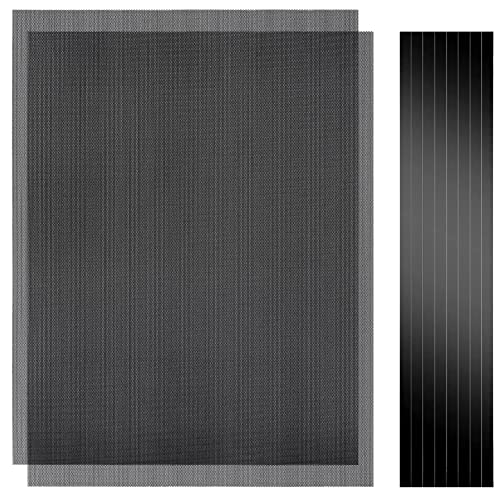
 MoKo 400x300mm DIY PC Case Dust Mesh Fan2 x 400*300mm-1mm hole15.75 x 11.81 x 0.01 inches0.5 PoundsCheck on Amazon
 MoKo 400x300mm DIY PC Case Dust Mesh Filter4 x 400*300mm-1mm hole15.75 x 11.81 x 0.15 inches1 poundsCheck on Amazon


Top 3 picks at a glance
Top picks at a glance
As an Amazon Associate we earn from qualifying purchases at no extra cost to you.


![MoKo 400x300mm DIY PC Case Dust Mesh Filter, [4 Pack] PVC Dustproof Magnetic Dust Filter Cover, PC Mesh Grill with Magnetic Frame Strip Computer Cooler Fan Dust Filter for Computer PC Case, Black](https://m.media-amazon.com/images/I/51YgJYNN2-L._SL160_.jpg)

| Model | Key spec | Price | Best for |
|---|---|---|---|
| MoKo 400x300mm Black (2pcs) | 1mm hole mesh, DIY cut | Check on Amazon | Standard-size front/top vents |
| YSSHUI Magnetic PVC (2pcs) | Cut-to-fit magnetic PVC mesh | Check on Amazon | Steel panels needing a quick magnetic mount |
| YIMATEECO 120mm Nylon | 80-mesh nylon, magnetic frame | Check on Amazon | Finer filtration on individual 120mm fans |
| Woanger 1000x300mm | Large single-sheet DIY mesh | Check on Amazon | Multiple vents from one large sheet |
| MoKo 400x300mm White (2pcs) | 1mm hole mesh, DIY cut | Check on Amazon | White or light-themed builds |
| MoKo 400x300mm Black (4pcs) | Magnetic frame, PVC mesh | Check on Amazon | Multi-vent builds, best per-filter value |
| MoKo 140x140mm (4pcs) | 1mm hole mesh, small fan size | Check on Amazon | Single 140mm case fans |
| YSSHUI Magnetic PVC (4pcs) | Cut-to-fit magnetic PVC mesh | Check on Amazon | Multiple vents, magnetic mounting |
MoKo 400x300mm DIY Mesh Filter, Black (2pcs)
This is MoKo’s standard-size DIY filter sheet, 400x300mm with 1mm mesh holes, sold as a two-pack for around $11. The 1mm hole size sits on the coarser end of the filtration spectrum, catching larger dust clumps and pet hair while letting more air through than a finer nylon mesh, which makes it a reasonable default for front and top intake vents where airflow volume matters more than catching microscopic particles.
Because it’s a DIY cut sheet rather than a pre-shaped panel, you’ll need scissors and a bit of patience to trim it to your case’s specific vent shape, and adhesive or tape to mount it since this version isn’t magnetic. That’s a small amount of extra setup work compared to the magnetic options on this list, in exchange for a lower price per square inch of coverage.
Pros
- Large 400x300mm sheet covers most standard front and top vents
- 1mm mesh balances dust capture with airflow
- Lower cost per square inch than the magnetic pre-framed options
Cons
- Requires cutting to size and separate adhesive, no magnetic frame
- Coarser mesh lets more fine dust through than the YIMATEECO nylon option
- Black only in this listing, won’t match light-themed builds
Who it’s for: budget builders comfortable cutting and taping their own filter to fit standard vent sizes.
YSSHUI Cut-to-Fit Magnetic PVC Filter (2pcs)
The YSSHUI filter covers the same 400x300mm footprint as the MoKo sheet above, but uses PVC mesh with a magnetic backing built in, so it mounts directly to any steel case panel without adhesive or tape. That makes it noticeably faster to install and, importantly, easier to remove for cleaning, since you can just peel it off, rinse it, and snap it back rather than dealing with old adhesive residue.
The magnetic mount only works on steel; if your case front panel is aluminum, plastic, or mesh without a steel backing plate, the magnets won’t grip and this filter isn’t a fit regardless of price. Check your case’s panel material before ordering if you’re unsure.
Pros
- Magnetic mounting for quick install and removal without adhesive
- Easy to rinse clean and reattach without residue buildup
- Same large coverage size as the MoKo DIY sheet
Cons
- Only works on steel panels; won’t grip aluminum or plastic
- Slightly pricier per sheet than the non-magnetic MoKo equivalent
- PVC mesh may feel less rigid than metal-framed magnetic filters
Who it’s for: builders with steel case panels who want fast, tool-free install and removal for regular cleaning.
YIMATEECO 120mm Nylon Dust Filter
Sized specifically for 120mm fan mounts, the YIMATEECO uses an 80-mesh nylon screen in a magnetic frame, priced at around $7 for two pieces. The 80-mesh nylon is noticeably finer than the 1mm-hole PVC mesh used on the MoKo and YSSHUI sheets, which means it catches smaller dust particles more effectively at the cost of a small amount of airflow restriction.
Because it’s pre-sized for 120mm fans specifically, rather than a cut-to-fit sheet, it’s the most convenient option here if your case’s dust entry points are individual case fans rather than large front or top vent panels. The magnetic frame mounts directly over a fan’s screw holes on steel-panel builds.
Pros
- Finer 80-mesh nylon catches more small dust particles than 1mm PVC mesh
- Pre-sized for 120mm fans, no cutting required
- Magnetic frame for quick mounting on steel panels
Cons
- Finer mesh restricts slightly more airflow than coarser filters
- Only fits 120mm fan mounts, not larger vent panels
- Magnetic mount still requires a steel surface to grip
Who it’s for: builders who want finer filtration specifically on individual 120mm intake fans rather than a large vent panel.
Woanger 1000x300mm DIY Mesh Filter
The Woanger is the largest single sheet on this list at 1000x300mm, over twice the length of the standard MoKo and YSSHUI sheets, priced at around $12. That extra length matters if you’re filtering a long PSU intake vent, a full case bottom, or want enough material to cover multiple smaller vents from a single purchase rather than buying separate multi-packs.
Like the standard MoKo sheet, it’s a DIY cut mesh without a magnetic backing, so plan on scissors and adhesive or tape for mounting. For the price, it offers the most raw material of anything on this list, which can work out cheaper per square inch than buying several smaller pre-cut packs if your case has multiple vents to cover.
Pros
- Largest single-sheet coverage on this list at 1000x300mm
- Cost-effective if covering multiple vents from one sheet
- Flexible enough to cut into several smaller custom shapes
Cons
- No magnetic backing, needs adhesive or tape to mount
- Requires more measuring and cutting work than pre-sized options
- Excess material is wasted if your case only has small vents
Who it’s for: builders with multiple or oversized vents who want to cover everything from one large sheet rather than several small packs.
MoKo 400x300mm DIY Mesh Filter, White (2pcs)
Functionally identical to the black MoKo sheet above, this version is white, aimed at the growing number of white and light-themed PC builds where a black mesh filter would stand out against a white front panel. It costs about a dollar more than the black version at around $12, likely reflecting a smaller production run for the less common colorway.
Everything about mesh size, DIY cutting requirement, and non-magnetic mounting carries over from the black version; the only real decision factor here is matching your case’s color scheme rather than any functional difference in filtration.
Pros
- Matches white and light-themed case builds where black mesh would clash
- Same 1mm mesh coverage and size as the black MoKo equivalent
- DIY cut sheet fits standard front and top vents
Cons
- Slightly pricier than the black version for the same functional filter
- Still requires cutting and adhesive, no magnetic frame
- White mesh may show discoloration from trapped dust more visibly over time
Who it’s for: white or light-colored build owners who want the filter mesh to match their case aesthetic.
MoKo 400x300mm Magnetic PVC Filter (4pcs)
This is MoKo’s magnetic version of the standard 400x300mm filter, sold as a four-pack for around $15, which works out to roughly $4 per filter, the best per-unit value among the magnetic options on this list. Like the YSSHUI magnetic filters, this only mounts securely on steel case panels, but the four-pack count makes it well suited to builds with several vents, front, top, side, and a PSU shroud opening, all needing coverage from one purchase.
Magnetic mounting means quick removal for cleaning without dealing with adhesive residue, and buying four at once avoids the awkward math of needing a third or fifth filter from a two-pack when your case has an odd number of vents.
Pros
- Best per-filter value among the magnetic options on this list
- Four-pack suits builds with multiple vents needing coverage
- Magnetic mount for tool-free install and cleaning removal
Cons
- Only works on steel case panels
- Higher total cost than a single two-pack if you only need one or two filters
- Same 1mm mesh coarseness as MoKo’s non-magnetic sheets
Who it’s for: builders with three or more vents to cover who want magnetic convenience at the lowest per-filter cost.
MoKo 140x140mm Mesh Filter (4pcs)
Sized for 140mm fans specifically, this four-pack at around $5 is the cheapest entry on this list and the most targeted for builds using 140mm intake fans rather than the more common 120mm size. Like the larger MoKo sheets, it uses 1mm hole mesh without a magnetic frame, so mounting still needs adhesive or a zip-tie approach around the fan’s mounting screws.
Because it’s pre-sized rather than a cut sheet, there’s no trimming required as long as your fan is genuinely 140mm; measure before ordering; since 140mm and 120mm fans aren’t interchangeable, a mis-sized filter won’t fit properly regardless of price.
Pros
- Lowest price on this list at under $6 for four filters
- Pre-sized for 140mm fans, no cutting needed
- Four-pack covers multiple fans from one purchase
Cons
- Only fits 140mm fans, not 120mm or larger vent panels
- No magnetic mount, needs adhesive or tie-based mounting
- Same coarser 1mm mesh as MoKo’s larger sheets
Who it’s for: budget builders with 140mm case fans who want a cheap, correctly sized filter without cutting a larger sheet down.
YSSHUI Cut-to-Fit Magnetic PVC Filter (4pcs)
This is the four-pack version of the YSSHUI magnetic PVC filter reviewed earlier, priced at around $14, offering the same 400x300mm coverage, magnetic steel-panel mounting, and easy-clean PVC mesh across four sheets instead of two. Per filter it works out to roughly $3, similar value to the MoKo four-pack magnetic option, with the choice between the two mostly coming down to brand preference or minor mesh texture differences.
As with the two-pack version, remember this only grips steel panels, and confirm your case’s material before buying based on the assumption that “magnetic” filters work universally.
Pros
- Comparable per-filter value to the MoKo magnetic four-pack
- Magnetic mount for quick install and cleaning
- Four-pack suits multi-vent builds
Cons
- Steel panel required for the magnetic mount to work
- Largely interchangeable with MoKo’s equivalent four-pack, so pricing on the day matters
- PVC mesh may feel less rigid than a metal-framed filter
Who it’s for: builders comparing magnetic four-packs who want the same coverage as MoKo’s option at a similar price point.
How we compared and picked
Owen Pritchard, our technical guides editor, evaluated these filters based on mounting method, mesh coarseness, and coverage size against common case vent configurations from his diagnostics bench work, where he regularly opens and closes cases during spare-parts swap-testing and has a practical sense of which vent shapes and panel materials show up most often. Airflow impact claims for finer mesh versus coarser mesh reflect general behavior for mesh filtration at these hole sizes rather than wind-tunnel measurements taken specifically for this review.
We grouped filters by mounting style, magnetic versus adhesive/cut-to-fit, since that’s the factor that most determines whether a given filter will actually work on a specific case before mesh fineness or price become relevant at all. Case panel material (steel versus aluminum or plastic) was flagged wherever it determines compatibility with the magnetic options.
What to look for in PC dust filters
Magnetic versus cut-to-fit: check your case material first
Magnetic filters, like the YIMATEECO and both YSSHUI and MoKo magnetic packs, are faster to install and remove for cleaning, but only work on steel case panels where the magnets can actually grip. Aluminum and plastic front panels, common on some higher-end and RGB-focused cases, won’t hold a magnetic filter at all no matter how strong the magnet is rated. If you’re not sure what your case panel is made of, a quick magnet test with any fridge magnet before buying saves a wasted purchase.
Mesh coarseness is a real trade-off, not a free upgrade
Finer mesh, like the YIMATEECO’s 80-mesh nylon, catches more of the small dust particles that coarser 1mm-hole mesh lets through, but it also restricts a bit more airflow through the same vent opening. For most builds with reasonable case airflow to spare, that small restriction won’t meaningfully raise temperatures. For a build already running warm with fans near their limit, a coarser filter is the safer choice to avoid compounding an existing airflow problem.
Sizing and coverage: pre-cut versus DIY sheet
Pre-sized filters like the YIMATEECO 120mm and MoKo 140mm options save cutting time but only fit their specific fan size exactly. DIY cut sheets like the standard MoKo 400x300mm panels and the larger Woanger sheet handle irregular vents, PSU intakes, and non-standard case openings that a pre-cut filter simply can’t match, at the cost of needing scissors, a straightedge, and some patience to trim cleanly.
Maintenance access matters as much as initial filtration
A dust filter that’s difficult to remove for cleaning tends to get neglected, which defeats the purpose. Magnetic filters generally win here since they pop off in seconds for a quick rinse or vacuum pass, while adhesive-mounted DIY sheets are more prone to being left in place and cleaned in position, which is less thorough than pulling the mesh fully away from the vent. Factor in how often you’re realistically willing to clean a given filter when choosing between mounting styles.
Mistakes buyers make
Buying a magnetic filter without checking whether the case panel is actually steel, then finding it won’t stick to an aluminum or plastic front panel.
Choosing the finest available mesh assuming it’s strictly better, without accounting for the airflow trade-off on a build that’s already running warm.
Skipping measurement before ordering a pre-sized filter like the 120mm or 140mm options, then receiving a filter that doesn’t match the fan’s actual mounting size.
Installing filters and then forgetting to clean them on a schedule, which lets them clog and actually reduce airflow more than having no filter at all.
Using adhesive-mounted DIY sheets in a spot that needs frequent access, making cleaning enough of a hassle that it gets skipped for months at a time.
Assuming a filter alone solves a dust problem without also addressing case airflow balance, since too many unfiltered exhaust paths can pull dust in through unprotected gaps regardless of how good the intake filters are.
Verdict
For most steel-panel cases with a couple of vents to cover, the MoKo 400x300mm Magnetic PVC Filter four-pack offers the best balance of coverage, easy cleaning, and per-filter value. If your case has individual 120mm or 140mm fans rather than large vent panels, the YIMATEECO and MoKo small-format options are better sized matches. For non-steel panels or irregular vent shapes, skip the magnetic options entirely and go with the DIY cut sheets from MoKo or Woanger instead. Whatever you choose, pair it with a regular pass from our best PC cleaning kit guide, since filters slow dust buildup, they don’t eliminate the need to clean what gets through.
Frequently asked questions
What’s the difference between a dust filter and a PC cleaning kit?
A dust filter is prevention: mesh mounted over intake fans and vents that stops dust from entering the case in the first place. A cleaning kit, covered in our best PC cleaning kit guide, is removal: compressed air, brushes, and microfiber cloths for dust that already built up. Most well-maintained builds use both, filters to slow accumulation and a cleaning kit for the dust that gets through anyway.
Do magnetic dust filters actually stay in place on a PC case?
On steel case panels, yes, magnetic filters like the YIMATEECO and several MoKo options hold securely since the magnets grip the metal directly. On aluminum or plastic front panels, which don’t attract magnets, a magnetic filter won’t stick at all, so check your case material before assuming a magnetic filter will work.
Does a finer mesh dust filter reduce airflow and hurt cooling?
Slightly, yes. A tighter mesh like the YIMATEECO’s 80-mesh nylon blocks smaller dust particles but also restricts a small amount of airflow compared to a coarser 1mm-hole mesh like MoKo’s standard filters. For most builds the airflow reduction is small enough not to meaningfully affect temperatures, but it’s a real trade-off worth knowing rather than assuming filters are free.
How often should I clean a dust filter once installed?
Roughly every two to four weeks for a typical home environment, more often if you have pets or live somewhere dusty, and less often in a clean, climate-controlled room. A quick visual check, holding the filter up to a light to see how much it blocks, is usually enough to tell if it needs a rinse or a vacuum pass.
Can I cut these filters to fit a non-standard case opening?
Yes, that’s the specific purpose of cut-to-fit options like the YSSHUI PVC mesh and the larger Woanger sheet, both sized generously so you can trim them with scissors to match irregular vents, PSU intakes, or side panel openings that don’t match a standard fan size.


