
The best 23 inch pc monitors occupy a size class that the monitor market labels loosely: a monitor sold as 23 inches usually measures 23.8 inches of viewable area, and a monitor sold as 24 inches is often the same panel. That shared class is the sweet spot for a desk that a 27-inch screen would crowd and a 20-inch screen would underuse, with Full HD resolution that keeps text sharp and windows roomy at a normal viewing distance.

This guide compares four monitors in the 23-inch class, and it states the true size of each one plainly. Two are office monitors with eye comfort features and docking-friendly ports, one is a gaming monitor with a 144Hz refresh rate, and one is a fast office monitor with a 120Hz panel. Every pick is a Full HD screen with HDMI, and the guide below explains how to choose between them.
How to Choose
True size and the 23.8-inch class
The first check is the viewable size. Monitors sold as 23 inches usually measure 23.8 inches of viewable area, and monitors sold as 24 inches are often the same panel, so the two labels describe one class rather than two sizes. What matters is the resolution and the footprint, not the headline number. A 23.8-inch panel at Full HD shows the same desktop as any other screen in the class, so compare ports, refresh rate and stand before comparing labels.
Resolution and text sharpness
Full HD at 1920 x 1080 is the standard resolution for this size, and it keeps text sharp and windows roomy at a normal desk distance. A 23.8-inch Full HD screen shows more detail than a 20-inch 1600 x 900 screen and less than a 27-inch QHD screen, which is the right middle ground for office work, study and browsing. Avoid lower resolutions in this size, because text softens quickly when the same panel carries fewer pixels.
Panel type and viewing angles
Panel type decides how the picture holds up when the viewer moves or shares the screen. IPS panels keep colours and contrast steady across wide angles, which suits shared desks and side-by-side seating, while TN panels are faster and often sit in the most affordable tier, but wash out quickly off-axis. In this size class, wide angles near 178 degrees in both directions signal an IPS panel, which is the practical choice for work and everyday use.
Refresh rate for work and play
A 60Hz panel is enough for office work, study and video playback. A 75Hz panel adds a small but noticeable smoothness to scrolling and mouse movement, and a 120Hz or 144Hz panel adds far more, which suits casual gaming alongside work. Response time matters for fast video: a 1ms figure keeps motion clean, while slower figures can smear fast movement. Choose the refresh rate for the games played, not for the documents written.
Ports and docking
Connectivity decides whether the monitor fits the computer without adapters. HDMI is the port most modern laptops and desktops expect, DisplayPort suits desktop graphics cards and some business laptops, and USB-C with power delivery turns a monitor into a docking station for a laptop. A monitor with USB-C, an Ethernet port and a hub, like the ASUS docking pick below, replaces a separate dock on a clean desk.
Eye comfort, speakers and stand
Long sessions make eye comfort features worth checking. Look for a blue light filter mode, a flicker-free backlight and an anti-glare coating, all of which are common in this class and genuinely help during extended reading. Built-in speakers are a bonus on a small desk, since they remove the need for separate desktop speakers, but they are modest in sound. Check the stand: height adjustment is the feature that matters most, and a VESA mount is the practical route when the stand cannot reach eye level.
Top Picks
Acer R240HY bidx 23.8-Inch Full HD IPS Monitor
Acer R240HY bidx 23.8-Inch Full HD IPS Monitor
- 23.8-inch Full HD 1920 x 1080 IPS panel
- 178-degree wide viewing angles
- VGA, HDMI and DVI inputs
- Low blue light mode
- Tilt-compatible stand
The Acer R240HY is the long-serving office pick in this class, a 23.8-inch Full HD IPS monitor with wide viewing angles and a zero-frame design. The IPS panel keeps colours steady across the desk, which suits shared workspaces, and the VGA, HDMI and DVI inputs cover modern laptops, older machines and office docks without adapters. The low blue light mode helps during long reading sessions, and the tilt stand sets the screen at a comfortable angle for a standard desk.
Who it is for: office workers and students who want a proven Full HD IPS screen for everyday work.
Caveats: It is an older model with a 60Hz panel, so casual gaming feels less smooth than on the faster picks below, and the stand gives tilt only.
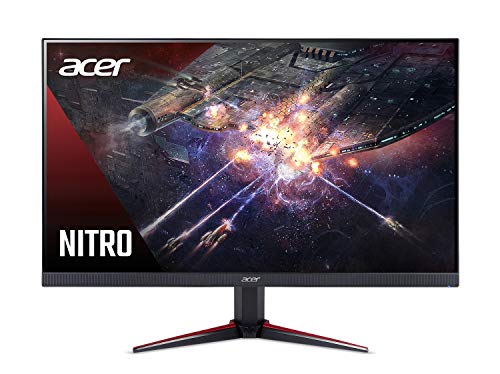
Acer Nitro VG240Y Pbiip 23.8-Inch 144Hz IPS Gaming Monitor
Acer Nitro VG240Y Pbiip 23.8-Inch 144Hz IPS Gaming Monitor
- 23.8-inch Full HD 1920 x 1080 IPS panel
- 144Hz refresh rate, 1ms VRB response time
- Two HDMI 2.0 ports plus DisplayPort
- FreeSync support
- Zero-frame design
The Acer Nitro VG240Y is the gaming pick in this class, a 23.8-inch Full HD IPS monitor with a 144Hz refresh rate and a 1ms visual response boost. The fast refresh rate keeps motion clean in games, and the FreeSync support keeps the refresh in step with the graphics card when frame rates move. Two HDMI ports plus DisplayPort cover a computer and a console at once, and the zero-frame design keeps the bezel thin for a multi-screen desk. It is the pick for a desk that must serve both work and play.
Who it is for: players and workers who share one screen between a computer and a console.
Caveats: It is a 1080p screen, so it cannot show 1440p detail, and the stand gives tilt only.
ASUS VA24ECPSN 23.8-Inch Full HD Docking Monitor
ASUS VA24ECPSN 23.8-Inch Full HD Docking Monitor
- 23.8-inch Full HD 1920 x 1080 IPS panel
- 75Hz refresh rate, Adaptive-Sync
- USB-C with power delivery, RJ45 Ethernet, HDMI
- Built-in speakers
- Height adjustment and VESA mount
The ASUS VA24ECPSN is the docking pick, a 23.8-inch Full HD IPS monitor that turns a single USB-C cable into a workstation. The USB-C port carries video and power to a laptop, the RJ45 Ethernet port gives the laptop a wired network connection, and the built-in speakers remove the need for separate desktop speakers. The 75Hz refresh rate adds smoothness to scrolling, and the height-adjustable stand sets the screen at eye level without a riser. For a laptop-first desk, this is the monitor that replaces a separate dock.
Who it is for: laptop users who want one cable for video, power and wired networking.
Caveats: It is a 75Hz office monitor, so fast gaming feels less smooth than on the 144Hz pick above, and the USB-C port must be checked against the laptop model.
ASUS VA249HG 23.8-Inch Full HD Eye Care Monitor
ASUS VA249HG 23.8-Inch Full HD Eye Care Monitor
- 23.8-inch Full HD 1920 x 1080 IPS panel
- 120Hz refresh rate, 1ms response time
- HDMI and VGA inputs
- Adaptive-Sync support
- Eye Care flicker-free and low blue light
The ASUS VA249HG is the fast office pick, a 23.8-inch Full HD IPS monitor with a 120Hz refresh rate and a 1ms response time. The fast panel makes scrolling and mouse movement visibly smoother than a 60Hz screen, and the Adaptive-Sync support keeps the refresh steady in casual games. Eye Care technologies with flicker-free backlighting and a low blue light mode suit long reading sessions, and the frameless design keeps the bezel thin for a clean desk. It is the pick for a work desk that also plays games.
Who it is for: office workers who want a fast panel for smooth scrolling and casual gaming.
Caveats: Its HDMI and VGA ports cover most machines, but it has no DisplayPort or USB-C, so a laptop dock needs its own connection.
Comparison Table
| Monitor | Viewable size | Resolution | Refresh rate | Panel | Ports | Best for |
|---|---|---|---|---|---|---|
| Acer R240HY | 23.8-inch | Full HD 1080p | 60Hz | IPS | VGA, HDMI, DVI | Proven office pick |
| Acer VG240Y | 23.8-inch | Full HD 1080p | 144Hz | IPS | 2 x HDMI, DisplayPort | Gaming and work |
| ASUS VA24ECPSN | 23.8-inch | Full HD 1080p | 75Hz | IPS | USB-C, RJ45, HDMI | Laptop docking |
| ASUS VA249HG | 23.8-inch | Full HD 1080p | 120Hz | IPS | HDMI, VGA | Fast office pick |
Which One Is Right for You?
Start with the computer. If the desk holds a laptop, the ASUS VA24ECPSN is the most useful answer, because one USB-C cable carries video, power and wired networking, and the height-adjustable stand keeps the screen at eye level through a long workday. If the desk must serve both work and games, the Acer VG240Y is the pick, with its 144Hz panel and two HDMI ports for a computer and a console. If the work is reading and documents all day, the ASUS VA249HG gives a fast 120Hz panel with eye comfort features, and the Acer R240HY is the proven office pick for a straightforward Full HD screen that covers the basics without extra features. In every case, remember that 23-inch and 24-inch labels describe the same 23.8-inch class, so compare the ports and the refresh rate rather than the headline number, and check the stand adjustment before the screen arrives.
Frequently Asked Questions
Is a 23-inch monitor the same as a 24-inch monitor?
Usually, yes. Monitors sold as 23 inches usually measure 23.8 inches of viewable area, and monitors sold as 24 inches are often the same panel. Compare the resolution, ports and refresh rate rather than the headline number.
Is Full HD enough at 23 inches?
Yes. Full HD at 1920 x 1080 keeps text sharp and windows roomy at a normal desk distance on a 23.8-inch screen, which is the right middle ground between a small 20-inch screen and a large 27-inch screen.
Can a 23-inch monitor serve as a second display?
Yes, and it is one of the best uses for this size. A 23.8-inch screen beside a laptop adds room for reference documents, chat or video without crowding the desk, and a VESA arm sets it at the right height.
What is a docking monitor?
A docking monitor carries USB-C with power delivery and often an Ethernet port and a hub, so one cable connects a laptop for video, charging and wired networking. It replaces a separate docking station on a clean desk.
Disclosure: As an Amazon Associate, we may earn from qualifying purchases.
Related guides
More from Amazon
Programs that pair well with the guide above. Offers and eligibility are set by Amazon and may change.
Free shipping on eligible items, Prime Video and more. Eligible new members can start with a free trial.
Start a Prime free trialAd-free music streaming. Eligible new subscribers can start with a free trial.
Try Music Unlimited freeA Prime membership for ages 18-24 with a trial period. Eligibility is set by Amazon.
See Prime for Young AdultsAudiobooks and podcasts to listen to on the go. Eligible new members can start with a free trial.
Try Audible freeAs an Amazon Associate we earn from qualifying purchases.









