Our Short List of 3
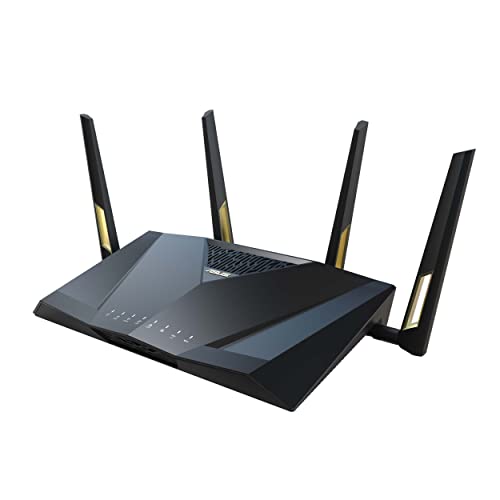
- Best for: Desks and living rooms with many wired devices that should never rely on Wi-Fi alone.
- AX6000 dual-band Wi-Fi 6 | 8 gigabit LAN ports | Dual 2.5G ports | AiMesh support

- Best for: Homes adding Wi-Fi 6E devices that want a strong single router with room to grow.
- AXE7800 tri-band Wi-Fi 6E | 6 GHz band | 2.5G port | AiMesh support

- Best for: Busy households that need strong all-round Wi-Fi for streaming, calls and gaming at the same time.
- AX5400 dual-band Wi-Fi 6 | 6 streams | OFDMA and MU-MIMO | HomeShield
All 4 Picks at a Glance
| Product | Specs | Action |
|---|---|---|
| ASUS RT-AX88U Pro |
| Check price on Amazon |
| ASUS RT-AXE7800 |
| Check price on Amazon |
| TP-Link Archer AX73 |
| Check price on Amazon |
 NETGEAR Nighthawk RAX50 |
| Check price on Amazon |
The best routers for video game streaming serve a demanding job: your game needs low latency to play well, while your broadcast needs steady upload bandwidth to reach viewers without dropping frames. A router that handles one and starves the other will show up as lag in your game or a stuttering stream, and both are visible to everyone watching.
Streaming gameplay live is different from watching a stream, because upload matters as much as download. The picks below are chosen for stable upload performance, quality-of-service tools that can prioritise the stream, wired ports for the gaming PC or console, and coverage that reaches a streaming setup wherever it lives in the house.
Our Top Picks

Top 3 picks at a glance
How to Choose
Upload stability
A live stream lives or dies on steady upload bandwidth. A router with a strong processor and a clean connection to the modem keeps upload smooth even when other devices are busy.
Quality of service
QoS lets you prioritise the streaming PC or console so a background download or a video call cannot steal its bandwidth mid-broadcast.
Wired connection
Wire the streaming machine to the router whenever possible. A cable removes wireless interference from the most latency-sensitive link in the whole setup.
2.5G ports
A 2.5G port suits a fast internet connection or a wired device that needs more than a gigabit. It also leaves headroom as connection speeds rise.
Coverage for the streaming room
If the streaming setup lives far from the modem, mesh coverage or a well-placed router matters more than any single feature. A weak signal in the streaming room will show up on camera.
Device capacity
A streaming household runs a gaming machine, a second monitor or laptop, phones, speakers and more. Look for Wi-Fi 6, multiple streams and MU-MIMO.
Quick Picks
If you want the short version, here it is: the picks below are ASUS RT-AX88U Pro, ASUS RT-AXE7800, TP-Link Archer AX73, NETGEAR Nighthawk RAX50 and TP-Link Deco X55 (3-Pack). Each one suits a different desk, room or budget, and the comparison table further down puts their key differences side by side so you can see the trade-offs at a glance before reading the detail.
Top Picks
ASUS RT-AX88U Pro
- Best for: Desks and living rooms with many wired devices that should never rely on Wi-Fi alone.
- AX6000 dual-band Wi-Fi 6 | 8 gigabit LAN ports | Dual 2.5G ports | AiMesh support
Desks and living rooms with many wired devices that should never rely on Wi-Fi alone.
It is a large, powerful router, so it suits a central spot with room around it for airflow.
The ASUS RT-AX88U Pro is built for wired homes: eight gigabit LAN ports plus two 2.5G ports let you cable a television, a console, a speaker hub, a work computer and a storage drive without adding a separate switch. Its dual-band Wi-Fi 6 radio covers the wireless side, and AiMesh support allows mesh expansion if a dead zone appears later.
The RT-AX88U Pro is the wired streaming pick: eight gigabit LAN ports plus two 2.5G ports for a gaming PC, a console, a capture setup and more.
Watch out for: It is a large, powerful router, so it suits a central spot with room around it for airflow.
ASUS RT-AXE7800
- Best for: Homes adding Wi-Fi 6E devices that want a strong single router with room to grow.
- AXE7800 tri-band Wi-Fi 6E | 6 GHz band | 2.5G port | AiMesh support
Homes adding Wi-Fi 6E devices that want a strong single router with room to grow.
The 6 GHz band has shorter range than the 2.4 GHz band, so placement still matters.
The ASUS RT-AXE7800 is a tri-band Wi-Fi 6E router with a 6 GHz band for the newest devices, a 2.5G port for a fast connection or a wired device, and AiMesh support for later expansion. It suits a home that is starting to collect Wi-Fi 6E laptops and phones and wants a router that keeps those devices on an uncrowded lane.
The RT-AXE7800 adds a 6 GHz band for the newest devices, with a 2.5G port and AiMesh support for later expansion.
Watch out for: The 6 GHz band has shorter range than the 2.4 GHz band, so placement still matters.
TP-Link Archer AX73
- Best for: Busy households that need strong all-round Wi-Fi for streaming, calls and gaming at the same time.
- AX5400 dual-band Wi-Fi 6 | 6 streams | OFDMA and MU-MIMO | HomeShield
Busy households that need strong all-round Wi-Fi for streaming, calls and gaming at the same time.
It has no 6 GHz band, so the newest Wi-Fi 6E and Wi-Fi 7 devices cannot use that extra lane.
The TP-Link Archer AX73 is a dual-band Wi-Fi 6 router with six streams, which gives it room to serve several devices at once without each one waiting its turn. OFDMA and MU-MIMO share the wireless capacity more efficiently than older routers, and the HomeShield tools add network security and parental controls for a household with many connected gadgets.
The Archer AX73 is the all-round option, with six streams and HomeShield tools for a household that streams, games and works at once.
Watch out for: It has no 6 GHz band, so the newest Wi-Fi 6E and Wi-Fi 7 devices cannot use that extra lane.
NETGEAR Nighthawk RAX50
- Best for: Households with many connected devices and several wired gadgets near the router.
- AX5400 dual-band Wi-Fi 6 | 8 streams | 5 gigabit ports | Nighthawk app control
Households with many connected devices and several wired gadgets near the router.
It has no 6 GHz band, so Wi-Fi 6E devices fall back to the standard bands.
The NETGEAR Nighthawk RAX50 is a dual-band Wi-Fi 6 router with eight streams and five gigabit ports, which gives it room for a wired console, a speaker hub and a work computer alongside a busy wireless network. The Nighthawk app handles setup and device management, and the router’s capacity suits households where many devices stay connected all day.
The Nighthawk RAX50 gives a streaming desk five gigabit ports and eight wireless streams, with app control for quick changes.
Watch out for: It has no 6 GHz band, so Wi-Fi 6E devices fall back to the standard bands.
TP-Link Deco X55 (3-Pack)
The TP-Link Deco X55 three-pack builds a single mesh network from three units, so phones, speakers and laptops move between rooms without dropping to a weaker signal or joining a different network name. The system manages itself, steering devices to the best unit, which suits homes where the router lives far from the rooms people actually use.
The Deco X55 three-pack suits a streaming setup far from the modem, putting a strong mesh signal in the streaming room itself.
Specs
- AX3000 dual-band mesh Wi-Fi 6 | 3 units | Covers large homes | AI-driven mesh
Best for: Multi-room homes where speakers, televisions and laptops sit far from the modem.
Watch out for: Each unit needs a power outlet and a sensible spot, so placement takes a little planning.
Common Mistakes to Avoid
Buying on headline figures alone
A big headline number — the fastest wireless speed, the highest resolution, the widest colour gamut — tells you almost nothing about how a product behaves on your desk or in your rooms. Two products with the same headline figure can feel completely different in daily use, because panel quality, firmware stability and build matter just as much. Read the specifications that describe real behaviour, such as panel type, port selection and coverage, before you decide.
Ignoring the ports you actually need
A monitor or router with the wrong ports forces awkward workarounds: adapters, hubs and cables that should never have been necessary. Count what you will plug in — a laptop, a console, a speaker hub, a server, a second computer — and make sure the product you choose has a port for each one, with the right standard. A single missing USB-C or 2.5G port can undo an otherwise perfect choice.
Choosing the wrong size for the room
A screen that is too large for a shallow desk will dominate the room and strain your eyes, while a router that is too weak for a large house will leave dead zones in the rooms you use most. Measure the desk or the distance to the farthest room before you buy, and match the product to the space rather than to the biggest option available.
Forgetting to confirm the exact model
Similar model names can hide different hardware: a revised version, a regional variant, or a bundle with different accessories. Before you buy, confirm the listing matches the exact model name and configuration in this guide, and check the maker’s own specifications if anything looks different. A few minutes of checking avoids a return.
Buying for today and forgetting tomorrow
A monitor or router should last several years, so a choice that fits today but has no room to grow will feel cramped sooner than you expect. Look for the features your next devices will want — an extra band, a faster port, a KVM switch, a higher resolution — even if you do not need them yet. Spending a little more on headroom is cheaper than replacing the whole product early.
Comparison Table
| Product | Key specs | Best for |
|---|---|---|
| ASUS RT-AX88U Pro | AX6000 dual-band Wi-Fi 6 | 8 gigabit LAN ports | Dual 2.5G ports | AiMesh support | Desks and living rooms with many wired devices that should never rely on Wi-Fi alone. |
| ASUS RT-AXE7800 | AXE7800 tri-band Wi-Fi 6E | 6 GHz band | 2.5G port | AiMesh support | Homes adding Wi-Fi 6E devices that want a strong single router with room to grow. |
| TP-Link Archer AX73 | AX5400 dual-band Wi-Fi 6 | 6 streams | OFDMA and MU-MIMO | HomeShield | Busy households that need strong all-round Wi-Fi for streaming, calls and gaming at the same time. |
| NETGEAR Nighthawk RAX50 | AX5400 dual-band Wi-Fi 6 | 8 streams | 5 gigabit ports | Nighthawk app control | Households with many connected devices and several wired gadgets near the router. |
| TP-Link Deco X55 (3-Pack) | AX3000 dual-band mesh Wi-Fi 6 | 3 units | Covers large homes | AI-driven mesh | Multi-room homes where speakers, televisions and laptops sit far from the modem. |
Which One Is Right for You?
If your streaming PC or console sits near the router, start with the ASUS RT-AX88U Pro: its wired ports and QoS tools are built for exactly this job, and a cable to the gaming machine is the single best upgrade you can make. If your setup lives in a far room, a mesh system such as the Deco X55 will put a strong signal where you stream. And if you are collecting Wi-Fi 6E devices, the ASUS RT-AXE7800 adds a 6 GHz lane for the newest hardware.
Frequently Asked Questions
Should I stream over Wi-Fi or a cable?
A cable, whenever you can. A wired connection gives the streaming machine the steadiest upload and the lowest latency, which is exactly what a live broadcast needs.
How much upload speed do I need to stream games?
It depends on the resolution and bitrate you stream at, but a stable upload well above your stream bitrate is the rule. Test your connection at the time you usually stream, not just once.
Does QoS really help a game stream?
Yes. QoS keeps the streaming machine’s traffic ahead of background downloads and other devices, which prevents the frame drops that viewers notice first.
Can a mesh system handle game streaming?
Yes, if the mesh units have a strong link between them. A tri-band mesh with a dedicated backhaul band, or a wired backhaul, keeps the streaming room’s connection steady.
Disclosure: As an Amazon Associate, we may earn from qualifying purchases.
Related guides
More from Amazon
Programs that pair well with the guide above. Offers and eligibility are set by Amazon and may change.
Free shipping on eligible items, Prime Video and more. Eligible new members can start with a free trial.
Start a Prime free trialAd-free music streaming. Eligible new subscribers can start with a free trial.
Try Music Unlimited freeA Prime membership for ages 18-24 with a trial period. Eligibility is set by Amazon.
See Prime for Young AdultsAudiobooks and podcasts to listen to on the go. Eligible new members can start with a free trial.
Try Audible freeAs an Amazon Associate we earn from qualifying purchases.