Our Short List of 3
All 4 Picks at a Glance
| Product | Specs | Action |
|---|---|---|
 ASUS TUF Gaming VG27AQ | Check price on Amazon | |
 Acer Nitro XV272U Vbmiiprx | Check price on Amazon | |
 Samsung Odyssey G5 G51F | Check price on Amazon | |
 AOC 24G2 | Check price on Amazon |
The best reviewed gaming monitors are the ones that keep appearing in roundups, buying guides, and player recommendations, not because one writer praised them once, but because many independent sources keep reaching the same conclusion. A monitor that is widely covered has been measured, compared, and lived with by enough people that its strengths and its flaws are both well known, and a buyer can choose it with a clear picture of what it does well and where it falls short. That shared record matters more than any single opinion, since a gaming monitor is a long-term purchase that will sit on the desk for years.
The five monitors in this guide earned their place by showing up again and again across coverage of gaming displays, with consistent notes on their panels, their speed, and their value. Each one is a 27-inch or 24-inch gaming monitor with a fast refresh rate, a sharp panel, and sync support, and each one has a distinct character: one leads on balance, one leads on refresh rate, one leads on colour, one leads on contrast, and one leads on value. The notes below explain what the coverage agrees on for each model, where the models differ, and which one fits the games being played.
This guide is about monitors that are widely covered, and the word in the keyword is used in that sense: these are the models that the gaming press and player communities keep coming back to. No single source decides the list, and the guide states the panel, the speed, and the sync support for each model so the choice can be checked against the machine it will connect to. The notes below explain which one suits competitive play, which one suits dark games, and which one gives the most value for a first gaming screen.
Our Top Picks
- ASUS TUF Gaming VG27AQ 27 Inch QHD 165Hz27” 2K WQHD IPS19.96 x 24.41 x 8.31 inches12.8 poundsCheck on Amazon
Top 3 picks at a glance
How to Choose
What wide coverage tells a buyer
A monitor that appears in many independent roundups has been measured by many hands, and the points of agreement across that coverage are the reliable facts: the panel type, the refresh rate, the response time, and the sync support. Where coverage disagrees, the difference usually comes down to the games being played or the settings being used, so a buyer should weigh the points of agreement more heavily than any single outlier. A monitor with a long, consistent record is a safer choice than a new model with only a few mentions, since the long record covers more use cases.
Refresh rate and response time
A fast refresh rate keeps motion smooth, and a low response time keeps fast camera pans from smearing, and the two figures together decide how a gaming monitor feels in play. A 144Hz panel is the baseline for a gaming monitor, and 165Hz, 170Hz, and 180Hz give extra headroom for fast shooters and racing games. Check the refresh rate over the connection being used, since some monitors only reach their maximum rate over DisplayPort and not over HDMI, and check the stated response time from the maker.
Resolution and screen size
A 27-inch QHD panel at 2560 by 1440 is the sweet spot for most gaming desks, giving sharp detail without the graphics load of 4K, while a 24-inch 1080p panel suits a tighter budget or a smaller desk. Resolution matters for reading as well as for games, since a sharp panel keeps text crisp and game detail clear, and a larger screen shows more of the game world at once. All five picks in this guide are 27-inch QHD screens except the value pick, which is a 24-inch 1080p screen, so the comparison stays honest.
Panel type: IPS or VA
IPS panels hold colour and contrast steady across wide viewing angles, which suits a desk where more than one person looks at the screen, while VA panels trade viewing-angle stability for deeper blacks and stronger contrast, which suits dark games and films in a dim room. TN panels are the fastest of the three types yet wash out quickly off-axis, so they suit a player sitting directly in front of a single screen. For most gaming desks, IPS is the safer choice, with VA as the pick for dark atmospheric games played in a dim room.
Adaptive sync support
Adaptive sync keeps the refresh rate of the monitor matched to the frame rate of the graphics card, which removes tearing and stutter when the frame rate dips. AMD FreeSync and NVIDIA G-Sync Compatible support both appear in this guide, and the right choice depends on the graphics card in the machine. Check that the sync support works over the connection being used, since some monitors only support sync over DisplayPort, and confirm the sync type on the listing before ordering for a specific graphics card.
Colour coverage and HDR
Colour coverage decides how vivid games look, and a monitor with wide gamut coverage will show richer colours than one that covers only the standard range. HDR support adds brighter highlights in games that use it, but the HDR figure on a monitor is only meaningful beside a stated local dimming or panel specification, so treat a bare HDR badge with caution. For work as well as play, full sRGB coverage is the baseline for accurate colour, while wider coverage suits photo and video work.
Stand adjustment and connectivity
Height, tilt, swivel, and pivot adjustment let the screen sit at eye level and turn into portrait orientation for code and long documents, and VESA mounting support opens the door to an arm for a cleaner desk. A gaming monitor should carry DisplayPort and HDMI inputs to cover a desktop, a laptop, and a console, and a USB hub is a useful extra. Check the full range of stand adjustment rather than assuming a gaming monitor adjusts in every direction, since some gaming stands offer only tilt.
Top Picks
ASUS TUF Gaming VG27AQ
The ASUS TUF Gaming VG27AQ is the most balanced pick in this guide, a 27-inch QHD IPS gaming monitor with a 165Hz refresh rate, a 1ms response time, and a thin bezel that suits a single-screen or multi-screen desk. The IPS panel holds colour steady across wide viewing angles, which suits a desk where more than one person looks at the screen, and the QHD resolution at 2560 by 1440 gives sharp detail without the graphics load of 4K. G-Sync Compatible support keeps frames smooth on NVIDIA graphics cards, and the monitor also works with adaptive sync on other cards.
The stand adjusts for height, tilt, swivel, and pivot, which helps set the screen at eye level and turn it into portrait orientation for code and documents, and VESA mounting support opens the door to an arm. The panel carries HDR10 support for brighter highlights in games and films that use it, and the thin bezel design keeps the screen compact on the desk. The VG27AQ appears in coverage of QHD gaming monitors more often than almost any other model in its class, with consistent notes on its balance of speed, colour, and value.
Who it is for: players building a QHD desk around an NVIDIA graphics card who want IPS viewing angles and a 165Hz panel. Caveats: confirm the listing is the VG27AQ model and not a similarly named TUF variant before ordering, and check that the graphics card has a DisplayPort output for the highest refresh rate.
Acer Nitro XV272U Vbmiiprx
The Acer Nitro XV272U Vbmiiprx is the high-refresh pick of this guide, a 27-inch QHD IPS monitor with a 170Hz refresh rate that gives extra headroom for fast games. The IPS panel keeps colour steady from wide angles, which suits a desk where the monitor sits off to one side, and the QHD resolution keeps text and game detail sharp at 27 inches. The 170Hz refresh rate and fast response time keep motion clean during rapid camera pans, and FreeSync Premium support keeps frames and refresh in step on AMD graphics cards.
The monitor carries a thin bezel design that keeps the screen compact, and the stand adjusts for height, tilt, swivel, and pivot, which helps set the screen at eye level. VESA mounting support suits an arm, and the panel includes HDR support for brighter highlights. The XV272U shows up in coverage of high-refresh QHD monitors with consistent notes on its speed and its value, and it suits a fast gaming desk as well as a mixed work and play setup.
Who it is for: players who want the highest IPS refresh rate in this guide and run an AMD graphics card, and desks that mix fast games with everyday work. Caveats: the model name is long and similar to other Nitro variants, so confirm the exact model number on the listing before ordering, and check the refresh rate over the connection being used, since some inputs cap the rate below the maximum.
Dell S2721DGF
The Dell S2721DGF is the premium IPS pick of this guide, a 27-inch QHD monitor with a 165Hz refresh rate, a fast Nano IPS panel, and wide colour coverage that keeps games vivid. The Nano IPS panel holds colour steady from wide angles and covers a wide gamut, which suits a desk where the monitor is viewed from the side, and the QHD resolution gives sharp detail without the load of 4K. G-Sync Compatible support and FreeSync Premium support both appear, so the monitor suits either graphics card brand.
The stand adjusts for height, tilt, swivel, and pivot, and the monitor carries a thin bezel design that keeps the screen compact. VESA mounting support opens the door to an arm, and the panel includes HDR support. The S2721DGF is one of the most widely covered QHD gaming monitors, with a long record across buying guides and comparisons, and the coverage agrees on its vivid panel and its support for either graphics card brand.
Who it is for: players who want the most vivid panel in this guide and a monitor that works with either graphics card brand. Caveats: confirm the listing is the S2721DGF and not a similarly named Dell S-series model, and note that the wide gamut can make colours look oversaturated in games that expect a standard gamut, so check the colour settings after setup.
Samsung Odyssey G5 G51F
The Samsung Odyssey G5 G51F is the high-refresh VA pick of this guide, a 27-inch QHD monitor with a 180Hz refresh rate, a flat VA panel, and a fully adjustable stand. The VA panel delivers deep blacks and strong contrast, which suits dark games and night racing, and the 180Hz refresh rate is the highest in this guide, keeping motion smooth. The flat panel is easier to share with a second screen than a curved one, and the thin bezel keeps the screen compact on the desk.
The stand adjusts in every direction, including height, tilt, swivel, and pivot, which helps set the screen at eye level, and VESA mounting support suits an arm. FreeSync support keeps frames smooth on AMD graphics cards, and the monitor carries HDR10 support for brighter highlights. The G51F appears in coverage of VA gaming monitors with consistent notes on its contrast and its refresh rate, and it suits players who spend most of their time in dark games and dim rooms.
Who it is for: players who want the highest refresh rate here and the deep blacks of a VA panel for dark games. Caveats: VA panels move more slowly between dark shades than IPS panels, so fast camera pans in dark scenes can leave a faint trail, and the G-Sync Compatible status of this model should be confirmed on the listing before ordering for an NVIDIA rig.
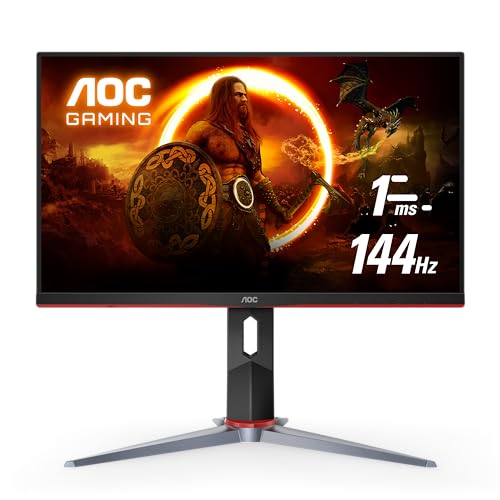
AOC 24G2
The AOC 24G2 is the value pick of this guide, a 24-inch 1080p IPS gaming monitor with a 144Hz refresh rate that has appeared in budget gaming coverage for years. The smaller panel and lower resolution mean a mid-range graphics card can hold high frame rates, and the IPS panel holds colour steady from wide angles, which suits a desk where more than one person looks at the screen. The 144Hz refresh rate keeps motion smooth, and FreeSync support keeps frames and refresh in step.
The monitor carries a thin bezel design that keeps the screen compact, and the stand adjusts for height, tilt, swivel, and pivot, which helps set the screen at eye level. VESA mounting support suits an arm, and the compact 24-inch size fits desks that cannot hold a larger screen. The 24G2 has one of the longest records of any budget gaming monitor, with consistent notes on its speed, its IPS panel, and its value, and it remains a sensible first gaming monitor.
Who it is for: players on a tighter budget or with a smaller desk, and first-time gaming monitor buyers who want a proven model. Caveats: the 1080p resolution at 24 inches is less sharp than QHD at 27 inches for desktop work and reading, so this pick suits a gaming-first desk rather than a mixed work and play desk, and confirm the exact 24G2 variant on the listing before ordering.
Comparison Table
| Monitor | Size and resolution | Refresh rate | Panel type | Sync support |
|---|---|---|---|---|
| ASUS TUF Gaming VG27AQ | 27-inch QHD IPS | 165Hz | IPS | G-Sync Compatible |
| Acer Nitro XV272U Vbmiiprx | 27-inch QHD IPS | 170Hz | IPS | FreeSync Premium |
| Dell S2721DGF | 27-inch QHD IPS | 165Hz | Nano IPS | G-Sync Compatible, FreeSync Premium |
| Samsung Odyssey G5 G51F | 27-inch QHD VA | 180Hz | VA | FreeSync |
| AOC 24G2 | 24-inch 1080p IPS | 144Hz | IPS | FreeSync |
Which One Is Right for You?
Choose the ASUS TUF Gaming VG27AQ for the most balanced gaming desk with IPS angles and G-Sync Compatible support. Choose the Acer Nitro XV272U for the highest IPS refresh rate and FreeSync Premium support. Choose the Dell S2721DGF for the most vivid panel and support for either graphics card brand. Choose the Samsung Odyssey G5 G51F for the highest refresh rate in the guide and deep VA blacks for dark games. Choose the AOC 24G2 for the most affordable proven gaming monitor. Whichever one is chosen, check the refresh rate over the connection being used, confirm the sync support for the graphics card in the machine, and weigh the points of agreement across coverage more heavily than any single opinion.
Frequently Asked Questions
How do I know if a gaming monitor is widely covered?
A widely covered monitor appears in many independent roundups, buying guides, and comparisons, with consistent notes on its panel, its speed, and its value. Check several sources rather than one, and look for agreement on the specifications that matter: the panel type, the refresh rate, the response time, and the sync support. A monitor with a long, consistent record is a safer choice than a new model with only a few mentions.
Is a higher refresh rate always better?
A higher refresh rate keeps motion smoother, but the benefit depends on the graphics card holding a frame rate to match it, and on the games being played. A 165Hz monitor needs a card that can render 165 frames per second to show its full advantage, while a slower card will not reach that rate in demanding games. A 144Hz panel is the baseline for gaming, and higher rates suit fast shooters and racing games most.
Do I need G-Sync or FreeSync?
Adaptive sync removes tearing and stutter when the frame rate dips, and the right choice depends on the graphics card in the machine. NVIDIA cards use G-Sync Compatible support, AMD cards use FreeSync, and some monitors support both. Check the sync support on the listing and the graphics card specifications before ordering, since a monitor with the wrong sync type will still work but without the smooth-frame benefit.
Can a gaming monitor also serve for work?
A gaming monitor with an IPS panel and a sharp QHD resolution serves well for work, with crisp text and steady colour across viewing angles. A monitor with a fast refresh rate also makes everyday scrolling and window movement feel smoother. The main trade is that gaming monitors sometimes offer less stand adjustment or fewer USB ports than a work monitor, so check the stand and the connectivity before ordering for a mixed desk.
Disclosure: As an Amazon Associate, we may earn from qualifying purchases.
Related guides
More from Amazon
Programs that pair well with the guide above. Offers and eligibility are set by Amazon and may change.
Free shipping on eligible items, Prime Video and more. Eligible new members can start with a free trial.
Start a Prime free trialAd-free music streaming. Eligible new subscribers can start with a free trial.
Try Music Unlimited freeA Prime membership for ages 18-24 with a trial period. Eligibility is set by Amazon.
See Prime for Young AdultsAudiobooks and podcasts to listen to on the go. Eligible new members can start with a free trial.
Try Audible freeAs an Amazon Associate we earn from qualifying purchases.