Our Short List of 3

- Best for: Players who want the strongest HDR on a flat 4K screen.
- 32-inch 4K UHD (3840 x 2160) Mini-LED IPS panel
- 144Hz refresh rate with DSC
- NVIDIA G-SYNC Ultimate
- DisplayHDR 1400 with local dimming

- Best for: Gamers who want G-Sync Ultimate HDR on a compact 27-inch screen.
- 27-inch 4K UHD (3840 x 2160) IPS panel
- Up to 144Hz refresh rate
- NVIDIA G-SYNC Ultimate
- Quantum Dot technology

- Best for: Players who want a curved ultrawide screen for immersive HDR gaming.
- 35-inch ultrawide (3440 x 1440) curved VA panel
- 200Hz refresh rate, 2ms response time
- NVIDIA G-SYNC Ultimate
- 512-zone full array local dimming
All 4 Picks at a Glance
| Product | Specs | Action |
|---|---|---|
| ASUS ROG Swift PG32UQX |
| Check price on Amazon |
| Acer Predator X27 bmiphzx |
| Check price on Amazon |
| ASUS ROG Swift PG35VQ |
| Check price on Amazon |
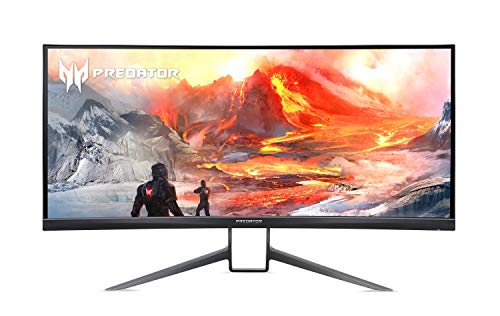 Acer Predator X35 bmiphzx |
| Check price on Amazon |
G-Sync Ultimate is the top tier of NVIDIA display sync, and it only appears on a small group of monitors, so choosing one means weighing screen size, resolution and HDR strength against each other rather than comparing dozens of similar models. Every monitor here carries a dedicated G-Sync processor, a wide local dimming backlight and peak brightness that clears the bar for true HDR, which is what separates this class from ordinary G-Sync Compatible screens.
This guide is for PC gamers who already own a GeForce card and want tear-free play with deep HDR, for ultrawide fans who want one curved screen instead of two, and for buyers who want a monitor that stays relevant for years. Every pick below comes from the names and specifications listed on its Amazon product page.
Our Top Picks
Top 3 picks at a glance
Quick Picks
As an Amazon Associate we earn from qualifying purchases.
| Product | Best for | Key spec from title |
|---|---|---|
| ASUS ROG Swift PG32UQX | Sharp 4K HDR on a 32-inch screen | 4K UHD, 144Hz, Mini-LED, DisplayHDR 1400 |
| Acer Predator X27 bmiphzx | Compact 27-inch 4K HDR gaming | 4K UHD, 144Hz, Quantum Dot, DisplayHDR 1000 |
| ASUS ROG Swift PG35VQ | Curved ultrawide HDR immersion | 35-inch ultrawide, 200Hz, DisplayHDR 1000 |
| Acer Predator X35 bmiphzx | Curved ultrawide with wide colour | 35-inch ultrawide, 200Hz, Quantum Dot, HDR 1000 |
How to Choose
Resolution and screen size
Resolution decides how much detail you see, and screen size decides how close that detail sits to your eyes. A 27-inch 4K panel packs pixels tightly, so text and game textures look crisp at a normal desk distance, while a 32-inch 4K panel gives the same resolution more room and suits players who sit slightly further back. Ultrawide 3440 by 1440 screens trade vertical pixels for width, which fills peripheral vision in racing and flight games. Match the resolution to your graphics card first, because driving 4K at high refresh rates demands a strong GPU, and a monitor your card cannot feed will never show its best side.
G-Sync Ultimate and HDR
G-Sync Ultimate means the monitor has a dedicated NVIDIA processor, variable refresh that works across the full range, and HDR with high peak brightness and local dimming, so it is a stricter standard than G-Sync Compatible. Check that the listing names G-Sync Ultimate specifically, because many monitors carry G-Sync Compatible or basic G-Sync without the HDR and dimming requirements. Look for DisplayHDR 1000 or 1400 certification and a local dimming zone count in the specifications, since those figures describe how bright highlights can get and how dark shadows can stay. A monitor without those marks will not deliver the same HDR picture.
Refresh rate and response
Refresh rate decides how smooth motion looks, and response time decides how clean fast movement stays. The 4K models here reach 144Hz, while the ultrawide models reach 200Hz, which suits fast shooters and racing games where the camera sweeps constantly. A 2ms or 4ms response time is normal for this class, and overdrive settings in the on-screen menu can sharpen motion further at the cost of occasional overshoot. Remember that DisplayPort bandwidth limits what a 4K panel can do at once, so some models trade colour depth or chroma for the top refresh rate, and the listing usually explains that trade-off.
Ports and desk fit
Ports decide what you can connect, and the stand decides whether the monitor fits your desk at all. Every model here has DisplayPort and HDMI, and G-Sync Ultimate works over DisplayPort, so check that your graphics card has a free DisplayPort output before buying. Ultrawide models are wide and heavy, so measure your desk depth and check the stand footprint, or plan for a VESA arm rated for the weight. A USB hub on the monitor keeps a keyboard, mouse and headset cable tidy, and a headphone jack on the panel is handy when you do not want to reach behind the PC.
The 4 Best Options
ASUS ROG Swift PG32UQX
- Best for: Players who want the strongest HDR on a flat 4K screen.
- 32-inch 4K UHD (3840 x 2160) Mini-LED IPS panel
- 144Hz refresh rate with DSC
- NVIDIA G-SYNC Ultimate
- DisplayHDR 1400 with local dimming
Players who want the strongest HDR on a flat 4K screen.
The 32-inch panel and its stand need a deep desk, so measure before ordering.
The PG32UQX is the sharpest 4K pick in this group, pairing a 32-inch Mini-LED panel with G-Sync Ultimate and DisplayHDR 1400, so HDR highlights reach further than on the other 4K model here. Its 144Hz refresh rate keeps fast games smooth, and the quantum dot layer widens the colour range for games and films that use it. The listing describes local dimming across the panel, which helps dark scenes hold their shadows without washing out. This is the monitor to choose when you want the strongest HDR picture on a flat 16 by 9 screen and your graphics card can drive 4K.
Watch out for: The 32-inch panel and its stand need a deep desk, so measure before ordering.
Acer Predator X27 bmiphzx
- Best for: Gamers who want G-Sync Ultimate HDR on a compact 27-inch screen.
- 27-inch 4K UHD (3840 x 2160) IPS panel
- Up to 144Hz refresh rate
- NVIDIA G-SYNC Ultimate
- Quantum Dot technology
Gamers who want G-Sync Ultimate HDR on a compact 27-inch screen.
The 27-inch 4K picture makes on-screen text small, so check your scaling settings.
The Predator X27 is the compact 4K option, putting the same 3840 by 2160 resolution and G-Sync Ultimate into a 27-inch panel that fits smaller desks and tighter budgets in this class. Its quantum dot IPS panel covers a wide colour range, and the DisplayHDR 1000 rating means bright highlights stand out clearly against dark scenes. The 144Hz refresh rate suits competitive play, and the 4ms response time keeps motion clean. Choose this one when you want true G-Sync Ultimate HDR but prefer a smaller screen that sits closer and keeps the pixel density high.
Watch out for: The 27-inch 4K picture makes on-screen text small, so check your scaling settings.
ASUS ROG Swift PG35VQ
- Best for: Players who want a curved ultrawide screen for immersive HDR gaming.
- 35-inch ultrawide (3440 x 1440) curved VA panel
- 200Hz refresh rate, 2ms response time
- NVIDIA G-SYNC Ultimate
- 512-zone full array local dimming
Players who want a curved ultrawide screen for immersive HDR gaming.
The curved VA panel shows some colour shift at steep side angles, so sit centred.
The PG35VQ is the ultrawide flagship here, with a curved 35-inch VA panel, a 200Hz refresh rate and a 512-zone full array local dimming backlight that gives HDR real depth. Its 3440 by 1440 resolution fills peripheral vision, which suits racing, flight and open-world games far better than a flat screen, and the quantum dot layer keeps colours rich across that wide view. The listing also notes a built-in amplifier for its audio output and an Aura Sync light on the rear. Pick this one when immersion matters more than pixel density and you have the desk space for a wide curved panel.
Watch out for: The curved VA panel shows some colour shift at steep side angles, so sit centred.
Acer Predator X35 bmiphzx
- Best for: Gamers who want ultrawide HDR with wide colour and built-in speakers.
- 35-inch ultrawide (3440 x 1440) curved VA panel
- 200Hz refresh rate, 2ms response time
- NVIDIA G-SYNC Ultimate
- 512 full array local dimming zones
Gamers who want ultrawide HDR with wide colour and built-in speakers.
The wide panel needs a sturdy desk or arm, and its weight is easy to underestimate.
The Predator X35 matches the PG35VQ on size and speed, with a curved 35-inch ultrawide panel, a 200Hz refresh rate and G-Sync Ultimate, but it frames the choice around wide colour and a simpler feature set. Its quantum dot VA panel covers a wide DCI-P3 colour range, and the DisplayHDR 1000 rating pairs with 512 local dimming zones to keep bright and dark areas distinct. The built-in speakers and USB hub keep the desk tidy, and the 1800R curve wraps the image around your view. Choose this one when you want ultrawide G-Sync Ultimate HDR with strong colour and a straightforward setup.
Watch out for: The wide panel needs a sturdy desk or arm, and its weight is easy to underestimate.
Which One Fits Your Situation
You want the sharpest HDR picture
Pick the ASUS ROG Swift PG32UQX. Its Mini-LED backlight and DisplayHDR 1400 rating give it the brightest HDR highlights in this group, and the 32-inch 4K panel shows fine detail clearly. It suits players who spend as much time in story-driven games and films as in competitive matches, and whose graphics card can drive 4K at high refresh rates without dropping settings.
You have a smaller desk
Pick the Acer Predator X27 bmiphzx. It delivers the same 4K resolution and G-Sync Ultimate HDR as the larger flat panel in a 27-inch body that fits a normal desk, and its high pixel density keeps text and textures crisp at close range. It is the sensible choice when space is tight but you still want true HDR rather than a basic G-Sync Compatible screen.
You play racing and flight games
Pick the ASUS ROG Swift PG35VQ. Its curved 35-inch ultrawide panel wraps the track or the cockpit around your view, and the 200Hz refresh rate keeps fast camera movement smooth. The 512-zone local dimming backlight gives night races and dark cockpits real depth, and the wide screen removes the need for a second monitor beside it.
You want ultrawide with simpler setup
Pick the Acer Predator X35 bmiphzx. It offers the same curved ultrawide size and 200Hz speed as the other ultrawide here, with wide quantum dot colour and built-in speakers that save you buying separate audio. It fits players who want one wide screen for games and everyday work, with a USB hub that keeps peripherals connected in one place.
Common Mistakes
- Buying a G-Sync Ultimate monitor for a PC with an AMD graphics card, since the dedicated processor features are built around NVIDIA cards.
- Choosing 4K without checking whether the graphics card can hold high frame rates at that resolution.
- Confusing G-Sync Compatible with G-Sync Ultimate, which is a stricter standard with HDR and local dimming requirements.
- Forgetting to measure desk depth and width before ordering a wide curved ultrawide panel.
- Using HDMI instead of DisplayPort and then wondering why the full refresh rate and variable refresh range are unavailable.
Frequently Asked Questions
What makes G-Sync Ultimate different from G-Sync Compatible?
G-Sync Ultimate requires a dedicated NVIDIA processor in the monitor, variable refresh across the full range, and HDR with high peak brightness plus local dimming. G-Sync Compatible monitors use the open Adaptive-Sync standard with no dedicated processor and no HDR requirement, so they can tear less but do not guarantee the same HDR picture or the same low-latency behaviour.
Do I need an NVIDIA graphics card for these monitors?
Yes, for the full benefit. The dedicated processor features and variable refresh range are designed around GeForce cards, so an NVIDIA card is the natural match. The monitors still show a picture from other cards, but you would pay for features you cannot use, and a G-Sync Compatible screen would suit that setup better.
Is 4K or ultrawide better for gaming?
It depends on the games you play. A 4K panel gives the sharpest image and suits story-driven and strategy games where detail matters, while an ultrawide panel fills peripheral vision and suits racing, flight and open-world games. Ultrawide screens also replace a second monitor for work, while 4K panels keep text crisper at the same size.
Can these monitors run at their top refresh rate and full colour at once?
Not always, because DisplayPort bandwidth sets a limit. A 4K panel may need to trade colour depth or chroma subsampling for its top refresh rate, and the listing usually explains the trade-off. Check the specifications for the exact combinations, and use DisplayPort rather than HDMI when you want the highest refresh rate the panel supports.
Related guides
More from Amazon
Programs that pair well with the guide above. Offers and eligibility are set by Amazon and may change.
Free shipping on eligible items, Prime Video and more. Eligible new members can start with a free trial.
Start a Prime free trialAd-free music streaming. Eligible new subscribers can start with a free trial.
Try Music Unlimited freeA Prime membership for ages 18-24 with a trial period. Eligibility is set by Amazon.
See Prime for Young AdultsAudiobooks and podcasts to listen to on the go. Eligible new members can start with a free trial.
Try Audible freeAs an Amazon Associate we earn from qualifying purchases.