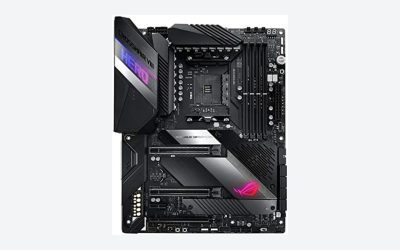
The ASUS ROG Strix B550-F Gaming WiFi II is the best AM4 motherboard for a Ryzen 5000 build: it offers a strong power-delivery design, two M.2 slots, a PCIe 4.0 graphics slot, Wi-Fi 6E and BIOS Flashback for updating without a processor. Budget builders can choose the GIGABYTE B550M K, and buyers who would rather purchase processor and board together can look at the bundles in this list. AM4 is AMD’s older DDR4 socket, and the Ryzen 5000 series is its final and fastest generation, so the board you pick needs a BIOS that recognizes those chips.
Our Top Picks
 GIGABYTE B550M K AMD AM4 Micro-ATX MotherboardmATX10.43 x 10.43 x 2.12 Inches1.7 poundsCheck on Amazon


Top 3 picks at a glance
Quick List
- ASUS ROG Strix B550-F Gaming WiFi II – best overall for a feature-rich ATX build
- GIGABYTE B550 Eagle WIFI6 – best for a full-size ATX board with Wi-Fi at a modest feature level
- GIGABYTE B550M K – best for a compact, no-frills Micro-ATX build with a mid-range chip
- Micro Center Ryzen 5 5500 with ASUS TUF Gaming A520M-Plus – best for a bundled entry-level gaming or office build
- Micro Center Ryzen 7 5800XT with ASUS TUF Gaming B550-PLUS WiFi II – best for a bundled eight-core build with a sturdier board
- Micro Center Ryzen 7 5800XT with ASUS Prime B550-PLUS AC – best for a bundled eight-core build with a plainer board
Which One Is Right for You?
| If you… | Choose |
|---|---|
| want the most features and room to upgrade later | ASUS ROG Strix B550-F Gaming WiFi II |
| are building around a Ryzen 5 or Ryzen 7 on a small case and a tight plan | GIGABYTE B550M K |
| want an ATX board with Wi-Fi and decent expansion without paying for premium extras | GIGABYTE B550 Eagle WIFI6 |
| need a processor and board in one purchase for a basic build | Micro Center Ryzen 5 5500 with TUF Gaming A520M-Plus |
| want a faster eight-core processor with the board already chosen | Micro Center Ryzen 7 5800XT with TUF Gaming B550-PLUS WiFi II |
| want the same eight-core chip with a more basic board | Micro Center Ryzen 7 5800XT with Prime B550-PLUS AC |
Three of these listings are combinations of a processor and a board, not standalone motherboards. That is useful if you have no processor yet, and it avoids any question about BIOS compatibility, but it is not what you want if you already own a Ryzen 5000 chip. In that case, the three standalone boards at the top of the list are the better fit.
All 6 Picks in Detail
1. GIGABYTE B550 Eagle WIFI6 – Best Full-Size Board with Wi-Fi at a Moderate Feature Level
As an Amazon Associate we earn from qualifying purchases at no extra cost to you.

The B550 Eagle WIFI6 is a full-size ATX board that sits in the middle of GIGABYTE’s B550 range. It lists support for Ryzen 5000, 4000 and 3000 processors, DDR4 memory, a 10+3 power-phase design, two M.2 slots, PCIe 4.0 and USB-C, plus Wi-Fi 6 for wireless connectivity. It is a good match for a mainstream gaming or work build around a six- or eight-core Ryzen where you want ATX expansion slots without moving up to a premium board.
In practice this board suits a builder who wants the ATX layout mainly for the slots and headers: extra fan connectors, room for a second M.2 drive and space around the graphics card. Before ordering, read the maker’s CPU support page for the minimum BIOS needed by your exact processor, because newer production runs often ship ready while older stock may not.
- AMD AM4 socket, B550 chipset, ATX form factor
- Supports Ryzen 5000, 4000 and 3000 series processors per the listing
- DDR4 memory, 10+3 power-phase design per the listing
- Two M.2 slots and PCIe 4.0 per the listing; confirm which slot runs at which speed
- Wi-Fi 6 and USB-C per the listing; confirm the Ethernet speed on the product page
Pros:
- ATX layout gives more expansion slots and fan headers than a Micro-ATX board
- Power design is suited to eight-core Ryzen 5000 chips
Cons:
- Fewer extras than the ASUS ROG Strix, such as premium audio and faster wired networking
- Check the BIOS version before pairing with a Ryzen 5000 chip
Choose it over the GIGABYTE B550M K when you want a full-size board with Wi-Fi and stronger power delivery.
2. GIGABYTE B550M K – Best Compact Board for a Straightforward Build

The B550M K is the cut-down option in GIGABYTE’s Micro-ATX line. The listing shows Ryzen 5000, 4000 and 3000 support, DDR4 memory, a 3+3 power-phase design, two M.2 slots and PCIe 4.0. It fits a small, simple build around a six-core chip such as a Ryzen 5 where the budget goes to the graphics card. It has no Wi-Fi in the listing name, so plan on using Ethernet or adding a wireless card.
It is easiest to recommend for a first build. Fewer parts mean fewer decisions, and the Micro-ATX size pairs well with small cases that cost less. Keep the processor in the 65W class, add a modest tower cooler, and the board will run quietly. If you later want an eight-core chip at full boost, plan on moving to a board with a stronger power stage.
- AMD AM4 socket, B550 chipset, Micro-ATX form factor
- Supports Ryzen 5000, 4000 and 3000 series processors per the listing
- DDR4 memory with a 3+3 power-phase design
- Two M.2 slots and PCIe 4.0 per the listing; the first M.2 slot is connected to the processor on Ryzen 5000 chips per the maker
- Four SATA ports on the maker’s specification sheet; confirm on the listing
Pros:
- Small footprint fits compact cases
- Gives PCIe 4.0 storage and graphics support at an entry level
Cons:
- The 3+3 power design is best matched to 65W processors, not high-core-count chips
- No Wi-Fi in the listing, and fewer slots and headers than ATX boards
The GIGABYTE B550 Eagle WIFI6 is the better pick if you plan to run an eight-core chip for years.
3. ASUS ROG Strix B550-F Gaming WiFi II – Best Overall for a Feature-Rich ATX Build

This is the most complete board in the list. The ROG Strix B550-F Gaming WiFi II combines a robust power stage and heatsinks with dual M.2 slots, Wi-Fi 6E, 2.5 Gb Ethernet and BIOS Flashback. That last feature matters for this topic: Flashback lets you update the BIOS from a USB stick with no processor installed, which solves the classic problem of a new board that does not yet recognize a Ryzen 5000 chip. It suits an enthusiast building around a Ryzen 7 or Ryzen 9.
The rest of the package supports the higher price tier: larger heatsinks around the power stage, a second M.2 heatsink, extra fan headers and good audio and networking. For a builder who intends to keep the board through one more processor upgrade, those details add up. The BIOS Flashback port sits on the rear panel and is worth locating before you start the build.
- AMD AM4 socket, B550 chipset, ATX form factor
- Two M.2 slots, with the first at PCIe 4.0 x4 and the second at PCIe 3.0 x4 per ASUS documentation
- Six SATA ports on the manufacturer’s specification sheet; confirm on the listing
- Wi-Fi 6E and 2.5 Gb Ethernet per the listing
- BIOS Flashback and HDMI output per the listing
Pros:
- BIOS Flashback makes Ryzen 5000 compatibility easy to solve
- Strong power stage and cooling for eight- and twelve-core chips
Cons:
- More board than a basic office or entry-gaming build needs
- The second M.2 slot is slower than the first
It outclasses the GIGABYTE B550 Eagle WIFI6 in networking and update tools, and costs more for it.
4. Micro Center Ryzen 5 5500 with ASUS TUF Gaming A520M-Plus – Best Entry-Level Bundle (Combo, Not a Standalone Board)

This listing is a bundle of a processor and a motherboard, so it answers a different question than a standalone board. The Ryzen 5 5500 is a six-core, twelve-thread chip from the Ryzen 5000 family, and the TUF Gaming A520M-Plus is a Micro-ATX board on AMD’s A520 chipset with DDR4 and M.2 support. The pairing suits a simple gaming, school or office computer where cost and convenience matter more than expansion.
Think of it as a ready-made foundation. You add memory, an SSD, a power supply and a case, and you have a capable machine for everyday work and games at modest resolutions. The compromise is the platform ceiling: A520 and the Ryzen 5 5500 both stay on PCIe 3.0, so storage and graphics upgrades will not gain from faster interfaces.
- Ryzen 5 5500 processor: six cores and twelve threads per the maker, with PCIe 3.0 only
- ASUS TUF Gaming A520M-Plus: AM4, A520 chipset, Micro-ATX, DDR4
- One M.2 slot on the ASUS A520M-Plus family; confirm on the listing
- Wireless networking is mentioned in the listing; confirm the exact Wi-Fi standard
- A520 boards do not support processor overclocking, and PCIe is limited to generation 3
Pros:
- Processor and board arrive as a matched set, reducing compatibility doubts
- Lowest entry point to a modern Ryzen 5000 system in this list
Cons:
- No PCIe 4.0 and a single M.2 slot limit future upgrades
- Six cores are enough for gaming but are less future-proof than eight
It trades expansion for simplicity compared with the B550 bundles below.
5. Micro Center Ryzen 7 5800XT with ASUS TUF Gaming B550-PLUS WiFi II – Best Eight-Core Bundle with a Sturdier Board (Combo)

Another combination, this one pairs the Ryzen 7 5800XT with the TUF Gaming B550-PLUS WiFi II. The 5800XT is an eight-core, sixteen-thread Zen 3 processor listed at 3.8 GHz base and up to 4.8 GHz boost, and the TUF board is a full-size ATX B550 model with PCIe 4.0, Wi-Fi 6, 2.5 Gb Ethernet and USB 3.2 Gen 2 ports. It is a strong fit for a gaming or streaming PC that needs extra cores and the room to add storage.
An eight-core, 105W processor changes the cooling picture. A basic cooler may be enough for light use, but sustained workloads reward a good tower or a 240mm liquid cooler. Check whether a cooler is in the box and size the case airflow accordingly. The board’s heatsinks and ATX size give it enough thermal margin to pair with that kind of cooling.
- Ryzen 7 5800XT: eight cores, sixteen threads, 105W TDP per the maker; confirm whether a cooler is included
- ASUS TUF Gaming B550-PLUS WiFi II: AM4, B550 chipset, ATX, DDR4
- PCIe 4.0 and two M.2 slots per ASUS documentation
- Wi-Fi 6 and 2.5 Gb Ethernet per the maker
- USB 3.2 Gen 2 ports per the listing
Pros:
- Eight cores plus a board with a more capable power design
- Good expansion for storage and networking
Cons:
- The 105W processor needs a capable cooler; check whether one is in the box
- Bundle limits your choice of processor and board
Compared with the Prime B550-PLUS AC bundle, it is the more complete choice because of faster networking and a stronger board.
6. Micro Center Ryzen 7 5800XT with ASUS Prime B550-PLUS AC – Best Eight-Core Bundle with a Plainer Board (Combo)

The same Ryzen 7 5800XT, this time paired with the ASUS Prime B550-PLUS AC. Prime is ASUS’s no-frills line, so you get the essentials: a B550 chipset, PCIe 4.0, dual M.2 slots, SATA 6 Gb/s ports and wireless networking in the AC (Wi-Fi 5) class according to the name. It fits someone who wants the eight-core processor and does not care about extras such as 2.5 Gb Ethernet or premium audio.
For gaming and general work the difference between this and the TUF bundle is often small, because the processor does the heavy lifting. The gap shows up in extras: networking speed, heatsink size, audio and the number of fan headers. If you plan a straightforward build with wired Ethernet and a couple of SSDs, the plainer board covers it.
- Ryzen 7 5800XT: eight cores, sixteen threads, 105W TDP per the maker; confirm cooler inclusion
- ASUS Prime B550-PLUS AC: AM4, B550 chipset, ATX, DDR4 per the listing
- PCIe 4.0 and two M.2 slots per the listing
- SATA 6 Gb/s ports; confirm the count on the product page
- Wireless networking in the AC class per the product name
Pros:
- Same powerful processor as the TUF bundle, with a simpler board
- Dual M.2 slots and PCIe 4.0 for a modern storage setup
Cons:
- Basic feature set compared with the TUF and ROG boards
- The older wireless standard may lag behind Wi-Fi 6 routers
It makes sense mainly if you want the eight-core chip and can live without the TUF board’s extras.
Specs Compared
| Product | Chipset | Form factor | Memory | M.2 / PCIe | Networking | Processor included |
|---|---|---|---|---|---|---|
| GIGABYTE B550 Eagle WIFI6 | B550 | ATX | DDR4 | 2 x M.2, PCIe 4.0 | Wi-Fi 6 | No |
| GIGABYTE B550M K | B550 | Micro-ATX | DDR4 | 2 x M.2, PCIe 4.0 | Ethernet; no Wi-Fi in the listing | No |
| ASUS ROG Strix B550-F Gaming WiFi II | B550 | ATX | DDR4 | 2 x M.2, PCIe 4.0 | Wi-Fi 6E, 2.5 Gb Ethernet | No |
| Micro Center Ryzen 5 5500 with TUF Gaming A520M-Plus | A520 | Micro-ATX | DDR4 | M.2 support; PCIe 3.0 class | Wireless; confirm standard on listing | Ryzen 5 5500 |
| Micro Center Ryzen 7 5800XT with TUF Gaming B550-PLUS WiFi II | B550 | ATX | DDR4 | M.2, PCIe 4.0 | Wi-Fi; confirm on listing | Ryzen 7 5800XT |
| Micro Center Ryzen 7 5800XT with Prime B550-PLUS AC | B550 | ATX | DDR4 | 2 x M.2, PCIe 4.0 | Wi-Fi AC class; confirm on listing | Ryzen 7 5800XT |
How We Chose These
We selected these six from the current catalog set for the topic and compared them on paper. For every item we read the manufacturer’s specification page and the retailer listing, focusing on chipset, form factor, memory type, M.2 and PCIe support, networking and processor compatibility. We gave extra attention to how each board handles Ryzen 5000, including the stated processor support and whether the maker provides a BIOS update tool. Because three entries are processor-and-board bundles, we labeled them clearly. We did not collect our own measurements, and where a listing left out a detail we ask you to confirm it on the product page.
What to Look For
Chipset: A520, B450, B550 and X570
Ryzen 5000 works on several AM4 chipsets, but they differ in what they let you do. A520 is the entry level: it supports Ryzen 5000 but not processor overclocking and limits PCIe to generation 3 on the chipset side. B450 and X470 are older and need a BIOS update for Ryzen 5000. B550 adds PCIe 4.0 for the graphics slot and one M.2 slot, memory overclocking and better power designs, and is the sweet spot for most builds. X570 offers more PCIe 4.0 lanes and extras but costs more and often requires active chipset cooling. For a new build today, B550 is the practical choice unless budget forces A520.
BIOS compatibility is the real trap
A board can list Ryzen 5000 support and still arrive with an older BIOS that does not recognize the chip. If the board boots to nothing, the usual fix is a BIOS update. Three solutions exist: a board with BIOS Flashback or a similar button that updates from a USB stick without a processor; a retailer or bundle that updates the BIOS before sale; or borrowing an older compatible Ryzen to update the board. Check the product page for the minimum BIOS version required for your chip, and if there is a sticker or note saying “Ryzen 5000 ready”, that is a good sign. Never skip this step on an older B450 or X470 board.
Power delivery and the chip you plan to run
Power phases supply the processor and their quality decides how well a board handles sustained loads. Rough rule of thumb: boards with a basic 3+3 or 4+3 design suit 65W six-core chips, mid-range designs with 8 to 10 phases suit eight-core chips at 105W, and robust designs with large heatsinks suit twelve- and sixteen-core processors. The number of phases is only part of the picture, because the quality of the parts and heatsinks matter, but it is a useful first screen. Worked example: pairing a 105W Ryzen 7 5800XT with a basic Micro-ATX board with small VRM heatsinks may throttle during long renders, while a full-size B550 board with larger heatsinks should hold boost clocks better.
Memory, storage and expansion
AM4 uses DDR4 only. Most boards officially support speeds up to 3200 MT/s with the Ryzen 5000 memory controller, and faster kits are overclocks, though DDR4-3600 is a common sweet spot. Two sticks give dual-channel bandwidth, and 16GB is a sensible minimum today while 32GB suits creators. For storage, look for at least one PCIe 4.0 M.2 slot if you want the fastest drives, and check whether using the second M.2 slot disables any SATA ports, as it does on some boards. For expansion, count the slots you will use: a graphics card, perhaps a capture card or network card, and keep in mind that Micro-ATX boards have fewer.
Form factor and case fit
ATX boards measure about 305 by 244mm, Micro-ATX boards about 244 by 244mm. Most ATX cases accept both, but a Micro-ATX case will not take an ATX board. Larger boards have more PCIe slots, more SATA ports and more room around the socket for big coolers. If you want a small build, a Micro-ATX board in a compact case works well, as long as you check that the graphics card and cooler fit together inside it.
Questions
Will my AM4 board work with a Ryzen 5000 CPU?
Many will, but it depends on the BIOS version. B550 and X570 boards generally support Ryzen 5000 with current firmware, while A520, B450 and X470 boards may need an update first. Check the maker’s CPU support list for the minimum BIOS version.
Is B550 worth it over A520?
For most gaming builds, yes. B550 adds PCIe 4.0 graphics, better power delivery and more storage options, and allows processor overclocking, which A520 does not. A520 is fine for light-duty office builds.
Do I need Wi-Fi on the motherboard?
Only if your PC cannot reach the router by cable. Boards with built-in Wi-Fi save you from buying a separate card, while boards without it are fine if you have Ethernet. The GIGABYTE B550M K in this list has no Wi-Fi in its listing.
What does BIOS Flashback do?
It lets you update the BIOS from a USB drive with no processor or memory installed, by pressing a button on the board. It is the easiest way to prepare a board for a Ryzen 5000 chip it does not yet recognize.
Does the Ryzen 7 5800XT include a cooler?
Sources conflict on this, so confirm what is in the box before you buy. With a 105W rating, plan on a capable aftermarket cooler regardless.
Should I buy AM4 now or move to AM5?
AM4 remains a good value for DDR4 owners and budget builds, but it is a finished platform with no new processors. AM5 uses DDR5 and has an upgrade path, so it suits longer-term builds, while AM4 suits keeping existing memory and spending less.
Update History
- October 20, 2026 – Initial publication; product set drawn from current catalog listings.
- Check the product page for current specifications and availability before buying.
Sources
- Manufacturer product and specification pages for ASUS and GIGABYTE
- Retailer listing titles and specification fields, including the processor-and-board bundle listings
- AMD Ryzen 5500 and 5800XT processor specifications as published in retailer and reference listings