The Ryzen 3 4350G, sold as the Ryzen 3 PRO 4350G, is a 4-core, 8-thread AM4 chip with Radeon Vega 6 graphics that can run esports and older games at 720p to 1080p on low settings with no graphics card. It is a legacy OEM part, so in 2026 it only makes sense as a cheap office or starter gaming PC, or as a stopgap before adding a GPU. For a new gaming build, a Ryzen 5 5600G or Ryzen 5 5500 plus a graphics card is the better route.
Searches such as “ryzen 4350g”, “amd ryzen 3 pro 4350g” and “r3 4350g” all point to the same chip. AMD introduced it in July 2020 as part of the Renoir-based Ryzen PRO 4000 G-series for business desktops. This review explains the confirmed specs, what the iGPU can realistically play, the platform you need, the OEM and cooler caveats, and what to buy instead.
Our Top Picks
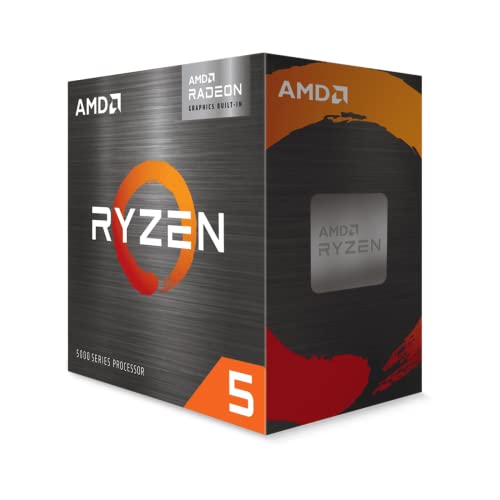 AMD Ryzen™ 5 5600G 6-Core 12-Thread Desktop Processor1.6 x 1.6 x 0.2 inches0.9 PoundsCheck on Amazon




Top 3 picks at a glance
Quick verdict: who should buy the Ryzen 3 PRO 4350G
- Good fit: you want a very low-cost AM4 desktop for browsing, office work, school and light gaming such as Minecraft, Fortnite at low settings, Valorant, CS2 at low settings or older titles; you want to add a discrete GPU later.
- Skip it: you want to play recent AAA games at 1080p without a GPU (any 4-core Vega 6 APU struggles there); you want a retail box with a cooler and a clear warranty; you prefer a chip with room to upgrade into 6 or 8 cores (the AM4 socket allows this, but the 4350G itself does not).
Ryzen 3 PRO 4350G specs
The figures below match widely published specifications from AMD and hardware databases. The 4350G is a monolithic 7 nm Zen 2 APU.
| Spec | Ryzen 3 PRO 4350G |
|---|---|
| Architecture | Zen 2 (Renoir) |
| Cores / threads | 4 / 8 |
| Base / max boost clock | 3.8 GHz / 4.0 GHz |
| L2 / L3 cache | 2 MB total (512 KB per core) / 4 MB |
| TDP | 65 W (configurable down to 45 W) |
| Socket | AM4 |
| Memory support | Dual-channel DDR4-3200 |
| Integrated graphics | Radeon Vega 6 (6 compute units, 384 shaders, up to 1.7 GHz) |
| Unlocked multiplier | No, locked |
| Release | July 2020 |
| Typical sale form | OEM or tray, often without a cooler |
PCIe support for the graphics slot is PCIe 3.0 on this APU generation; it is not a PCIe 4.0 part. We did not find a retail boxed edition from AMD, so expect system-builder and OEM sources.
How well does the 4350G game?
The Ryzen 3 PRO 4350G plays light games at 720p and 1080p on low settings, but the 6-compute-unit Vega graphics and shared system memory limit it. With a dedicated graphics card installed, the 4 cores and 8 threads still handle many games at 1080p, though newer titles can hit CPU limits.
The ranges below are approximate and describe the typical class of Vega 6 APU performance in published reviews. They are not measurements we took, and they change with RAM speed and game version.
| Game type | Settings | Expected result |
|---|---|---|
| Esports (Valorant, CS2 older maps, League of Legends) | 720p to 1080p, low | Often playable, roughly 60 to 120 fps depending on the title and map |
| Fortnite, Roblox, Minecraft | 1080p, low or performance mode | Playable, roughly 40 to 70 fps |
| Older AAA (about 2015 to 2018) | 720p to 900p, low | Mostly playable around 30 fps |
| Recent AAA | 720p, lowest, upscaling | Frequently under 30 fps or unplayable |
| With an entry-level discrete GPU (RX 6500 XT or GTX 1650 class) | 1080p, medium | Good for esports and most older titles; the 4-core CPU can limit newer games |
Why RAM speed matters more than usual
Vega 6 shares the system RAM, so memory bandwidth is its main bottleneck. Dual-channel DDR4-3200 gives about 51 GB/s of theoretical bandwidth (3200 MT/s x 8 bytes x 2 channels), while single-channel gives about half. Running one stick can cut iGPU frame rates by a large amount. Always install two matching modules and enable the memory profile in the BIOS.
Productivity and everyday use
Four Zen 2 cores with 8 threads at up to 4.0 GHz are plenty for office applications, web browsing with many tabs, video calls, 1080p video playback and light photo editing. It is not suited to heavy video editing, 3D rendering or game streaming with CPU encoding. As a PRO part it adds business features such as AMD memory guard (memory encryption) and manageability features, which matter mainly for office fleets, not gamers.
Platform: boards, RAM, BIOS and cooler
- Socket and boards: AM4. A320, B450, B550, X470 and X570 boards can run it with the right BIOS. Check the maker’s CPU support list for “Ryzen 3 PRO 4350G” on your exact board, because 4000-series APUs were supported after later BIOS updates on many older boards.
- BIOS: an older board may need a BIOS update before it boots the chip, and if you do not own a compatible CPU to flash with, that can be a blocker. Buy a board that lists the 4000-series G chips on its support page, or ask the seller whether it ships with a current BIOS.
- Memory: two DDR4 modules, 3200 MT/s, 8 GB each is a practical minimum for gaming on an iGPU, because the iGPU also reserves part of the system memory.
- Cooler: OEM chips are often sold without a cooler. Plan for a small AM4 tower or the Wraith Stealth class cooler; 65 W is easy to cool.
- Display outputs: use the motherboard’s HDMI or DisplayPort. Not every board has both, so check the rear panel before buying.
Power and thermals
A 65 W AM4 part may draw about 1.35 times its TDP at its peak, which is roughly 88 W of socket power (PPT). In light use and gaming on the iGPU it draws well below that. The chip can be configured to a 45 W profile in business systems, which makes it popular in small office PCs. Any modest cooler will keep it comfortable, and a small-form-factor case works well.
Worked example: a budget 4350G build and where to spend the money
Assume a small, low-cost PC for school and light gaming. The order in which you spend matters more than the chip itself.
| Priority | Part | Why |
|---|---|---|
| 1 | Two matching 8 GB DDR4-3200 modules | Dual channel roughly doubles bandwidth for the Vega 6 iGPU compared with one stick |
| 2 | B550 or B450 micro-ATX board with a current BIOS | Avoids a no-boot problem and leaves a path to a Ryzen 5000 chip |
| 3 | SSD, NVMe if the board has an M.2 slot | Loading times and responsiveness improve more than a faster CPU would |
| 4 | Basic AM4 cooler | OEM chips often include none |
| 5 | Later: discrete GPU | The largest gaming jump; even an entry card beats Vega 6 |
The iGPU also reserves some system memory. With 16 GB total and a typical 512 MB to 2 GB graphics reservation, you keep 14 GB or more for Windows and games. With 8 GB total, the same reservation leaves little headroom for modern games, so 16 GB is the realistic floor.
Ryzen 3 PRO 4350G vs Ryzen 5 5600G vs Ryzen 5 5500
| Spec | Ryzen 3 PRO 4350G | Ryzen 5 5600G | Ryzen 5 5500 |
|---|---|---|---|
| Architecture | Zen 2 | Zen 3 | Zen 3 (reduced cache) |
| Cores / threads | 4 / 8 | 6 / 12 | 6 / 12 |
| Integrated graphics | Vega 6 | Vega 7 | None |
| TDP | 65 W | 65 W | 65 W |
| Box cooler | Usually none (OEM) | Wraith Stealth in retail box | Wraith Stealth in retail box |
| Best for | Office, school, very light gaming | No-GPU gaming PC | Budget PC that will have a graphics card |
If your PC will have a discrete GPU from day one, the iGPU is irrelevant and the 5500 or 5600 is the better chip. If it will not have one for months, the 5600G wins. The 4350G sits in the middle and mainly wins on availability in office-PC trade-ins.
Troubleshooting a 4350G build
- No display on first boot: plug the monitor into the motherboard output, not a graphics card slot. Update the BIOS if the board predates 4000-series APU support.
- Low iGPU frame rates: confirm two RAM modules are installed in the slots the manual recommends (usually slots 2 and 4) and that the memory profile is enabled.
- Stutter in games: check that the iGPU memory reservation is set to auto or a higher value in the BIOS, and close background apps on an 8 GB system.
- Business features missing: some consumer boards do not expose PRO features; this does not affect gaming.
Ryzen 3 PRO 4350G alternatives
If the 4350G is not available or you want more performance, these are the AM4 options to compare. Specs are from AMD’s published listings.
| Chip | Cores / threads | Graphics | Why consider it |
|---|---|---|---|
| Ryzen 5 5600G | 6 / 12 | Radeon Vega 7 | Zen 3, a clear step up in CPU and iGPU; best AM4 APU for a no-GPU gaming PC |
| Ryzen 7 5700G | 8 / 16 | Radeon Vega 8 | Eight cores for streaming and multitasking alongside iGPU gaming |
| Ryzen 5 5500 | 6 / 12 | None | Cheap 6-core for a build that will use a discrete GPU |
| Ryzen 3 4100 | 4 / 8 | None | Retail-boxed, cooler included, for a GPU-based budget build |
| Ryzen 3 3200G or Ryzen 5 3400G | 4 / 4 or 4 / 8 | Vega 8 or Vega 11 | Older APUs; usually used or leftover |
Is the Ryzen 3 PRO 4350G still worth buying in 2026?
Only at a very low price and for a light use case. The 4350G is a 2020 OEM part, so supply is mostly used, tray or resold stock, and there is no standard consumer warranty path. A Ryzen 5 5600G adds two cores, much better single-thread speed and slightly stronger graphics on the same socket. If your target is “play games without buying a graphics card”, spend the small extra for the 5600G; if your target is “an office PC that can also run Minecraft”, the 4350G is fine.
Decision guide
| Your goal | Pick |
|---|---|
| Office or school PC, light gaming | Ryzen 3 PRO 4350G if cheap and in good condition |
| Gaming without a graphics card | Ryzen 5 5600G |
| Gaming with a discrete GPU, tight budget | Ryzen 5 5500 or Ryzen 5 5600 |
| Small-form-factor, low-power PC | 4350G configured near 45 W, or a 5600G with a low-profile cooler |
Settings that help the 4350G in games
- Enable the memory profile (XMP or DOCP). Without it, DDR4-3200 kits may run at 2133 or 2400 MT/s, which cuts iGPU frame rates noticeably.
- Raise the iGPU memory allocation if the BIOS offers it. Auto is fine for most; a manual 2 GB setting can help older games that check for video memory.
- Use the Balanced or High performance power plan in Windows. Power saver limits clocks and causes stutter.
- Lower resolution and use upscaling. 900p or 720p with AMD FidelityFX Super Resolution in supported games often gives a much smoother result than 1080p native.
- Keep graphics drivers current. AMD’s Adrenalin driver supports the Vega iGPU and sometimes improves older-title behaviour.
Buying options and cautions
- OEM or tray: the normal form. There is typically no cooler, so budget for one.
- Used or pulled from office PCs: common, since PRO chips came in business desktops. Ask for proof it boots and avoid listings with bent-pin photos.
- Sellers that relabel parts: avoid listings whose title or photos do not clearly say Ryzen 3 PRO 4350G with the AMD part number, and avoid unusually cheap offers from unfamiliar sellers.
- Pre-built office PCs: a small business desktop that includes a 4350G can cost less than the parts, but check the PSU, RAM configuration (single channel is common) and BIOS lock-ins from the maker.
Parts that pair well with a 4350G build
AMD Ryzen 5 5600G, the stronger APU
A 6-core, 12-thread Zen 3 APU with Radeon Vega 7 graphics, at 65 W on the same AM4 socket. It is the natural upgrade if you want better iGPU gaming than the 4350G offers, and it works with most B550 and many B450 boards after a BIOS update. Choose it if you plan to play without a graphics card for a while.
As an Amazon Associate we earn from qualifying purchases at no extra cost to you.
MSI PRO B550M-P motherboard
A micro-ATX AM4 board listed for Ryzen 5000, 5000 G-series, 4000 G-series and 3000 G-series processors, which covers the 4350G generation and gives an upgrade path to a 5600G. A B550 board also provides PCIe 4.0 for a future discrete GPU. Confirm that your chosen revision lists the exact CPU you buy.

ASRock B550M-HDV motherboard
A budget micro-ATX AM4 option that lists support for Ryzen 5000, 4000 and 3000 series. It offers video outputs on the rear panel for iGPU use, and its small size suits compact cases. Good for a basic office or starter gaming build.

TEAMGROUP T-Force Vulcan Z 16 GB DDR4-3200 kit
A 2×8 GB kit at 3200 MT/s with CL16, matching the 4350G’s supported memory speed. The dual-channel pair matters more than usual here because the iGPU shares system memory. Enable the XMP or memory profile in the BIOS to reach the rated speed.
AMD Wraith Stealth AM4 cooler
A slim stock-style cooler for AM4 with a 4-pin fan connector. The 4350G’s 65 W rating is within what this class of cooler handles, and it is a cheap fix for tray chips that ship without one. Expect more fan noise than a tower cooler under load.

Thermalright Assassin X120 Refined SE cooler
A single-tower cooler with four heat pipes and a 120 mm PWM fan. It is quieter than a slim stock-style cooler and suits a small build that you may upgrade to a Ryzen 5 or 7 later. Check your case height limit before ordering.

How we chose and what this review is based on
This review is research-based. We did not use these products ourselves; specs come from AMD-published information and hardware databases, and performance statements are approximate ranges drawn from general review findings. The store listing we found for the 4350G itself came from a third-party seller of an OEM part, so we did not feature it as a product pick.
Ryzen 3 PRO 4350G FAQ
Is the Ryzen 3 4350G the same as the Ryzen 3 PRO 4350G?
People use both names for the same chip. The part AMD listed is the PRO version, sold mainly to system builders and business PCs.
Can the Ryzen 3 PRO 4350G run games without a graphics card?
Yes, light and older games at 720p to 1080p on low settings. Recent AAA titles are generally not playable on its Vega 6 graphics.
Does the 4350G come with a cooler?
Often not. OEM and tray units usually ship without one, so buy an AM4 cooler separately unless the listing says one is included.
What motherboard do I need for the 4350G?
An AM4 board with a BIOS that supports the 4000 G-series. B550 boards are the safest; older A320, B450 or X470 boards may need an update first.
Is the 4350G good for a budget gaming PC?
It is acceptable for esports and light games, but a Ryzen 5 5600G or Ryzen 5 5500 with a graphics card gives far better results for a modest extra cost.
How much RAM does the 4350G need?
16 GB as two 8 GB modules in dual channel is a good target, because the iGPU takes a share of system memory and needs the bandwidth.
Can I upgrade from the 4350G later?
Yes, on the same AM4 board, to a Ryzen 5000-series chip if the board’s BIOS supports it. Check the maker’s CPU list before you buy the new chip.
Sources
- AMD, Ryzen PRO 4000 G-series product information
- WikiChip, Ryzen 3 PRO 4350G entry
- TechPowerUp CPU database, Ryzen 3 PRO 4350G entry
- Motherboard makers’ AM4 CPU support lists
Last updated: October 2026