
The Lian Li O11 Vision Compact is the best glass panel PC case for a showcase build: its three-panel glass design shows the front, side and top of the system, its dual-chamber layout hides the power supply and cables, and it supports 360mm radiators and long graphics cards in a body smaller than a full tower. Budget builders who want panoramic glass and pre-installed lighting should look at the FOIFKIN F600, while smaller systems fit the MOROVOL Micro-ATX model. A “showcase build” is a PC arranged to be seen, so glass coverage, cable hiding and lighting matter more than raw airflow.
Our Top Picks
 MOROVOL MATX PC Case13.39"D x 10.87"W x 12.44"H13.39 x 10.87 x 12.44 inches10.7 poundsCheck on Amazon



Top 3 picks at a glance
Quick List
- Lian Li O11 Vision Compact (Black) – best for a premium three-panel glass build in black
- FOIFKIN F600 – best for panoramic glass with seven pre-installed ARGB fans
- MOROVOL V3 Micro-ATX – best for a compact panoramic-glass build
- Lian Li O11 Vision Compact (White) – best for the same design in a white theme
- MOROVOL ATX with Diamond Mesh Front – best for an airflow-focused single glass panel build with RGB fans
- GAMDIAS ATX Mid Tower – best for a budget-friendly ATX case with four ARGB fans
Which One Is Right for You?
| If you… | Choose |
|---|---|
| want the most polished showcase and will add your own fans | Lian Li O11 Vision Compact (Black) |
| are building around white parts | Lian Li O11 Vision Compact (White) |
| want wraparound glass and a pile of lighting included | FOIFKIN F600 |
| have a Micro-ATX board and a small desk | MOROVOL V3 Micro-ATX |
| care about cooling first and showing off second | MOROVOL ATX with Diamond Mesh Front |
| need a simple ATX case with several included fans | GAMDIAS ATX Mid Tower |
Showcase cases split into two camps. The premium route, led by the Lian Li design, gives you a distinctive layout but expects you to buy fans and cable accessories. The value route includes fans and lighting but compromises on materials and finishing. Decide how much of the visual effect you want from the case itself versus from the parts inside it.
All 6 Picks in Detail
1. Lian Li O11 Vision Compact (Black) – Best Premium Three-Panel Glass Build
As an Amazon Associate we earn from qualifying purchases at no extra cost to you.

Lian Li’s O11 line popularized the dual-chamber showcase layout, and the Vision Compact brings it to a smaller body. The listing describes a compact ATX case with back-connect support and three panels of glass, so the front, side and top all show the interior. The motherboard and graphics card sit on one side, while the power supply and most cabling live behind the motherboard tray, which keeps the visible chamber tidy. It suits anyone who wants a built-to-be-seen PC and will supply their own fans.
Since fans are usually not included, budget for a set of 120mm fans, ideally in matching color and lighting, plus a hub for the lighting cables. Many owners fill the side and bottom with intake fans and put exhaust fans at the rear and top, which keeps the glass-front chamber well ventilated. Allow extra time for the first build, because the two-chamber layout rewards planning cable routes before parts go in.
- Compact ATX dual-chamber case with three-panel glass, per the listing
- Back-connect motherboard support, which moves the connectors to the rear of the board
- Supports 360mm radiators and graphics cards up to about 408mm per the maker’s information; confirm on the product page
- CPU cooler clearance around 167mm per retailer specifications; confirm on the product page
- Fans are typically not included; confirm on the listing
Pros:
- Clean sightlines and a layout designed for display
- Room for large graphics cards and radiators in a mid-size body
Cons:
- Fans must be bought separately, which adds to the build budget
- Glass-heavy design needs careful airflow planning
It is the more refined choice compared with the FOIFKIN F600, which includes lighting but not the same level of design polish.
2. FOIFKIN F600 – Best Panoramic Glass with Pre-Installed Fans

The F600 is built for builders who want the showcase look without buying much else. It is an ATX mid-tower with a 270-degree panoramic glass design, a Type-C port and seven pre-installed PWM ARGB fans according to the listing. That fan count is unusual at this level and means you can power up a lit build immediately. It suits a first-time builder who wants a window into the case and a coordinated lighting scheme.
Seven fans can create a lot of noise and cabling if all are run at full speed, so use the motherboard’s fan curve or the case’s controller to lower speed at idle. The panoramic front also means the fans are visible, which is part of the appeal. Treat the included set as a starting point, and swap any that prove too loud for quieter models later.
- ATX mid-tower with 270-degree panoramic glass per the listing
- Seven pre-installed PWM ARGB fans per the listing
- USB Type-C front I/O per the listing
- Maker information indicates support for multiple 360mm radiators and graphics cards around 400mm; confirm on the listing
- CPU cooler clearance near 170mm per retailer information; confirm
Pros:
- A large fan set is included, so the case is ready to light up
- Wraparound glass gives a view into the system from two sides
Cons:
- Included fans may be basic, and many fans can be noisy at full speed
- Glass-heavy front limits intake unless the fans are well arranged
Against the Lian Li O11 Vision Compact, it offers more included hardware and less brand polish.
3. MOROVOL V3 Micro-ATX – Best Compact Panoramic-Glass Build

Small showcase builds are a popular trend, and this MOROVOL case supports them with a Micro-ATX form factor, a 270-degree panoramic tempered glass design and three pre-installed fans. It suits a desktop where space is limited and the owner wants visible components without a tower’s footprint. Because the case is small, parts need to be chosen with care: the graphics card, cooler and power supply all have tighter limits than in an ATX case.
Tight cases reward careful part selection. Choose a graphics card well under the stated length, a power supply that matches the case’s limit, and a cooler comfortably below the height rating. A compact air cooler or a 240mm liquid cooler at the top usually fits better than a tall tower. With that planning, the result is a small, bright desktop that still shows the parts clearly.
- Micro-ATX case with 270-degree panoramic tempered glass per the listing
- Three fans pre-installed, USB 3.0 front port per the listing
- Graphics card clearance listed near 320mm by the seller, though other sources say 335mm; use the lower figure
- CPU cooler clearance near 158mm per retailer information; confirm
- Limited power supply length; confirm on the product page
Pros:
- Small footprint with a large glass area
- Pre-installed fans reduce the shopping list
Cons:
- Tight clearances restrict graphics cards, coolers and power supplies
- Micro-ATX boards offer fewer slots
It is the small counterpart to the FOIFKIN F600, trading size for fitting constraints.
4. Lian Li O11 Vision Compact (White) – Best for a White Showcase Theme

This is the same O11 Vision Compact in white. Everything about the structure is shared with the black model: compact ATX body, three-panel glass, back-connect support and the dual-chamber layout. The only change is the color, which matters in a themed build with a white graphics card, white memory and a white cooler. It suits builders who want the interior to look clean and bright, though white cases show dust and fingerprints more easily.
To get the most from a white build, match the details: white cables or sleeved extensions, a white power supply shroud if available, and fans in the same finish. Lighting also looks different on white surfaces, reflecting more light into the case, so many builders choose softer ARGB settings. Use gloves while building, since oils from your hands will mark the finish.
- Compact ATX dual-chamber case with three-panel glass, white finish per the listing
- Back-connect motherboard support per the listing
- Radiator and graphics card support the same as the black model per the maker; confirm
- Fans are typically not included; confirm on the listing
- Same CPU cooler clearance as the black version, roughly 167mm per retailer information
Pros:
- Matches a white-themed build without painting or wraps
- Same flexible layout as the black version
Cons:
- White surfaces show dirt and fingerprints
- Requires white parts elsewhere to look right
Choose it over the black model only if the parts you own or plan to buy are white.
5. MOROVOL ATX with Diamond Mesh Front – Best Airflow-Focused Case with a Glass Side
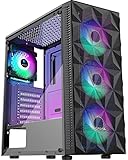
This case sits at the practical end of the list. It has a tempered glass side panel and a diamond-shaped mesh front, plus four pre-installed RGB fans, so it prioritizes airflow over a full wraparound view. It is a good fit for a gaming PC that runs hot and needs fresh air, and it still shows off the motherboard and graphics card through the side window. It is a showcase case in the traditional sense, with one glass panel instead of several.
The mesh front also makes maintenance easier, since dust shows up on a removable filter or the mesh itself rather than inside the case. If your build is a gaming system with a power-hungry graphics card, the extra intake can lower temperatures noticeably compared with a glass-fronted case. Check the cable room behind the tray before you buy, and plan a tidy route for the main power leads.
- ATX mid-tower with tempered glass side panel and diamond mesh front per the listing
- Four pre-installed RGB fans per the listing; confirm whether the lighting is addressable
- USB 3.0 front I/O per the listing
- Radiator and graphics card limits not stated in the listing name; confirm on the product page
- Designed for airflow with a ventilated front
Pros:
- Mesh front supports better intake than glass fronts
- Fans are included
Cons:
- Only a side window, so the view is narrower
- Cable management room may be modest; confirm on the listing
It is the conventional alternative to the wraparound designs above, with better cooling potential.
6. GAMDIAS ATX Mid Tower – Best Simple ATX Case with Four ARGB Fans

The GAMDIAS case is a straightforward ATX mid-tower with tempered glass, a front airflow mesh and four 120mm ARGB fans built in. The listing states room for up to six 120mm fans, support for a 340mm graphics card and, in the full title, a 360mm radiator and 160mm CPU cooler. It suits a first or second build where the goal is a lit, glass-sided PC with a sensible layout, and it leaves room to grow with more fans.
A sensible plan is to use the four included fans as two front intakes, one rear exhaust and one top exhaust, then add two more if the graphics card runs hot. The listing’s 160mm cooler limit suits most mid-size air coolers, and the 360mm radiator support at the front leaves room for a liquid upgrade later. It is an easy case to build in, which counts for a lot on a first project.
- ATX mid-tower with tempered glass and front airflow mesh per the listing
- Four 120mm ARGB fans built in, room for up to six per the listing
- Graphics card clearance of 340mm per the listing
- 360mm radiator support and 160mm CPU cooler clearance per the full listing; confirm
- Standard ATX motherboard support
Pros:
- Simple, familiar layout that is easy to build in
- Four ARGB fans included, with room to add more
Cons:
- 340mm graphics card limit rules out the longest cards
- Less dramatic than a dual-chamber showcase design
Next to the MOROVOL mesh case, it offers addressable lighting and a similar approach to airflow.
Specs Compared
| Product | Motherboard size | Glass layout | Included fans | Radiator support | GPU / cooler clearance |
|---|---|---|---|---|---|
| Lian Li O11 Vision Compact (Black) | ATX (back-connect supported) | Three-panel glass | Confirm on listing; typically none | 360mm per the maker | About 408mm / 167mm; confirm on listing |
| FOIFKIN F600 | ATX | 270-degree panoramic glass | 7 PWM ARGB | Confirm on listing | About 400mm / 170mm; confirm on listing |
| MOROVOL V3 Micro-ATX | Micro-ATX | 270-degree panoramic glass | 3 | Confirm on listing | About 320mm / 158mm; confirm on listing |
| Lian Li O11 Vision Compact (White) | ATX (back-connect supported) | Three-panel glass | Confirm on listing; typically none | 360mm per the maker | About 408mm / 167mm; confirm on listing |
| MOROVOL ATX with Diamond Mesh Front | ATX | Glass side panel, mesh front | 4 RGB | Confirm on listing | Confirm on listing |
| GAMDIAS ATX Mid Tower | ATX | Tempered glass, mesh front | 4 ARGB | 360mm per the full listing | 340mm / 160mm |
How We Chose These
We chose these cases from the current catalog set for the topic, then compared them using the manufacturer pages and retailer listings. The factors were glass coverage, motherboard size, included fans, radiator support, and graphics card and cooler clearance. We weighted glass layout heavily because the topic is showcase builds, and we noted where a case focuses on airflow instead. Several clearance figures differ between sellers, so we used the lower number when sources disagreed and asked you to confirm the rest on the product page. We do not claim to have built in these cases ourselves.
What to Look For
Glass layout and what it shows
Not all glass panel cases show the same thing. A single side window displays the motherboard and graphics card but hides the rest. Panoramic designs, which wrap the front corner into the side, let you see more of the build and make fans and lighting visible from two angles. Three-panel designs add a top or front panel as well. More glass means more visual impact, but also more heat held in and more fingerprints to wipe. Tempered glass is stronger than regular glass and breaks into small pieces, but it is still fragile at the edges, so never lean on a panel or lift the case by it.
Airflow versus appearance
A glass front looks dramatic but limits where air can enter. Cases with a glass front rely on side or bottom intake, which works well with enough fans but can run hotter than a mesh front. A simple approach is positive pressure: more intake fan airflow than exhaust, so dust is pushed out of gaps instead of pulled in. For a showcase build, use at least two front or side intake fans and one rear exhaust fan, and add top exhaust for hot processors. If the case has a mesh front, the lighting will still show through, giving a compromise.
Clearance checks that avoid returns
Before buying, write down three numbers: your graphics card length, your cooler height and your radiator size. A rule of thumb is to leave at least 10mm between the card and any front fan or radiator, and 5mm above a tower cooler. Worked example: a 336mm graphics card does not fit a case rated for 320mm, and with a front radiator and fans installed, the usable space may be shorter than the listed figure. Compare these numbers with the case specifications, and when two sources disagree, assume the smaller one.
Cable management and the dual-chamber idea
A showcase build is only as good as its cabling. Dual-chamber cases hide the power supply and extra cable length behind the motherboard tray, so only the necessary cables are visible. Back-connect motherboards go further, placing power and fan connectors on the rear so almost no cable shows. For other designs, use cable combs, sleeved extensions and Velcro ties, and route the main cable bundle where the glass does not show it. Plan the order of installation, since a tidy build takes more time than a quick one.
Lighting standards
ARGB fans use a 3-pin 5V connector and RGB fans may use a 4-pin 12V connector. These are not interchangeable, and plugging a 5V ARGB connector into a 12V header can damage the lights. Confirm what your motherboard offers and what the fans require. Many cases with several lit fans include a small hub or controller, which saves headers on the motherboard.
Dust, filters and long-term upkeep
Showcase builds show every speck of dust, so filters matter. Look for removable filters on the intake sides, bottom and any front mesh, and clean them every month or two. Tempered glass panels attach with thumbscrews, hinges or magnets; check how easy they are to remove, because you will take them off often. Keep the case away from carpet to reduce dust at the bottom intake, and wipe the glass with a dry microfiber cloth before showing the build. These habits keep the display looking good long after the first day.
Questions
Are glass panel cases bad for cooling?
The glass itself does not heat the system, but glass fronts reduce intake area. With enough fans and good placement, a glass case can run cool, and cases with mesh front panels give extra airflow.
Is tempered glass safe to handle?
It is strong, but edges and corners are weak points. Remove the panel before moving the case, set it on a soft surface and avoid pressing on it. If it cracks, replace it, since damaged glass can shatter further.
Do I need back-connect parts for a clean build?
No, but they help. A back-connect motherboard puts connectors on the back, so fewer cables appear in the main chamber. You can still build a tidy system with a standard board by routing cables carefully.
Will a long graphics card fit?
Compare the card’s length with the case’s rating and leave a few millimeters of margin, more if a front radiator is fitted. Cases like the Lian Li support very long cards, while compact Micro-ATX models have lower limits.
How do I clean a glass case?
Use a microfiber cloth and a glass-safe cleaner on the glass, and a soft brush or compressed air on the fans and filters. Do not spray cleaner directly into the case.
Is a white case harder to keep clean?
Yes. White surfaces show dust, fingerprints and cable marks more than black ones. A regular dusting routine keeps them looking sharp.
Update History
- October 20, 2026 – Initial publication; product set drawn from current catalog listings.
- Check the product page for current specifications and availability before buying.
Sources
- Manufacturer product and specification pages for Lian Li
- Retailer listing titles and specification fields for FOIFKIN, MOROVOL and GAMDIAS cases
- Retailer specification summaries for graphics card, cooler and radiator clearance figures
Related guides
- Best Budget HP Laptops: Ten Listings Decoded by Processor, RAM and Reseller Tags: 10 Compared (2026)
- 10 Best Gaming Laptops for Singapore: Twelve Widely Sold Options and an Import Checklist (2026)
- Ryzen Threadripper 1900X for Gaming: Specs and Is It Worth It?
- Ryzen 3 PRO 4350G Review for Gaming in 2026: Specs and Verdict


