
For most gamers who want strong contrast without paying OLED money, a 27-inch 1440p mini LED monitor such as the AOC Q27G3XMN or Q27G40XMN is the practical entry point, while 4K buyers should look at models like the KTC M27U6 or KOORUI S2741LM, and enthusiasts can step up to the LG 27GM950B or Samsung Odyssey Neo G8. Reviewers in 2026 stress that the number of dimming zones, not the words mini LED on the box, decides how good the picture looks.
As an Amazon Associate we earn from qualifying purchases at no extra cost to you.


Our Top Picks
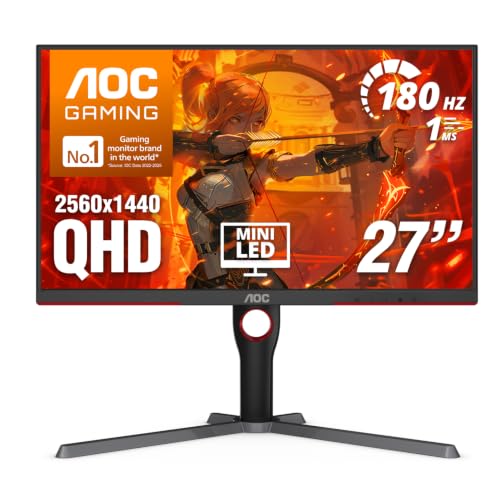 AOC 27 Inch Gaming Monitor QHD 180Hz Mini-LED27" 180Hz Mini-LED10.19 x 23.82 x 20.94 inches15.6 PoundsCheck on Amazon
 LG 27GM950B-B 27-inch Ultragear evo Mini-LED IPS 5K9.8 x 24.2 x 21.1 inches18.7 PoundsCheck on Amazon


Top 3 picks at a glance
Mini LED Monitors at a Glance
| Monitor | Best for | Key stated specs (as reported) | Limits |
|---|---|---|---|
| AOC Q27G3XMN | Value QHD mini LED | 27-inch, 1440p, 180Hz, 336 zones (ReviewConsensus) | Lower zone count, visible blooming |
| AOC Q27G40XMN | More zones at 1440p | 1,152 zones, 180Hz (TFTCentral) | Peak brightness below premium models |
| MSI MAG 274QPF X30MV | Competitive play | 1,152 zones, up to 300Hz (TFTCentral) | Focus on speed over color extras |
| KTC M27U6 | Affordable 4K mini LED | 27-inch 4K, mini LED (Exponation) | Less known brand; support varies by region |
| KOORUI S2741LM | 4K with strong HDR | 4K, 160Hz, 1,152 zones, HDR 1400 certification (TFTCentral) | Brand has a smaller track record |
| LG 27GM950B | Premium high-resolution | 27-inch 5K, 165Hz, 2,304 zones, 1,250 nits peak (Display Ninja) | Premium tier; demanding on the GPU |
| Samsung Odyssey Neo G8 | Large fast VA | 32-inch, 240Hz, 1,196 zones (TFTCentral) | VA panel behavior; large size |
| MSI MPG 274URDFW E16M | 4K with very high refresh | 27-inch 4K, up to 320Hz (Exponation) | Needs a powerful GPU to use the refresh |
Model availability changes by region, and some of these appeared in outlet lists with different names. Confirm the exact variant name on the maker’s page before buying.
What Mini LED Actually Is
A mini LED monitor uses a backlight made of many small LEDs grouped into dimming zones. When the picture is dark in one area, those zones dim, giving deeper blacks and brighter highlights than a standard edge-lit LCD. The panel in front is still an LCD, usually IPS or VA, so contrast and response time still depend on the panel type.
Why Zone Count Matters
With a few hundred zones, a bright cursor or subtitle on a dark scene can create a visible halo, known as blooming. With over a thousand zones, the effect shrinks, but it does not vanish, because each zone still covers a patch of the screen. OLED lights every pixel independently, so it does not bloom, but OLED monitors cost more and carry burn-in considerations.
- Around 300 zones: Noticeable lift over regular IPS; blooming visible in dark games.
- Around 1,000 zones: Better highlight control; suited to HDR movies and games.
- 2,000 zones and above: Premium models with the most accurate local dimming.
Specs That Matter Beyond Zones
- Peak brightness: HDR 1000 or HDR 1400 labels indicate bright highlights, and they matter only if local dimming works well.
- Refresh and response: Dimming algorithms can add processing delay. Reviewers measure input lag separately, so look for that data.
- Panel type: IPS offers better viewing angles. VA gives deeper native contrast but slower dark transitions.
- Resolution: 1440p suits mid-range GPUs. 4K needs a card such as an RTX 5070 Ti or Radeon RX 9070 XT class to reach high frame rates.
- Connections: DisplayPort 1.4 or 2.1 for high refresh rates, and HDMI 2.1 if you use a console.
Fit and Compatibility Notes
- Mini LED monitors are often thicker and heavier than regular panels, so confirm your desk and any monitor arm can carry the weight.
- HDR on Windows needs to be enabled in display settings, and some games need their HDR option switched on separately.
- Local dimming settings are often hidden in the monitor’s on-screen menu. Reviewers recommend trying different dimming levels for desktop and game use, because desktop use can show zone halos around windows and text.
- Fan noise exists on some bright models, and the cooling design affects how quiet a bedroom setup is.
- For consoles, check which resolution and refresh rate the HDMI ports support.
Budget Tiers
| Tier | Typical choice | What to expect |
|---|---|---|
| Budget | AOC Q27G3XMN, AOC Q27G40XMN | 1440p, 180Hz, a few hundred to about 1,000 zones |
| Mid-range | KTC M27U6, KOORUI S2741LM, MSI MAG 274QPF X30MV | 4K or 300Hz class, over 1,000 zones |
| Premium | LG 27GM950B, Samsung Odyssey Neo G8, MSI MPG 274URDFW E16M | High resolution, brightness or refresh rate extremes |
Pick X If You…
| If you… | Pick | Why |
|---|---|---|
| want better blacks on a tight budget | AOC Q27G3XMN | Named value pick by ReviewConsensus |
| want more zones without going 4K | AOC Q27G40XMN | 1,152 zones per TFTCentral |
| play competitive shooters | MSI MAG 274QPF X30MV | Up to 300Hz with mini LED |
| want the lowest-cost 4K mini LED | KTC M27U6 | Exponation’s 4K value choice |
| care most about HDR brightness | KOORUI S2741LM or LG 27GM950B | HDR 1400 label, high peak brightness |
| want a big immersive panel | Samsung Odyssey Neo G8 | 32-inch, 240Hz |
Alternatives
- OLED monitors: Per-pixel lighting and very fast response, but higher cost, lower sustained full-screen brightness, and care needed for static images.
- Standard IPS high-refresh monitors: Cheaper, no blooming, but flatter contrast.
- VA monitors: A cost-effective way to get stronger contrast without local dimming.
Mini LED in Daily Use
On the desktop, mini LED behaves differently from games. White windows and black backgrounds meet along sharp edges, and zones can light up in a way that makes text look haloed. Many monitors offer a local dimming toggle or levels, and reviewers often advise dropping to low or off for productivity, then returning to a higher setting for movies and HDR games. Some premium models improve this by combining higher zone counts with better algorithms.
HDR Realities
Not every HDR badge is equal. A monitor with HDR 1000 or HDR 1400 certification should reach a high peak brightness in small areas, and a well-tuned mini LED can deliver specular highlights that make sunlight, flames and neon stand out. Windows HDR handling is improving but still needs a manual switch and occasional calibration with the Windows HDR Calibration app. In games, use the in-game peak brightness slider to match the monitor’s stated peak.
Choosing Between Mini LED, OLED and Standard IPS
If your room is bright and you spend hours on documents, mini LED or standard IPS avoids burn-in worries. If you mostly game in the dark and want the fastest pixel response, OLED is the usual alternative reviewers cite, accepting lower peak brightness and more careful use. Standard IPS remains the sensible choice for those who care more about frame rate per unit spent than contrast.
Buying Checklist
- Look for independent measurements of local dimming performance, not only marketing zone counts.
- Look up input lag with dimming on, as some algorithms add delay.
- Read the warranty and its policy for backlight faults.
- Match the panel size to your desk and the resolution to your graphics card.
- Find out whether firmware updates are available, since dimming behavior can improve with updates on some models.
Gaming Considerations
Mini LED backlights switch zones on and off in time with the image, and the controller needs a few milliseconds to do so. Fast scenes with small bright objects, like tracer rounds or a crosshair in a dark map, can briefly show a trailing glow as zones catch up. Reviewers who publish input lag figures generally report that the better models keep latency close to regular IPS panels, but the numbers vary by dimming mode, so read them for the exact model.
Refresh rate matters too. A 1440p screen at 180Hz is easy for a mid-range card to feed, while 4K at 160Hz or higher needs an RTX 5070 Ti or Radeon RX 9070 XT class GPU, and pushing a 300Hz panel to its limit is realistic only in esports titles. If the monitor will be shared with a console, confirm that its HDMI 2.1 ports support 120Hz at the resolution you want.
Size and Resolution Choices
Twenty-seven inches is the most common size, offering good pixel density at 1440p and a sharp image at 4K. Thirty-two inches suits 4K and gives a more immersive view but needs more desk depth. Ultrawide mini LED models, such as the Acer Predator X34 X0 which Display Ninja lists with 2,392 zones, add field of view for racing and simulation games but demand more from the GPU. A 5K model like the LG 27GM950B has very high pixel density, which improves text, while gaming at that resolution relies on upscaling.
Frequently Asked Questions
Is mini LED better than OLED for gaming?
It depends on priorities. Mini LED gets brighter and avoids burn-in concerns, while OLED has no blooming and faster pixel response. Many buyers choose mini LED for mixed desktop and gaming use.
What is blooming?
Blooming is a halo of light around bright objects on dark backgrounds, caused by a dimming zone being larger than the object. More zones reduce but do not remove it.
Do I need 1,000 or more zones?
Not necessarily. A few hundred zones still lift contrast over a regular IPS. Above 1,000, highlights in HDR content look more controlled, which matters if you watch movies or play HDR games often.
Will a mini LED monitor work with my GPU?
Yes. Any recent Nvidia or AMD card works. For 4K at high frame rates, a card in the RTX 5070 Ti or RX 9070 XT class is a sensible match.
Does mini LED suffer burn-in?
The LCD and LED backlight design is not prone to the permanent image retention that affects OLED, so it is considered safer for static desktop elements.
Should I use local dimming on the desktop?
Many reviewers switch it off or lower it for desktop work, since halos can appear around cursors and windows. Turn it back on for games and video.


