
A mini PC for work should do three things: run your office software without stutter, drive the monitors you already own, and stay out of the way on a crowded desk. Of the six machines below, the GMKtec G10 and BOSGAME E5 Plus look best for a main work computer because of their Ryzen processors and extra display and network connections, while the KAMRUI AK1PLUS suits lighter use with 16GB of memory. The origimagic C3 is better described as a thin client or signage box. These are third-party brands, so check warranty terms and the operating system before ordering.
Our Top Picks
 Origimagic C3 Mini PC Intel Core i3-5005U5005U 8+512GB5.04 x 5 x 1.69 inches1.9 PoundsCheck on Amazon


Top 3 picks at a glance
Short list by job
As an Amazon Associate we earn from qualifying purchases at no extra cost to you.
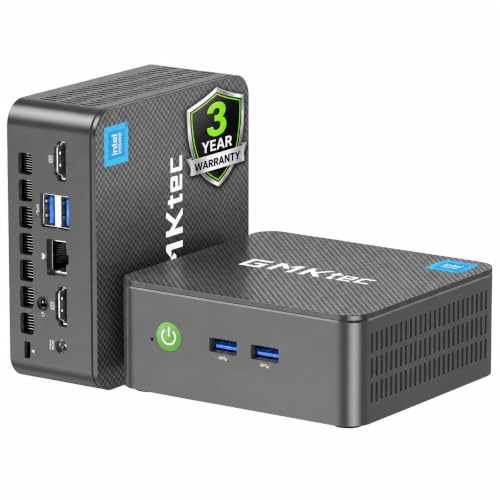


- GMKtec G10 – best for a daily-driver desk with up to three displays
- BOSGAME E5 Plus – best for network-heavy setups and multi-monitor desks
- KAMRUI AK1PLUS – best for simple office tasks with room to add a second drive
- BOSGAME E2 Plus – best for a low-cost study or back-office PC
- GMKtec G3S – best for a basic, quiet front-desk machine
- origimagic C3 – best for signage, kiosks and thin-client use
Specs as the titles state them
| Model | Type | Key specs in the title | Best for |
|---|---|---|---|
| GMKtec G10 | Mini PC | Ryzen 5 3500U, 16GB DDR4, 1TB SSD, triple 4K, HDMI 2.1, USB-C, 2.5G LAN | Main work PC |
| BOSGAME E5 Plus | Mini PC | “Ryzen 5400U”, 8GB upgradable RAM, 256GB SATA SSD, dual 2.5G LAN, triple display, W11 | Multi-display and network use |
| KAMRUI AK1PLUS | Mini PC | Celeron N5095, 16GB RAM, 256GB SSD, dual 4K, 2.5-inch SSD expansion | Light office work |
| BOSGAME E2 Plus | Mini PC | Ryzen 5 3501U (as listed), 8GB RAM, 256GB SSD, triple 4K, Gigabit Ethernet | Study and back office |
| GMKtec G3S | Mini PC | Intel N95, 8GB DDR4, 256GB SSD, dual HDMI, 3x USB 3.2, Wi-Fi 5, RJ45 | Front desk |
| origimagic C3 | Mini PC / thin client | Core i3-5005U, 8GB, 512GB SSD, 2 HDMI, Gigabit LAN, Wi-Fi 5 | Signage and kiosks |
The six mini PCs in detail
GMKtec G10: the most complete desk machine in the group
The title lists a Ryzen 5 3500U, 16GB of DDR4, a 1TB SSD, triple 4K display output through HDMI 2.1 and USB-C, and a 2.5G Ethernet port. On paper that is the best balance of memory, storage and connectivity in this set, and the 1TB drive spares you an immediate upgrade.
The Ryzen 3500U is an older laptop-class chip, so expect competent office speed and not workstation speed. The title also mentions Proxmox, a virtualization platform, which tells you the seller expects hobbyist server use; that is a bonus, not a promise of performance. Operating system, noise level and whether RAM can be swapped are not stated, so read the product details before assuming any of them. Before paying, compare the two Type-C and HDMI claims with your monitors, and ask whether the SSD is a standard M.2 stick or a soldered module, since that decides how easily you can replace it if it fails.
Pros
- 16GB RAM and 1TB SSD in the title
- Triple-display output and a 2.5G LAN port
- Suitable for light virtual machines or a home lab
Cons
- Older-generation processor
- Operating system and upgrade options are not spelled out
Who it’s for: professionals who want one small box for spreadsheets, calls and several screens.
Who should skip it: buyers who need strong performance for video editing or large builds.
BOSGAME E5 Plus: dual network ports and a rare upgradable-RAM note
BOSGAME gives this unit a processor name that is hard to verify: the title says “Ryzen 5400U”, which does not match a common product naming scheme, so look for the exact model in the specification list. The rest of the title reads better: 8GB of upgradable RAM, a 256GB SATA SSD, dual 2.5G LAN, Wi-Fi 5, Bluetooth 5.0, triple 4K via HDMI, DisplayPort and Type-C, and Windows 11.
The twin 2.5G ports and the “soft router” wording point to people who want to route traffic or segment a small office network. For an ordinary desk job they are a bonus. The SATA drive is slower than NVMe but fine for office use. Eight gigabytes is the limit to watch, so plan to use the stated upgrade path if you run many applications. One practical check: confirm which of the three video outputs can run at 4K 60Hz at the same time, and whether the DisplayPort is full size. Seller titles usually quote the best case, and a multi-monitor desk is the first place a mismatch shows up.
Pros
- Upgradable RAM mentioned in the title
- Dual 2.5G Ethernet
- Windows 11 stated
Cons
- Processor name is unclear and must be verified
- Only 8GB and a SATA SSD as supplied
Who it’s for: small offices that need two network ports and several monitors on one desk.
Who should skip it: anyone who wants an NVMe drive or more than 8GB out of the box.
KAMRUI AK1PLUS: a 16GB entry model with a drive bay
KAMRUI lists a Celeron N5095 reaching 2.9GHz, 16GB of RAM, a 256GB SSD, dual 4K display output, Wi-Fi, Bluetooth and Ethernet. It also says it supports a 2.5-inch SSD for expansion, so storage can grow without replacing the system drive.
The N5095 is an entry-level chip, built for basic computing in a low-power footprint. It should manage browsing, office documents and video calls, though it will feel slower than the Ryzen models when you push heavier applications. Its 16GB of memory is an advantage over the 8GB units for people who keep many tabs open. The title does not name an operating system, so verify that before purchase. If you plan to add the second drive, check how it is mounted and whether a cable is included, because the title says only that expansion is supported. Also ask what the warranty period is and who handles repairs, since the brand is lesser known.
Pros
- 16GB RAM stated
- Room for a 2.5-inch SSD
- Dual 4K display output
Cons
- Entry-level processor
- Operating system and port counts not named
Who it’s for: reception desks, home offices and anyone who values memory over processor speed.
Who should skip it: buyers running design software, compilers or heavy spreadsheets.
BOSGAME E2 Plus: the budget Ryzen with three-screen output
This is the lowest-priced Ryzen unit in the group. The title cites a Ryzen 5 3501U (check the listing, because that exact designation is unusual), 8GB of RAM, a 256GB SSD, triple 4K display through USB-C and dual HDMI, and Gigabit Ethernet. It is pitched at office, business and study use.
As a second computer or a classroom machine, those specifications make sense. The 8GB and 256GB combination is the minimum you would want for a work PC today, and the title does not say whether either can be expanded. Wireless standards and the operating system are also missing, so ask before you order. If the processor turns out to be a rebadged older part, treat it as an entry-level Ryzen. A sensible way to de-risk this purchase is to keep your packing slip, check the processor name in Windows System Information on arrival, and compare it with the listing. A mismatch is grounds for a return.
Pros
- Ryzen-class processor at a low tier
- Three-display output through USB-C and HDMI
- Gigabit Ethernet
Cons
- Processor model needs verification
- Memory and storage upgrade options unknown
Who it’s for: students, small shops and secondary desks that need multiple screens on a budget.
Who should skip it: people who need a lot of local storage or more than light multitasking.
GMKtec G3S: simple, quiet-leaning and well-connected
The G3S pairs an Intel N95 (turbo up to 3.4GHz per the title) with 8GB of DDR4 and a 256GB SSD. Connectivity is clearly listed: dual HDMI for 4K, three USB 3.2 ports, Wi-Fi 5, Bluetooth 5.0 and an RJ45 Ethernet jack. That is a tidy set for someone who needs two displays and a few peripherals.
Entry-level Intel N-series chips are efficient and well suited to basic office tasks, though they are not meant for heavy multitasking. With only 8GB, you may feel the pinch if your browser holds many tabs. The title does not name the operating system, so treat that as an open question. It is a sensible choice for a counter, a hot desk or a conference-room display. The N95 class chip is common in budget mini PCs, so the choice usually comes down to the port layout and the seller. Here the clear port list is the main point in its favor, and the lack of any stated expansion path is the main drawback if your needs grow.
Pros
- Clear port list including three USB 3.2
- Dual 4K HDMI
- Low-power processor
Cons
- 8GB RAM limits heavy multitasking
- Operating system and upgrade options not listed
Who it’s for: front desks, hot desks and meeting rooms with simple, steady workloads.
Who should skip it: anyone who needs a single powerful machine for a heavy daily workload.
origimagic C3: an older chip that fits kiosks better than desks
The title describes a Core i3-5005U, 8GB of RAM, a 512GB SSD, two HDMI outputs, Gigabit LAN and Wi-Fi 5. Its wording leans toward digital signage, learning and thin-client roles, and “10 OS” is ambiguous, so confirm what operating system, if any, is supplied.
The i3-5005U is a fifth-generation processor, and chips that old generally fall outside Microsoft’s supported list for Windows 11. The 512GB drive is more storage than most of the 8GB group, which helps for local files. For a signage player, a library terminal or a remote desktop client where the heavy work happens on a server, it is reasonable. As a primary work machine in a modern office, the newer Ryzen units in this list are a better fit. If you do pick it, check for a VESA mount and ask whether the supplied operating system can be activated, since a signage deployment often needs a stable licence and remote management more than raw speed.
Pros
- 512GB SSD in the title
- Two HDMI outputs and Gigabit LAN
- Fits signage and thin-client roles
Cons
- Old processor generation
- Operating system claim is unclear
Who it’s for: kiosks, digital signs, classroom terminals and remote-desktop front ends.
Who should skip it: anyone planning a Windows 11 workstation with modern security expectations.
Sizing a mini PC to your workday
A desk-math table you can fill in
Most buying mistakes happen because people look at the processor and forget the desk. Start by listing your displays, peripherals and network needs, then match them to the listing.
| Workday | What it demands | Look for | Good fit from the list |
|---|---|---|---|
| Bookkeeper with two monitors | Spreadsheets, browser, PDF | 16GB RAM, two video outputs | G10, AK1PLUS |
| Reception or counter | Booking software, calls | Quiet, dual HDMI, Ethernet | G3S, E2 Plus |
| Small office network | Routing, VLANs, VPN | Two Ethernet ports | E5 Plus |
| Signage or kiosk | One app, always on | HDMI, stable network | C3 |
| Home lab | Virtual machines | 16GB or more, large SSD | G10 |
Count your monitor inputs, note which cable types they use, and compare with the HDMI, DisplayPort and Type-C counts in the title. A “triple display” claim assumes you have the right adapters. Some Type-C ports carry video and some do not.
A worked example: one bookkeeper, two monitors
Suppose you run accounting software, a browser with a dozen tabs and a PDF reader on two 1080p monitors. Memory is the first filter: 16GB covers that load, which points to the G10 or the AK1PLUS. Next count outputs: two HDMI or one HDMI plus Type-C with video is enough. Then check the SSD. A 256GB drive will hold the operating system and software, but a year of scanned documents will not fit, which favors the 1TB G10 or the AK1PLUS with its second-drive option. The decision becomes clear before comparing anything else.
Processor class and memory
The Ryzen units suit mixed office loads, the Celeron and N-series models suit light use, and the Core i3-5005U suits fixed-function jobs. Eight gigabytes is workable for a few applications, but 16GB is safer if you keep a browser, a mail client and a spreadsheet open together. Ask whether RAM is a removable module: in some small chassis it is soldered and cannot be replaced.
Storage, ports and expansion
A 256GB drive is tight after Windows updates and business software. NVMe is faster than SATA, but both work for office tasks. Extra bays, like the KAMRUI’s 2.5-inch option, are handy for local archives. Look for enough USB ports for your keyboard, scanner and headset, plus an Ethernet jack so you are not dependent on Wi-Fi 5 in a crowded office.
Cooling, noise and mounting
Small chassis rely on compact fans or passive cooling. Dust and tight spaces reduce airflow over time, so leave clearance around the vents. Many mini PCs include a VESA bracket for mounting behind a monitor; none of these titles mention one, so check the listing and the monitor’s mounting pattern. If you work in a quiet space, scan buyer comments for fan noise.
Quick checklist for any listing in this category:
- Exact processor model, not just a brand line
- RAM size, plus whether it is a removable module
- SSD type (NVMe or SATA) and any spare drive bay
- Video outputs by type, with the stated refresh rate at 4K
- Operating system edition and activation status
- Return window and who services the warranty
- Power adapter details and whether a VESA bracket is included
Operating system, warranty and support
Windows 11 needs a TPM 2.0 module, UEFI Secure Boot and a processor on Microsoft’s supported list. Several titles here do not mention an operating system, so confirm the edition, activation and recovery media. For a business, ask about invoice support and the return window, since warranty processes with small brands vary. For more options, see our mini PC roundup for gaming, office and media and the small form factor PC guide.
How we picked these six
This list is built from the published listings: processor, memory, storage, display outputs, network ports and any operating system mentioned in each title, read against Windows 11’s requirements and general mini PC design norms. Nobody on the team used or measured these units. Where the same maker sells similar models, we compared them as separate products instead of merging them. We ranked machines by how well their stated specifications match a work desk, and we flagged vague or unusual processor names, missing operating system details and old chip generations instead of guessing. Anything not in the title is marked “check the listing”.
Common mini PC mistakes
Trusting display counts. A triple-display headline can depend on adapters or lower refresh rates.
Ignoring the operating system line. A cheap box with no licence can cost more once you add Windows.
Choosing 8GB for a heavy desk. Fine for a counter, tight for a spreadsheet user.
Forgetting heat. Hiding the unit in a cabinet can raise temperatures and noise.
Overlooking support. Small brands differ widely in warranty handling, so save the order details.
Buying for the listing photo. A tiny case looks neat, but check the ports you actually use, such as a card reader or a second network jack, before assuming they exist.
The short verdict
If you want one mini PC for a daily work desk, the GMKtec G10 has the strongest specifications in the titles. Pick the BOSGAME E5 Plus when network ports matter, and the KAMRUI AK1PLUS when 16GB and a drive bay matter more than processor speed. The G3S and E2 Plus handle simple counters and study desks, and the origimagic C3 belongs in kiosk roles. Verify the operating system on whichever you choose, and keep the order paperwork until the machine has run a full working week without trouble.
Questions people ask
Is a mini PC powerful enough for everyday office work?
For documents, email, web apps and video calls, yes. All six listings use low-power laptop-class processors, which handle those tasks without trouble when paired with 8GB or more of RAM and an SSD. Where they struggle is heavy spreadsheets, large photo batches, virtual machines and many browser tabs at once. For those, pick the 16GB listings and check whether memory can be upgraded.
How many monitors can a mini PC drive?
The titles here advertise dual or triple 4K output, but those are seller claims. Real limits depend on which ports are used, the cable type, the refresh rate and whether a USB-C port carries video. Before buying, match your monitors’ inputs to the listing’s HDMI, DisplayPort and Type-C counts, and look for the stated refresh rate at 4K.
Do these mini PCs come with Windows 11?
Only some titles say so. The BOSGAME E5 Plus lists W11, but the others leave the operating system out, and the origimagic C3 title says “10 OS”, which is ambiguous. Ask the seller, or read the product details, to learn which edition is installed, whether it is activated and what happens if you wipe the drive.
Can I upgrade the RAM or storage later?
It depends on the model. The BOSGAME E5 Plus title says its 8GB is upgradable and the KAMRUI title mentions room for a 2.5-inch SSD. For the rest, the title is silent, so check the listing or manual. Never assume memory is socketed in a small chassis, because some mini PCs solder it to the board.
Can a mini PC be wall or monitor mounted?
Many mini PCs ship with a VESA bracket that attaches behind a monitor, but none of these titles mention one, so confirm it in the listing. A mounted unit frees desk space, though it needs clearance for ventilation. Also check that the cable layout still reaches your power outlet and network jack once the case is tucked away.
Related guides
- Windows Macos Linux Gaming Performance Comparison Strengths Weaknesses
- Desktop Operating Systems Gaming Performance Strengths Weaknesses
- 5G Home Internet Wifi Modem Settings Low Latency Gaming


