A dead controller mid-session is usually a power-management problem, not a hardware problem. Xbox wireless controllers still ship without a rechargeable pack, so they run on disposable batteries unless you add a charging solution yourself. Nintendo’s Joy-Con controllers charge only while attached to the console, which leaves spare pairs flat exactly when friends arrive for multiplayer. A charging dock fixes both problems by giving every controller a home where it refills between sessions.
This guide covers five docks across the two platforms where the problem is worst. Three are Xbox stations: a single-controller magnetic stand from Razer, and dual stations from PowerA and Fosmon that include rechargeable packs and battery doors. Two are Nintendo Switch docks from KDD and PowerA that charge Joy-Con controllers the console cannot handle in parallel.
As an Amazon Associate, we earn from qualifying purchases.
Top 3 picks at a glance


Quick Answer
For a dual Xbox setup, choose the PowerA Dual Charging Station or the Fosmon Dual 2 MAX for its larger batteries. For a single Xbox controller, the Razer Quick Charging Stand is the tidy pick. On Nintendo Switch, the KDD dock adds game storage, while the PowerA Joy-Con Charging Dock is the compact official option.
The Best Controller Charging Docks
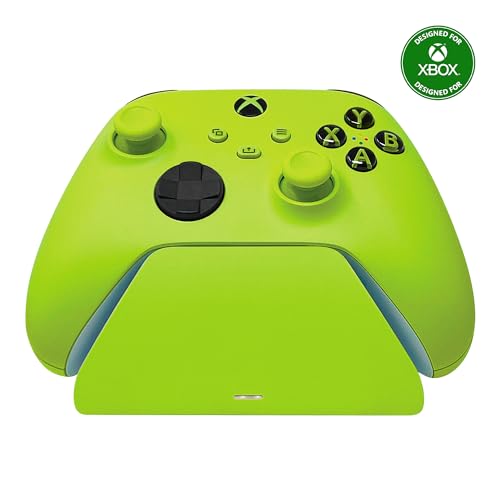
Razer Universal Quick Charging Stand for Xbox (Electric Volt)
Razer’s stand is the single-controller option in this guide, for players who keep one main Xbox controller on the desk and want it parked, charged and ready. It uses magnetic contacts, so the controller snaps into place and starts charging without fiddling with a cable or lining up a port, and the cradle matches the Xbox Wireless Controller’s curves. This is the Electric Volt colorway; other controller-matching colors are listed.
In the box: a rechargeable battery, a USB-C cable and battery covers for both Xbox One and Xbox Series X|S controllers, so one purchase converts a disposable-battery controller into a rechargeable one. The stand is USB powered, drawing from the console, a PC or a wall adapter, and it is officially licensed under the Designed for Xbox program. The honest limit is capacity: it charges one controller, so two-pad households should look at the dual stations below.
Specs
- Platform: Xbox Series X|S and Xbox One wireless controllers
- Controllers charged: 1
- Charging method: Magnetic contact charging
- Includes: Rechargeable battery, USB-C cable, battery covers for Xbox One and Series X|S
- Power source: USB
- Licensing: Designed for Xbox, officially licensed
- Model: Confirm on the listing
PowerA Dual Charging Station for Xbox Series X|S
PowerA’s dual station is the straightforward two-controller answer for Xbox households. It charges two controllers at once and includes two 1100mAh rechargeable packs, so both pads stop eating disposable batteries. The design uses charge-through battery doors: the included doors carry the charging contacts, so you set each controller on the dock and the pack refills through the door.
Four doors are in the box, two shaped for Xbox Series X|S controllers and two for Xbox One controllers, for mixed-generation households. LEDs show amber while charging and white when full, so status reads at a glance. Power comes from an included AC adapter rather than a USB port, freeing the dock from needing the console awake. The station is officially licensed by Xbox and backed by a two-year limited warranty.
Specs
- Platform: Xbox Series X|S and Xbox One wireless controllers
- Controllers charged: 2
- Battery packs: 2 x 1100mAh rechargeable packs included
- Battery doors: 4 charge-through doors (2 Series X|S, 2 Xbox One)
- Indicators: LED, amber while charging and white when full
- Power source: AC adapter, included
- Licensing: Officially licensed by Xbox
- Warranty: Two-year limited
- Models: 1519296-01 and 1522767-01
Fosmon Dual 2 MAX Controller Charger for Xbox
Fosmon’s Dual 2 MAX competes on battery size. Its two included packs are rated at 5280mWh each, which Fosmon also expresses as 2200mAh, and the listing describes up to 40 to 45 hours of play per charge, the longest runtime figure in this guide. A drained pack takes four to five hours to refill in exchange, which suits an overnight dock rather than a quick top-up between matches. Four battery covers are included so the packs fit both current and previous generation Xbox controllers.
The listing also leans on safety paperwork many rivals skip: it describes the packs as SGS certified to UL 2054 and UL 62368 standards, with overcharge and short-circuit protection. One firm limit is printed clearly: the station is not compatible with the Xbox Elite Series 2, because that controller has a sealed internal battery and no battery door. Retailer records for this product family show two model numbers, C-10758 and C-10777, so confirm the exact model on the listing before ordering.
Specs
- Platform: Xbox Series X|S, Xbox One, One S, One X and Elite (first generation) controllers
- Controllers charged: 2
- Battery packs: 2 x 5280mWh (2200mAh) NiMH packs included
- Play time: Up to 40 to 45 hours per charge, per the listing
- Charge time: 4 to 5 hours
- Battery covers: 4 included
- Certifications: SGS certified to UL 2054 and UL 62368, per the listing
- Not compatible: Xbox Elite Series 2
- Model: Confirm on the listing
KDD Switch Controller Charging Dock Station

The KDD station is the organizer’s pick for Nintendo Switch households. It charges four Joy-Con controllers and one Pro Controller at the same time, covering two Joy-Con pairs plus the pad most single players use. Around the charging slots sit eight game card storage slots, so cartridges live with the controllers instead of loose in a drawer. Individual indicators show which controllers are still charging.
KDD lists compatibility with both the original Switch and the OLED model. Joy-Con slide onto the charging rails the same way they attach to the console. Some listings also describe charging a second Pro Controller by cable; on-dock capacity is four Joy-Con plus one Pro Controller. Power input details vary between listing revisions, so confirm them on the product page.
Specs
- Platform: Nintendo Switch and Switch OLED
- Controllers charged: 4 Joy-Con and 1 Pro Controller on the dock
- Game storage: 8 game card slots
- Indicators: LED charge indicators per slot
- Model: kdd-001
- Power source: Confirm on the listing
PowerA Joy-Con Charging Dock for Nintendo Switch
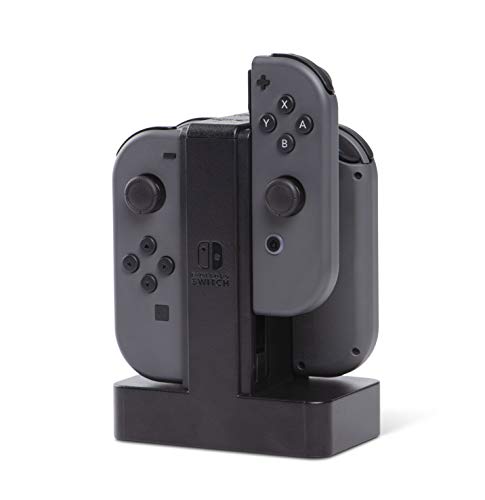
PowerA’s Joy-Con dock is the compact, officially licensed alternative for Switch players who only need Joy-Con charging. It holds four Joy-Con controllers at once, two full pairs, and each slot has its own LED that glows red while charging and green when full. The slide-in design mirrors how Joy-Con attach to the console rails, so controllers drop in and lift out with one hand.
A weighted base keeps the dock planted when controllers are pulled off at an angle. The dock is USB powered, so it can run from the Switch dock’s own USB port and live beside the console with no extra wall adapter. It does not charge a Pro Controller or store game cards, so players who need either feature should choose the KDD station above.
Specs
- Platform: Nintendo Switch Joy-Con controllers
- Controllers charged: 4 Joy-Con simultaneously
- Indicators: Individual LED per Joy-Con, red while charging and green when full
- Design: Slide-in connection, weighted base
- Power source: USB
- Licensing: Officially licensed by Nintendo
- Warranty: Two-year limited
- Pro Controller charging: No
How to Choose
Start with the platform, because nothing in this category crosses over. Xbox stations rely on replacement battery packs and contact doors shaped for Xbox controllers, while Switch docks use the Joy-Con rail connector or a Pro Controller cradle, so confirm the platform line in the Specs list first.
Next, count your controllers and check what the box includes. Dual Xbox stations like the PowerA and Fosmon include two packs and doors for both controller generations. Single stands like the Razer charge one controller and suit one-player desks. On the Switch side, decide whether you need Pro Controller charging and game storage, which is the KDD, or Joy-Con charging only in a smaller footprint, which is the PowerA dock.
Finally, look at power and indicators. AC-powered docks charge independently of the console, while USB-powered docks need a live port on the console, PC or a wall adapter. Per-controller LEDs that change color at full charge end the guesswork about which pad is ready. Elite Series 2 owners should skip every pack-based station: its battery is sealed, so only cable or contact charging works.
Who Should Skip
PlayStation players should skip all five picks, since DualSense controllers use different contacts and need a dock built for them. Xbox Elite Series 2 owners should skip the pack-based dual stations for the reason above, and single-pair Joy-Con owners who dock the console overnight gain little, since the console already charges that pair. Anyone happy plugging in a USB cable between sessions can skip the category entirely; docks buy tidiness and readiness, not faster play.
FAQ
Will these docks charge the Xbox Elite Series 2 controller?
Not the pack-based stations. The Elite Series 2 has a sealed internal battery and no removable battery door, so the PowerA and Fosmon packs cannot be installed in it, and Fosmon states the incompatibility outright. The first-generation Elite, which does have a battery door, works with the Fosmon covers. Elite Series 2 owners should charge over USB-C or use a contact dock built for that controller.
How long do the included battery packs take to charge?
It depends on pack size. The Fosmon listing gives four to five hours for its larger 5280mWh packs, while published figures for the PowerA station’s smaller 1100mAh packs run shorter; confirm the exact figure on the listing. Joy-Con controllers take roughly three and a half hours to fill on a docked console, and the PowerA Joy-Con dock’s per-slot LEDs turning green signals that each one is done.
Can one dock charge both Xbox and Nintendo Switch controllers?
No. The charging contacts, battery packs and connectors are designed per platform, and none of the five docks here accepts controllers from both systems. The closest thing to a combined setup is the KDD station, which covers two Nintendo controller types, Joy-Con and Pro Controller, plus game card storage. Households running both consoles need one dock per platform.
Is it safe to leave controllers sitting on the dock all the time?
That is the use these docks are designed for. Licensed models like the PowerA and Razer stations manage the charge and signal completion through their indicators. Sensible habits still apply: keep the dock ventilated, use the included adapter or a reputable USB source, and if a pack ever feels hot or swollen, stop using it and replace it rather than charging it again.
Final Verdict
Most Xbox households should buy the PowerA Dual Charging Station: it is licensed, includes packs and doors for both controller generations, and its color-changing LEDs make readiness obvious. Players who prize runtime over charge speed should pick the Fosmon Dual 2 MAX, and single-controller desks are best served by the Razer stand. On Nintendo Switch, the KDD station wins for families juggling Joy-Con pairs, a Pro Controller and loose game cards, while the PowerA Joy-Con dock is the neater Joy-Con-only choice.
Product and ASIN Reference
| Product | ASIN |
|---|---|
| Razer Universal Quick Charging Stand for Xbox (Electric Volt) | B09DHFP82V |
| PowerA Dual Charging Station for Xbox Series X | S |
| Fosmon Dual 2 MAX Controller Charger for Xbox | B01CDCG4KM |
| KDD Switch Controller Charging Dock Station | B08FX5QKGD |
| PowerA Joy-Con Charging Dock for Nintendo Switch | B01MR6JD1M |
Related guides
More from Amazon
Programs that pair well with the guide above. Offers and eligibility are set by Amazon and may change.
Free shipping on eligible items, Prime Video and more. Eligible new members can start with a free trial.
Start a Prime free trialAd-free music streaming. Eligible new subscribers can start with a free trial.
Try Music Unlimited freeA Prime membership for ages 18-24 with a trial period. Eligibility is set by Amazon.
See Prime for Young AdultsAudiobooks and podcasts to listen to on the go. Eligible new members can start with a free trial.
Try Audible freeAs an Amazon Associate we earn from qualifying purchases.