A fan splitter looks like the simplest part in a gaming PC, yet it decides whether your extra case fans run on a sensible curve or fight the motherboard for current. The real decision is not whether to split a header, but how many fans one header can safely feed, how far the cables must reach, and whether the fans sharing a signal are close enough in size and speed to behave as one.
This guide is for builders short on headers: players adding a second intake fan, owners of twin-fan CPU coolers, and anyone filling a large case on a budget board. Every pick below comes from Amazon listings and their stated titles and specifications, covering short two-way cables, longer sleeved leads, a five-way splitter cable and a daisy-chain design for spread-out fans.
Our Top Picks

Top 3 picks at a glance

Quick Picks
As an Amazon Associate we earn from qualifying purchases
| Product | Best for | Key spec from title |
|---|---|---|
| Cable Matters 2-Pack 2 Way 4 Pin PWM Fan Splitter Cable | Adding one fan beside an existing fan | 4-inch cable, 12W max rating |
| JBtek All Black Sleeved PWM Fan Splitter Cable, 2 Pack | Clean-looking windowed builds | 240mm all-black sleeved cable |
| J&D PWM Fan Splitter Cable (2 Pack) | Neighbouring top or front fan pairs | 6-inch, 24 AWG copper conductors |
| ThreeBulls PWM Fan Hub Splitter Cable, 1 to 5 Way | A full fan wall on one curve | Splits one header to five fans |
| skineat 4-Pin PWM Fan Splitter Cable | Fans spread across a tall case | Daisy-chain sockets along one cable |
How to Choose
Count Fans Before You Count Headers
Start with the build you actually have. A compact case adding one front fan needs only a two-way cable, while a tower with three intakes and two exhausts may need a five-way splitter or several two-way leads. Check how many chassis headers your motherboard offers and which ones sit near the fans. Buying the largest splitter by default wastes cable and concentrates every fan on a single curve, even when the board could give the radiator and the case fans separate control.
Respect the Header Current Limit
Every fan on a splitter draws its power from the same header, so the current figures printed on the fan labels add up. Many motherboard headers are rated around one amp, though the manual is the only reliable source for your board. Two typical case fans sit comfortably inside that budget; five high-speed fans may not. A splitter with a stated power rating, such as the Cable Matters two-way cable, gives you a ceiling to work against instead of guessing from cable thickness.
Match Cable Length to the Case
Splitter cables in this guide run from four inches to a daisy chain over a metre long, and the wrong length causes real problems. A short cable keeps a pair of adjacent fans tidy but cannot bridge a tall case. Long leads reach distant mounts, yet the slack has to hide somewhere. Measure from the header to the farthest fan before ordering, and favour layouts, such as sockets spaced along one cable, that follow the fan positions instead of forcing every fan to meet at one point.
Know What Happens to Speed Control
A splitter sends one PWM signal to every attached fan, and only one fan sends its speed reading back, because a header can only interpret a single tachometer signal. Identical fans behave predictably under that arrangement. Mixing a fast radiator fan with a slower case fan on one cable makes the reported speed misleading and the curve wrong for at least one of them. Three-pin fans still fit most of these cables, but they run without PWM control, following voltage instead.
The 5 Best Options
Cable Matters 2-Pack 2 Way 4 Pin PWM Fan Splitter Cable, 4 Inches

This is the splitter for the smallest version of the problem: one free header and one extra fan to feed. Four inches of cable suits fans mounted side by side, such as a pair of front intakes or the two fans on a compact tower cooler, and the short run leaves almost nothing to hide. Cable Matters states a maximum power rating on the listing, which helps you check the pair against your header limit. Because two cables come in the pack, the second can cover another header or stay in the parts drawer as a spare.
Specs
- Splits one 4-pin motherboard header to two fans
- Cable length: 4 inches
- Maximum power rating: 12W per the listing
- RPM sensing pin connected to the main fan only
- 3-pin fans fit but run without speed control
Best for: Adding a second fan beside an existing one in a compact case.
Watch out for: The 4-inch reach is short, so check the distance from your header to both fans before ordering.
ASIN: B01DV1Z0Z4
JBtek All Black Sleeved PWM Fan Splitter Cable 1 to 2 Converter, 2 Pack
Builders who care how the inside of a glass-sided case looks tend to land on this JBtek two-pack. The full black sleeving hides the coloured wires that basic splitters leave exposed, and at 240mm the cable reaches further than stubby adapters, which suits a front fan paired with a bottom intake. One output arm carries all four pins so the motherboard still receives a speed reading, while the second arm omits the tachometer pin by design. Two cables per pack means a mid-tower with two spare headers can double up two fan pairs.
Specs
- Splits one 4-pin PWM header to two fans
- Cable length: 240mm
- All-black sleeved jacket
- One output arm omits the tachometer pin, so only one fan reports speed
- Works with 4-pin PWM and 3-pin fans
Best for: Tidy, colour-matched builds with fans a moderate distance apart.
Watch out for: Stock and seller details vary on this older listing, so confirm the pack contents on the listing before ordering.
ASIN: B01EF9OI0O
J&D PWM Fan Splitter Cable (2 Pack), 6 Inch
The J&D two-pack sits between the shortest adapters and full-length leads. Six inches is enough to pair fans that sit in neighbouring mounts, such as two top exhausts, without leaving loops of spare cable behind the motherboard tray. The listing highlights 24 AWG oxygen-free copper conductors, a heavier gauge than the thinnest budget cables, which matters when two fans share one header’s current. A plain PVC jacket keeps the cable flexible for tight bends around drive cages. With two splitters included, one pack can serve both the intake pair and the exhaust pair.
Specs
- Splits one 4-pin header to two fans
- Cable length: 6 inches (15cm)
- 24 AWG oxygen-free copper conductors
- PVC flexible jacket
- Compatible with 3-pin and 4-pin PWM case fans
Best for: Pairing neighbouring fans where a mid-length, flexible cable routes cleanly.
Watch out for: The PVC jacket is unsleeved, so it shows coloured wiring more than sleeved rivals in a windowed case.
ASIN: B07F392BF6
ThreeBulls PWM Fan Hub Splitter Cable, 1 to 5 Way, 15.7 Inch
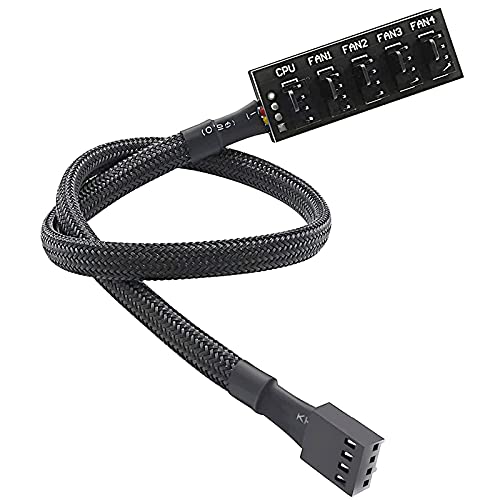
When the plan is a whole wall of fans on one curve, this ThreeBulls cable splits a single header five ways instead of two. The 15.7-inch sleeved lead gives the split point some distance from the motherboard, so the five outputs start closer to the fans they feed. It suits cases with three front intakes and two top exhausts that should rise and fall together during a gaming session. Remember that all five fans draw from the one header, so this cable only makes sense with modest fans and a header whose rating you have checked in the manual.
Specs
- Splits one 4-pin header to five fans
- Cable length: 15.7 inches (40cm)
- Sleeved cable jacket
- Supports 4-pin PWM and 3-pin fans
- All five fans share one PWM signal and one speed reading
Best for: Running a matched set of case fans on a single fan curve.
Watch out for: Five fans can exceed a one-amp header, so add up the current ratings on your fan labels first.
ASIN: B07M5P7VHG
skineat 4-Pin PWM Fan Splitter Cable, PST Daisy Chain

Most splitters branch from one point, which forces every fan cable to converge on the same spot. This skineat cable instead places its sockets along a single long run, in the PST daisy-chain style, so each fan plugs in near its own mount. That layout suits tall cases and radiators positioned far from the motherboard headers. Only the first socket reports a speed signal, as with most multi-way splitters, and the braided jacket helps the long cable survive being routed along case edges. Check which length variant you are ordering, because the listing covers several.
Specs
- One 4-pin PWM plug feeding four sockets along a single cable
- RPM signal reported from the first socket only
- Braided outer jacket
- Supports 3-pin and 4-pin fans
- Overall length varies by variant: Confirm on the listing
Best for: Fans spread along a tall case where a branch-style splitter cannot reach.
Watch out for: The listing sells several lengths, so confirm the variant and socket spacing before ordering.
ASIN: B0F8H26NFL
Which One Fits Your Situation
You Are Adding One Fan to a Nearly Full Build
Pick the Cable Matters two-way cable. Its four-inch length is made for two fans in neighbouring mounts, the stated 12W ceiling makes the current check simple, and the second cable in the pack covers the next small upgrade without another order.
Your Build Has a Glass Panel and Visible Cables
Choose the JBtek two-pack. The black sleeving keeps the split from standing out against dark components, and 240mm of cable lets you route behind the tray instead of across the motherboard. You also get a second splitter for the exhaust pair, so the whole case stays consistent.
You Want Every Case Fan on One Curve
The ThreeBulls five-way cable is the match. Three intakes and two exhausts can share one header and one curve, which keeps noise behaviour predictable when a game loads the system. Add the fan current ratings first, keep the total under the header limit in your motherboard manual, and use identical fans so the single speed reading stays meaningful.
Your Fans Sit Far Apart in a Tall Case
Go with the skineat daisy-chain cable. Its sockets are spaced along one long run, so a bottom intake, a front pair and a top exhaust can each plug in close to home instead of stretching to a single branch point. Confirm the length variant on the listing matches your case height before ordering.
Common Mistakes
- Stacking one splitter on another until a single header feeds six or seven fans, which can exceed the header’s current rating and starve every fan of power.
- Mixing different fan models on one splitter, then trusting the single reported speed as if it described both fans.
- Expecting each fan to report its own RPM, when only one output on a splitter carries the tachometer signal back to the board.
- Ordering the shortest cable for a tall case and leaving connectors strained at an angle, which can work a plug loose over time.
- Assuming a splitter adds power like a hub, when every watt still comes from the motherboard header itself.
Frequently Asked Questions
Can a fan splitter damage my motherboard?
A splitter itself is just wiring, but it lets you connect more load than a header is rated for. If the combined current of the attached fans passes the header limit, usually around one amp, the header can overheat or shut down. Add up the ratings printed on your fan labels and stay under the figure in the motherboard manual.
Will all fans on a splitter run at the same speed?
They all receive the same control signal, so identical fans will track each other closely. Different models respond differently to the same signal, which is why matched fans give the cleanest result. Only one fan reports its speed back to the header, and the motherboard treats that reading as the speed for the whole group.
Can I use a splitter on the CPU fan header?
Yes, and it is a common way to run a twin-fan tower cooler or a matched radiator pair from the CPU header so both fans follow the processor’s temperature curve. Keep both fans identical, plug the primary fan into the output that carries the speed signal, and make sure the pair’s combined current stays within the CPU header’s rating.
What is the difference between a splitter and a powered hub?
A splitter is a passive cable: every fan on it is powered by the motherboard header, so the header’s current limit caps the fan count. A powered hub adds a SATA or Molex connection to the power supply and draws fan power from there, using the header only for the control signal, which allows far more fans per header.
Related guides
More from Amazon
Programs that pair well with the guide above. Offers and eligibility are set by Amazon and may change.
Free shipping on eligible items, Prime Video and more. Eligible new members can start with a free trial.
Start a Prime free trialAd-free music streaming. Eligible new subscribers can start with a free trial.
Try Music Unlimited freeA Prime membership for ages 18-24 with a trial period. Eligibility is set by Amazon.
See Prime for Young AdultsAudiobooks and podcasts to listen to on the go. Eligible new members can start with a free trial.
Try Audible freeAs an Amazon Associate we earn from qualifying purchases.