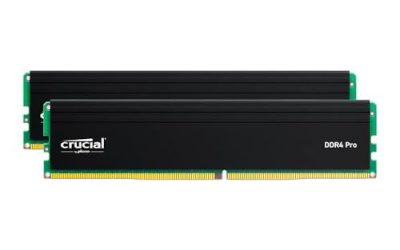
The G.SKILL Flare X5 32GB (2x16GB) DDR5-6000 CL36 kit is the best low profile RAM in this group for a build with a large CPU cooler: G.SKILL lists the Flare X5 family at a 33 mm module height, and this version carries both AMD EXPO and Intel XMP 3.0 profiles so it suits either platform. “Low profile” means the memory modules, heat spreader included, stand only about 32 to 34 mm above the board, which lets big tower air coolers hang their fans over the memory slots without touching. DDR4 buyers have two short kits here too, from TEAMGROUP and Kingston.
Our Top Picks

Top 3 picks at a glance
Quick List
- G.SKILL Flare X5 32GB DDR5-6000 CL36 – best overall for either AMD or Intel DDR5 builds under a big cooler
- G.SKILL Flare X5 64GB DDR5-6000 CL36 – best for creators and heavy multitaskers who need capacity
- G.SKILL Flare X5 64GB DDR5-6000 CL30 (EXPO) – best for AMD builders chasing tighter timings at high capacity
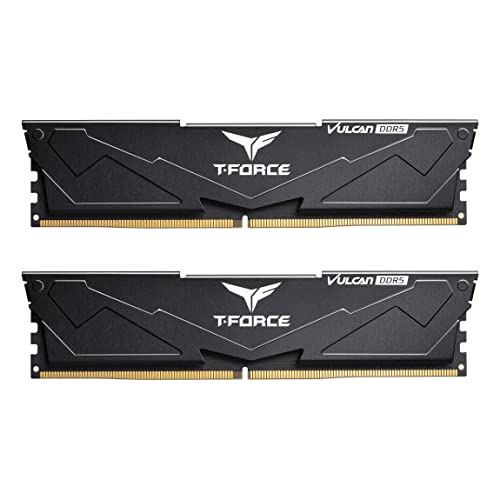
- TEAMGROUP T-Force Vulcan DDR5 32GB 6000 CL38 – best for Intel DDR5 boards that want a simple, slim, RGB-free kit
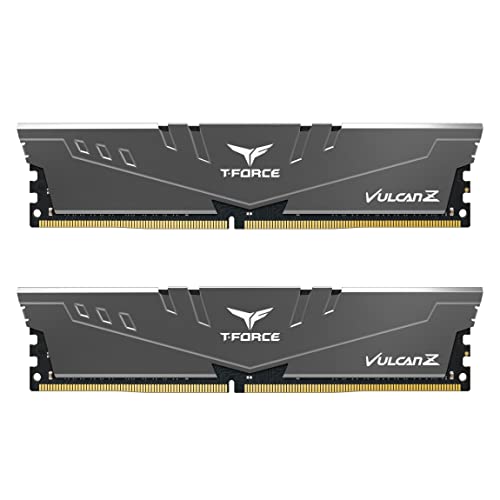
- TEAMGROUP T-Force Vulcan Z DDR4 16GB 3200 CL16 – best for DDR4 platforms where clearance is tight
- Kingston FURY Beast DDR4 32GB 3200 CL16 – best for DDR4 builds that want 32 GB from a known brand
Which One Is Right for You?
| If you… | Choose |
|---|---|
| Run an AMD AM5 or Intel DDR5 board and need 32 GB under a large cooler | G.SKILL Flare X5 32GB CL36 |
| Edit video, compile code or run virtual machines on DDR5 | G.SKILL Flare X5 64GB CL36 |
| Have an AMD board and want 64 GB with tighter CL30 timing | G.SKILL Flare X5 64GB CL30 (EXPO) |
| Build on an Intel 600 or 700 series DDR5 board and want a plain black heat spreader | TEAMGROUP Vulcan DDR5 32GB |
| Are keeping an older DDR4 system and have very little cooler clearance | TEAMGROUP Vulcan Z DDR4 16GB |
| Are on DDR4 and want 32 GB with a quick, plug-and-play XMP kit | Kingston FURY Beast DDR4 32GB |
The first decision is DDR4 or DDR5, because the two are physically and electrically incompatible. The second is capacity, then platform (EXPO, XMP or both). Height only matters once those are settled, and every kit here is already in the low-profile class.
All 6 Picks in Detail
1. G.SKILL Flare X5 32GB (2x16GB) DDR5-6000 CL36 – Best Overall for Large Coolers
As an Amazon Associate we earn from qualifying purchases at no extra cost to you.

This is a two-module 32 GB DDR5 kit rated at 6000 MT/s with CL36-36-36-96 timings at 1.35 V. It carries both AMD EXPO and Intel XMP 3.0 profiles, so it is the flexible choice if you may change platforms later. G.SKILL describes the Flare X5 family as low profile and aimed at compact builds or systems with large CPU coolers. It suits gamers and everyday users who want 32 GB without worrying about fan clearance.
- 32 GB kit (2x16GB), DDR5 U-DIMM
- 6000 MT/s, CL36-36-36-96 at 1.35 V
- AMD EXPO and Intel XMP 3.0 profiles
- Low-profile module of about 33 mm per G.SKILL
- Black aluminum heat spreader; no RGB on this family
- Limited lifetime warranty per the manufacturer
Build notes: DDR5-6000 with a CL30-to-CL36 range is a common sweet spot for current AM5 platforms, and the dual profile means you can enable EXPO on AMD or XMP on Intel from the firmware menu. Install the modules in the second and fourth slots from the CPU unless your manual says otherwise, and update the motherboard firmware first for the best compatibility.
Who should skip it: if you already know you will run a Ryzen board and want the tightest timings, the CL30 kit below is a closer match, and if you do heavy multi-application work, the 64 GB version gives you far more room. For most gaming PCs, though, 32 GB of DDR5-6000 is the practical center of the market.
Pros:
- Dual EXPO and XMP support
- Very short for a DDR5 kit
Cons:
- CL36 is looser than the CL30 kit
- No RGB for those who want lighting
It is the safer pick than the CL30 kit if you are not sure which platform you will use.
2. G.SKILL Flare X5 64GB (2x32GB) DDR5-6000 CL36 – Best for Capacity-Hungry Builds

This 64 GB kit shares the platform support and the 33 mm family height of the 32 GB version but doubles the capacity with two 32 GB modules. It suits video editors, streamers, developers and anyone running several virtual machines.
- 64 GB kit (2x32GB), DDR5 U-DIMM
- 6000 MT/s, CL36-36-36-96 at 1.35 V
- AMD EXPO and Intel XMP 3.0 profiles
- Low-profile family height of about 33 mm
- Matte black heat spreader
- Two-module kit keeps the board at dual-channel
Build notes: higher-capacity DDR5 modules often stress the memory controller more than 16 GB modules, so enabling a profile may need a firmware update, and some boards lower the stable speed with 64 GB. Always check the motherboard’s memory support list, and be ready to loosen the speed one step if the system does not pass a memory stress run.
Who should skip it: pure gamers will rarely use more than 32 GB, and the extra capacity is better spent on a faster storage drive or graphics card. Creators who edit high-resolution video, work with large image libraries or run several virtual machines will see the benefit most.
Pros:
- Capacity for demanding workloads
- Dual-platform profiles in a low-profile kit
Cons:
- Overkill for gaming alone
- May need a firmware update for stable speeds
Choose it over the CL30 kit if you want flexibility between AMD and Intel boards.
3. G.SKILL Flare X5 64GB (2x32GB) DDR5-6000 CL30 EXPO – Best for AMD Builders Who Want Tighter Timings
This 64 GB kit is tuned for AMD EXPO with CL30-40-40-96 timings at 1.40 V, and the listing names only EXPO support. The tighter first timing helps latency-sensitive workloads on Ryzen platforms. It suits AM5 owners who want large capacity and are comfortable with a slightly higher voltage.
- 64 GB kit (2x32GB), DDR5 U-DIMM
- 6000 MT/s, CL30-40-40-96 at 1.40 V
- AMD EXPO profile only per the listing
- Low-profile Flare X5 family, about 33 mm tall
- Matte black finish
- Confirm Intel XMP compatibility on the listing before using it on Intel boards
Build notes: 1.40 V is above the 1.35 V of the other Flare kits, which is normal for tighter timings but produces a little more heat, so ensure some airflow over the modules. EXPO-only means it is meant for AMD boards; do not assume it will work as an Intel profile.
Who should skip it: anyone on an Intel board, or anyone who may change platforms in a year or two, should pick the dual-profile CL36 kit instead. The listing is explicit about EXPO only, and treating an EXPO-only kit as universal is a common source of boot problems.
Pros:
- Tight CL30 timing at high capacity
- Same short height as the other Flare kits
Cons:
- Aimed at AMD platforms only
- Slightly higher voltage
It is the best pick here for AM5 owners, while the CL36 64 GB kit suits mixed or Intel use.
4. TEAMGROUP T-Force Vulcan DDR5 32GB 6000 CL38 – Best for Intel DDR5 Boards with a Plain Look

The Vulcan DDR5 is a 32 GB (2x16GB) kit at 6000 MT/s and CL38, and the listing names compatibility with 600 and 700 series chipsets and XMP 3.0. TEAMGROUP lists the module height at about 32.7 mm. It suits Intel DDR5 builders who want slim, no-frills memory.
- 32 GB kit (2x16GB), DDR5-6000 (PC5-48000)
- CL38 timing
- XMP 3.0 profile; listing references 600 and 700 series chipsets
- Module height of about 32.7 mm per TEAMGROUP
- Black aluminum heat spreader, no RGB
- For AMD EXPO, TEAMGROUP sells a separate Vulcan variant; confirm before using this one
Build notes: CL38 is looser than the Flare X5 options, which can mean slightly lower responsiveness in latency-sensitive tasks, but for mainstream gaming and productivity the difference is modest. Because the listing is oriented to XMP, AMD builders should look at the EXPO version rather than rely on cross-platform behavior.
Who should skip it: AMD AM5 builders and anyone chasing the lowest latency. The TEAMGROUP range includes AMD-oriented kits, so if you like the brand, search for the EXPO variant rather than force this one onto a Ryzen board.
Pros:
- Slim at about 32.7 mm
- Simple, well-known brand
Cons:
- Looser timings than the Flare kits
- Platform focus is Intel
Relative to the 32 GB Flare X5, it is a close match on height but gives up AMD profile support.
5. TEAMGROUP T-Force Vulcan Z DDR4 16GB 3200 CL16 – Best for DDR4 Systems with Tight Clearance
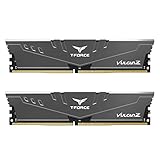
The Vulcan Z is a 16 GB (2x8GB) DDR4-3200 CL16 kit. TEAMGROUP specifies the module height at about 32 mm, which is among the shortest DDR4 heat-spreader kits. It suits older Intel or AMD AM4 systems, or small-form-factor DDR4 builds, where a big tower cooler leaves very little room.
- 16 GB kit (2x8GB), DDR4 U-DIMM
- 3200 MT/s (PC4-25600), CL16
- Roughly 32 mm module height per TEAMGROUP
- Gray heat spreader, no RGB
- XMP profile for automatic speed; confirm voltage on the listing
- DDR4 only; not compatible with DDR5 boards
Build notes: 16 GB is enough for most gaming today but is the minimum you would want for newer titles with background apps. If your board has four slots and you want more memory later, buy a matching second kit rather than mixing brands, since mismatched timings can reduce stability.
Who should skip it: anyone building a new PC. DDR4 platforms are mature but no longer the main upgrade path, and buying 16 GB of DDR4 for a fresh build leaves little room to grow. It is best viewed as an upgrade or repair part for an existing DDR4 machine.
Pros:
- Among the shortest DDR4 modules
- Widely compatible 3200 speed
Cons:
- 16 GB limits heavy multitasking
- DDR4 is on its way out for new builds
The Kingston kit offers double the capacity at slightly greater height.
6. Kingston FURY Beast DDR4 32GB (2x16GB) 3200 CL16 – Best for DDR4 Builds That Want 32 GB
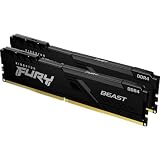
This is a 32 GB (2x16GB) DDR4-3200 CL16 kit in the non-RGB FURY Beast form. Kingston’s datasheet lists it at about 34 mm tall, which is still low-profile compared with RGB DDR4 and some taller heat spreaders. It suits DDR4 upgraders who want to double capacity without worrying about cooler clearance.
- 32 GB kit (2x16GB), DDR4 U-DIMM
- 3200 MT/s, CL16
- Module height of about 34 mm per Kingston
- Plug-and-play XMP profile
- Black heat spreader, no RGB lighting
- Lifetime warranty per the manufacturer
Build notes: 34 mm is only 1 to 2 mm taller than the other kits here, so most coolers that clear the Flare X5 will clear this one as well, but confirm against your cooler’s stated memory clearance. The Kingston FURY Beast DDR4 RGB version is considerably taller, so avoid mixing up the two product lines.
Who should skip it: if your cooler’s memory clearance is below about 35 mm, confirm the margin before ordering, and if you are on DDR5 this kit will not install at all. It is simply a solid, no-surprises DDR4 option for existing systems.
Pros:
- 32 GB at a modest height
- Recognizable brand with lifetime warranty
Cons:
- Slightly taller than the Vulcan Z
- DDR4 only
It trails the Vulcan Z by a couple of millimeters of height but doubles the capacity.
Specs Compared
| Kit | Type | Capacity | Speed | Timings | Profiles | Height |
|---|---|---|---|---|---|---|
| G.SKILL Flare X5 32GB | DDR5 | 2x16GB | 6000 MT/s | CL36-36-36-96, 1.35 V | EXPO and XMP 3.0 | About 33 mm |
| G.SKILL Flare X5 64GB | DDR5 | 2x32GB | 6000 MT/s | CL36-36-36-96, 1.35 V | EXPO and XMP 3.0 | About 33 mm |
| G.SKILL Flare X5 64GB CL30 | DDR5 | 2x32GB | 6000 MT/s | CL30-40-40-96, 1.40 V | EXPO | About 33 mm |
| TEAMGROUP Vulcan DDR5 32GB | DDR5 | 2x16GB | 6000 MT/s | CL38 | XMP 3.0 | About 32.7 mm |
| TEAMGROUP Vulcan Z DDR4 16GB | DDR4 | 2x8GB | 3200 MT/s | CL16 | XMP (confirm on listing) | About 32 mm |
| Kingston FURY Beast DDR4 32GB | DDR4 | 2x16GB | 3200 MT/s | CL16 | XMP (confirm on listing) | About 34 mm |
How We Chose These
This guide is built from published specifications, not from personal use of the memory. We compared the six kits in the catalog set on the points that decide clearance and compatibility: DDR generation, capacity, rated speed and timings, platform profiles and module height from manufacturer datasheets. Where height or profile support was not stated clearly in the listing, we used the manufacturer’s data or marked it “confirm on listing.” We note where a kit is platform-specific, such as EXPO-only or XMP-oriented, and we do not claim any measured performance results.
What to Look For
Memory choice looks simple until a large cooler is involved. Three things decide whether a kit works: the right DDR generation for the board, enough vertical space under the cooler’s fan, and a profile the board understands. The sections below cover each in order, with a worked example for clearance, so you can check a kit against your own parts before buying rather than after the cooler is already mounted.
Module Height and the Math of Cooler Clearance
Standard DDR5 modules with tall RGB light bars can reach 44 mm or more, while low-profile kits sit near 32 to 34 mm. Large dual-tower air coolers often have a front fan that overhangs the first memory slot, so the gap between the cooler’s lowest fin or fan and the top of the board is what matters. Rule of thumb: take the cooler’s stated memory clearance (many list a figure such as 40 mm), subtract the module height, and keep at least 2 to 3 mm spare. A 33 mm module under a 40 mm clearance leaves 7 mm; a 44 mm module would not fit. If the cooler lists no figure, measure from the board surface to the underside of the fan with the fan in its lowest position, or raise the fan on its clips.
DDR4 or DDR5: Compatibility Comes First
DDR4 and DDR5 use different notches and cannot be swapped. AM4 boards and older Intel boards use DDR4, while AM5 uses only DDR5. Some Intel 600 and 700 series boards support DDR4 and some DDR5, but never both on the same board, so check the board model. Buying the wrong generation is the most common memory mistake.
EXPO, XMP and Speed Sweet Spots
EXPO is AMD’s one-click memory profile and XMP 3.0 is Intel’s. Kits with both profiles work on either platform through the firmware menu. For AM5, DDR5-6000 at CL30 to CL36 is widely regarded as a sweet spot because it matches the memory controller’s preferred ratio. Going far above that offers small gains and often requires manual tuning. For DDR4, 3200 MT/s at CL16 is the mainstream standard.
Capacity and Channel Layout
Two modules in a dual-channel arrangement deliver more bandwidth than one. 32 GB suits most gaming and general use, 16 GB is the lower limit for newer games, and 64 GB makes sense for editing, large datasets or virtual machines. Four-module configurations can reduce top speed on many boards, so two larger modules are usually the better choice.
Worked Example: Fitting a Dual-Tower Cooler
Suppose your tower cooler lists 38 mm of memory clearance with the front fan in its default position. A 33 mm Flare X5 module leaves 5 mm of margin, which is comfortable. A 34 mm Kingston module leaves 4 mm, also fine. A 44 mm RGB module would collide with the fan by 6 mm, so you would need to raise the fan on its clips or move to a different cooler. If you fit a second fan on a dual-tower cooler, the rear fan usually sits over the VRM heatsink rather than the memory, so only the front fan and first slot are at risk.
Firmware, Training Time and Stability
DDR5 memory training can make the first boot after a change take a minute or two. This is normal. After enabling a profile, run a memory stress program or a long gaming session to confirm there are no crashes, and update the motherboard firmware if you see instability. If a kit does not hold its rated speed, lowering it by one step is a normal and safe fix, and your vendor’s support can advise on the board’s qualified memory list.
Mixing Kits and Upgrading Later
Memory kits are binned and sold as matched pairs, so the safest upgrade path is to buy the full capacity in one kit. Adding a second identical kit later can work, but four-module DDR5 setups often have to run slower than two-module ones. If you expect to want 64 GB eventually, buy it now as two 32 GB modules and leave the other two slots empty.
Heat Spreaders and Airflow
Low-profile kits trade height for heat spreader size, but normal gaming loads rarely stress memory thermally. A little airflow from a case fan or the CPU cooler is enough. If you run high-voltage kits such as the 1.40 V CL30 option in a cramped case, make sure there is some air path across the modules.
Questions
What counts as low profile RAM?
Modules about 34 mm tall or less, including the heat spreader, are usually considered low profile. Standard RGB heat spreaders commonly reach 40 to 55 mm.
Will the G.SKILL Flare X5 work with a big air cooler?
At about 33 mm, it clears most large coolers, but you should still compare it with the cooler’s listed memory clearance. Some coolers need the fan moved up a few millimeters.
Can I use DDR5 in a DDR4 motherboard?
No. The notch positions and electrical specs differ, so the module will not fit or work. Check your motherboard’s memory type first.
Is CL30 meaningfully better than CL36 at 6000 MT/s?
It lowers first-word latency, which helps some applications and certain game scenarios, but the real-world difference is usually small. Capacity and stability matter more than a few CAS cycles.
Should I get 32 GB or 64 GB?
For gaming and general use, 32 GB is the comfortable target. Choose 64 GB for video editing, large projects or virtual machines.
Does the Vulcan DDR5 work on AMD AM5?
This listing is oriented to Intel XMP 3.0 on 600 and 700 series boards. For AM5, look for a kit with an EXPO profile, such as the Flare X5 options here.
Update History
- October 21, 2026 – Initial publication; product set drawn from current catalog listings.
- Check the product page for current specifications and availability before buying.
Sources
- Manufacturer product and specification pages for G.SKILL, TEAMGROUP and Kingston
- Retailer listing titles and specification fields for each kit
- Published memory reviews that measured module height, as a cross-check