A fish tank PC case is not really about the computer. It is about the window. The category takes its name from the wraparound panoramic glass that removes the corner pillar, so the motherboard, graphics card, and fans sit inside a clear box like exhibits in an aquarium. That changes what a buyer should judge: cable routing becomes interior design, fan color becomes a lighting scheme, and the way the graphics card is mounted decides how the build looks from across the room.
This guide ranks nine cases from mainstream budget towers to premium showcase designs, with an eye on three questions. How much of the glass is truly unobstructed, how well does the case keep components cool behind that glass, and how roomy is it for tall graphics cards and large radiators? Everything below comes from the product listings, so verify measurements before you buy. Think of it as a 2026 shopping map for builders who want their hardware on display rather than hidden in a dark box under the desk.
Our Top Picks
 MUSETEX Y6 PC Case16.73"D x 10.83"W x 15.67"H16.73 x 10.83 x 15.67 inches13.09 poundsCheck on Amazon
 MUSETEX ATX PC Case 7 PWM ARGB Fans16.73"D x 8.35"W x 18.5"H16.73 x 8.35 x 18.5 inches15 poundsCheck on Amazon

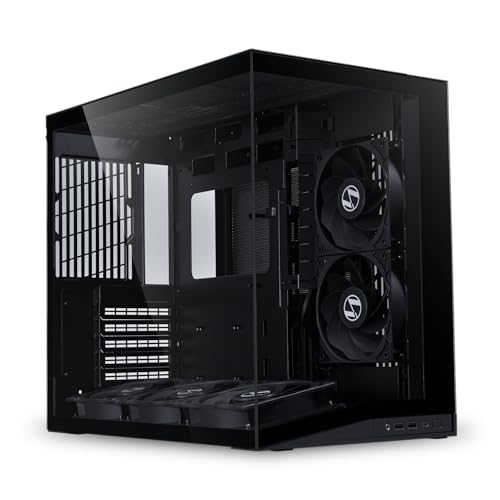

Top 3 picks at a glance
Quick Picks
As an Amazon Associate we earn from qualifying purchases at no extra cost to you.


| Product | Best for | Key spec from the title |
|---|---|---|
| MUSETEX Y6 | Full lighting package | 7 infinity mirror PWM ARGB fans, ATX mid tower, Type-C, 270-degree glass |
| FOIFKIN F600 | Fans included, simple build | 7 pre-installed PWM ARGB fans, ATX mid-tower, 270-degree glass |
| MUSETEX K2 | Dual-glass look | 7 PWM ARGB fans, Type-C, full-view dual tempered glass |
| Lian Li O11D Mini V2 Flow | Airflow-first showcase | Five 120mm reverse-blade fans, panoramic glass, 10-degree angled intake |
| Lian Li V100-ATX | Large GPUs and radiators | Supports 420mm GPUs and 360mm radiators, USB-C, dust filter |
| MONTECH TG3 | Back-connect motherboards | 430mm GPU and 180mm cooler clearance, 4 ARGB fans, 360mm radiator |
| RUIX OV303 | High-airflow budget | 4 x 120mm Prism ARGB PWM fans, USB 3.0 and Type-C |
| Thermaltake View 380 TG ARGB | Name-brand dual glass | 4 x 120mm ARGB fans, hidden-connector motherboard support |
| MOROVOL MATX V3 | Small desk, micro-ATX | 270-degree panoramic glass, 3 fans, micro-ATX, USB 3.0 |
The 9 Best Options
MUSETEX Y6 with Infinity Mirror ARGB Fans
The Y6 is the lighting-first choice in the budget tier. The title lists seven pre-installed infinity mirror PWM ARGB fans, an ATX mid-tower frame, a Type-C front port, and 270-degree full-view tempered glass in black. Infinity mirror fans add a tunnel-like depth effect to the glow, which suits a build that is meant to be admired through the glass. For a first showcase PC, getting seven fans in the box means you do not have to buy extras to fill the layout, and the corner-free glass gives a clear view of the whole interior.
- Seven fans are included, which covers intake, exhaust, and a bottom or side spot without extra purchases.
- The 270-degree glass gives a nearly uninterrupted view of the interior.
- A Type-C front port is listed, a convenience for modern phones and drives.
- The title says nothing about maximum GPU length or radiator support, so check the specification table first.
- Seven RGB fans means more cables to hide, which is a real task behind glass.
Skip it if you prefer a subdued, single-color look or want the quietest possible setup, since a large number of lit fans leans loud and bright. Compared with the next pick, the FOIFKIN F600, the two cases share a fan count and glass style, so the choice comes down to brand preference, front-panel details, and the exact layout shown in the listing photos.
FOIFKIN F600 Panoramic Mid-Tower
The F600 is the Y6’s closest rival. The listing describes a black ATX mid-tower with seven pre-installed PWM ARGB fans, 270-degree panoramic glass, and Type-C. It is aimed at builders who want the aquarium look without a premium tier, and the long list of included fans makes it a good fit for a build where the case itself is the main lighting feature. The F600 name is newer in the market, which can be a plus for fresh styling and a minus for long-term support.
- Seven PWM fans come pre-installed, so the case is ready for a build on arrival.
- Panoramic glass with no corner pillar suits the fish tank look.
- Type-C support and ATX compatibility fit most current motherboards and front-panel cables.
- FOIFKIN is a smaller name, so warranty and replacement-part availability need a close read.
- The title offers no radiator or GPU clearance figures, leaving key fit questions open.
Skip it if you want a recognized brand with a track record, because the Lian Li and Thermaltake models further down offer that. Against the MUSETEX K2 that follows, the F600 keeps the sweeping 270-degree view while the K2 swaps to a dual-glass design, so decide whether you prefer a wraparound curve or two flat panels. Because the F600 lists the same Type-C and fan count as the Y6, it is worth comparing the photos of the front panel and the rear cable area, since those are the places where otherwise similar budget cases differ most.
MUSETEX K2 Dual Tempered Glass ATX Case
The K2 is MUSETEX’s more conventional showcase layout. The title lists seven pre-installed PWM ARGB fans, Type-C, and full-view dual tempered glass on a black ATX mid-tower. Instead of a continuous curve, you get two glass surfaces, typically front and side, which still show off the hardware from two angles. It suits builders who like the clean look of glass on two faces but do not need the wraparound corner, and who want a case that sits comfortably against a wall.
- Dual glass panels show the hardware from the front and side.
- Seven ARGB fans are included, so the lighting is complete from the start.
- Type-C and ATX support make it compatible with current builds.
- It is less distinctive as a fish tank design than the 270-degree cases above.
- As with the other budget cases, the title gives no GPU length or cooler height, so buyers must verify fit.
Skip it if the continuous wraparound look is the main reason you are shopping. It sits between the pillarless Y6 and F600 and the premium Lian Li O11D Mini V2 Flow, offering a familiar dual-glass shape at a mainstream tier, and it is the easiest one here to place in a corner or beside a monitor. Builders who hate the look of cables across a wide glass panel will find the two-panel format more forgiving, because one side can stay solid in appearance while the other becomes the display window for the graphics card and memory.
Lian Li O11D Mini V2 Flow
The O11D Mini V2 Flow is the airflow-minded design classic in the roundup. The listing describes an ATX case with panoramic glass, five 120mm reverse-blade fans in a non-RGB black set, and a 10-degree angled intake. Reverse-blade fans mean the lit side can face the glass if you add lighting later, while the standard fan face looks cleaner for builds without RGB. This is the case for builders who want a showcase PC that still treats cooling seriously, since the angled intake is aimed at improving air delivery.
- Five 120mm fans are included, which gives a ready airflow layout out of the box.
- Panoramic glass keeps the aquarium look without sacrificing cooling.
- Lian Li is a recognized case brand with a strong reputation among builders.
- The fans are non-RGB, so lighting must be added separately for a colorful build.
- The compact size means large radiators and very long graphics cards may need careful planning.
Skip it if you want an out-of-the-box RGB spectacle, as the budget cases above deliver that more directly. Compared with the Lian Li V100-ATX that follows, the O11D Mini is the more traditional showcase, while the V100 leans toward big graphics cards and large radiators. The O11D Mini is also the only listing here that spells out its fan blade orientation, a detail that matters for builders who plan to add their own lighting strips or swap in a different fan color later. Buyers who value resale value tend to prefer recognized names like this one, since used cases from known brands are easier to sell on.
Lian Li V100-ATX Mid-Tower
The V100 puts capacity at the front of the listing. The title mentions a side USB-C I/O, a dust filter, support for 420mm graphics cards and 360mm radiators, an included GPU bracket, and LED lighting. It is a case for builders who plan to install a flagship graphics card or a large liquid cooler and want the glass view without compromising on clearance. The included GPU bracket is a practical detail, since heavy cards can sag over time and a support helps protect the slot.
- Support for 420mm GPUs makes it one of the roomiest in the group.
- A 360mm radiator fits for large liquid-cooling loops.
- A dust filter and GPU bracket show attention to long-term upkeep.
- The title does not describe fan count, so buyers should confirm what is included.
- It is less of a pure fish tank design than the pillarless 270-degree models.
Skip it if you want a compact, desk-friendly build or the full curve of wraparound glass. Next to the MONTECH TG3, the V100 offers a bit more GPU length on paper, while the TG3 adds a tiered showcase layout and back-connect readiness. The V100 is a sensible foundation for a build that will change over time, because clearance is the part of a case that cannot be upgraded later. If you expect to swap the graphics card within a couple of years, the extra room listed in the title is cheap insurance, and the dust filter reduces the cleaning burden behind the glass.
MONTECH TG3 Panoramic ATX Case
The TG3 is the design-forward pick. The listing calls it a panoramic ATX case, back-connect ready, with four ARGB fans, a tiered showcase, 430mm GPU clearance, 180mm cooler clearance, and 360mm radiator support. Back-connect readiness refers to motherboards that place their power and data connectors on the rear, which leaves the front of the board visually clean. The clearance figures in the title make it one of the easier cases to size before you buy.
- 430mm GPU clearance fits all but the most extreme graphics cards.
- 180mm cooler clearance leaves room for large air coolers.
- Back-connect support is ideal for a minimalist wiring layout.
- Only four ARGB fans are listed, fewer than some cheaper cases.
- Back-connect parts are only useful if your motherboard and power supply support the layout.
Skip it if your motherboard is a standard design and you are not interested in rear-connector wiring. Compared with the RUIX OV303, the TG3 is the more showcase-oriented design, while the OV303 focuses on straightforward high airflow at a gentler tier. The TG3 is the case to study if you are willing to buy a compatible back-connect motherboard, because the pairing is what delivers the cleanest possible front view. With a standard board, much of its appeal shrinks, and a cheaper case with a similar glass layout would be a more rational purchase. Four fans is enough for a mid-range build, though a hot graphics card may benefit from additional intake fans.
RUIX OV303 ATX Mid-Tower
The OV303 is the budget airflow option. The title lists an ATX mid-tower with four pre-installed 120mm Prism ARGB PWM fans, USB 3.0 and Type-C ports, and a high-airflow design in black. It does not claim the full wraparound view of the more expensive cases, but it gives a glass-fronted showcase at an accessible tier. This is a sensible first case for someone whose priority is a cool, bright build, not a premium presentation.
- Four 120mm ARGB PWM fans give a balanced airflow base.
- Both USB 3.0 and Type-C ports are listed on the front.
- The high-airflow positioning suits warm rooms and hot graphics cards.
- The title does not mention panoramic glass, so it is a less pure fish tank design.
- The brand is lesser known, so check warranty and return details.
Skip it if you specifically want the wraparound look. Against the Thermaltake View 380 TG ARGB, the OV303 has a similar fan count but less brand backing, so the Thermaltake is the safer pick for buyers who value a known name. The OV303 makes the most sense for someone upgrading from an older, plain case who wants a visible improvement without a large outlay, and who does not mind a little extra research on the brand. Because four 120mm fans are listed, it can usually be configured with a front intake and a rear exhaust, which is a classic and effective layout for a mid-range build.
Thermaltake View 380 TG ARGB
The View 380 is the name-brand mainstream choice. The listing describes a black ATX case with four 120mm ARGB fans included, support for hidden-connector motherboards, and front and side dual tempered glass panels. The hidden-connector support means you can use a back-connect board for a clean front view, which is a nice feature at this tier. Thermaltake has a long history in the case market, which gives buyers more confidence about support and replacement parts.
- Dual tempered glass on the front and side gives a strong showcase view.
- Four 120mm ARGB fans are included.
- Hidden-connector motherboard support enables a very clean interior.
- It does not offer the continuous wraparound view of the 270-degree models.
- The title lists no GPU or radiator clearance numbers.
Skip it if you want the pillarless fish tank look or need massive clearance. Next to the compact MOROVOL that follows, the View 380 is the full-size ATX option, so the real question is whether your motherboard and desk justify the larger footprint. For many buyers the View 380 is the middle path between a lesser-known budget brand and a premium showcase case: you pay for a known name, four included fans, and two glass faces, and you accept that the interior view is a little less dramatic than the pillarless designs. It is also a comfortable option for gift builds, because a familiar brand is easy to explain and easy to support.
MOROVOL MATX V3 Micro-ATX Case
The MOROVOL V3 is the small-footprint entry. The title lists a Micro-ATX case with 270-degree panoramic tempered glass, three fans pre-installed, and USB 3.0 in black. A micro-ATX frame suits compact desks and smaller motherboards, while still offering the pillarless glass look that defines the category. It is the one to look at if your goal is an aquarium-style showcase that does not take over the room.
- The micro-ATX size is compact and desk-friendly.
- 270-degree panoramic glass keeps the signature fish tank view.
- Three fans are included for basic airflow.
- It supports only micro-ATX and smaller boards, which limits upgrade paths.
- Smaller internal volume can limit radiator size and graphics card length.
Skip it if you own a full ATX motherboard or plan to install a large liquid cooler. As the smallest option here, it is the right choice for compact builds, and a good counterpoint to the larger cases that fill the earlier part of the list. Because it supports only smaller boards, plan the whole build around it: choose a micro-ATX motherboard, a compact cooler, and a graphics card that fits the interior before you place the order. The reward is a tidy aquarium-style PC that looks deliberate on a small desk rather than oversized, and that is easier to move when you rearrange the room. Three included fans cover basic cooling, but a hot graphics card will want extra intake.
Who Should Build in a Showcase Case
A glass-heavy case rewards builders who enjoy the look of the machine as much as its raw speed. A case like this is a purchase you see every day, so a few extra minutes of planning pay off. If your PC sits in a visible spot such as a desk corner, a living room shelf, or behind a streaming setup, a panoramic case turns it into a feature piece. It is also the right fit for anyone who likes to change hardware often, since an open view makes upgrades easy to admire.
Streamers and content creators
If your PC appears on camera, the glass and lighting are part of the set. Seven-fan cases such as the Y6 and F600 provide an instantly lit backdrop, while the Lian Li models give a more controlled, premium look.
Custom-loop and premium builders
The V100 and TG3 provide the clearance for large radiators and long graphics cards, so the showcase can include a serious cooling setup. Cable routing quality becomes essential here, and so does the choice of a graphics card whose cooler matches the look of the rest of the build. These builders tend to keep a case for several hardware generations, so clearance is worth more than fan count.
Who should look elsewhere
Buyers who need quiet operation, simple dusty-environment cleaning, or compact travel-friendly builds may prefer a solid-panel case. Glass-heavy designs show every cable and collect visible dust, so the tidy look takes some upkeep. Households with young children or pets should also think about where the glass faces and whether the case could be knocked over, because tempered glass is strong but heavy when it fails.
How to Choose
Glass layout and visibility
A true fish tank design uses two glass panels that meet without a corner pillar, giving a continuous view. Dual flat panels, as on the K2 and View 380, show the interior from two sides but with a visible edge. Check whether the glass is tempered, how it is fastened, and whether it can be removed easily for cleaning, since thumbscrews are friendlier than hidden clips. Panels that sit flush with a thin frame look cleaner than those with wide bezels. Ignore claims of anti-glare or scratch-proof coatings unless the listing explains them, because tempered glass is mostly judged by thickness and edge finish. A pillarless corner is the feature that matters most for the aquarium effect.
GPU length and cooler height
Match the case to the graphics card. Measure your card in millimeters and compare it with the listed clearance, leaving at least 10 to 20mm spare. Large air coolers of 160mm to 180mm need side clearance as well. The V100 lists 420mm GPU support and the TG3 lists 430mm, so they suit the largest cards, while the compact cases require smaller ones. Remember that front-mounted radiators and fans can reduce usable GPU length by several centimeters, so the headline figure is a ceiling rather than a promise. A vertical GPU mount, which many showcase builders like, also needs extra depth, and requires a riser cable that is usually sold separately.
Radiator support and fan count
If you plan liquid cooling, look for 240mm, 280mm, or 360mm support listed clearly, and check which sides they mount on. Included fans save money, but remember that RGB fans can be loud, so confirm PWM support for speed control. The O11D Mini V2 Flow ships five fans, while the Y6, F600, and K2 each list seven. For air cooling, three intake fans and one or two exhaust fans make a balanced starting point. A 360mm radiator needs mounting space on the top or side, and thick radiators can collide with tall memory modules, so check the clearance diagram. Do not equate more fans with better cooling, because blocked intakes behind glass can still trap heat.
Motherboard size and back-connect support
Confirm the case matches your motherboard format: ATX covers most full-size boards, while micro-ATX cases such as the MOROVOL need a smaller board. If you want a clean front view, a back-connect motherboard and a case that supports it, like the TG3 and View 380, hide the cables entirely. Also confirm that the power supply sits in a basement shroud and that its length fits, since cable bulk is the most common reason a clean glass build turns messy. A standard ATX power supply is the safe assumption, while a smaller form factor needs a bracket.
Front ports and dust filters
Look for USB 3.0 and USB-C on the front or top, and check that your motherboard has a matching header. Dust filters on intakes keep the glass interior cleaner, and removable ones are easier to maintain. A case without filters will show dust faster than any other design. Top-mounted ports are easier to reach on a desk, while front ports are better when the case sits on the floor. If you plan to use a USB-C headset or fast external drive, confirm the header type on your motherboard before assuming the front port will work at full speed.
Where budget cases cut corners
Entry-tier cases tend to cut corners on thin steel, tight cable-management gaps, and fans that are noisy at full speed. Ignore marketing around infinity mirror effects and focus on clearance numbers, filter coverage, and panel construction. Reading user photos of the rear section reveals more about build quality than any spec line. Look for a warranty period, a stated glass thickness, and a clear return policy, since a panoramic panel that arrives chipped is a common complaint across the category. Spending a little more on a recognized brand often buys better packaging and faster replacements, which matters with fragile glass.
Wraparound Glass or Airflow-First Panels
The main trade-off in this category is between dramatic panoramic glass and conventional panels with deliberate ventilation. Both can look good, but they behave differently as your hardware heats up and as dust accumulates. Most buyers of this keyword end up choosing between the two based on where the PC will live, how much they care about temperatures, and how many hours a week they will spend admiring the interior rather than playing on it. The table lays out the contrast using the cases in this roundup.
| Factor | Wraparound glass (Y6, F600, MOROVOL) | Airflow-first or dual glass (O11D Mini, K2, View 380) |
|---|---|---|
| Visual impact | Continuous, pillarless view | Two panels or angled intake |
| Airflow focus | Depends on side and bottom intakes | Designed around intake paths |
| Cable visibility | Everything is on show | Easier to hide on one side |
| Best for | Display builds | Mixed gaming and display |
Pick wraparound for display builds
If the goal is a room-defining showpiece, the wraparound view is unmatched. Expect to spend more time on cable routing and component choice, since there is nowhere to hide a messy build. Pair it with a graphics card and memory that look good under lighting, and plan on tidying cables whenever you add a drive, because a single loose lead stands out immediately behind glass.
Pick airflow-first for hot hardware
If you run a power-hungry graphics card and care about temperatures, favor a case built around intake paths and mesh. The O11D Mini V2 Flow and the OV303 take that approach and keep the glass look secondary. For many buyers this is the better compromise, because the machine still looks impressive while running cooler and quieter under long gaming sessions. If you are unsure, favor airflow, since a good-looking case that throttles is a disappointment.
Setup, Compatibility and Upgrade Tips
What to check before buying
Confirm motherboard format, maximum graphics card length, cooler height, radiator size, and the front-panel connectors. Measure the desk or shelf space, including room for the glass panels to be removed. Check whether the listed fans are included and whether they are PWM, and ask how many controllers or splitters you will need for the lighting. Check the weight of the case as well, since tempered glass adds heft, and make sure the desk or shelf can support it.
What to upgrade first
Cable management and fans are the first areas worth refining in a glass case. Sleeved or color-matched extension cables transform the look, and replacing a noisy fan with a quieter one improves daily comfort. Add dust filters if the case lacks them, and consider a GPU support bracket for heavier graphics cards. A vertical GPU mount is a popular upgrade for showcase builds, but it needs a riser cable and enough depth, so confirm those before committing. Plan lighting last: a single controller that syncs every fan is easier to live with than several separate remotes.
Common compatibility traps
Many panoramic cases limit the space behind the motherboard tray, which can make routing thick cables tough. Front-panel Type-C requires a matching motherboard header, which some older boards lack. A tall radiator can collide with memory modules, and a long graphics card can block front-mounted fans. Always read the clearance diagram, not just the title. Finally, ARGB headers are not universal: confirm that your motherboard has the three-pin header the fans expect, or that the case includes a hub, so the lighting works on the first boot. Test-fit the major parts outside the case if you can, and keep the case box until the build is finished and stable.
Which One Fits Your Situation
A first showcase build on a budget
The MUSETEX Y6 delivers panoramic glass and seven fans in one box, which keeps extra purchases to a minimum. It is an easy way to get a lit aquarium PC working in a weekend.
A premium airflow-minded display PC
The Lian Li O11D Mini V2 Flow suits builders who want a recognized brand, five included fans, and a cooling-conscious layout behind the glass. Add your own lighting later if you want color.
A flagship graphics card and big radiator
The Lian Li V100-ATX or the MONTECH TG3 provide the clearance for long cards and 360mm radiators, with the TG3 adding back-connect support.
A compact desk
The MOROVOL MATX V3 keeps the panoramic look in a micro-ATX body that fits smaller spaces. Pick a micro-ATX board and a compact cooler to match.
Common Mistakes
- Buying on looks alone without checking GPU length and cooler clearance.
- Assuming included RGB fans are quiet or controllable without checking the controller.
- Ignoring cable routing space behind the motherboard tray.
- Choosing micro-ATX to save space and then wanting a larger board later.
- Placing a glass case where direct sunlight or pets can damage the panels.
- Forgetting that every cable and speck of dust is visible through the glass.
Related guides
- Windows Macos Linux Gaming Performance Comparison Strengths Weaknesses
- Desktop Operating Systems Gaming Performance Strengths Weaknesses
- 5G Home Internet Wifi Modem Settings Low Latency Gaming
Frequently Asked Questions
What makes a case a fish tank case?
The term describes cases with panoramic, corner-free glass that wraps around two sides. The design shows the hardware like a tank, which is why cable and component presentation matter more than in a typical case.
Do panoramic cases run hotter?
They can, because glass does not ventilate. Airflow depends on the intake and exhaust fans, so look for cases that list multiple fans and clear intake paths.
Are RGB fans worth it?
For a showcase build they are part of the point. Choose PWM models for speed control, and make sure you have a controller or motherboard header to manage them.
Can I use a full-size graphics card?
Often yes, but verify the length. Cases such as the V100 and TG3 list generous GPU clearance, while compact cases may be limited.
What is back-connect?
It refers to motherboards and cases that place power and data connectors on the rear of the board. The result is a cleaner front view, which suits glass cases.
How do I clean a glass case?
Use a microfiber cloth and a glass-safe cleaner on the panels, and clear dust filters regularly. Power down and unplug before opening the case.
Final Words
For most builders, the MUSETEX Y6 or FOIFKIN F600 offer the quickest route to a lit aquarium-style PC, while the Lian Li O11D Mini V2 Flow rewards those who value airflow and brand reputation. Buyers with big graphics cards should look at the V100 or TG3, and small-desk builders will like the MOROVOL. Whatever you choose, plan the interior before you buy: measure clearances, hide the cables, and treat the case as part of the room. A fish tank case rewards patience, so give the interior layout as much thought as the parts list, and let the glass show something you are proud of every day.