
The WOLFBOX MegaFlow 50 is the safest all-round starting point if you want a reusable replacement for canned air in a gaming PC, while the 320,000 RPM brushless duster-and-vacuum is the pick for people who want the strongest stated motor and a suction mode. Every product on this page is a rechargeable electric blower, a device that spins a small fan to push a steady stream of air instead of using a disposable can of propellant. They suit PC cases, heatsinks, keyboards, and the dust that collects on radiator fins. Brushes, swabs, and wipes are a separate category and are covered in the buying section below.
Our Top Picks
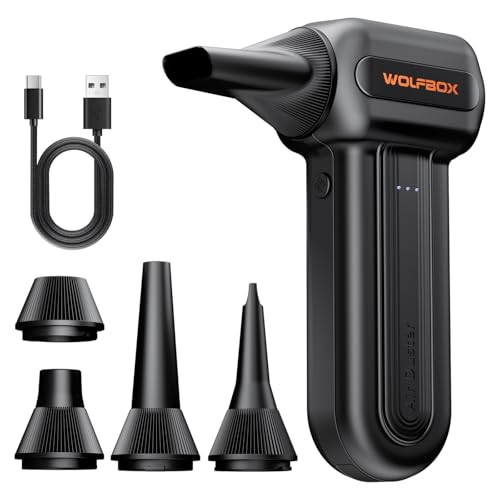


Top 3 picks at a glance
Quick List
- WOLFBOX MF60 – best for a straightforward three-speed cordless blower with fast charging
- WOLFBOX MegaFlow 50 – best for a mini blower that also handles keyboards and household jobs
- 130000RPM jet blower with LED light – best for dim corners inside a case
- 320,000 RPM duster and vacuum 2-in-1 – best for buyers who want suction plus blowing in one tool
- 130000RPM brushless cordless duster – best for a brushless motor at a mid-range stated speed
- Meudeen Air-01 – best for a compact computer-focused cleaner aimed at keyboards
Which One Is Right for You?
| If you… | Choose |
|---|---|
| want one tool for the case, the keyboard, and the living room | WOLFBOX MegaFlow 50 |
| want the highest stated motor speed and a vacuum mode | 320,000 RPM duster and vacuum 2-in-1 |
| clean inside dark cases and want built-in lighting | 130000RPM jet blower with LED light |
| prefer a brushless motor with adjustable gears and a light | 130000RPM brushless cordless duster |
| want a three-speed blower from a known brand with quick charging | WOLFBOX MF60 |
| mostly clean keyboards and small desk gear | Meudeen Air-01 |
Higher RPM does not automatically mean better cleaning. Airflow, nozzle shape, and how long the battery lasts matter just as much, and those numbers are often missing from listing titles. If your main job is a quick monthly pass over a mesh-front case and a keyboard, any of these will do; if you also clean a radiator or a dusty carpeted room, favor the models that state brushless motors or extra attachments. Think about where the tool will live as well: a mini blower that fits in a desk drawer gets used more often than a larger unit that sits in a closet, and a tool you actually use every month keeps heatsink temperatures lower over the long run than a stronger one you rarely reach for.
All 6 Picks in Detail
1. WOLFBOX MF60 – Best for a Simple Three-Speed Cordless Blower
As an Amazon Associate we earn from qualifying purchases at no extra cost to you.
The MF60 is the more conventional of the two WOLFBOX units. Its listing describes an electric, cordless, rechargeable air blower with three adjustable speeds, a stated 110,000 RPM, and fast charging, and it is pitched at PC and keyboard cleaning. It suits someone replacing a habit of buying cans of compressed air and who wants predictable, adjustable output without extra complexity. Because the listing title is cut off in the catalog data, confirm the included nozzles and battery capacity on the product page before you buy.
- Electric, cordless, rechargeable design
- Three adjustable speed settings
- Stated motor speed of 110,000 RPM
- Fast charging stated in the listing
- Marketed for PC and keyboard cleaning
Pros
- Three speeds let you drop the airflow for light keyboards and raise it for heatsinks
- Rechargeable, so there is no running out of cans mid-clean
- Established brand name on the listing
Cons
- Battery capacity and runtime are not stated in the title
- Stated speed is lower than the 130,000 and 320,000 RPM options
Compared with the MegaFlow 50, the MF60 reads as the more PC-specific listing, while the MegaFlow 50 leans toward general household use.
2. WOLFBOX MegaFlow 50 – Best for Cleaning the PC and the Rest of the House

The MegaFlow 50 is described as an electric mini blower with a stated 110,000 RPM, three gears, and fast charging, and its title names computers, keyboards, and the house as targets. That makes it a good fit for a shared household where the same blower will clear a keyboard on Monday and a window track on Saturday. Its small size is the main appeal; a mini format is easy to store in a desk drawer next to your PC tools.
- Electric mini blower with a rechargeable battery
- Three adjustable gears
- Stated speed of 110,000 RPM
- Fast charging stated in the listing
- Marketed for computers, keyboards, and household cleaning
Pros
- Compact enough to keep with the PC and take to a LAN event
- Multi-purpose positioning covers more than the case
- Three gears give control over delicate parts
Cons
- A mini body can mean a smaller battery, so confirm runtime on the listing
- Same stated speed as the MF60, so the difference is mainly design and positioning
Next to the generic 130000RPM jet blower, the MegaFlow 50 trades some stated speed for a recognizable brand and a more compact shape.
3. 130000RPM Jet Blower with LED Light – Best for Dim Corners Inside a Case

This unbranded-style listing describes a cordless, rechargeable electric air blower with a stated 130,000 RPM and an LED light, sold as a powerful jet blower. The light is the practical feature for PC work: the bottom of a case, the area behind the PSU shroud, and the gaps between radiator fins are exactly where dust hides and where a work light helps. It fits people who clean in a dim room or under a desk.
- Cordless and rechargeable electric blower
- Stated speed of 130,000 RPM
- Built-in LED light
- Described as a mini air blower
- Motor type not stated in the visible title, so confirm on the listing
Pros
- LED light helps you see what you are cleaning
- Higher stated speed than the 110,000 RPM units
- Compact format for a small tool bag
Cons
- Brand and support details are less clear from the listing
- Whether it is brushed or brushless is not stated, which affects expected life
Compared with the brushless 130000RPM duster, this one shares the stated speed and light but does not announce its motor type.
4. 320,000 RPM Duster and Vacuum 2-in-1 – Best for Blowing Plus Suction

This is the outlier in the group and the one with the boldest numbers. The listing calls it a compressed air duster and vacuum in one, with a powerful brushless motor stated at 320,000 RPM, an ergonomic aluminum alloy grip, and a long-runtime rechargeable battery. Having both modes matters in a PC context because blowing alone can just relocate dust around a room, whereas suction can pull some of it into a filter or bag where the design allows.
- 2-in-1 blower and vacuum
- Brushless motor with a stated 320,000 RPM
- Aluminum alloy grip described as ergonomic
- Rechargeable with a long runtime stated
- Included nozzles and filter details: confirm on listing
Pros
- Two modes in one tool reduce the number of gadgets in your kit
- Brushless motors generally run cooler and last longer than brushed ones
- Metal grip suggests a sturdier body than all-plastic units
Cons
- Strong airflow is easy to overdo near spinning fans and loose cables
- Larger and heavier than mini blowers, which may tire your hand in long sessions
Against the 130000RPM brushless duster, this model offers the extra vacuum function and a much higher stated speed, at the cost of more bulk.
5. 130000RPM Brushless Cordless Duster – Best for a Brushless Motor at a Moderate Speed

This listing combines a stated 130,000 RPM with a rechargeable brushless blower, three adjustable gears, and an LED light. For PC owners that is a sensible middle ground: strong enough to clear a dust-clogged heatsink, adjustable enough to lower the output for keyboards and fan filters, and lit well enough to work inside a dark chassis. The title also references dust removal for other jobs, so it can double as a general-purpose cleaner.
- Rechargeable, cordless brushless blower
- Stated 130,000 RPM
- Three adjustable gears
- LED light
- Battery capacity and attachments: confirm on listing
Pros
- Brushless motor stated in the title
- Light plus three gears is a practical feature pairing
- Less extreme than the 320,000 RPM model, which can be easier to control
Cons
- No vacuum function is stated
- Brand identity is not clear from the title
Compared with the jet blower with an LED light, this one adds the brushless motor and the three-gear control that the other listing does not clearly state.
6. Meudeen Air-01 – Best for Keyboards and Small Desk Cleaning
The Meudeen Air-01 is described as a computer vacuum cleaner and cordless canned-air alternative with a stated 110,000 RPM, aimed at keyboard cleaning. It is the older-style listing in this group and the most keyboard-centric. If your cleaning is mostly keycaps, laptop vents, mouse pads, and monitor bezels, it is a reasonable low-fuss tool, and it also gets used on cameras and consoles. Heavy case or radiator work may call for one of the higher-speed models.
- Cordless, rechargeable computer cleaner
- Stated speed of 110,000 RPM
- Positioned for keyboard cleaning
- Described with a vacuum cleaner name; confirm whether it truly offers suction
- Model number Air-01
Pros
- Clear keyboard and computer focus
- Familiar form for desk use
- Cordless operation for tidy desk setups
Cons
- Lower stated speed than most of the field
- Few feature details appear in the title, so confirm accessories and runtime
Next to the WOLFBOX MF60, which matches its stated speed, the Air-01 is the lighter, more desk-oriented option.
Specs Compared
| Product | Stated speed | Motor | Speed settings | Light | Vacuum mode |
|---|---|---|---|---|---|
| WOLFBOX MF60 | 110,000 RPM | Confirm on listing | 3 speeds | Confirm on listing | Not stated |
| WOLFBOX MegaFlow 50 | 110,000 RPM | Confirm on listing | 3 gears | Confirm on listing | Not stated |
| 130000RPM jet blower with LED light | 130,000 RPM | Confirm on listing | Confirm on listing | Yes (LED) | Not stated |
| 320,000 RPM duster and vacuum 2-in-1 | 320,000 RPM | Brushless | Confirm on listing | Confirm on listing | Yes |
| 130000RPM brushless cordless duster | 130,000 RPM | Brushless | 3 gears | Yes (LED) | Not stated |
| Meudeen Air-01 | 110,000 RPM | Confirm on listing | Confirm on listing | Confirm on listing | Named as a computer vacuum cleaner; confirm on listing |
How We Chose These
This comparison is built from research rather than lab work. We started with current catalog listings for rechargeable electric air dusters aimed at PC and keyboard cleaning, then compared what each listing title states about motor type, stated speed, adjustable settings, lighting, and extra functions. We favored products whose titles clearly describe cordless, rechargeable operation, since that is the main reason to leave canned air behind. Where a listing did not state a detail, we marked it for you to confirm instead of guessing. We also kept the set varied, from mini blowers to a vacuum combination, so the page covers different cleaning habits instead of six near-identical units.
What to Look For
Why electric dusters replace canned air
A can of compressed air is a pressurized container of a propellant gas, and it empties after a few minutes of steady use. Cans also get cold as the contents expand, and if you tilt them, liquid propellant can spit out onto a board. An electric duster uses a battery and a small motor-driven fan, so there is no liquid and no waste. Over a year of monthly cleanings, one rechargeable unit replaces a stack of empty cans, and you can run it for as long as the battery lasts.
How to read RPM claims
The figures on these listings, from 110,000 to 320,000 RPM, describe how fast the motor spins. They do not tell you airflow volume, air speed at the nozzle, or noise. A higher number usually means a stronger stream, but a narrow nozzle on a 110,000 RPM unit can still feel sharper than a wide one on a bigger motor. Treat RPM as a rough tier: around 100,000 is fine for keyboards and light case dust, 130,000 handles heatsinks and radiator fins more easily, and anything beyond that is a bonus for stubborn dust and larger rooms. Look for stated nozzle options and for the number of speed gears, because adjustability is more useful than a headline number.
Brushless versus brushed motors
A brushed motor uses small carbon contacts that wear down over time, so it may lose power or fail sooner. A brushless motor uses electronic switching and tends to run cooler, quieter, and longer. When a listing says brushless in the title, it is worth noting, especially if you expect to use the blower every week. When a listing is silent, assume nothing and look at the product page for motor details.
Safety when blowing air through a PC
Turn the PC off, unplug the power cord, and press the power button once to drain residual charge before you open the case. Hold case fans and graphics-card fans still with a finger or a cotton swab handle while you blow dust out of them, because a strong stream can spin the fan faster than its normal speed and strain the bearings. Keep the nozzle a few inches from components, work in short bursts, and avoid pointing it at your face or the room. Wear safety glasses and consider a dust mask, since fine dust is easy to inhale. Do not open a power supply to clean it; blow only through its vents from outside. Charge the battery with the supplied cable, do not leave it charging unattended, and stop using it if the housing swells, smells, or becomes hot.
Battery, charging, and storage
Most of these units use a built-in lithium-ion battery charged over USB, and several listings advertise fast charging. Runtime is rarely stated in the title, so check the product page for battery capacity and for how long the unit runs on each gear. Higher gears drain the cell much faster than the lowest one, so a claim of long runtime usually refers to the gentlest setting. Store the blower at room temperature, away from direct sun and heaters, and top it up every few months so the cell does not sit empty for long periods. If you travel to LAN events with it, keep it in your carry-on bag rather than checked luggage, as airlines generally ask for spare lithium batteries to go in the cabin.
Nozzles and attachments
A narrow nozzle concentrates the air for keyboard gaps and heatsink fins, while a wider one moves more air across a case floor or a dust filter. A soft brush attachment lets you loosen stubborn dust as you blow. Because attachments differ from model to model and the titles rarely list them, treat the included nozzle set as a reason to read the full product page. Plastic nozzles are preferable near circuit boards, and a flexible tip helps in cramped cases where a rigid tube cannot reach.
Do you need a full cleaning kit too?
A duster removes loose dust, but it does not remove grease or sticky residue. A small kit of soft brushes, microfiber cloths, cotton swabs, and 90 percent or higher isopropyl alcohol handles those jobs. None of the listed products here is a kit, so if you want one, buy it separately and use the blower for the dry step. A simple rule of thumb is to blow first, brush stubborn patches second, then wipe surfaces with a barely damp cloth last, and never spray liquid directly onto electronics.
A worked example
Suppose you clean a mid-tower case with a mesh front, a 240 mm radiator, and a mechanical keyboard every month. A three-speed blower at 110,000 to 130,000 RPM is plenty: use the lowest gear on the keyboard, the middle gear on fan filters and radiator fins, and the highest only for packed heatsink fins. Expect a session of about 10 to 15 minutes, so a battery that runs for 20 to 30 minutes on the middle gear is enough. If you also want to pull dust out of a carpeted office, the vacuum combination becomes more attractive.
Questions
Is an electric air duster safe to use inside a PC?
Yes, when the PC is powered off and unplugged. Electric blowers move air without liquid propellant, but you should still hold fans still, keep the nozzle at a distance, and avoid touching bare circuitry.
Can a high-speed blower damage a fan?
It can if you let the fan overspin. Hold the blades with a finger or a swab handle while blowing so the bearings are not forced to spin faster than normal.
How often should I clean my gaming PC?
Every one to three months is a common range, depending on pets, carpet, and whether the case has dust filters. Check intake filters first, since they catch most of the dust before it reaches components.
Does a vacuum mode matter?
It helps when you want to capture dust instead of blowing it around, such as in a keyboard or a desk drawer. For case interiors, blowing the dust outside of the room or into a bag is usually the cleaner method.
Is 320,000 RPM too strong for a keyboard?
A very high stated speed can be hard to control, so look for adjustable gears and use the lowest setting near keycaps and small parts. The strongest setting is better reserved for packed heatsinks and radiators.
Do I still need isopropyl alcohol and brushes?
Yes, for any residue that air cannot lift. Use the blower for loose dust and a damp cloth with isopropyl alcohol for fingerprints and sticky spots, keeping liquids away from open connectors.
Can I use one of these on a laptop?
Yes, with a gentle gear. Aim the stream at the vents and keyboard from a few inches away, keep the laptop powered off, and avoid blowing hard directly into the fan inlet, which can spin the fan too fast.
Update History
- October 20, 2026 – Initial publication; product set drawn from current catalog listings.
- Check the product page for current specifications and availability before buying.
Sources
- Retailer listing titles and specification fields for each product above
- General electronics cleaning and static-safety guidance from PC component makers’ maintenance advice
Related guides
- Best Budget HP Laptops: Ten Listings Decoded by Processor, RAM and Reseller Tags: 10 Compared (2026)
- 10 Best Gaming Laptops for Singapore: Twelve Widely Sold Options and an Import Checklist (2026)
- Ryzen Threadripper 1900X for Gaming: Specs and Is It Worth It?
- Ryzen 3 PRO 4350G Review for Gaming in 2026: Specs and Verdict


