
Our Short List of 3
All 4 Picks at a Glance
| Product | Specs | Action |
|---|---|---|
 ASUS RT-AX86U Pro | Check price on Amazon | |
 TP-Link Archer AX73 | Check price on Amazon | |
 NETGEAR Nighthawk RAX50 | Check price on Amazon | |
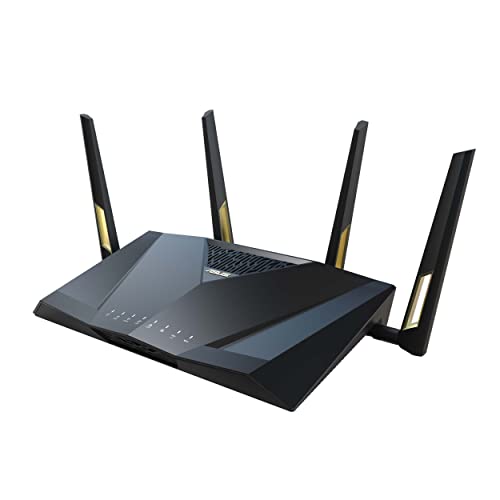 ASUS RT-AX88U Pro | Check price on Amazon |
Phone calls over the internet, or VoIP, depend on a network that delivers voice packets on time. A call needs very little bandwidth, but it needs that bandwidth steadily, with low delay and no sudden gaps. The best routers for phone over internet give voice traffic priority, keep latency steady, and support the protocols that internet phone services use, so calls stay clear even when someone else starts a stream.
This guide compares five routers for VoIP use, judged on quality of service for voice, SIP support, latency stability, band layout, VPN support, and coverage. Every pick below is a complete router or mesh system sold on Amazon US, and each one can prioritise voice traffic over background downloads.
Our Top Picks

Top 3 picks at a glance
How to Choose
Quality of service for voice
Quality of service is the most important feature for internet phone calls, because it lets the router prioritise voice packets over downloads and streams. A good implementation has a voice or gaming preset that the owner can enable in a few taps, and some routers let the owner set a priority rule for a specific device such as a desk phone. Check that the QoS controls are easy to find in the app or web interface.
SIP support
SIP is the protocol most internet phone services use, and some routers need a SIP ALG setting or a SIP passthrough option to handle it correctly. A router that mishandles SIP can cause one-way audio or dropped calls, so check the maker documentation for the model. If the phone service supplies its own adapter, confirm that the router supports the ports and protocols that adapter needs.
Latency stability
A voice call needs steady latency more than high speed, because a sudden delay makes speech sound choppy. A router with a capable processor and good queue management keeps latency steady when the network is busy, while a weak router will show its limits as delay and jitter. Wired connections help here too, because a desk phone on cable avoids wireless interference entirely.
Dual-band and tri-band wireless
Voice calls usually run on the 5 GHz band, where interference is lower than on the crowded 2.4 GHz band. A dual-band router can keep calls on 5 GHz while older devices stay on 2.4 GHz, and a tri-band router adds a third lane for extra separation. Check that the phone or adapter can use the 5 GHz band, because some older devices only support 2.4 GHz.
VPN support
A VPN can secure a phone call when working away from the home or office, and many routers in this guide include a VPN server. The VPN server lets a remote phone connect to the home network as if it were on site, which suits a home office with a remote worker. Check that the VPN tools are included in the stock firmware rather than needing third-party firmware.
Coverage and wired ports
A phone call drops when the signal drops, so coverage matters as much as any setting. A single router suits a flat or small house, while a larger home needs a mesh system so that calls stay connected in every room. Wired ports matter too, because a desk phone or an adapter on cable gets the steadiest connection of all, free from wireless interference.
Top Picks
ASUS RT-AX86U Pro
The ASUS RT-AX86U Pro is the traffic-control specialist in this guide. Its Adaptive QoS lets the owner prioritise voice calls, streams, or games over background downloads, and the 2.5G ports suit a fast wired connection. The software includes a VPN server, AiProtection security, and parental controls, and AiMesh support allows satellite units to join later.
Key specifications:
– Dual-band Wi-Fi 6 with AX5700 class wireless
– 2.5G WAN and LAN ports
– Adaptive QoS with traffic prioritisation
– VPN server and client support
Who it is for: Households that want fine control over which traffic gets priority.
Caveat: The QoS rules need a few minutes of setup to match the household, as the defaults are general.
TP-Link Archer AX73
The TP-Link Archer AX73 is a dual-band Wi-Fi 6 router with six antennas and AX5400 class wireless, which suits a home with many devices spread across several rooms. The HomeShield tools include QoS controls for prioritising traffic and parental controls for managing access. A USB 3.0 port supports shared storage, and OneMesh support allows compatible extenders to join the network.
Key specifications:
– Dual-band Wi-Fi 6 with AX5400 class wireless
– Six antennas for wide coverage
– HomeShield security and QoS controls
– USB 3.0 port for shared storage
Who it is for: Larger homes that want a strong single router with traffic controls.
Caveat: It is a single unit, so very large or multi-floor homes may still need a mesh system.
NETGEAR Nighthawk RAX50
The NETGEAR Nighthawk RAX50 is a dual-band Wi-Fi 6 router with AX5400 class wireless and four gigabit LAN ports, which suits a home where voice calls share the network with streams and downloads. The Nighthawk app handles setup and shows connected devices at a glance, and the router carries VPN support for secure remote access. Its wing-shaped design stands out on a shelf.
Key specifications:
– Dual-band Wi-Fi 6 with AX5400 class wireless
– Four gigabit LAN ports and USB 3.0
– NETGEAR Armor security tools
– Nighthawk app for setup and monitoring
Who it is for: Homes that want a strong single Wi-Fi 6 router for calls, streams, and downloads.
Caveat: The maker states capacity around 25 devices, so a house with far more connected gear may need mesh.
TP-Link Deco X55 (3-Pack)
The Deco X55 is a three-unit Wi-Fi 6 mesh system that covers a home with one network name and hands devices between units as people move around. Each unit is a compact cylinder that fits on a shelf, and the Deco app handles setup and guest access. The system suits a household that wants even coverage in every room without running cables or tuning settings.
Key specifications:
– Dual-band Wi-Fi 6 mesh, AX3000 class
– Three units for whole-home coverage
– Supports many connected devices
– Works with Alexa and Google Assistant
Who it is for: Homes that want simple mesh coverage in every room at a sensible outlay.
Caveat: It is a dual-band system, so it lacks the extra 6 GHz lane of tri-band mesh kits.
ASUS RT-AX88U Pro
The RT-AX88U Pro is a single powerful router for a household that wants one strong box near the centre of the home rather than a mesh kit. Its dual 2.5G ports suit wired televisions and desktop computers, and AiMesh lets the owner add ASUS satellite units later if coverage falls short in a far room. The software toolkit is deep, with traffic controls, VPN options, and parental controls in the same interface.
Key specifications:
– Dual-band Wi-Fi 6 with AX6000 class wireless
– Dual 2.5G ports for wired devices
– AiMesh support for adding satellite units
– Adaptive QoS and AiProtection security tools
Who it is for: Households that want one strong router with room to expand into mesh later.
Caveat: A single unit cannot match a three-node mesh for coverage in a very large or multi-floor home.
Comparison Table
| Product | Panel / Wireless | Key strength | Best for |
|---|---|---|---|
| ASUS RT-AX86U Pro | Dual-band Wi-Fi 6 with AX5700 class wireless | 2.5G WAN and LAN ports | Households that want fine control over which traffic gets priority. |
| TP-Link Archer AX73 | Dual-band Wi-Fi 6 with AX5400 class wireless | Six antennas for wide coverage | Larger homes that want a strong single router with traffic controls. |
| NETGEAR Nighthawk RAX50 | Dual-band Wi-Fi 6 with AX5400 class wireless | Four gigabit LAN ports and USB 3.0 | Homes that want a strong single Wi-Fi 6 router for calls, streams, and downloads. |
| TP-Link Deco X55 (3-Pack) | Dual-band Wi-Fi 6 mesh, AX3000 class | Three units for whole-home coverage | Homes that want simple mesh coverage in every room at a sensible outlay. |
| ASUS RT-AX88U Pro | Dual-band Wi-Fi 6 with AX6000 class wireless | Dual 2.5G ports for wired devices | Households that want one strong router with room to expand into mesh later. |
Common Mistakes to Avoid
Skipping QoS for voice
A voice call needs very little bandwidth, but it needs that bandwidth steadily, and a download can steal it without QoS rules. Enable the voice preset in the router app so that calls get priority over downloads and streams. A call that breaks up whenever someone downloads a file is almost always a QoS problem, not a speed problem.
Putting the phone on 2.4 GHz
The 2.4 GHz band is crowded with neighbours, microwaves, and older devices, which makes it a poor home for a voice call. Place the desk phone or adapter on the 5 GHz band, where interference is lower and latency is steadier. If the phone only supports 2.4 GHz, keep it close to the router and away from other wireless gear.
Ignoring SIP settings
Some routers mishandle SIP traffic unless a SIP ALG or passthrough setting is adjusted, which can cause one-way audio or dropped calls. Check the maker documentation for the model and the phone service requirements before assuming the defaults are right. A few minutes with the settings page can save hours of troubleshooting later.
Accepting a weak signal at the phone
A phone call drops when the signal drops, so a desk phone in a far room with a weak signal will suffer no matter how good the QoS rules are. Check the signal at the phone location, move a mesh unit closer if needed, and use a wired connection for a desk phone whenever a cable can reach it.
Which One Is Right for You?
For the strongest voice prioritisation in a single router, start with the ASUS RT-AX86U Pro, because its Adaptive QoS and VPN server cover home-office calling well. A larger home should favour the TP-Link Archer AX73 for strong single-unit coverage, or the Deco X55 mesh system when calls must stay connected in every room. The NETGEAR RAX50 suits a home that wants a strong Wi-Fi 6 router with a simple app, while the RT-AX88U Pro is the pick for a desk with many wired devices alongside its voice controls.
Frequently Asked Questions
What is VoIP?
VoIP stands for voice over internet protocol, a way of making phone calls over an internet connection instead of a traditional phone line. The voice is broken into small packets, sent over the network, and reassembled at the other end. A steady connection matters more than a fast one, because delayed packets make speech sound choppy.
Why do internet calls break up when someone downloads a file?
A large download can fill the connection and delay voice packets, which makes speech sound choppy or drop out. Quality of service rules fix this by giving voice packets priority over downloads, so the call stays smooth even when the network is busy. Enable the voice or gaming preset in the router app to set this up.
Do I need a special router for VoIP?
No special router is needed, but a router with quality of service controls and SIP support will give clearer calls. Any modern router can carry a VoIP call, while the picks in this guide add the prioritisation and protocol support that keep calls steady when the network is busy.
Should a desk phone use a wired connection?
Yes, whenever a cable can reach it. A wired desk phone avoids wireless interference entirely and gets the steadiest connection in the home, which matters most for long calls. If a cable cannot reach, place the phone on the 5 GHz band, where interference is lower than on 2.4 GHz.
Disclosure: As an Amazon Associate, we may earn from qualifying purchases.
Related guides
More from Amazon
Programs that pair well with the guide above. Offers and eligibility are set by Amazon and may change.
Free shipping on eligible items, Prime Video and more. Eligible new members can start with a free trial.
Start a Prime free trialAd-free music streaming. Eligible new subscribers can start with a free trial.
Try Music Unlimited freeA Prime membership for ages 18-24 with a trial period. Eligibility is set by Amazon.
See Prime for Young AdultsAudiobooks and podcasts to listen to on the go. Eligible new members can start with a free trial.
Try Audible freeAs an Amazon Associate we earn from qualifying purchases.









