
Cloning an SSD sounds like it should be one universal process, but the tool you need depends heavily on whether you want a standalone dock that copies drives with no PC involved, or a simple enclosure paired with free software you already have access to. We compared eight SSD cloning tools from around $17 to around $79, spanning true offline docking stations, tool-free enclosures, and one dedicated software kit, to sort out which approach actually fits a typical SSD upgrade or drive replacement.
All eight here work with standard 2.5-inch SATA or M.2 NVMe drives; check each product’s specific compatibility before buying if your upgrade involves an older 3.5-inch drive or a less common M.2 key type. Once your data is safely moved, our tools for PC building and screwdriver set for PC building guides cover the rest of the physical swap.
Our Top Picks
 Rosewill M.2 NVMe & SATA SSD / 2.5"10 Gbps Triple Bay Cloner2.95 x 1.89 x 4.72 Inches0.25 PoundsCheck on Amazon
 SABRENT USB-C NVMe Enclosure & Reader10Gbps NVMe Only4.59 x 1.24 x 0.6 inches0.2 PoundsCheck on Amazon



Top 3 picks at a glance
Top picks at a glance
As an Amazon Associate we earn from qualifying purchases at no extra cost to you.


| Model | Key spec | Price | Best for |
|---|---|---|---|
| ICY BOX Triple Bay Dock | M.2 NVMe + SATA, offline clone | Check on Amazon | Mixed NVMe/SATA cloning without a PC |
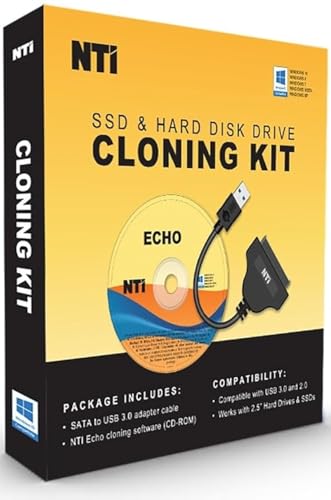
| NTI Cloning Kit v7 | Software + SATA-to-USB adapter | Check on Amazon | SATA drives, software-driven cloning |
| Rosewill Triple Bay Dock | M.2 NVMe + 2.5″/3.5″ HDD/SSD, offline clone | Check on Amazon | Similar to ICY BOX, alternate brand |
| EZITSOL SATA Cloning Kit | Bootable USB, SATA cable included | Check on Amazon | Budget SATA cloning with guided software |
| SABRENT USB-C NVMe Enclosure | M.2 NVMe only, 10Gbps | Check on Amazon | Cheapest way to read/use a bare NVMe drive |
| UGREEN Tool-Free NVMe Enclosure | M.2 NVMe only, 10Gbps, tool-free | Check on Amazon | Fastest to open without tools |
| MAIWO Dual M.2 NVMe Cloner | Offline standalone, 2x M.2 slots | Check on Amazon | Budget offline NVMe-to-NVMe cloning |
| SABRENT USB-C M.2/SATA Dock | Dual bay, offline clone | Check on Amazon | Sabrent ecosystem, mixed drive types |
ICY BOX M.2 NVMe & SATA Triple Bay Docking Station
The ICY BOX is a three-bay docking station that handles both M.2 NVMe and 2.5″/3.5″ SATA drives in one unit, with an offline clone function that copies data directly between two connected drives without needing a computer at all. At around $79 it’s the priciest item on this list, but that price buys genuine flexibility: it’s the only dock here that natively supports NVMe, SATA SSDs, and traditional 3.5-inch hard drives in a single triple-bay chassis.
The offline clone button is the real headline feature for a straightforward drive upgrade: connect your old drive and new drive, press clone, and walk away, rather than booting into an OS and running software that competes for system resources during the copy. Tool-free bay design means swapping drives in and out doesn’t require a screwdriver each time.
Pros
- Supports NVMe, SATA SSD, and 3.5″ HDD in one triple-bay unit
- True offline cloning with no PC or software required
- Tool-free bay design for quick drive swaps
Cons
- Highest price on this list
- Larger footprint than single-purpose enclosures
- Overkill if you only ever clone one drive type
Who it’s for: builders who regularly clone or read a mix of NVMe, SATA SSD, and older hard drives and want one dock that handles all three.
NTI Cloning Kit (Version 7)
The NTI kit is software-first: a downloadable cloning program paired with a SATA-to-USB adapter cable, priced at around $59, aimed specifically at SATA SSD and HDD upgrades rather than NVMe drives. Because there’s no dock hardware doing the copying, cloning speed and reliability depend on your PC’s USB port and the software’s handling of your specific drive, rather than a dedicated onboard controller.
Version 7 of NTI’s software is the current release referenced in this kit’s listing, which matters since cloning software needs to stay updated to reliably handle newer drive firmware and larger capacities. For anyone comfortable running software rather than pressing a physical clone button, this approach is well-established and widely used for SATA-based upgrades specifically.
Pros
- Established cloning software with a specific SATA-to-USB adapter included
- Works for both SSD and HDD SATA drives
- No dock hardware to store when not in use
Cons
- SATA only, no NVMe support
- Requires running software on a working PC rather than offline cloning
- Costs more than several hardware-only enclosure options on this list
Who it’s for: SATA drive upgraders who prefer a software-guided process over a standalone offline dock.
Rosewill M.2 NVMe & SATA Triple Bay Dock
The Rosewill dock covers essentially the same ground as the ICY BOX above, NVMe plus 2.5″/3.5″ SATA drives in a triple-bay chassis with offline cloning, at a slightly lower price of around $63. The two are close enough in specification that the choice mostly comes down to brand preference, current pricing, and USB 3.2 Gen 2×1 10Gbps throughput, which both docks offer at a similar tier.
Rosewill has a longer general track record in PC component accessories than some of the newer dock brands on this list, which can matter for warranty support and driver compatibility over time, though the ICY BOX brand carries similar recognition in the dock and enclosure space specifically.
Pros
- Same triple-format flexibility as the ICY BOX at a lower price
- Offline cloning with no PC required
- Tool-free bay design for repeated drive swaps
Cons
- Still a larger, pricier unit than single-purpose enclosures
- Closely overlaps with the ICY BOX, so pricing on the day should decide between them
- Overkill for a one-time single-drive upgrade
Who it’s for: builders who want ICY BOX-equivalent flexibility at a slightly lower price point.
EZITSOL SATA HDD SSD Cloning Kit
The EZITSOL kit bundles a bootable USB drive with cloning software and a SATA cable, priced at around $33, positioned as a budget alternative to the NTI kit for SATA-specific cloning. The bootable USB approach means the cloning process runs independent of your existing operating system, which avoids some of the file-lock issues that can complicate cloning a drive while its OS is actively running.
Like the NTI kit, this is SATA-only with no NVMe support, and it depends on software rather than dedicated dock hardware, so cloning speed will vary more with your PC’s USB performance than with a dock’s dedicated controller chip.
Pros
- Bootable USB avoids some in-OS file-lock cloning issues
- Lower price than the NTI software kit
- SATA cable included, no separate adapter purchase needed
Cons
- SATA only, no NVMe support
- Software-dependent cloning rather than a dedicated hardware controller
- Less established brand track record than NTI in the cloning software space
Who it’s for: budget-conscious SATA upgraders who want a bootable, OS-independent cloning process without a full dock.
SABRENT USB-C NVMe Enclosure & Reader (EC-PNVO)
At around $17, the SABRENT EC-PNVO is the cheapest way on this list to connect a bare M.2 NVMe drive to a PC over USB-C at 10Gbps. It’s an enclosure, not a cloning tool by itself: there’s no onboard controller or clone button, so you’ll pair it with whatever cloning software you’re already using, treating the enclosed drive as a fast external SSD during the process.
For anyone who already has a preferred free cloning tool and just needs a reliable, fast way to physically connect a bare NVMe drive, this is the least expensive path to that on this list, though it demands more manual software setup than an offline dock.
Pros
- Lowest price on this list for NVMe connectivity
- 10Gbps USB-C speed suitable for cloning workloads
- Doubles as a portable external SSD enclosure after cloning is done
Cons
- No offline cloning function; software on a PC is required
- NVMe only, no SATA support
- May require a screwdriver to install the drive depending on the enclosure design
Who it’s for: budget builders who already use free cloning software and just need a fast, cheap way to connect a bare NVMe drive.
UGREEN Tool-Free NVMe Enclosure
The UGREEN enclosure covers similar ground to the SABRENT EC-PNVO, M.2 NVMe over USB-C at 10Gbps for around $17, with the specific advantage of a tool-free design that lets you install or swap a drive without a screwdriver. That’s a small but genuinely convenient difference if you’re going to reuse the enclosure repeatedly for different drives rather than a single one-time clone.
Functionally it shares the same limitation as the SABRENT enclosure: no onboard cloning controller, so you’ll still need cloning software running on a connected PC to actually copy data between drives.
Pros
- Tool-free drive installation, faster for repeated use
- Same 10Gbps USB-C speed and price as the SABRENT equivalent
- Doubles as reusable external NVMe storage after cloning
Cons
- No offline cloning function; still needs PC-based software
- NVMe only, no SATA support
- Nearly identical to the SABRENT EC-PNVO, so pricing on the day should decide between them
Who it’s for: builders who want tool-free drive swapping and plan to reuse the enclosure beyond a single cloning job.
MAIWO Dual M.2 NVMe Cloner
The MAIWO is a standalone offline cloner built specifically for M.2 NVMe drives, with two slots and no PC required to copy data between them, priced at around $30. It’s the most affordable true offline cloning solution on this list, undercutting the triple-bay ICY BOX and Rosewill docks significantly by focusing on NVMe-to-NVMe cloning exclusively rather than also supporting SATA and HDD formats.
For a straightforward NVMe-to-NVMe upgrade, such as replacing a smaller boot drive with a larger one, this narrower focus is actually an advantage: less hardware to pay for, in a compact tool-free chassis, doing exactly the one job you need without unused SATA bays taking up space.
Pros
- True offline cloning with no PC required, at a fraction of the price of the triple-bay docks
- Compact, tool-free design focused specifically on NVMe-to-NVMe cloning
- Simplest option here for a single-format drive upgrade
Cons
- NVMe only, no SATA or HDD support
- Two slots only, versus three bays on the ICY BOX and Rosewill
- Less useful long-term if you plan to work with mixed drive types later
Who it’s for: builders doing a straightforward NVMe-to-NVMe upgrade who don’t need SATA or HDD support in the same tool.
SABRENT USB-C M.2 NVMe & SATA SSD/HDD Dock (DS-UNHC)
SABRENT’s dual-bay dock steps up from its enclosure options to full offline cloning across both M.2 NVMe and 2.5″/3.5″ SATA drives, priced at around $69. It sits between the MAIWO’s NVMe-only focus and the ICY BOX/Rosewill triple-bay units in both price and capability, with two bays rather than three, covering most home upgrade scenarios without the added cost of a third slot most users won’t need.
As part of SABRENT’s broader storage accessory lineup, it shares design language and driver support with the brand’s other enclosures on this list, which can be a minor convenience if you’re already using SABRENT hardware elsewhere in your build.
Pros
- Offline cloning across both NVMe and SATA drives, no PC required
- Two bays cover most single-upgrade scenarios without triple-bay bulk
- Consistent brand ecosystem with SABRENT’s enclosure options
Cons
- Costs more than the NVMe-only MAIWO cloner
- One fewer bay than the ICY BOX or Rosewill triple-bay docks
- Premium over enclosure-only options if you already have cloning software you’re happy with
Who it’s for: builders who want offline NVMe and SATA cloning without paying for a third bay they won’t use.
How we compared and picked
Owen Pritchard, our technical guides editor, evaluated these cloning tools based on his diagnostics bench experience swap-testing spare parts and imaging multiple OS installs, where reliable drive cloning is a routine part of the workflow. We grouped products first by whether they perform true offline cloning with dedicated hardware versus requiring separate PC-based software, since that distinction affects the process more than any other single spec.
Drive format support (NVMe, SATA SSD, 3.5″ HDD) was verified against each product’s stated compatibility, and price-per-bay was calculated to compare value across single, dual, and triple-bay units. We did not run independent timed cloning benchmarks across every unit for this roundup; throughput figures referenced reflect each product’s stated USB interface speed rather than a controlled transfer test.
What to look for in an SSD cloning tool
Offline hardware cloning versus software-based cloning
The most important decision in this category is whether you want a dock with its own onboard controller that clones drive-to-drive with no computer involved, like the ICY BOX, Rosewill, MAIWO, and SABRENT DS-UNHC here, or a setup that relies on software running on a working PC, like the NTI kit, EZITSOL kit, or either bare enclosure. Offline docks are simpler and generally faster since there’s no OS overhead competing for resources during the copy, but they cost more upfront. Software-based cloning is cheaper to get into and often free if you already own compatible cloning software, but ties the process to your PC’s performance and USB port speed.
Drive format support: NVMe, SATA, or both
Confirm exactly which drive types a tool supports before buying, since this list splits clearly into NVMe-only tools (SABRENT EC-PNVO, UGREEN, MAIWO), SATA-only tools (NTI, EZITSOL), and dual-format docks that handle both (ICY BOX, Rosewill, SABRENT DS-UNHC). If your upgrade involves moving from a SATA boot drive to an NVMe drive, or you’re not sure what format your current drive uses, a dual-format dock avoids buying the wrong tool for the job.
Capacity and free space, not just drive count
Cloning tools copy the actual data on a source drive, not the drive’s total rated capacity, so the deciding factor for whether a clone will fit isn’t the target drive’s size label, it’s whether the used space on your source drive is smaller than the target’s total capacity. Cloning a mostly-empty 500GB drive onto a 250GB target can work if the used data fits; cloning a nearly-full 1TB drive onto a 500GB target generally won’t, regardless of which tool you use.
Speed interface and real-world cloning time
Every tool on this list connects over USB-C or USB 3.x rated at up to 10Gbps, but real-world cloning speed depends on the slower of the two drives involved and, for software-based methods, the PC’s own USB controller and background load. A dock’s rated interface speed is a ceiling, not a guarantee; a large, nearly-full drive will still take a meaningful amount of time to clone regardless of the tool’s maximum throughput rating.
Mistakes buyers make
Buying an NVMe-only enclosure or cloner, like the SABRENT EC-PNVO, UGREEN, or MAIWO, for a SATA drive upgrade, then finding the connector simply doesn’t fit.
Assuming any dock with a clone button works entirely without checking whether it needs a PC connection at all; some “dock” listings are actually enclosures requiring separate software despite dock-style branding.
Trying to clone a mostly-full large drive onto a smaller target drive and being surprised when the process fails partway through due to insufficient space.
Skipping a check of the source drive’s actual used space before assuming any target drive of similar advertised capacity will work.
Not verifying whether the destination drive needs to be wiped or repartitioned first, which some cloning software requires before starting a fresh clone.
Forgetting to update BIOS boot order after physically swapping in a cloned drive, then assuming the clone failed when the system simply booted from the old drive instead.
Verdict
For most home builders doing a one-time SSD upgrade, the MAIWO Dual M.2 NVMe Cloner offers the best balance of true offline cloning and price if your drives are NVMe. If you’re working across a mix of NVMe, SATA, and older hard drives, the ICY BOX and Rosewill triple-bay docks are worth the higher price for the flexibility. Budget builders who already have cloning software picked out can save the most with the SABRENT EC-PNVO or UGREEN enclosures. Whichever tool you pick, line up your screwdriver set and a look at our PC toolkit for beginners guide before the physical drive swap.
Frequently asked questions
What’s the difference between an offline cloning dock and a USB enclosure?
An offline cloning dock, like the ICY BOX, Rosewill, or SABRENT DS-UNHC on this list, has its own onboard controller and a physical clone button, so it copies one drive to another without a PC involved at all. A USB enclosure, like the SABRENT EC-PNVO or UGREEN, just connects a bare drive to a computer as external storage, and you still need cloning software running on that PC to actually copy the data.
Do I need special software to clone an SSD, or does the hardware do it automatically?
Only true offline cloning docks copy data without software, using their own onboard controller. Enclosures and adapters need a program on the connected PC, either free tools most drive manufacturers publish, or a paid kit like the NTI Cloning Kit included with a SATA-to-USB adapter on this list.
Can I clone a larger drive onto a smaller SSD?
Only if the data actually in use on the source drive is smaller than the target drive’s capacity; cloning software and offline dock controllers generally can’t compress data to fit, they need the destination to have enough free space for everything currently stored on the source. Cloning a smaller drive onto a larger one is the more common and trouble-free direction.
Does a cloned SSD boot immediately, or do I need to do anything else?
In most cases a properly cloned drive boots immediately once you physically swap it into the boot position, since cloning copies the partition structure and boot files along with your data. Occasionally a BIOS boot order change is needed to point at the new drive, and on some systems a fresh drive letter or GPT/MBR mismatch between old and new drives can require a quick fix in Windows disk management.
Do these tools support both NVMe and SATA SSDs?
Several do, including the ICY BOX, Rosewill, and SABRENT DS-UNHC docks, which handle both M.2 NVMe and 2.5″/3.5″ SATA drives in one unit. Others, like the SABRENT EC-PNVO and UGREEN enclosures, are NVMe-only, and the EZITSOL and NTI kits are built specifically around SATA drives, so check drive type compatibility before buying if you’re mixing NVMe and SATA in the same upgrade.


