
A 34-inch QHD gaming ultra-wide monitor shows more of the game than a standard 16:9 screen. The 3440 x 1440 resolution stretches the view sideways, so corners, side roads, and opponents at the edge of the frame come into view, while the 21:9 aspect ratio leaves room for a chat window beside the game. The best 34 inch QHD gaming ultra wide monitors pair that wide view with a fast refresh rate and a panel that keeps motion sharp.
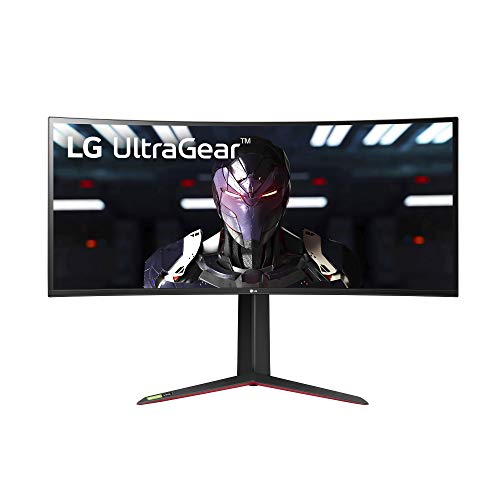

This guide compares five 34-inch QHD gaming ultra-wide monitors, judged on panel type, refresh rate, response time, adaptive sync, curve, HDR support, and ports. Every pick below is a 34-inch monitor with a 3440 x 1440 panel sold on Amazon US, and each one is aimed at gaming first.
Our Top Picks
How to Choose
Panel type
Panel type decides the character of the screen. Nano IPS panels give wide colour and steady viewing angles, VA panels give deeper blacks for dark games and films, and QD-OLED panels give near-instant response times with the deepest blacks of all. For a desk where more than one person watches, IPS is the safe choice, while a solo player in a dark room may prefer VA or OLED.
Refresh rate
Refresh rate decides how smooth motion looks, and the picks in this guide run from 144 Hz to 175 Hz. A 144 Hz panel is the baseline for ultrawide gaming, while 160 Hz and 165 Hz panels add extra smoothness for fast titles. The 175 Hz OLED panel in this guide is the fastest here, but it only helps when the graphics card can deliver that many frames at 3440 x 1440.
Response time
Response time decides how clean fast motion looks, and the picks in this guide range from 1 ms on LCD panels to 0.03 ms on the OLED model. A fast response time keeps moving objects sharp instead of smearing across the screen, which matters in shooters and racing games. Check whether the stated figure is grey-to-grey or MPRT, because the two measures are not the same.
Curve
The curve pulls the edges of the picture toward the viewer, which suits a wide screen that would otherwise stretch away at the sides. A 1800R curve is gentle, a 1500R curve is more pronounced, and a flat panel suits work that involves straight lines such as spreadsheets and editing timelines. Try to see a curved screen in person before buying, because the feel of the curve is personal.
Adaptive sync and HDR
Adaptive sync matches the monitor refresh rate to the graphics card output, which removes tearing and stutter. FreeSync Premium covers AMD cards, while G-SYNC Compatible certification covers NVIDIA cards, and most picks in this guide carry one or both. HDR support adds brighter highlights in games and films that carry HDR, with the OLED models giving the strongest HDR effect.
Ports and extras
An ultrawide monitor should connect to the computer and console on the desk without adapters. Look for DisplayPort for the full refresh rate and HDMI for consoles, and check the number of USB ports for peripherals. A KVM switch is a useful extra for a desk with two computers, while built-in speakers cover casual use without extra boxes.
Top Picks
LG UltraGear 34GP83A-B
The LG 34GP83A-B is a 34-inch curved ultrawide with a 3440 x 1440 Nano IPS panel running at 160 Hz, which suits games that reward a wide field of view. The Nano IPS panel covers 98 percent DCI-P3 for rich colour, and the 1 ms response time keeps fast motion sharp. The stand adjusts for height, tilt, and pivot, and the 21:9 aspect ratio fits a game view plus a chat window side by side.
Key specifications:
– 34-inch curved QHD Nano IPS panel, 3440 x 1440
– 160 Hz refresh rate
– 1 ms response time
– 98 percent DCI-P3 and G-SYNC Compatible
Who it is for: Gamers who want a curved 34-inch QHD ultrawide with wide colour and fast motion.
Caveat: The 160 Hz refresh rate is reached through overclocking in the on-screen menu.
Dell S3422DWG
The Dell S3422DWG is a 34-inch curved ultrawide with a VA panel that delivers deeper blacks than the IPS models in this guide, which suits dark games and films. The 1800R curve pulls the edges of the picture toward the viewer, and the 144 Hz refresh rate with a 1 ms response time keeps motion smooth. The stand adjusts for height and tilt, and the design is understated for a shared desk.
Key specifications:
– 34-inch curved VA panel, 3440 x 1440
– 144 Hz refresh rate
– 1 ms response time
– 1800R curve with FreeSync Premium Pro
Who it is for: Players who want a curved 34-inch ultrawide with strong contrast for dark scenes.
Caveat: The VA panel has narrower viewing angles than the IPS ultrawides in this guide.
Gigabyte M34WQ
The Gigabyte M34WQ is the flat ultrawide in this guide, with a 34-inch IPS panel at 3440 x 1440 and a 144 Hz refresh rate. The flat panel suits work that involves straight lines, such as spreadsheets and editing timelines, while the KVM switch lets one keyboard and mouse serve two computers. The stand adjusts for height and tilt, and the IPS panel keeps colours steady from wide angles.
Key specifications:
– 34-inch flat IPS panel, 3440 x 1440
– 144 Hz refresh rate
– 1 ms response time
– Built-in KVM switch with USB-C
Who it is for: Gamers and workers who want a flat 34-inch ultrawide with a KVM switch.
Caveat: The flat panel gives less immersion than the curved ultrawides in this guide.
Alienware AW3423DWF
The Alienware AW3423DWF uses a QD-OLED panel, which gives near-instant response times and deep blacks that LCD panels cannot match. The 34-inch curved screen runs at 165 Hz with a 0.1 ms response time, and colour coverage reaches 99 percent DCI-P3. The design suits players who want the strongest contrast and motion clarity in this guide, and the stand adjusts for height, tilt, and swivel.
Key specifications:
– 34-inch curved QD-OLED panel, 3440 x 1440
– 165 Hz refresh rate
– 0.1 ms response time
– 99 percent DCI-P3 and HDR True Black 400
Who it is for: Players who want the strongest contrast and motion clarity in this class.
Caveat: OLED panels need care with static on-screen elements over long sessions, so vary the content.
Samsung Odyssey OLED G8 G85SB
The Samsung Odyssey OLED G8 is a 34-inch QD-OLED ultrawide running at 175 Hz with a 0.03 ms response time, which makes it the fastest panel in this guide. The QD-OLED panel delivers deep blacks and vivid colour, and the built-in smart TV apps let the screen stream films without a connected computer. The slim design suits a desk where the monitor doubles as a media screen after hours.
Key specifications:
– 34-inch QD-OLED panel, 3440 x 1440
– 175 Hz refresh rate
– 0.03 ms response time
– Smart TV apps built in
Who it is for: Players who want the fastest ultrawide here, with streaming apps built in.
Caveat: The smart features add setup steps that a plain monitor does not need.
Comparison Table
| Product | Panel / Wireless | Key strength | Best for |
|---|---|---|---|
| LG UltraGear 34GP83A-B | 34-inch curved QHD Nano IPS panel, 3440 x 1440 | 160 Hz refresh rate | Gamers who want a curved 34-inch QHD ultrawide with wide colour and fast motion. |
| Dell S3422DWG | 34-inch curved VA panel, 3440 x 1440 | 144 Hz refresh rate | Players who want a curved 34-inch ultrawide with strong contrast for dark scenes. |
| Gigabyte M34WQ | 34-inch flat IPS panel, 3440 x 1440 | 144 Hz refresh rate | Gamers and workers who want a flat 34-inch ultrawide with a KVM switch. |
| Alienware AW3423DWF | 34-inch curved QD-OLED panel, 3440 x 1440 | 165 Hz refresh rate | Players who want the strongest contrast and motion clarity in this class. |
| Samsung Odyssey OLED G8 G85SB | 34-inch QD-OLED panel, 3440 x 1440 | 175 Hz refresh rate | Players who want the fastest ultrawide here, with streaming apps built in. |
Common Mistakes to Avoid
Pairing an ultrawide with a weak graphics card
A 3440 x 1440 panel has about 2.4 times the pixels of a 1080p screen, so it needs a capable graphics card to reach high refresh rates. A weak card will leave a fast ultrawide running slowly, which wastes the panel. Check the graphics card against the games played before choosing, and be ready to lower settings if the card cannot keep up.
Ignoring the curve
The curve on an ultrawide is a matter of taste, and a buyer who dislikes it will notice it every day. A gentle 1800R curve suits most players, while a stronger curve feels more immersive to some and distracting to others. Try to see a curved screen in person before buying, because the feel of the curve cannot be judged from a specification sheet.
Using HDMI for the full refresh rate
Some ultrawide monitors only reach their highest refresh rate over DisplayPort, while HDMI tops out lower. A buyer who connects over HDMI and wonders why the panel runs slower than stated has usually hit this limit. Check the supported refresh rate per input in the listing, and use a DisplayPort cable for the fastest modes.
Leaving static images on an OLED panel
OLED panels give the strongest contrast in this guide, but static on-screen elements left for hours can leave a mark. Vary the content, use a screensaver, and hide taskbars and health bars when the screen is idle. A little care keeps an OLED ultrawide looking its best for years.
Which One Is Right for You?
For the most balanced 34-inch QHD gaming ultrawide, start with the LG 34GP83A-B, because its Nano IPS panel pairs wide colour with a 160 Hz refresh rate. Players who want the strongest contrast should favour the Alienware AW3423DWF with its QD-OLED panel, while the Samsung Odyssey OLED G8 is the fastest screen here at 175 Hz. The Dell S3422DWG suits players who want a curved VA panel with deep blacks, and the Gigabyte M34WQ is the pick for a desk that needs a flat panel with a KVM switch for work as well as play.
Frequently Asked Questions
What resolution is a 34-inch QHD ultrawide?
A 34-inch QHD ultrawide usually means a 3440 x 1440 panel with a 21:9 aspect ratio. That is the QHD resolution stretched sideways, giving about a third more horizontal pixels than a standard 2560 x 1440 screen. The extra width shows more of the game world and leaves room for a second window beside the game.
Do I need a strong graphics card for a 34-inch QHD ultrawide?
Yes, more than for a standard QHD screen. A 3440 x 1440 panel has about 2.4 times the pixels of a 1080p screen, so it needs a capable graphics card to reach high refresh rates. Check the graphics card against the games played before choosing, because a weak card will leave the fast panel underused.
Is a curved ultrawide better than a flat one?
It depends on the use. A curved panel pulls the edges of a wide screen toward the viewer, which suits games and films where immersion matters. A flat panel suits work with straight lines, such as spreadsheets and editing timelines, where a curve can distort the view. Many players prefer curved for gaming and flat for mixed work.
Can a 34-inch ultrawide replace two monitors?
Often, yes. A 34-inch ultrawide has enough width for a game plus a chat window, or for two documents side by side, which covers many dual-monitor workflows. A second screen still helps for tasks that need three or more windows open at once, such as streaming with a chat, a game, and a monitoring tool.
Disclosure: As an Amazon Associate, we may earn from qualifying purchases.
Related guides
More from Amazon
Programs that pair well with the guide above. Offers and eligibility are set by Amazon and may change.
Free shipping on eligible items, Prime Video and more. Eligible new members can start with a free trial.
Start a Prime free trialAd-free music streaming. Eligible new subscribers can start with a free trial.
Try Music Unlimited freeA Prime membership for ages 18-24 with a trial period. Eligibility is set by Amazon.
See Prime for Young AdultsAudiobooks and podcasts to listen to on the go. Eligible new members can start with a free trial.
Try Audible freeAs an Amazon Associate we earn from qualifying purchases.









