
Our Short List of 3
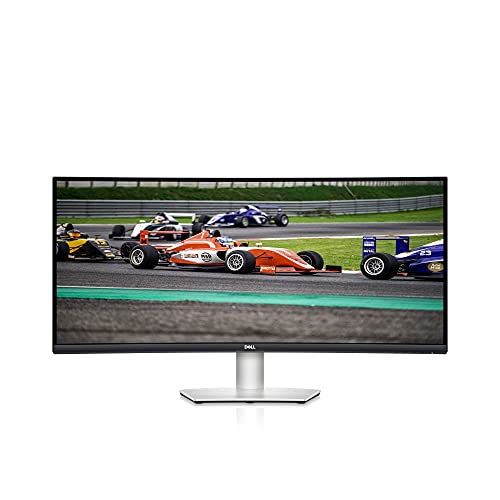
- 34 inch VA panel, 3440 x 1440 resolution, 100 Hz refresh rate, 1800R curve, 21:9 aspect ratio, HDMI and DisplayPort inputs, height-adjustable stand.

- 34 inch IPS panel, 3440 x 1440 resolution, 60 Hz refresh rate, 1800R curve, USB-C with power delivery, HDMI and DisplayPort inputs, height-adjustable stand.

- 34 inch VA panel, 3440 x 1440 resolution, 180 Hz refresh rate, 1500R curve, HDR support, HDMI and DisplayPort inputs, FreeSync Premium support, height-adjustable stand.
All 4 Picks at a Glance
| Product | Specs | Action |
|---|---|---|
| Dell S3422DW 34-Inch Curved UltraWide |
| Check price on Amazon |
| LG 34WN80C-B 34-Inch UltraWide QHD Curved |
| Check price on Amazon |
| ASUS TUF Gaming VG34VQL3A 34-Inch |
| Check price on Amazon |
 Samsung ViewFinity S65UC 34-Inch UltraWide |
| Check price on Amazon |
A 34 inch ultrawide monitor is the sweet spot for people who want a much wider view without giving up their whole desk. At 34 inches diagonally with a 21:9 aspect ratio, these screens give you roughly a third more horizontal space than a standard 16:9 display of the same height, which means two full windows can sit side by side with room to spare. The best 34 inch ultrawide monitors handle that extra width well, pairing a sharp 3440 x 1440 panel with the features that match how you actually spend your day, whether that is editing timelines, playing games, or keeping a spreadsheet open next to a browser.
The appeal is easy to understand once you live with one. A ultrawide screen removes the bezel in the middle of a two-monitor setup, so a video timeline stretches across one continuous canvas, a game fills your peripheral vision, and a document can sit next to your notes without constant window juggling. Curved panels deepen that effect by wrapping the edges of the screen slightly toward you, which makes the far corners feel closer and easier to read. Flat ultrawides exist too, and they suit shared screens and colour-critical work where a straight image matters more than immersion.
This guide covers five 34 inch ultrawide monitors that fit different budgets and different priorities. Some lean toward gaming with high refresh rates and adaptive sync, others lean toward office work with USB-C docking and height-adjustable stands, and one is a colour-focused panel for creators. Every pick below is a 34 inch, 21:9, 3440 x 1440 display, so you can compare them on the details that actually separate one from another: panel type, refresh rate, curve, connectivity, and colour coverage.
Our Top Picks
Top 3 picks at a glance
How to Choose
Resolution and pixel density
Almost every 34 inch ultrawide uses a 3440 x 1440 resolution, often called UWQHD. At this size that works out to around 110 pixels per inch, which is sharp enough for text to look clean at a normal viewing distance while keeping interface elements at a comfortable size. A few older or cheaper 34 inch panels use 2560 x 1080, which looks noticeably softer on a screen this large, so UWQHD is the baseline worth holding. Higher resolution ultrawides exist, but they are rare at 34 inches and usually carry a much higher asking figure.
Panel type: VA, IPS, or OLED
Panel type shapes contrast, viewing angles, and motion. VA panels deliver the deepest blacks and the strongest contrast of the common LCD types, which suits dark rooms and movie watching, though their viewing angles are narrower and fast motion can smear slightly. IPS panels keep colours consistent from wide angles and respond quickly, making them the safe all-round choice for mixed work and play. OLED ultrawides bring perfect blacks and near-instant response times, but they cost far more and need sensible brightness habits to keep the panel healthy over years of use.
Refresh rate and adaptive sync
Refresh rate is measured in hertz, and it tells you how many times per second the screen redraws its image. A 60 Hz panel is fine for office work, writing, and video, but gaming benefits from 100 Hz and above, where motion looks smoother and mouse movement feels more direct. Many 34 inch ultrawides run at 144 Hz or 165 Hz, and some reach 175 Hz. Adaptive sync, sold as FreeSync or G-Sync compatibility, matches the refresh rate to your graphics card output so fast motion stays free of tearing and stutter.
Curve: flat, gentle, or deep
Curvature is measured as a radius in millimetres, with smaller numbers meaning a tighter bend. A 1500R curve is a visible wrap that suits gaming and immersive media, a 1800R curve is gentler and feels natural for mixed use, and a flat panel is the right call when straight lines matter, such as photo editing or CAD work. There is no universally correct curve. Sit at a normal distance and imagine the corners: if you want them pulled toward you, choose a curve; if you share the screen with a colleague, choose flat.
Colour coverage and HDR
Colour coverage is usually quoted as a percentage of a colour space such as sRGB or DCI-P3. Full sRGB coverage is the minimum for accurate everyday work, while 90 percent or more of DCI-P3 gives richer reds and greens that suit video editing and HDR content. HDR support on ultrawides varies widely: entry-level HDR400 certification mainly means the panel can accept an HDR signal, while HDR600 and above bring the local dimming and brightness needed for a visible difference. Treat HDR400 as a bonus, not a deciding feature.
Connectivity and USB-C
A 34 inch ultrawide often becomes the hub of a desk, so its ports matter. Look for at least two video inputs, preferably DisplayPort and HDMI, so a desktop and a laptop can both stay connected. USB-C with power delivery is the single most useful extra for laptop users, because one cable can carry the picture, charge the laptop, and connect a keyboard and mouse through the monitor’s USB hub. Check the wattage: 65 W covers most thin laptops, while larger machines may want 90 W or more.
Ergonomics and desk fit
A 34 inch ultrawide is wide, typically around 80 centimetres across, so measure your desk before ordering. The stand should adjust in height and tilt at minimum, and swivel is a useful bonus. VESA mounting holes let you move the screen onto an arm, which frees desk space and makes it easier to line the screen up with your eye level. A monitor that sits too high or too low will cause neck strain over a long day, so adjustability is not a luxury feature.
Top Picks
Dell S3422DW 34-Inch Curved UltraWide
- 34 inch VA panel, 3440 x 1440 resolution, 100 Hz refresh rate, 1800R curve, 21:9 aspect ratio, HDMI and DisplayPort inputs, height-adjustable stand.
The Dell S3422DW is a 34 inch curved ultrawide built around a VA panel with a 3440 x 1440 resolution and a 100 Hz refresh rate. Its 1800R curve gives a gentle wrap that suits long workdays without feeling aggressive, and the VA panel delivers strong contrast that makes movies and dark scenes look deep and rich. It is a calm, capable screen for people who want width first and gaming speed second.
Who it is for: home office workers and media watchers who want a wide, immersive screen for documents, video, and light gaming at a sensible figure.
Caveats: the 100 Hz refresh rate is modest next to 144 Hz gaming panels, and the VA panel trades some viewing-angle consistency for its contrast advantage. Confirm the exact model code S3422DW on the listing before ordering, since Dell sells several similar 34 inch screens.
LG 34WN80C-B 34-Inch UltraWide QHD Curved
- 34 inch IPS panel, 3440 x 1440 resolution, 60 Hz refresh rate, 1800R curve, USB-C with power delivery, HDMI and DisplayPort inputs, height-adjustable stand.
The LG 34WN80C-B pairs a 34 inch curved IPS panel with a 3440 x 1440 resolution and a 60 Hz refresh rate, and it leans firmly toward productivity. Its IPS panel keeps colours accurate from wide angles, which matters when the screen is shared or viewed from the side, and the gentle 1800R curve keeps the far edges comfortable to read. USB-C with power delivery lets a laptop connect with a single cable, which keeps a desk tidy.
Who it is for: laptop users and office workers who want a clean single-cable setup and accurate colours for documents, spreadsheets, and video calls.
Caveats: the 60 Hz refresh rate makes it a poor fit for fast-paced gaming, and a third-party tracker has reported the listing as unavailable at times, so confirm the listing is live and the model code is 34WN80C-B before ordering.
LG 34WP65C-B 34-Inch Curved UltraWide
The LG 34WP65C-B is a 34 inch curved ultrawide with a VA panel, a 3440 x 1440 resolution, and a 160 Hz refresh rate, which makes it one of the more versatile picks in this roundup. It is fast enough for serious gaming while its curved VA panel and HDR support keep movies looking rich. The 160 Hz refresh rate and 1 ms-class response time put it a step above the office-focused panels here for competitive play.
Specs
- 34 inch VA panel, 3440 x 1440 resolution, 160 Hz refresh rate, 1800R curve, HDR support, HDMI and DisplayPort inputs, AMD FreeSync support.
Who it is for: gamers who also work at the same desk and want one screen that handles both, with a high refresh rate for play and a wide canvas for work.
Caveats: VA panels can show slight smearing in very fast dark scenes, and a conflicting ASIN has been seen attached to this model name, so confirm the listing shows model 34WP65C-B before ordering.
ASUS TUF Gaming VG34VQL3A 34-Inch
- 34 inch VA panel, 3440 x 1440 resolution, 180 Hz refresh rate, 1500R curve, HDR support, HDMI and DisplayPort inputs, FreeSync Premium support, height-adjustable stand.
The ASUS TUF Gaming VG34VQL3A is a 34 inch curved gaming ultrawide with a VA panel, a 3440 x 1440 resolution, and a 180 Hz refresh rate. It is the fastest panel in this roundup, built for players who want smooth motion in shooters and racing games across a wide field of view. The 1500R curve wraps more aggressively than the 1800R panels here, which deepens the sense of being inside the game world.
Who it is for: PC gamers who want the highest refresh rate available at 34 inches and a strong curve for immersion.
Caveats: the deep 1500R curve can distort straight lines for design work, and the VA panel trades viewing angles for contrast. Confirm the exact model code VG34VQL3A on the listing, since ASUS sells several similar TUF ultrawides.
Samsung ViewFinity S65UC 34-Inch UltraWide
- 34 inch VA panel, 3440 x 1440 resolution, 100 Hz refresh rate, 1000R curve, USB-C with power delivery, HDR support, built-in speakers.
The Samsung ViewFinity S65UC is a 34 inch curved ultrawide aimed at creators and multitaskers, with a VA panel, a 3440 x 1440 resolution, and a 100 Hz refresh rate. Its 1000R curve is the deepest in this roundup, wrapping the screen noticeably around the viewer, and its USB-C port with power delivery makes it a tidy hub for a laptop-based setup. Built-in speakers and a slim design keep the desk clean.
Who it is for: creators and multitaskers who want a deeply curved screen for timelines and documents, with single-cable laptop docking.
Caveats: the 1000R curve is a matter of taste and can feel too aggressive for shared viewing, and this pick carries the thinnest verification in this article, so confirm the listing and the model code LS34C654UANXGO before ordering. Do not confuse it with the older S65UA model.
Comparison Table
| Monitor | Panel | Refresh Rate | Curve | USB-C Power Delivery | Best For |
|---|---|---|---|---|---|
| Dell S3422DW | VA | 100 Hz | 1800R | No | Home office and media |
| LG 34WN80C-B | IPS | 60 Hz | 1800R | Yes | Laptop docking and office work |
| LG 34WP65C-B | VA | 160 Hz | 1800R | No | Gaming plus work |
| ASUS TUF VG34VQL3A | VA | 180 Hz | 1500R | No | Fast-paced gaming |
| Samsung ViewFinity S65UC | VA | 100 Hz | 1000R | Yes | Creators and multitasking |
Which One Is Right for You?
If your day is mostly documents, video calls, and browsing, the LG 34WN80C-B or the Dell S3422DW will serve you well. The LG model wins when you use a laptop and want a single cable to handle picture and charging, while the Dell model wins when you watch a lot of video and want the deeper contrast of a VA panel. Both are calm, reliable screens that make a workday wider without demanding a powerful graphics card.
If you game at the same desk where you work, the LG 34WP65C-B is the balanced pick, with a 160 Hz refresh rate that keeps motion smooth and a curve that suits both play and productivity. The ASUS TUF VG34VQL3A goes further for competitive players, with a 180 Hz refresh rate and a deeper curve, though its aggressive wrap is less suited to design work. Creators who live in editing timelines should look at the Samsung ViewFinity S65UC, whose deep curve and USB-C docking fit a laptop-based creative setup, as long as the curve suits your taste.
Before ordering any of these, measure your desk. A 34 inch ultrawide needs roughly 80 centimetres of width, and a deep curve needs a little more depth than a flat screen. Check that your graphics card has a DisplayPort output for the full refresh rate, and remember that driving 3440 x 1440 at high refresh rates asks more of a graphics card than a standard 1080p screen.
Frequently Asked Questions
Is a 34 inch ultrawide better than two monitors?
For most people, yes, when the goal is one continuous workspace. A ultrawide removes the bezel in the middle, so timelines, spreadsheets, and games stretch across one unbroken canvas. Two separate monitors still win when you need to run two full-screen applications at different settings, or when you want to angle one screen toward a second person.
Do I need a powerful graphics card for a 34 inch ultrawide?
A 3440 x 1440 panel has about two and a half times the pixels of a 1080p screen, so it does ask more of a graphics card in games. Office work, video, and browsing run fine on modest hardware, but for high-refresh gaming at this resolution you will want a mid-range or better graphics card with a DisplayPort connection.
Is a curved ultrawide good for photo and video editing?
A gentle curve is fine for video editing, where the timeline benefits from the extra width, but a flat panel is safer for photo work where straight lines and consistent geometry matter. If colour accuracy is your priority, look for an IPS panel with strong sRGB coverage rather than focusing on the curve.
Can I connect a laptop to a 34 inch ultrawide with one cable?
Yes, if the monitor has USB-C with power delivery. One cable carries the picture, charges the laptop, and connects peripherals through the monitor’s USB hub. The LG 34WN80C-B and the Samsung ViewFinity S65UC in this roundup both support this, while the other picks need a separate charger.
Disclosure: As an Amazon Associate, we may earn from qualifying purchases.
Related guides
More from Amazon
Programs that pair well with the guide above. Offers and eligibility are set by Amazon and may change.
Free shipping on eligible items, Prime Video and more. Eligible new members can start with a free trial.
Start a Prime free trialAd-free music streaming. Eligible new subscribers can start with a free trial.
Try Music Unlimited freeA Prime membership for ages 18-24 with a trial period. Eligibility is set by Amazon.
See Prime for Young AdultsAudiobooks and podcasts to listen to on the go. Eligible new members can start with a free trial.
Try Audible freeAs an Amazon Associate we earn from qualifying purchases.









