
The best 75 inch TV for the money in 2026 is the 75-inch TCL QM7K, because it combines strong mini-LED contrast, useful HDR brightness, low input lag, HDMI 2.1 gaming features, and a sale price that is usually far below premium alternatives.
It is not the absolute best TV in every category. An OLED such as the 77-inch LG C5 produces cleaner dark-room contrast, while the Sony BRAVIA 5 has a particularly polished picture processor. But for a large living room, mixed streaming, sports, movies, and console gaming, the QM7K delivers the most balanced performance per dollar.
As an Amazon Associate we earn from qualifying purchases at no extra cost to you.

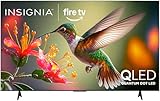

Our Top Picks


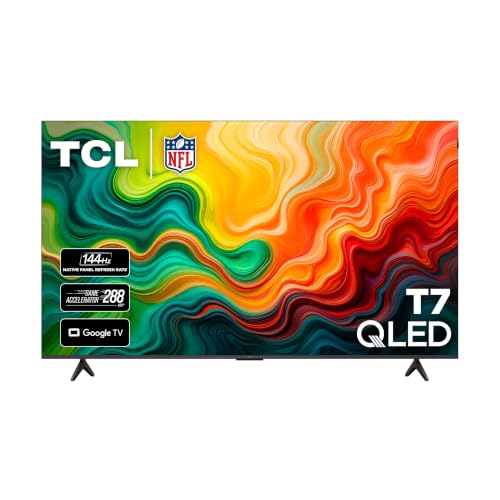
Top 3 picks at a glance
Best 75-inch TVs ranked by total value
| Rank | Model | Typical sale range | Panel and backlight | Peak HDR class | Gaming strengths | Best for |
|---|---|---|---|---|---|---|
| 1 | TCL QM7K 75-inch | $900–$1,300 | QLED mini-LED LCD | High brightness | 4K/144Hz, VRR, low lag | Best overall value |
| 2 | Hisense U8QG 75-inch | $1,000–$1,500 | Mini-LED QLED LCD | Very high brightness | High-refresh gaming, VRR | Bright rooms and HDR impact |
| 3 | Sony BRAVIA 5 75-inch | $1,100–$1,600 | Mini-LED LCD | High brightness | 4K/120Hz, VRR, ALLM | Upscaling and streamed TV |
| 4 | Samsung QN90F 75-inch | $1,600–$2,300 | Neo QLED mini-LED LCD | Very high brightness | 4K/165Hz, VRR, low lag | Bright rooms and PC gaming |
| 5 | LG C5 77-inch | $2,000–$2,700 | OLED | High, with perfect black | 4K/144Hz, VRR, four HDMI 2.1 ports | Dark-room movies and premium gaming |
1. TCL QM7K: the best 75 inch TV for the money
The TCL QM7K is the easiest recommendation when value matters more than brand prestige. Its mini-LED backlight gives it much better contrast and HDR punch than a conventional edge-lit LCD, while the quantum-dot layer produces vivid color without requiring OLED pricing.
Its picture is especially convincing with 4K HDR movies, sports, and games. Bright highlights such as sunlight, explosions, and reflections stand out, and local dimming helps black bars and dark scenes look substantially deeper than they do on basic LED televisions. Some blooming can still appear around subtitles or bright objects against black, but that is the normal trade-off for a large, bright LCD.
Upscaling is good rather than class-leading. High-quality 1080p streaming and cable channels look clean from normal seating distance, but very compressed broadcast video can reveal noise and softness. This is less noticeable on a 75-inch screen if you sit around 9 to 12 feet away.
For gaming, the QM7K is unusually well equipped for its price. It supports a high refresh rate, variable refresh rate, automatic low-latency behavior, and HDMI 2.1 bandwidth suitable for modern consoles and gaming PCs. Input lag is low enough that competitive players are unlikely to object, although a premium gaming monitor remains more responsive at very high frame rates.
Buy it when: you want the largest practical upgrade in contrast and HDR without spending more than roughly $1,300.
2. Hisense U8QG: the bright-room HDR choice
The Hisense U8QG is a strong alternative to the TCL when the television must overcome daylight, lamps, or a wide-open living room. Its high-brightness mini-LED system makes HDR effects look forceful even before the room is dark.
It also offers a rich color range, strong local dimming, and gaming features that suit both consoles and PCs. The main reason it ranks below the TCL is not a lack of specifications. It is the balance between motion handling, processing consistency, software preferences, and sale pricing. When the U8QG is only slightly more expensive, it is an excellent upgrade for a bright room; when the gap becomes large, the TCL usually offers better value.
Hisense’s processing has improved, but Sony remains more dependable with difficult low-resolution sources. Check whether the content you watch most is native 4K streaming or older cable and broadcast material before choosing it.
3. Sony BRAVIA 5: best for upscaling and everyday television
The Sony BRAVIA 5 is the sensible pick for viewers who watch a lot of cable, older shows, sports feeds, DVDs, or compressed streams. Sony’s image processing tends to preserve natural faces, clean up edges, and handle uneven source quality more gracefully than many value-focused televisions.
Its mini-LED backlight supplies convincing contrast and HDR brightness, though its value depends heavily on the sale price. It is not the right choice if you need the strongest possible PC gaming specification or want every last unit of brightness. Its 4K/120Hz gaming support is sufficient for PlayStation 5, Xbox Series X, and most living-room gaming, but the TCL, Samsung, and LG models offer more headroom for a high-end PC.
Choose the BRAVIA 5 if picture consistency matters more than maximum specifications. It is particularly attractive for households that watch varied sources rather than exclusively streaming 4K movies.
4. Samsung QN90F: the premium LCD value
The Samsung QN90F is a premium mini-LED LCD with excellent brightness, strong anti-reflection performance, broad gaming support, and a polished smart-TV experience. It is one of the better choices for a room with windows directly opposite the screen.
Its advantages over the cheaper TCL are visible in difficult lighting conditions: reflections are better controlled, motion processing is more refined, and HDR remains impressive at a wider range of viewing angles. The improvement is real, but it is not always proportional to the price difference. Samsung also does not provide Dolby Vision, so users with Dolby Vision-heavy movie libraries may prefer another brand.
It becomes a good value when discounted into the $1,600–$1,900 range. At much higher prices, an OLED deserves consideration unless your room is unusually bright.
5. LG C5: the premium movie and gaming choice
The 77-inch LG C5 is not the cheapest answer, but it is the best option here for a dark or moderately lit room where black level and viewing angle matter more than raw brightness. OLED pixels switch off individually, eliminating the blooming that can surround subtitles and stars on an LCD.
It also offers excellent gaming support, including four HDMI 2.1 inputs, 4K high-refresh operation, VRR, and very low input lag. Its limitations are equally important: OLED brightness is lower than the brightest mini-LED sets, and static interface elements can contribute to long-term image retention if displayed for many hours every day.
For a mixed-use living room with lots of daytime sports, the TCL or Samsung is safer. For evening films and single-player games, the LG C5 provides the more cinematic image.
Match the TV to your room and devices
| Your situation | Best match | Why |
|---|---|---|
| Bright room with windows | Samsung QN90F or Hisense U8QG | High brightness and better reflection handling |
| Mixed use under $1,300 | TCL QM7K | Best balance of contrast, gaming, and price |
| Older cable and compressed streams | Sony BRAVIA 5 | More natural upscaling and processing |
| Dark-room movies | LG C5 77-inch | Perfect black and no LCD blooming |
| Gaming PC at high frame rates | LG C5, Samsung QN90F, or TCL QM7K | High refresh rates and HDMI 2.1 support |
Bandwidth and seating calculations that affect the purchase
For 4K gaming at 120Hz, use an Ultra High Speed HDMI cable rated for 48Gbps. Uncompressed 3840 × 2160 video contains about 8.29 million pixels per frame; at 120 frames per second, that is almost 995 million pixel updates every second before blanking, HDR metadata, and overhead are included. Consoles commonly use compression or chroma subsampling, but a proper 48Gbps cable gives the widest compatibility margin.
A 75-inch 16:9 screen is approximately 65.4 inches wide and 36.8 inches tall. For a practical viewing distance, calculate about 1.2 to 1.6 times the screen diagonal: roughly 7.5 to 10 feet for an immersive setup, or up to about 12 feet for casual viewing. If your seating is much farther away, the benefits of expensive HDR and fine 4K detail become harder to see.
Settings to use after installation
- Picture mode: Start with Movie, Filmmaker, or the manufacturer’s equivalent instead of Vivid. This reduces exaggerated sharpening and inaccurate skin tones.
- HDR: Leave HDR brightness and local dimming at High or the calibrated default. Raising contrast beyond its intended range can clip bright detail.
- Gaming: Enable Game Mode, VRR, and automatic low-latency mode. These settings reduce processing delay; the trade-off is usually less motion smoothing.
- Motion: For sports, use moderate motion smoothing. For films, use Off or a low setting to avoid the “soap opera” effect.
- Sharpness: Keep it near the neutral midpoint, often 0 or 10 depending on the brand. Excessive sharpness creates white outlines around text and faces.
- HDMI input: Turn on the television’s enhanced, deep-color, or HDMI 2.1 mode for the port connected to a console or PC.
Warranty and total ownership value
Compare the included manufacturer’s warranty before deciding between two similarly priced models. A one-year limited warranty is common, but coverage details can differ for panel defects, dead pixels, shipping damage, and in-home service. Also budget for a sturdy wall mount or stand, a certified HDMI cable, and possible sound equipment. Large thin TVs often have adequate dialogue but limited bass, so a basic soundbar can affect the real purchase cost.
For most buyers, the final choice is simple: buy the TCL QM7K when it is comfortably below $1,300, choose the Hisense U8QG for maximum bright-room HDR, select the Sony BRAVIA 5 for difficult streaming and cable sources, and move to the LG C5 when dark-room picture quality matters more than budget. That is why the QM7K remains the best 75 inch TV for the money in 2026.
Frequently asked questions
Will the TCL QM7K show blooming around bright objects?
Yes, some blooming can appear around subtitles or bright objects against black. That is a normal trade-off for a large, bright LCD with local dimming. The QM7K still produces deeper dark scenes and black bars than basic LED televisions, but it does not eliminate blooming the way the LG C5’s individually controlled OLED pixels can.
What HDMI cable should I use for 4K gaming at 120Hz?
Use an Ultra High Speed HDMI cable rated for 48Gbps. A 4K frame contains about 8.29 million pixels, and at 120 frames per second that becomes almost 995 million pixel updates every second before additional overhead. Consoles may use compression or chroma subsampling, but a proper 48Gbps cable provides the widest compatibility margin.
How far away should I sit from a 75-inch TV?
For a 75-inch 16:9 screen, a practical viewing distance is about 1.2 to 1.6 times the screen diagonal: roughly 7.5 to 10 feet for an immersive setup, or up to about 12 feet for casual viewing. At much greater distances, expensive HDR effects and fine 4K detail become harder to see.
Is the LG C5 suitable for a room that displays static images often?
It can be used in such a room, but static interface elements displayed for many hours every day can contribute to long-term image retention. The LG C5 is better suited to dark-room films and single-player games, while a TCL or Samsung model is described as safer for a mixed-use living room with lots of daytime sports.
Does the Samsung QN90F support Dolby Vision?
No, the article states that Samsung does not provide Dolby Vision. This matters if your movie library relies heavily on Dolby Vision. The QN90F remains a premium mini-LED LCD with strong brightness, anti-reflection performance, broad gaming support, and a polished smart-TV experience, but another brand may be preferable for Dolby Vision-heavy viewing.







