X570 is the high-end AM4 chipset, so the right board depends on what you plan to plug into it. The ASUS TUF Gaming X570-Plus (Wi-Fi) is the most balanced pick in this list, with a 12+2 DrMOS claim, dual M.2 and a title that names Ryzen 5000. The ROG Crosshair VIII Dark Hero is the enthusiast option, and the MSI MPG X570 Gaming Plus and ASRock X570 Phantom Gaming 4 are the plainer choices. Two listings are third-party or used, and they come with warnings below. Because AM4 is a mature platform, check BIOS support for your exact CPU before you pay for any of these.
Our Top Picks
Top 3 picks at a glance
Picks in one glance
As an Amazon Associate we earn from qualifying purchases at no extra cost to you.




- ASUS TUF Gaming X570-Plus (Wi-Fi) – best balance, Ryzen 5000 named, 12+2 claim
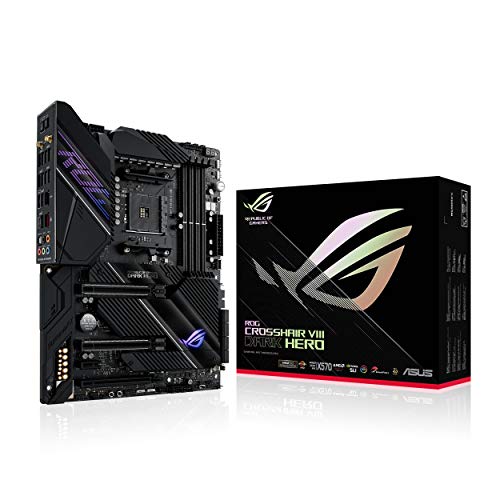
- ASUS ROG Crosshair VIII Dark Hero – best for enthusiasts, X570S with PCH heatsink
- ASUS ROG Crosshair VIII Hero – best for 2.5 Gbps LAN and RGB features
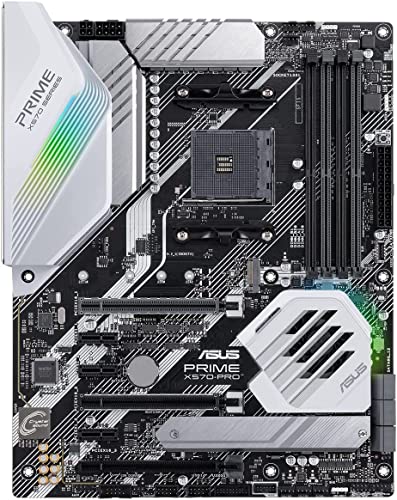
- ASUS Prime X570-Pro – best plain, Zen 3-ready ATX board
- MSI MPG X570 Gaming Edge WiFi – best for built-in Wi-Fi 5
- MSI MPG X570 Gaming Plus – best simple ATX option
- ASRock X570 Phantom Gaming 4 – best low-cost entry, sparse listing
- Gigabyte X570 Gaming X – budget board, check Ryzen 5000 support
- Generic board “Fit for” MSI Gaming Edge WiFi (Used) – caution
- ZXKLXYY board “Fit for” ASRock Taichi – caution
Spec table
| Model | Chipset and socket | Form factor | Key point from title | Best for |
|---|---|---|---|---|
| ASUS TUF Gaming X570-Plus (Wi-Fi) | X570, AM4 | ATX | 12+2 DrMOS, dual M.2, Zen 3 | Balance |
| ASUS ROG Crosshair VIII Dark Hero | X570S, AM4 | ATX | 14+2 Ti stages, PCH heatsink, Wi-Fi 6 | Enthusiasts |
| ASUS ROG Crosshair VIII Hero | X570, AM4 | ATX | 2.5 Gbps LAN, PCIe 4.0 | Feature-rich |
| ASUS Prime X570-Pro | X570, AM4 | ATX | Zen 3, dual M.2, USB 3.2 Gen 2 | Plain build |
| MSI MPG X570 Gaming Edge WiFi | X570, AM4 | ATX | AC Wi-Fi 5, DDR4 | Wireless |
| MSI MPG X570 Gaming Plus | X570, AM4 | ATX | DDR4, USB 3.2 Gen 2 | Simple |
| ASRock X570 Phantom Gaming 4 | X570, AM4 | Check the listing | USB 3.2, HDMI, RJ45 | Low cost |
| Gigabyte X570 Gaming X | X570, AM4 | ATX | Ryzen 3000, DDR4, HDMI 2.0B | Budget |
| Generic “Fit for” MSI Gaming Edge (Used) | X570, AM4 | Check the listing | Used, third-party seller | Not advised |
| ZXKLXYY “Fit for” ASRock Taichi | X570, AM4 | ATX | DDR4 128GB, odd CPU list | Not advised |
Board-by-board breakdown
ASUS TUF Gaming X570-Plus (Wi-Fi)
The title says AM4, Zen 3, Ryzen 5000 and 3rd Gen Ryzen, ATX, PCIe 4.0, dual M.2 and “12+2 with Dr. MOS Power Stage”. Naming Ryzen 5000 matters on X570, because many boards launched before that generation. The Wi-Fi in the name is not described further, so check which standard it is. Dr. MOS is a power-stage design, and the phase layout is a claim, not proof of thermal performance. The TUF line is positioned as a durable mid-range family, which is brand positioning and not something the title proves. Dual M.2 covers a main drive and one extra, while the SATA ports mentioned elsewhere in the family are better for older drives. If a chipset fan is fitted, expect a little noise and some dust over the years.
- Pros: Ryzen 5000 named; dual M.2; power stage claim.
- Cons: Wi-Fi details missing; no LAN speed listed.
Who it’s for: most AM4 builders who want X570 features. Who should skip it: buyers who want an informative title.
ASUS ROG Crosshair VIII Dark Hero
This is an X570S board, the refresh designed with a passive chipset heatsink in mind. The title lists AM4, Zen 3, ATX, PCIe 4.0, 14+2 Ti power stages, PCH heatsink, Wi-Fi 6, 2.5 Gbps LAN and a USB 3.2 Gen 2 Type-C port, but it ends in an unclosed bracket, so some detail is missing. The 14+2 claim is the strongest VRM in this group on paper. The “S” in X570S refers to a revision aimed at quieter cooling, and the listing’s PCH heatsink wording fits that. Since the title is cut off, you cannot see the remaining ports, so read the manufacturer page before buying. At this tier you are paying for build quality and extras, and a six-core or eight-core Ryzen will not use most of what the board offers.
- Pros: strong power stage claim; Wi-Fi 6; 2.5 Gbps LAN; heatsinked chipset.
- Cons: premium tier; truncated title; far more board than a mid-range Ryzen needs.
Who it’s for: enthusiasts pairing it with a high-core AM4 chip. Who should skip it: anyone on a normal budget.
ASUS ROG Crosshair VIII Hero
The title says X570, ATX, PCIe 4.0, integrated 2.5 Gbps LAN, USB 3.2, SATA, M.2 and “Node and Aura Sync RGB lighting”. The “Node” wording is unclear, perhaps a typo, so verify what it means. The title does not name Ryzen 5000, so an old unit may need a BIOS update before the newer chip works. This is the older sibling of the Dark Hero without the X570S label. That usually means an actively cooled chipset, so check the photos and the case clearance around it. ROG-tier boards tend to add extra headers and premium audio, but the title does not list them, and we do not add them from memory. Buy it for the 2.5 Gbps LAN and the layout, not for a promise that is absent from the listing.
- Pros: 2.5 Gbps LAN; premium ROG line; PCIe 4.0.
- Cons: unclear wording; no CPU list in the title; chipset likely needs active cooling.
Who it’s for: feature-rich builds. Who should skip it: people who prefer a passive chipset.
ASUS Prime X570-Pro
The title names AM4, Zen 3, Ryzen 5000 and 3rd Gen Ryzen, ATX, PCIe Gen4, dual M.2, HDMI, SATA 6GB/s and USB 3.2 Gen 2. It does not mention wireless, so assume none unless the manufacturer page says otherwise. The Prime series is ASUS’s plainer line, which suits a build that wants X570 connectivity without styling. SATA 6GB/s is useful if you keep several older drives, and HDMI is available if you ever fit a processor with integrated graphics. Because it names both Zen 3 and 3rd Gen Ryzen, it is among the safer choices for a Ryzen 5000 chip, though a shipped BIOS version is still worth checking. The title repeats ATX, which is just sloppy writing.
- Pros: Ryzen 5000 named; dual M.2; HDMI output.
- Cons: no wireless in the title; no VRM detail; listing repeats ATX.
Who it’s for: practical wired builds. Who should skip it: Wi-Fi-only homes.
MSI MPG X570 Gaming Edge WiFi
This ATX board lists AM4, DDR4, PCIe 4.0, SATA 6Gb/s, M.2, USB 3.2 Gen 2, AC Wi-Fi 5 and HDMI. AC Wi-Fi 5 is an older wireless standard than Wi-Fi 6, which is fine for most home use. The title does not name Ryzen 5000, so confirm the BIOS version and CPU support list for your processor. The MPG line is MSI’s gaming-oriented range, but the title gives no VRM, M.2 count or LAN details. AC Wi-Fi 5 reaches typical home speeds on a 5 GHz network if the router is nearby, and Bluetooth is not mentioned in the title. If wireless matters, compare with the ASUS Dark Hero, which lists Wi-Fi 6.
- Pros: built-in Wi-Fi; PCIe 4.0; DDR4 clearly stated.
- Cons: older Wi-Fi standard; CPU generation not named.
Who it’s for: buyers who need wireless on X570. Who should skip it: those who want Wi-Fi 6.
MSI MPG X570 Gaming Plus
The title lists AM4, PCIe 4.0, DDR4, SATA 6Gb/s, M.2, USB 3.2 Gen 2, HDMI and ATX. It is similar to the Gaming Edge but without the wireless card in the title. The listing does not name the Ryzen generation, so confirm BIOS support if you plan on a Ryzen 5000 chip. Because it shares a family name with the Gaming Edge, it is easy to mix the two up when comparing prices, so check the exact model before ordering. The title does not list a LAN speed or an M.2 count, so confirm them on the manufacturer page. For a wired desktop with a single drive it covers the basics without extras you may not use.
- Pros: simple, widely understood layout; HDMI; PCIe 4.0.
- Cons: sparse title; no wireless.
Who it’s for: simple wired builds. Who should skip it: wireless buyers.
ASRock X570 Phantom Gaming 4
The title is a jumble: “ASRock X570 Phantom Gaming 4AM4/USB3.2/HDMI/RJ45 Motherboard”. It suggests AM4, USB 3.2, HDMI and a LAN port, and nothing else. Memory type, size, M.2 count and Ryzen generation are all missing, so use the manufacturer page. It is the low-cost entry in the group. The “4” in the name denotes the Phantom Gaming 4 tier, which is ASRock’s entry gaming line, though the title does not prove that. With almost nothing stated, the safest approach is to open the manufacturer page and read the memory support list, the CPU support list and the slot layout before you decide. Do not assume it matches the better-described boards above.
- Pros: low-cost X570 entry; HDMI output.
- Cons: almost no detail; title is muddled.
Who it’s for: buyers who verify specs themselves. Who should skip it: anyone who wants clear listing data.
Gigabyte X570 Gaming X
The title lists AMD Ryzen 3000, X570, ATX, PCIe 4.0, DDR4, USB 3.1, Realtek ALC887, HDMI 2.0B, RGB Fusion 2.0 and a Realtek GbE 8118 LAN. It names only Ryzen 3000, so a Ryzen 5000 chip will require checking the BIOS. The audio and LAN chips named are basic rather than premium. HDMI 2.0B is enough for a 4K display at 60 Hz when you use a processor with integrated graphics. RGB Fusion 2.0 controls lighting only. If you own a Ryzen 3000 chip, this is a straightforward fit; if you bought a 5000-series chip, use a flash method that works without a CPU, or a spare compatible processor, before you rely on it.
- Pros: clear component list; HDMI 2.0B; budget positioning.
- Cons: Ryzen 5000 not named; basic audio and LAN.
Who it’s for: budget Ryzen 3000 builds. Who should skip it: buyers who want a Ryzen 5000 guarantee.
Generic motherboard “fit for” MSI MPG X570 Gaming Edge WiFi (Used)
This listing is labelled Used and the brand is Generic, with wording that says it is “fit for” an MSI board. That phrasing is typical of third-party sellers and does not confirm that you receive a genuine, warrantied MSI board. We list it only as a warning. If you want the Gaming Edge WiFi, prefer the new MSI listing above. If a used board is your only option, ask for clear photos of the board and the I/O area, confirm the return window, and check for bent socket pins before installing a CPU. Without a warranty, a dead board is simply a loss, and a board with an unknown BIOS history is harder to troubleshoot.
- Pros: may cost less than new.
- Cons: used; unclear seller and warranty; wording does not confirm the exact model.
Who it’s for: nobody we can recommend. Who should skip it: anyone who needs a warranty.
ZXKLXYY board “fit for” ASRock X570 Taichi
This listing uses an unfamiliar brand and says “fit for ASROCK X570 Motherboard Taichi”, with DDR4 128GB and a CPU list of bare numbers (5700, 5900, 5600, 3400, 4300, 2600 and 3800) that carry no suffixes, so it never says which exact variants work. The wording is ambiguous: it may be a replacement part or a refurbished board. Treat it as unverified and do not buy it on this title alone. Ask the seller what exactly is being sold, whether it is new, used or refurbished, what warranty applies and whether the BIOS supports your CPU. If the answers are vague, buy one of the known-brand boards above instead. The risk is higher than the saving.
- Pros: ATX, DDR4 and X570 appear in the title.
- Cons: unknown brand; unclear condition; confusing CPU list.
Who it’s for: no one without confirming the seller. Who should skip it: almost everyone.
How we picked these
We compared product titles, published specifications, manufacturer documentation and buyer reviews, and treated every title statement as a seller claim. Nobody on the team used or measured these units. We included every X570 listing in our set, including two risky ones, and labelled them. We did not add specifications from memory where a title was silent. Near-duplicate listings, such as the two MSI Gaming boards, are described as variants of one family, and revised or refreshed models like the X570S are called out. Price is mentioned only as a relative tier, since listing prices change.
What to look for in an X570 board
X570 versus B550 and AM5
X570 is an AM4 chipset for Ryzen 3000 and 5000, with PCIe 4.0 and more chipset lanes, USB ports and SATA ports than B550. B550 handles one graphics card and one or two drives for less. AM4 uses DDR4, while the newer AM5 platform uses DDR5 only, so a move to AM5 means new memory, a new CPU and often a new cooler bracket. If you already own a Ryzen 5000 chip and DDR4, an X570 board is the cheapest way to add features without replacing the whole PC. Our guide to the best AM4 motherboards for Ryzen 5000 CPUs compares the cheaper boards.
Chipset fan and heatsinks
The original X570 chipset runs warm, so many boards include a small fan. A fan is a moving part that can collect dust and make noise. The X570S refresh, like the Dark Hero here, is designed around a passive heatsink. Check your case airflow either way, and inspect photos of the chipset area. A practical test of your case: a fan sitting under a long graphics card gets less airflow, so check how much clearance the card leaves. If you choose a fanless board, remember that it still needs air moving through the case, because a passive heatsink only works if heat can leave it.
BIOS and Ryzen 5000
X570 launched with Ryzen 3000, so older boards may need updates. Follow this checklist:
- Find the CPU support list for the exact board and note the BIOS version for the 5000 series.
- Check the sticker or box for the shipped version.
- Use a flash feature without a CPU if available, or follow our guide on BIOS Flashback without a CPU.
- Keep power stable, do not interrupt the flash, and do not run it on a failing power supply.
- Remember that combos and used boards may carry older firmware, so plan for an update.
PCIe 4.0 lanes and M.2
A common AM4 layout gives the graphics card 16 CPU lanes and one M.2 slot 4 CPU lanes, with the chipset feeding extra slots. Filling every M.2 slot can disable SATA ports or share bandwidth, so read the manual. Resizable BAR is a BIOS option that may need enabling; see how to enable Resizable BAR on an older motherboard.
VRM, memory and used-board risk
A VRM matters most with high-core Ryzen chips under heavy loads. DDR4 only works in AM4; do not buy DDR5. Treat used or third-party boards with extra caution and ask about warranty, return policy and photos of the actual board. Memory is simple on this platform: use two DDR4 sticks in the slots the manual recommends, and enable the XMP or equivalent profile. Do not mix DDR4 with DDR5, because the slots differ and the parts are not interchangeable. A strong VRM also helps keep a hot Ryzen 9 stable, but a Ryzen 5 will run happily on the plainer boards. Finally, handle the board by its edges and ground yourself before touching the socket.
Mistakes buyers make
The most common is buying a board listed for Ryzen 3000 and assuming it runs a Ryzen 5000 chip. Another is trusting “fit for” titles from unfamiliar brands, which may not describe a real, new board. People also pay for a premium X570 board while using only one drive, forget to check the case for a chipset-fan clearance, or buy DDR5 for an AM4 build. Some buyers also trust a title that lists a long CPU range without checking which BIOS version unlocks each model. Buyers also overlook that the first boot after a CPU change can take longer while the board retrains memory. Finally, buyers touch the socket without discharging static, which can damage parts. Remember that bundles and used boards may arrive with old firmware. Another slip is skipping the chipset-fan check in a cramped case, where a long graphics card can block airflow and let the chipset run hot.
Verdict
The ASUS TUF Gaming X570-Plus (Wi-Fi) is the safest recommendation because the title names Ryzen 5000 and lists the VRM design. The ROG Crosshair VIII Dark Hero suits enthusiasts, and the ASUS Prime X570-Pro suits plain wired builds. Skip the Used and ZXKLXYY listings unless you can verify the seller and model, and always confirm BIOS support first. For a cheaper wired build the ASUS Prime X570-Pro or MSI MPG X570 Gaming Plus will do, as long as the CPU list covers your processor. If you are buying everything new, compare with an AM5 board before committing to this older platform.
Related guides
- Windows Macos Linux Gaming Performance Comparison Strengths Weaknesses
- Desktop Operating Systems Gaming Performance Strengths Weaknesses
- 5G Home Internet Wifi Modem Settings Low Latency Gaming
Frequently asked questions
Is X570 still worth buying for a Ryzen 5000 build?
It can be, if you already own AM4 parts or want PCIe 4.0 with extra chipset lanes, USB ports and SATA ports. B550 is cheaper and covers the main needs of a single graphics card and one or two drives. Choose X570 when you need the extra connectivity, and look at AM5 if you are buying everything new.
Do X570 boards have a chipset fan?
Many do, because the X570 chipset runs warm, but not all boards use one. The X570S variant, which includes the ROG Crosshair VIII Dark Hero here, is listed with a PCH heatsink in its title. Check the listing for the cooling design, and consider the noise and the dust that a small fan can collect over time.
Will an X570 board run a Ryzen 5000 processor out of the box?
Not always. X570 launched with Ryzen 3000, so older stock may need a BIOS update before it recognises a Ryzen 5000 chip. The ASUS titles here mention Zen 3 and Ryzen 5000, but the Gigabyte X570 Gaming X title mentions only Ryzen 3000. Use BIOS Flashback or a compatible older chip if needed.
Should you buy a used or third-party X570 board?
Be careful. A listing marked Used or titled as fitting another brand’s board may not include a warranty, original accessories or a verified BIOS. If you cannot confirm the seller, return policy and the exact model, a new board from a known brand is the safer purchase, even if it costs more.
Is X570 better than B550?
It offers more chipset connectivity, such as extra PCIe lanes, USB and SATA ports, and some premium boards have strong VRMs. For one graphics card and one or two drives, B550 usually does the job at a lower cost. Choose X570 if you plan to use many drives or add-in cards.