
The best gaming laptop for Singapore is a model that is sold widely enough to have local support, runs cool in a hot and humid climate and arrives with a charger that fits your sockets. Because this guide lists US-store options, it focuses on what changes when you import: warranty coverage, plug and voltage, service parts and heat. The twelve laptops below range from an RTX 3050 entry model to 16GB and 32GB RTX 5060 machines, and we flag the listings that need extra checking before you commit.
Our Top Picks
 HP Victus 15.6" Full HD 144Hz Gaming Laptop16GB | 512GB SSD19 x 12 x 3 Inches7 poundsCheck on Amazon
Top 3 picks at a glance
Compare the twelve at a glance
As an Amazon Associate we earn from qualifying purchases at no extra cost to you.




| Model | Key point from the title | Price tier | Best for |
|---|---|---|---|
| Acer Nitro V 16S, RTX 5060 | Ryzen 7 260, 32GB DDR5, 1TB, 16-inch 180Hz | Premium | Spec-rich all-rounder |
| ASUS TUF 16, RX 7700S | Ryzen 7 7735HS, Radeon RX 7700S, 32GB, 1TB, 165Hz | Premium | Players who want an AMD GPU |
| MECHREVO Aurora 16X, RTX 5060 | i7-14650HX, 16GB, 512GB, 2.5K 180Hz | Mid-range | Display-focused buyers who accept brand risk |
| MSI Thin 15.6, RTX 4060 | i5-13420H, 16GB DDR4, 512GB, 144Hz | Mid-range | Slim 1080p play |
| TVEPGZD 16-inch, RTX 4060 8GB | i7-11370H, 16GB DDR4, 1TB, 2.5K 165Hz | Mid-range | Spec checkers only |
| HP Victus 15.6, RTX 3050 | i5-12450H, 16GB, 512GB, 144Hz | Budget | Entry-level play |
| Acer Nitro V 15.6, RTX 4050 | i5-13420H, 8GB DDR5, 512GB, 165Hz | Mid-range | GPU first, upgrade RAM later |
| ASUS ROG Strix G16, RTX 5060 | i7-14650HX, 16GB DDR5, 1TB, Wi-Fi 7 | Premium | Well-known brand, solid mid GPU |
| Acer Nitro V 15.6, RTX 5050 | i5-13420H, 16GB, 512GB, 165Hz, mouse pad | Mid-range | Newest-generation entry GPU |
| Lenovo LOQ, RTX 4050 | Ryzen 5 7235HS, 16GB DDR5, 512GB, Ethernet | Mid-range | Wired network users |
| ASUS ROG Strix G16, RTX 4060 | i7-13650HX, 16GB DDR5, 1TB, 165Hz | Premium | Previous-generation power |
| Alienware 16 Aurora, RTX 5050 | Core 7 240H, 16GB DDR5, 1TB, WQXGA 120Hz | Premium | Premium-brand finish |
The twelve laptops
Acer Nitro V 16S with RTX 5060
The most generous listing: a Ryzen 7 260, RTX 5060, 32GB DDR5, a 1TB Gen 4 SSD and a 16-inch 180Hz WUXGA IPS display. The "572 AI TOPS" line is a seller number, not a gaming result. The larger body suits warm rooms, since there is more space for airflow. Because it is the most specified listing, check the live listing for stock and the seller’s return terms before you rely on the specification.
Pros
- 32GB DDR5
- 1TB SSD
Cons
- Premium tier
- Large charger and body
Who it’s for: Players who want specs to last.
ASUS TUF 16 with Radeon RX 7700S
A Ryzen 7 7735HS with a Radeon RX 7700S, 32GB DDR5 and a 1TB SSD. The title says it "beats" Intel and GeForce rivals, which is marketing language; check independent buyer reports. A Radeon GPU lacks some features found on GeForce, so check the games you play and any capture or streaming software you rely on.
Pros
- 32GB DDR5
- Radeon GPU for AMD fans
Cons
- Comparison claims unverified
- Some tools favor GeForce
Who it’s for: Players comfortable with AMD graphics.
MECHREVO Aurora 16X with RTX 5060
An i7-14650HX, RTX 5060, 16GB DDR5 and a 512GB SSD with a 100% sRGB 2.5K 180Hz screen and "Ice Shark Cooling". That cooling name is a brand claim. The brand is not as widely sold as Acer or ASUS, so confirm regional support and parts before buying. Ask how a battery or fan replacement would be handled if the laptop leaves warranty.
Pros
- 2.5K 180Hz
- 100% sRGB listed
Cons
- 512GB SSD
- Support path uncertain
Who it’s for: Display-conscious buyers who check support first.
MSI Thin 15.6-inch with RTX 4060
An i5-13420H, RTX 4060, 16GB DDR4 and a 512GB SSD in a 144Hz Full HD body. DDR4 is older, but the 16GB size is helpful. It is a modest, practical machine, and the slim body suits a small desk. A thin chassis can run warmer, so keep the vents clear and consider a stand.
Pros
- RTX 4060
- 16GB RAM
Cons
- DDR4 memory
- Mid-tier price
Who it’s for: Players who want a simple 1080p laptop.
TVEPGZD 16-inch RTX 4060 laptop
This unfamiliar brand lists an 11th-gen i7-11370H, RTX 4060 8GB, 16GB DDR4, a 1TB SSD and a 2.5K 165Hz screen. An older CPU alongside a recent GPU is an unusual pairing, so verify the specification table and the warranty source before ordering. Ask the seller to confirm the CPU in writing, because a mismatch is easy to miss in a long title.
Pros
- 1TB SSD
- 2.5K 165Hz
Cons
- Unusual CPU and GPU pairing
- Unfamiliar brand
Who it’s for: Careful buyers who can verify details.
HP Victus 15.6-inch with RTX 3050
An i5-12450H, RTX 3050, 16GB RAM and 512GB SSD. It is the entry tier here and the only RTX 3050, so GPU performance is lower than the rest. A widely sold brand helps with service. With 16GB already installed, the main limit is GPU power rather than memory, so keep to 1080p settings.
Pros
- Entry tier
- Widely sold brand
Cons
- Lowest-end GPU
- 512GB SSD
Who it’s for: First-time buyers on a tight budget.
Acer Nitro V 15.6-inch with RTX 4050
An i5-13420H, RTX 4050 laptop GPU, 8GB DDR5 and a 165Hz IPS display. The memory is the compromise, and a second module is a common upgrade; check the listing for a free slot. DDR5 modules cost more than older types, which is worth factoring into the real price.
Pros
- RTX 4050
- 165Hz IPS
Cons
- 8GB memory
- 512GB SSD
Who it’s for: Players who will add RAM.
ASUS ROG Strix G16 with RTX 5060
An i7-14650HX, RTX 5060, 16GB DDR5, a 1TB Gen 4 SSD and Wi-Fi 7, in a 16:10 165Hz display. It is a widely sold line, which can mean easier regional service. It is also the first one here with a full 1TB. The 16:10 aspect ratio gives a little more vertical space for work, which is useful if the laptop doubles as a study machine.
Pros
- 1TB SSD
- Wi-Fi 7
Cons
- Premium tier
- 16GB RAM
Who it’s for: Players who want a known brand and a solid GPU.
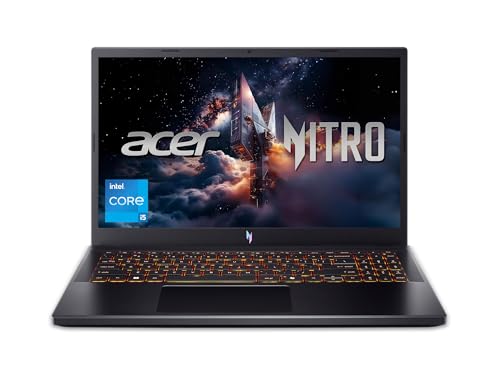
Acer Nitro V 15.6-inch with RTX 5050
A listing with an i5-13420H, RTX 5050 8GB GDDR7, 16GB RAM and 512GB SSD, plus a mouse pad. The RTX 5050 is the newest entry GPU here, and the mouse pad is a minor add-on. Because the title says 8GB of GDDR7 memory on the GPU, check the listing for confirmation, since seller titles occasionally mix up system RAM and video memory.
Pros
- RTX 5050 GDDR7
- 16GB RAM
Cons
- 512GB SSD
- Entry GPU class
Who it’s for: Buyers who want a newer-generation entry GPU.
Lenovo LOQ with RTX 4050
A Ryzen 5 7235HS, RTX 4050, 16GB DDR5, 512GB SSD, Ethernet, USB-C and HDMI in a 15.6-inch 144Hz body. A wired port is helpful for online play in busy apartment buildings, where wireless interference is common. Check that your router sits close enough for a cable run.
Pros
- Ethernet port
- 16GB DDR5
Cons
- 512GB SSD
- 144Hz only
Who it’s for: Online players who prefer wired internet.
ASUS ROG Strix G16 with RTX 4060
An i7-13650HX, RTX 4060, 16GB DDR5 and a 1TB Gen 4 SSD with Wi-Fi 6E. It is an older generation than the RTX 5060 Strix, so compare prices carefully, since a newer RTX 5060 model may cost little more; it can be a good option if the discount is large.
Pros
- 1TB SSD
- Strong CPU
Cons
- Older GPU generation
- Premium tier
Who it’s for: Buyers who find a discount on a previous-generation model.
Alienware 16 Aurora with RTX 5050
A Core 7 240H, RTX 5050, 16GB DDR5, a 1TB SSD and a WQXGA 120Hz screen with Wi-Fi 7. The premium brand finish is the main appeal, though the GPU is entry-class and the 120Hz refresh rate is modest. Many buyers pay for the design, so decide whether that matters before you accept the premium.
Pros
- 1TB SSD
- WQXGA display
Cons
- Entry GPU in a premium tier
- 120Hz refresh
Who it’s for: Buyers who value brand finish.
How we picked these
We relied on published specifications, manufacturer documentation and buyer reviews, favoring 15 and 16-inch models that are sold internationally. Nobody on the team used or measured these units. Seller claims about cooling, AI performance and comparisons with rivals are treated as marketing, and unfamiliar brands are flagged.
Choosing a gaming laptop for Singapore
Heat and humidity
A warm, humid climate shortens the margin for cooling. Compare the vent layout in photos and choose models with generous vents, keep the laptop on a hard surface and watch for dust build-up. If your game stutters, our guide on making a game use the NVIDIA GPU covers a common cause.
Plug, voltage and chargers
Check the adapter label for its voltage range and the plug shape. Local sockets are commonly the three-pin style, but confirm what your building uses, and buy a proper adapter or power cable, not an improvised one.
Display, storage and RAM
A 144Hz to 180Hz panel suits most players, while a 2.5K screen needs a stronger GPU. Aim for 16GB of RAM and at least 512GB, and prefer 1TB if you install several large games. Check whether memory is upgradeable on the exact model, because a few thin laptops solder it.
Warranty and availability
Ask whether the maker honors an overseas purchase, who pays for shipping and which service centers handle your model. A laptop sold locally by the same brand is usually easier to repair.
Import versus local retail: a quick audit
- Search the exact model number on local retailer sites
- Compare local warranty terms with the overseas listing
- Write down shipping, tax and adapter costs
- Confirm the keyboard layout
- Check the return policy for overseas shipping
If a local store sells the same model, the extra support may outweigh a small price gap. If the model is not sold locally at all, treat repairs as your biggest risk. Total the landed cost on paper first: item, shipping, any tax, an adapter and the cost of a protection plan, then compare the sum with the local price rather than the sticker price alone.
Mistakes buyers make
- Assuming every brand has local service. Smaller brands may have none.
- Ignoring DDR4 versus DDR5. Memory type matters for upgrades.
- Chasing the newest GPU only. A 1TB SSD or a better display can be a better use of money.
- Forgetting heat. Hot rooms push laptops to throttle sooner.
- Not saving the listing. Keep a copy of the specification for warranty claims.
- Overlooking noise. Fans spin faster in warm rooms, so read buyer comments on noise before choosing a thin model.
Verdict
For wide availability and a well-rounded spec, the ASUS ROG Strix G16 with RTX 5060 and the Acer Nitro V 16S are the safest bets. The Lenovo LOQ and HP Victus work for lower budgets. Treat the MECHREVO and TVEPGZD listings as higher-risk until you verify support and specifications. Whichever you choose, save the listing, note the model number and ask the seller about overseas warranty in writing before you pay.
Related guides
- Windows Macos Linux Gaming Performance Comparison Strengths Weaknesses
- Desktop Operating Systems Gaming Performance Strengths Weaknesses
- 5G Home Internet Wifi Modem Settings Low Latency Gaming
Frequently asked questions
What should Singapore buyers check on a US laptop listing?
Check the warranty coverage, charger voltage range and plug fit, keyboard layout and whether the model number is sold locally. Also compare shipping, tax and return costs against a local retailer’s price.
Which brands are easiest to service in Singapore?
Widely sold brands such as Acer, ASUS, MSI, HP, Lenovo and Dell generally have a wider service network than small import brands, but confirm for your specific model with the maker.
Is cooling more important in a hot climate?
Yes, because the laptop starts from a higher room temperature. Look for well-vented designs, keep the air intakes clear and consider a cooling pad if temperatures climb during long sessions.
Are Radeon GPUs a good choice?
They can be, depending on the games you play. Some features and tools favor GeForce, so check that your key games and software work well on Radeon before ordering.
Should I buy an unfamiliar brand?
Only with care. Verify the specifications, the seller’s return policy and the warranty source. A low price is not worth much if there is no service route.


