A school does not buy a 3D printer the way a hobbyist does. The machine will sit in a classroom, a library makerspace, or a corner of the tech lab, and it will be operated by twelve-year-olds, rotating substitute teachers, and one overworked STEM coordinator. That changes the checklist. Raw print volume and exotic filament support matter much less than whether the printer arrives assembled, whether the moving parts are shielded, and whether a student can start a job without a forty-minute calibration ritual.
This guide is built for teachers, librarians, club advisors, and district buyers who need a printer that survives a full semester of student projects in 2026. Every model below is a compact, beginner-oriented unit marketed to kids and first-time users, so the comparison focuses on classroom friction: setup, safety, app control, model libraries, and what comes in the box.
Top 3 picks at a glance
Quick Picks
As an Amazon Associate we earn from qualifying purchases at no extra cost to you.




| Product | Best for | Key spec from the title |
|---|---|---|
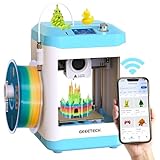
| AOSEED AI Kids Printer (8 PLA Filaments) | Whole-class starter bundle | 400mm/s, enclosed, 12,000+ models, 8 PLA filaments |
| AOSEED AI Kids Printer (8 PLA Spools) | Same bundle, spool-focused listing | 400mm/s, leveling-free, one-click WiFi app control |
| Entina Tina2 Plus | Fast, simple beginner lab | 250mm/s, auto leveling, PEI build plate |
| Mini Starter Kit Printer (SD Card) | All-in-one kit for a first printer | Auto leveling, 1 roll of filament, SD card included |
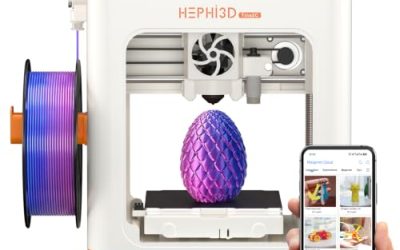
| Hephi3d TINA2 Plus | Ready-out-of-the-box classrooms | Fully assembled, 250mm/s, WiFi app control |
| Magic Jimmy AI Printer | Remote monitoring of student jobs | Enclosed design, live camera, 12,000+ models |
| Ugee Funbox | Safety-minded buyers | UL GREENGUARD safe, 500mm/s, enclosed |
| Entina Tina2S | Easy setup on a tight schedule | Auto leveling, WiFi and app control, huge model library |
How to Choose
Enclosure and student safety
A hot nozzle and a moving print head are the two hazards that matter around kids. An enclosed chassis keeps fingers away from both and also blocks drafts that can warp a print. Several models here list an enclosed design in the title, and one lists a UL GREENGUARD claim, which relates to low chemical emissions in indoor air. If the printer will live in a shared room with no ventilation, that certification language deserves weight. Printers without an enclosure are fine for a supervised club but need a rule about no hands near the bed during a job.
Setup time and leveling
Manual bed leveling is the number one reason classroom printers end up in a closet. Look for auto leveling or leveling-free wording, plus a fully assembled unit so the first print happens in the first class period. A teacher with a single prep period cannot spend it tightening gantry screws. Assembled, self-leveling machines also reduce the difference between a good day and a bad day when a different adult runs the lab.
Control, apps, and the model library
Wireless app control lets a teacher queue jobs from a laptop instead of walking a memory card around the room. An SD card slot is still useful as a fallback when school network rules block device pairing, so the kit that ships with a card has a practical edge. Model libraries listing 12,000 or more files give younger students something to print on day one, but make sure older students can import their own files for design class.
Speed claims and what to ignore
Listed speeds run from 250mm/s to 500mm/s. Those are maximum travel or print speeds, and real classroom prints will run slower to keep detail. Do not pay extra for the top number alone. What to ignore: AI branding without a described function, and gift-oriented packaging language. What to weigh: included filament, a flexible build plate for removing finished parts, and whether replacement nozzles and spools are easy to reorder. Budget units often cut corners on documentation and support, so confirm a teacher-friendly manual exists before a bulk purchase.
The 8 Best Options
AOSEED AI Kids Printer (8 PLA Filaments)
This listing leads with a 400mm/s speed, an enclosed design, and a library of 12,000+ models, all aimed at children. The title also calls out leveling-free operation, one-click WiFi app control, and a bundle of eight PLA filaments, which means a class can print in several colors without a separate supply order. It suits an elementary or middle school makerspace that wants to launch quickly and keep teachers out of the calibration business.
- Strength: enclosed and leveling-free, which removes two of the biggest classroom headaches.
- Strength: eight included PLA filaments cover the first weeks of projects.
- Trade-off: the speed figure is a headline number, and the title does not describe how it holds up on detailed prints.
Skip it if students need to print large engineering parts, since the title describes a kids-first product rather than a high-volume lab machine.
AOSEED AI Kids Printer (8 PLA Spools)
This is a second listing of the same AOSEED concept, with the filament bundle described as eight PLA spools. The shared specs are 400mm/s, 12,000+ models, an enclosed safe design, leveling-free printing, and one-click WiFi app control. For a buyer, the practical question is which listing is in stock or comes with the better bundle, because the printer description matches. A district buying several units for different classrooms may find that two listings give flexibility on delivery.
- Strength: STEM-oriented framing and a large preloaded model library fit introductory units.
- Strength: app control lets a teacher start jobs from a desk.
- Trade-off: it overlaps almost completely with the other AOSEED listing, so buying both adds no new capability.
Skip it if you already chose the other AOSEED bundle; pick whichever has the filament count you prefer.
Entina Tina2 Plus
The Tina2 Plus pairs 250mm/s printing with auto leveling, a PEI build plate, WiFi and app control, and a fully assembled mini body. It is pitched at beginners and kids, which makes it a natural pick for after-school clubs and library programs. The PEI plate is a practical classroom detail because finished parts can be released more easily, which saves a scraper and some frustration.
- Strength: fully assembled with auto leveling, so setup is short.
- Strength: PEI build plate listed in the title.
- Trade-off: the title does not mention an enclosure, so supervision matters more.
Skip it if your school requires a fully enclosed printer for unsupervised student access.
Mini Starter Kit Printer (SD Card)
This unbranded mini printer is sold as a complete starter kit: fully assembled, WiFi-enabled, auto leveling, one roll of filament, and an SD card. That bundle is useful for a school that wants to open a box and print the same afternoon. The SD card path also works on networks where wireless pairing is restricted, which is a common school IT situation.
- Strength: everything needed for a first print is listed as included.
- Strength: SD card plus WiFi gives two ways to send files.
- Trade-off: only one roll of filament is included, so a class will need a refill plan quickly.
Skip it if you want a recognizable brand name for procurement paperwork or a large included filament assortment.
Hephi3d TINA2 Plus
Hephi3d lists this as a beginner printer friendly for kids, fully assembled and ready to use, with auto leveling, 250mm/s speed, and WiFi app control. The ready-to-use language is the draw: a teacher can plan a lesson around it without a build day. Its feature set closely mirrors the Entina Tina2 Plus, so it is a sensible alternate when one listing is unavailable or a school wants to split purchases across vendors.
- Strength: ready out of the box with no assembly.
- Strength: auto leveling and app control keep supervision light.
- Trade-off: the title shows no enclosure or safety certification.
Skip it if student safety rules call for an enclosed chassis.
Magic Jimmy AI Printer
Magic Jimmy stands out for its live camera, which lets a teacher watch a print from across the room or from a phone. Combined with a safe enclosed design, a fully assembled body, and 12,000+ models, it fits a school where the printer sits in a locked room and staff check progress remotely. The creative learning positioning matches elementary STEM blocks.
- Strength: live camera allows remote monitoring of long jobs.
- Strength: enclosed design with a large model library.
- Trade-off: the title does not list a speed or build plate detail, so check specs before ordering several.
Skip it if you only need the simplest possible machine and do not care about camera monitoring.
Ugee Funbox
The Funbox is the only model here that cites UL GREENGUARD safety, alongside an enclosed design, 500mm/s listed speed, 12000+ models, and one-click WiFi app control. For a school nurse, facilities lead, or parent committee asking about indoor air quality, that certification wording gives a concrete document to point to. It is also the fastest listed speed in this group.
- Strength: emissions-related certification language in the title.
- Strength: enclosed design with app control and a large model library.
- Trade-off: the highest speed claim does not guarantee better classroom prints.
Skip it if budget is the main constraint and certification is not required by your district.
Entina Tina2S
Tina2S is described as a fully assembled mini printer for kids and beginners with auto leveling, easy setup, WiFi and app control, and a huge model library. The wording emphasizes setup simplicity, which suits schools buying one unit for a pilot program before scaling up. It sits alongside the Tina2 Plus in the same family, so staff can standardize on one brand of consumables.
- Strength: easy setup and auto leveling lower the training burden.
- Strength: app control and a large library help new users.
- Trade-off: the title lists no speed figure, enclosure, or build plate detail.
Skip it if you need to compare printing speed or build surface in detail before buying.
Which One Fits Your Situation
A locked makerspace with remote supervision
Magic Jimmy AI Printer is the natural pick because its live camera lets a teacher check progress without standing over the machine, while the enclosed design limits contact with hot parts.
A district with strict indoor air policies
Ugee Funbox gives the clearest paperwork angle thanks to its UL GREENGUARD wording, plus an enclosed build.
A club with no setup time
The Mini Starter Kit Printer ships with filament and an SD card, so a volunteer advisor can print on the first meeting.
Several classrooms on a steady rollout
The AOSEED AI Kids Printer (8 PLA Filaments) combines an enclosed body, leveling-free design, and a large filament bundle, which keeps repeat supply orders smaller.
Common Mistakes
- Buying on the speed number alone and ignoring enclosure, leveling, and included materials.
- Skipping a filament plan, then discovering one roll disappears after a single project.
- Assuming wireless pairing will work on a locked-down school network without asking IT first.
- Ordering two listings that are the same printer and calling it variety.
- Placing the printer in an unventilated closet instead of a space with airflow and adult sight lines.
Related guides
- Windows Macos Linux Gaming Performance Comparison Strengths Weaknesses
- Desktop Operating Systems Gaming Performance Strengths Weaknesses
- 5G Home Internet Wifi Modem Settings Low Latency Gaming
Frequently Asked Questions
Do school printers need to be enclosed?
It is not a legal requirement in most cases, but an enclosure keeps small hands away from a hot nozzle and moving parts. For unsupervised or younger groups it is the safer default.
Is app control necessary?
No, but it lets a teacher queue prints from a laptop or phone. Keep an SD card fallback in case the school network blocks pairing.
How many models should a class buy?
Plan around queue time rather than headcount. One printer can serve a small club, while a full class doing weekly projects usually needs several, since each job occupies the machine for a while.
Are the large model libraries important?
They help younger students start quickly, but design lessons depend on importing student-made files. Confirm that custom files can be sent to the printer through the app or the SD card.