Printing photographs at a professional standard is a different problem from printing documents that happen to contain pictures. The questions that matter are the ink chemistry, how many ink channels the printer uses to build color, the widest sheet it can feed, and how much each finished print costs after the first set of cartridges runs out. A printer that looks like a bargain on the box can turn out to be expensive the moment a client asks for twenty prints, so this guide frames every pick around those four ideas.
It is written for working photographers selling prints, serious hobbyists who want gallery-quality output at home, small studios that need wide sheets for portfolios and proofs, and designers producing color-critical samples. Six wide-format and semi-professional models from Canon and Epson fit that brief in the listing set, and two pocket-sized 4×6 printers were left out because snapshot printing is a casual task. As of 2026 the real split is between dye-based and pigment-based inks and between cartridge printers and refillable tank designs.
Our Top Picks
 Canon PIXMA PRO-200S Professional 13" Wireless Inkjet PhotoLarge28.7 x 18.6 x 14.04 inches32 PoundsCheck on Amazon
 Canon imagePROGRAF PRO-310 Professional 13" Wireless Inkjet PhotoLarge28.7 x 18.6 x 14.04 inches31.6 PoundsCheck on Amazon
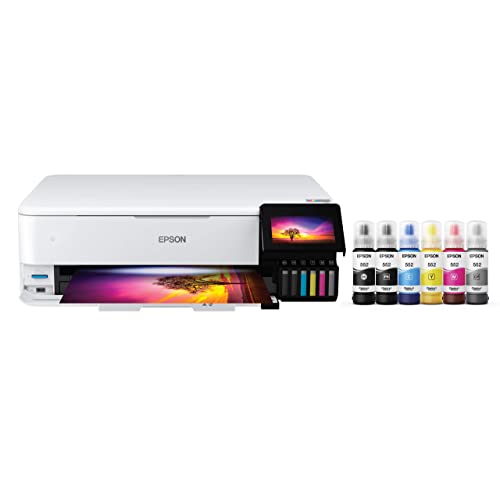 Epson EcoTank Photo ET-8550 Wireless Wide-Format All-in-One TankLarge29.8 x 20.6 x 16.9 inches24.5 poundsCheck on Amazon
Top 3 picks at a glance
Quick Picks
As an Amazon Associate we earn from qualifying purchases at no extra cost to you.



| Product | Best for | Key spec from the title |
|---|---|---|
| Canon PIXMA PRO-200S | Vivid color prints for portfolios | 13-inch wireless, 8-color dye ink, 3-inch LCD |
| Canon imagePROGRAF PRO-310 | Long-lasting archival prints | 13-inch wireless, 9-color pigment ink, 3-inch LCD |
| Epson EcoTank Photo ET-8550 | High-volume wide-format printing | Wide-format all-in-one, cartridge-free 6-color, up to 16 ppm |
| Canon imagePROGRAF PRO-1100 | Largest sheets and fine-art work | 17-inch professional wireless inkjet |
| Epson Expression Photo HD XP-15000 | Entry wide-format with duplex printing | 6-color, 13 x 19 in., auto 2-sided, up to 9.2 ppm |
| Epson EcoTank Photo ET-8500 | Home studio that also scans and copies | Cartridge-free 6-color all-in-one, up to 16 ppm |
How to Choose
Dye or pigment ink
Dye inks, as in the PIXMA PRO-200S, tend to give very saturated color and a smooth glossy finish, which suits portfolio prints that will be handled and framed behind glass. Pigment inks, as in the PRO-310, sit on top of the paper in tiny solid particles, so they usually resist fading and water better and handle matte and fine-art stocks well. If you sell prints that must last for decades, lean pigment. If you want maximum pop on glossy photo paper and plan to display or replace prints, dye is attractive.
Number of inks and what it buys you
More ink channels generally mean smoother gradients and better control of shadows, skin tones, and neutral grays. The listings here run from 6-color on the Epson models to 8-color dye and 9-color pigment on the Canon 13-inch models. A six-color design is capable for general photography, while 8 or 9 channels give a professional more headroom on black-and-white conversions and difficult color transitions. Do not chase a number alone; ask whether the printer ships with, or can use, the paper profiles you need.
Sheet size and throughput
A 13-inch printer, such as the Canon 13-inch pair or the Epson 13 x 19 inch XP-15000, handles A3-plus sheets, enough for most exhibition prints. The 17-inch PRO-1100 opens up larger frames and panoramic crops. Speed figures like up to 16 ppm or up to 9.2 ppm in the titles refer to simplified print jobs, not full-resolution photo output, so expect real photo prints to take longer. Auto 2-sided printing helps proofs and portfolio books, not framed pieces.
Running cost, paper, and where budgets cut corners
Cartridge printers have a low entry cost and a higher cost per print, while tank models invert that: the EcoTank Photo listings describe cartridge-free, bottle-filled operation, which favors anyone printing in volume. Ignore the all-in-one scanner unless you need it, but do weigh paper handling, cut-sheet capacity, and borderless support. Cheaper machines tend to drop pigment inks, shrink the maximum sheet size, or reduce the ink channel count, so check that the cut you accept matches the work you actually sell. Also budget for paper: a premium glossy, luster, or cotton rag stock changes the look of a print as much as the ink does, and manufacturer color profiles for those papers are what keep results predictable from one batch to the next. Print a small sample strip on any new paper so you waste fewer full-size sheets while dialing in color.
The 6 Best Options
Canon PIXMA PRO-200S
This 13-inch wireless inkjet uses an 8-color dye ink system and a 3-inch color LCD. It is aimed at photographers who value punchy color and rich skin tones on glossy and luster papers.
- Strength: Eight dye channels support smooth tonal transitions and strong saturation.
- Strength: The 3-inch LCD and wireless support simplify use at a desk without a computer cable.
- Trade-off: Dye prints do not offer the same fade resistance claim as pigment output.
It suits wedding and portrait photographers who print client samples and display pieces, and a 13-inch sheet is comfortably large for album proofs and wall prints. Because the LCD shows status without a computer, it works well on a shared studio shelf. Skip it if archival permanence or matte fine-art paper is your main business, because a pigment model fits that better.
Canon imagePROGRAF PRO-310
The PRO-310 combines a 13-inch format and wireless connectivity with a 9-color pigment ink set and a 3-inch LCD. The pigment system is the main reason to pick it over the dye-based sibling.
- Strength: Nine pigment channels point to broad color and strong black-and-white capability.
- Strength: Pigment ink generally resists fading and moisture, helpful for sold prints.
- Trade-off: It carries a higher tier than the dye PRO-200S for similar print width.
It is a fit for fine-art printers and photographers who sell limited editions, particularly those working on textured or matte papers where pigment tends to look its best. Landscape and black-and-white shooters often value the extra channels for smooth gray ramps. Skip it if you just want vivid snapshots in a casual home setting, where a simpler tank model would cost less to run.
Epson EcoTank Photo ET-8550
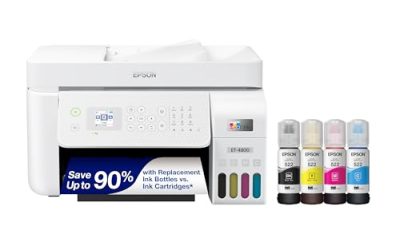
This wide-format all-in-one prints, scans, and copies, uses a cartridge-free 6-color tank system, and lists speeds of up to 16 ppm. It addresses the biggest complaint about photo printing: the expense of replacement cartridges.
- Strength: Tank design lowers ink spend for heavy printing.
- Strength: Wide-format capability plus scan and copy functions fit a small studio.
- Trade-off: Six colors offer less nuance than the eight and nine-channel Canon models.
Choose it if you print many images and also need document functions, for example a freelancer who prints invoices, contact sheets, and proofs from one machine. Filling the tanks from bottles is a different routine than swapping cartridges, so allow a little time at setup. Skip it if black-and-white fine-art work or maximum color depth drives your purchase.
Canon imagePROGRAF PRO-1100
The PRO-1100 is the largest printer in the group, described as a 17-inch professional wireless inkjet. Its extra width is the primary reason to consider it.
- Strength: The 17-inch format handles bigger prints than the 13-inch machines.
- Strength: The imagePROGRAF line is positioned for professional and gallery output.
- Trade-off: The title gives little detail, and the size means a larger footprint and higher purchase tier.
It suits professionals who regularly sell large prints and need desk-level workflow, such as architectural, landscape, or event photographers who deliver oversized wall pieces. Plan for a sturdy table and confirm the paper types you intend to use before purchase. Skip it if you rarely print beyond 13-inch sheets, since the space and cost would sit unused.
Epson Expression Photo HD XP-15000
The XP-15000 is a wireless wide-format inkjet that prints 13 x 19 inches, uses six colors, and adds automatic 2-sided printing at up to 9.2 ppm. It is the entry point for large-format photo output.
- Strength: 13 x 19 inch capability at a gentler purchase tier than the professional-class machines.
- Strength: Auto 2-sided printing helps for proofs, brochures, and portfolio spreads.
- Trade-off: Cartridge ink raises per-print cost versus the tank models.
It fits aspiring professionals building a first portfolio, or students who need large critique prints for class. The duplex feature is a bonus for printed portfolio books and client proofs, though glossy photo stock usually prints on one side. Skip it if you expect to print hundreds of sheets monthly, because running cost will add up.
Epson EcoTank Photo ET-8500
The ET-8500 shares the EcoTank idea: a wireless color all-in-one Supertank with cartridge-free 6-color photo printing, up to 16 ppm, and USB and memory options.
- Strength: Refillable tanks keep cost per print low for volume work.
- Strength: Print, scan, and copy functions with card access suit a busy home studio.
- Trade-off: It sits in a semi-professional class, not at the pigment-based top end.
It is a sensible choice for hobbyists and small sellers who value economy, such as someone printing seasonal craft-fair photo cards or family albums. The USB and memory options mentioned in the title may also help when you want to print without a computer, though confirm the exact formats on the product page. Skip it if you require nine-color pigment output or 17-inch width.
Which One Fits Your Situation
You sell framed prints and need them to last
Pick the Canon imagePROGRAF PRO-310. Its pigment ink set speaks to longevity, and the 13-inch width covers most exhibition sizes.
You photograph portraits and weddings and want rich color
The Canon PIXMA PRO-200S is the natural match, offering eight dye inks that favor warm skin tones on glossy papers.
You print in volume and also scan documents
The Epson EcoTank Photo ET-8550 or ET-8500 reduces ink spend, and the all-in-one functions double as a small-office tool. Choose the ET-8550 if you want the wide-format listing.
You need the biggest sheets or you are just entering large format
The Canon imagePROGRAF PRO-1100 handles 17-inch work for established professionals, while the Epson Expression Photo HD XP-15000 is the economical way to try 13 x 19 inch printing.
Common Mistakes
- Choosing by printer price alone and ignoring ink cost, which often exceeds the purchase tier within a year.
- Printing on the wrong paper setting, which ruins color accuracy more than any hardware difference.
- Skipping a calibrated monitor, then blaming the printer for colors that never matched the screen.
- Buying a 17-inch machine when 13-inch work is all you sell.
- Treating “up to” page-per-minute numbers as photo speeds when they describe simple documents.
Related guides
- Windows Macos Linux Gaming Performance Comparison Strengths Weaknesses
- Desktop Operating Systems Gaming Performance Strengths Weaknesses
- 5G Home Internet Wifi Modem Settings Low Latency Gaming
Frequently Asked Questions
What is the difference between dye and pigment photo printers?
Dye inks absorb into the paper and give vivid color, while pigment inks sit on the surface and typically last longer and resist water. Pigment is common in fine-art workflows.
Are EcoTank printers good enough for professional photos?
The six-color tank models handle high-quality photo output and cost less per print, though the eight and nine-channel Canon models offer more color control for demanding work.
Do I need a 17-inch printer?
Only if you regularly sell prints larger than 13 x 19 inches. Most portfolio and exhibition work fits on 13-inch sheets.
Why were small 4×6 printers excluded?
Pocket and dock printers serve casual snapshots from phones. They lack the paper sizes, ink sets, and color control that professional output requires.