Epson sells two very different kinds of printers under one name, and mixing them up is the most common way to end up disappointed. The EcoTank line replaces cartridges with refillable ink tanks, which is why those listings talk about cartridge-free printing and years of ink. The Workforce Pro line stays with a conventional inkjet design built for office speed, with document feeders and large paper trays. Picking an Epson is really picking which of those two philosophies matches how much you print and what you print.
This guide covers eight current Epson models, from compact home tank printers to wide-format photo machines and busy-office workhorses. It is written for buyers who already prefer the brand, perhaps for its tank system or its photo output, and need to narrow the field by paper size, speed, feeder, and connectivity. Nothing here is based on personal use. Each description sticks to the specifications in the listing so you can compare models fairly in 2026 and confirm details before you order.
Our Top Picks
 Epson EcoTank ET-4800 Wireless Color All-in-One Supertank PrinterOne Size11.8 x 14.8 x 6.7 inches11 poundsCheck on Amazon
 Epson EcoTank ET-2903 Wireless All-in-One Color Supertank Printer12.5 x 14.2 x 6.4 inches9.3 PoundsCheck on Amazon
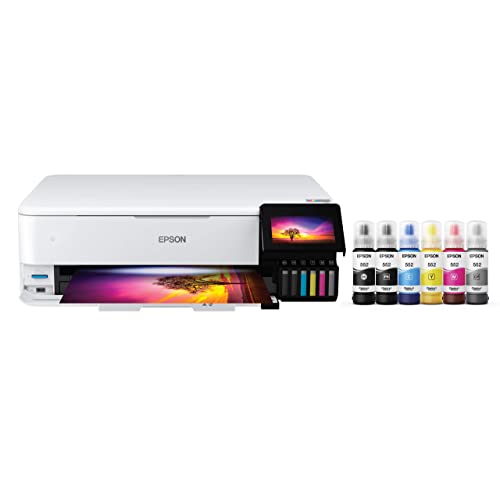 Epson EcoTank Photo ET-8550 Wireless Wide-Format All-in-One TankLarge29.8 x 20.6 x 16.9 inches24.5 poundsCheck on Amazon


Top 3 picks at a glance
Quick Picks
As an Amazon Associate we earn from qualifying purchases at no extra cost to you.


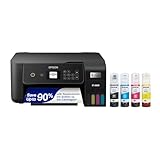


| Product | Best for | Key spec from the title |
|---|---|---|
| Epson EcoTank ET-4800 | Home office with scanning needs | Cartridge-free, fax, ADF, Ethernet, up to 10 ppm |
| Epson EcoTank ET-2903 | Light home printing | Up to 3 years of ink, 11 PPM, 1.44 inch color screen |
| Epson Workforce Pro WF-4820 | Small office document work | Up to 25 ppm, 35-sheet ADF, auto 2-sided |
| Epson EcoTank ET-2800 | Simple family printer | Cartridge-free, up to 10 ppm, borderless photos |
| Epson EcoTank Photo ET-8550 | Wide-format photo printing | 6-color wide-format, up to 16 ppm |
| Epson Workforce Pro WF-4930 | High-volume office tasks | 50-page ADF, 500-sheet capacity, auto 2-sided |
| Epson EcoTank ET-2900 | Low-volume home use | Up to 3 years of ink, 11 PPM, 1.44 inch screen |
| Epson EcoTank ET-15000 | Wide-format office and graphics | 13 x 19 in., Ethernet, fax, up to 17 ppm |
How to Choose
Tank or cartridge design
Six of these models are EcoTank printers, described as cartridge-free with refillable tanks. The upfront purchase is higher than a basic cartridge printer, but you refill from bottles, and the ET-2900 and ET-2903 titles go as far as citing up to three years of ink. The two Workforce Pro models use a standard inkjet approach better matched to document-heavy offices. If you print rarely, a tank printer avoids the dried-out cartridge problem. If you print many pages daily, speed and paper capacity usually matter more than the ink system.
Ask yourself a practical question before comparing anything else: how many pages leave this machine in a typical week? Under fifty pages, the compact tank models are plenty. Several hundred pages with double-sided output and scanned originals coming back in, and the office-class Workforce Pro models start to earn their place. Use the answer as a filter, then use the specs below to break ties.
Speed, paper capacity, and duplexing
Titles give speeds from 10 ppm up to 25 ppm. Anything near 10 or 11 ppm is fine for homework and shipping labels but slow for a 40-page report. The WF-4820 lists up to 25 ppm with auto 2-sided printing and a 250-sheet tray, and the WF-4930 lists a 500-sheet paper capacity. If you print more than a few pages a day, look for automatic duplex printing, which saves paper and avoids flipping sheets by hand.
Scanning, faxing, and the document feeder
All eight are all-in-one printers with print, scan, and copy functions, and several add fax. An automatic document feeder, or ADF, matters when you scan multipage stacks: the WF-4820 lists a 35-sheet feeder, the ET-4800 lists an ADF, and the WF-4930 lists 50 pages. Models without a feeder, such as the compact ET-2800, ET-2900, and ET-2903, require placing each page on the glass. Choose by how often you scan documents, not by how often you scan photos.
Paper size and connectivity
Most buyers need standard letter paper. Only the ET-8550 and ET-15000 are billed as wide-format, with the ET-15000 explicitly listing 13 x 19 inch printing. Wide-format machines are larger and cost more to run, so only buy one if you print posters, charts, or prints that large. For connectivity, every model is described as wireless, and the ET-4800 and ET-15000 also list Ethernet, which is valuable in an office with a wired network. Ignore small-screen size differences, though a 1.44 inch color screen does make setup easier than a button-only panel.
The 8 Best Options
Epson EcoTank ET-4800
The ET-4800 is the home-office EcoTank. The title lists cartridge-free printing, scanning, copying, faxing, up to 10 ppm, an ADF, and Ethernet. That feature mix makes it a sensible fit for a remote worker who occasionally scans paperwork and wants a wired network option.
- Strength: includes an automatic document feeder for multipage scans and copies.
- Strength: Ethernet and fax add office-style connectivity to a refillable-tank design.
- Trade-off: up to 10 ppm is relatively slow for large print jobs.
Skip it if you print long documents daily and need faster output.
Epson EcoTank ET-2903
The ET-2903 is a compact wireless all-in-one with refillable tanks and a promise of up to three years of ink in the title. It also lists 11 PPM and a 1.44 inch color screen. It suits a household that prints homework, forms, and the occasional recipe and wants to forget about ink refills for a long while.
- Strength: up to 3 years of ink, according to the listing.
- Strength: color display makes setup and menu navigation easier.
- Trade-off: no ADF listed, so multipage scanning is manual.
Skip it if you need fax, Ethernet, or a feeder for stacks of paper.
Epson Workforce Pro WF-4820
This is the speed-first choice among the small-office models. The title lists up to 25 ppm, a 35-sheet ADF, auto 2-sided printing, and a 250-sheet tray, with print, scan, copy, and fax. It suits a practice or home business that moves through invoices, contracts, and forms all day.
- Strength: up to 25 ppm and automatic duplexing speed up document work.
- Strength: 35-sheet ADF and 250-sheet tray reduce reloading and manual scanning.
- Trade-off: it is a conventional inkjet design, not a refillable-tank printer.
Skip it if you print only a handful of pages a month.
Epson EcoTank ET-2800
The ET-2800 is a simple, wireless, cartridge-free all-in-one in black. The title mentions up to 10 ppm and borderless photo printing, so it works as a plain family printer that can also produce snapshots without white margins.
- Strength: cartridge-free printing with refillable tanks.
- Strength: borderless photo printing is called out in the title.
- Trade-off: no feeder or fax is listed, so it is a light-duty machine.
Skip it if you need to scan stacks of paperwork or print in volume. Anyone who sends or receives faxes should also look elsewhere, since fax is not part of the title.
Epson EcoTank Photo ET-8550
The ET-8550 is the photo-focused EcoTank. The title lists cartridge-free six-color wide-format photo printing, scanning, copying, and up to 16 ppm. It is aimed at hobbyists and photographers who want large prints without cartridges and who care about color range.
- Strength: six-color printing is aimed at photo quality.
- Strength: wide-format capability opens up larger prints.
- Trade-off: a wide-format photo printer takes more desk space than a home all-in-one.
Skip it if your printing is mostly text documents and shipping labels.
Epson Workforce Pro WF-4930
The WF-4930 is the high-capacity office model. The title lists auto 2-sided printing, copy, scan, fax, a 50-page ADF, and 500-sheet paper capacity. That feeder and paper supply make it best for a busy shared office where reloading trays interrupts work.
- Strength: 50-page ADF is the largest feeder listed in this group.
- Strength: 500-sheet paper capacity cuts how often you refill.
- Trade-off: it is larger than the compact home models, so it needs a proper shelf or stand.
Skip it if you want a small home printer for occasional use. A model with this much paper capacity and feeder size only pays off when several people send jobs to it every day.
Epson EcoTank ET-2900
The ET-2900 shares the headline features of the ET-2903: wireless, refillable tanks, up to three years of ink, 11 PPM, and a 1.44 inch color screen. It is a light-duty household printer, and the near-identical listings suggest the two differ mainly by model number.
- Strength: up to 3 years of ink, according to the title.
- Strength: compact all-in-one with a color screen.
- Trade-off: no ADF, fax, or Ethernet is mentioned.
Skip it if you need office features, or if the ET-2903 listing is easier to find.
Epson EcoTank ET-15000
The ET-15000 is the wide-format supertank option. It lists cartridge-free printing, scanning, copying, faxing, up to 17 ppm, 13 x 19 inch printing, and Ethernet. That makes it useful for an office that creates posters, spreadsheets, and large drawings.
- Strength: 13 x 19 inch capability handles oversized documents.
- Strength: Ethernet and fax add office-ready connectivity.
- Trade-off: its size and wide-format design are overkill for letter-only households.
Skip it if you never print larger than standard letter. It is also a poor fit for a cramped desk, since a wide-format machine needs room for both the body and the larger paper path.
Which One Fits Your Situation
You run a small business from home
The Epson Workforce Pro WF-4820 balances speed and feeder capacity. If you print heavily and share the machine with others, the WF-4930 offers more paper and a bigger feeder.
You print rarely but want it ready every time
The Epson EcoTank ET-2903 or ET-2900 suits light use, and the up to three years of ink claim is the main selling point. The ET-2800 is an alternative for families who like borderless photo printing.
You make large prints
For photos, the Epson EcoTank Photo ET-8550 is built around six-color output. For oversized documents and graphics, the ET-15000 lists 13 x 19 inch support and Ethernet.
You work from a spare room and scan a lot
The Epson EcoTank ET-4800 pairs a feeder with tank-based printing, so scanning contracts or receipts is easier than on a flatbed-only model. The wired Ethernet option also helps if the spare room has a network jack and shaky Wi-Fi.
Think of it as the middle road. It does not match the Workforce Pro models for speed, but it brings feeder-based scanning to a quiet, low-maintenance printer that fits on a small desk.
Common Mistakes
- Buying a tank printer for a high-volume office when document speed and a bigger paper tray matter more.
- Choosing a wide-format model when you only ever print letter-size pages.
- Skipping the ADF on a printer you plan to use for scanning contracts or receipts.
- Assuming matching model numbers are identical. The ET-2900 and ET-2903 listings look nearly the same, so compare the details before buying.
- Forgetting to check that Ethernet or fax is included if your office needs either one.
Related guides
- Windows Macos Linux Gaming Performance Comparison Strengths Weaknesses
- Desktop Operating Systems Gaming Performance Strengths Weaknesses
- 5G Home Internet Wifi Modem Settings Low Latency Gaming
Frequently Asked Questions
Are EcoTank printers better than cartridge printers?
They suit people who print regularly and want to avoid buying cartridges. The refillable design shifts cost to the upfront purchase. For heavy office use, a Workforce Pro model may match your speed needs better.
What does ppm mean?
It stands for pages per minute and is the manufacturer maximum for simple text pages. Real documents with graphics or photos print more slowly, so use the number as a comparison between models, not a promise.
Do I need Ethernet if the printer is wireless?
Not at home, where Wi-Fi usually works fine. An office with a wired network may prefer Ethernet for stability. Only the ET-4800 and ET-15000 mention it in the titles.
Can these printers handle photos?
Several can print borderless photos, but the ET-8550 is the one designed around photo output with six colors. If photo quality matters most, that is the model to look at first.