
Lightweight is a claim, not a spec: only one title in this group, the Phatom, gives a weight (3.46 lb), and that figure is the seller’s. Smaller screens are the safest guide, so the 13.8-inch Surface Laptop, the 14-inch HP models and the renewed 14-inch Dell Latitude are the likeliest to feel light in a bag, while the 15.6-inch and 16-inch listings trade carry weight for screen space. Below are ten Windows laptops, how to read their titles and a carry-weight worksheet, plus a reminder that the charger and case often decide a commute more than the laptop itself.
Our Top Picks

Top 3 picks at a glance
Quick picks by carry style
As an Amazon Associate we earn from qualifying purchases at no extra cost to you.


- Microsoft Surface Laptop (13.8-inch) – best for a premium, travel-ready machine.
- Dell Latitude 5420 (14-inch, Renewed) – best for business use with 16GB of RAM.
- HP 14-inch N150 – best for a simple 14-inch machine with a Microsoft 365 trial.
- HP 2026 Everyday Laptop – best for light web and study work, with details to confirm.
- WISESWAN Core i3 (12GB / 256GB) – best for extra memory at a modest tier.
- NIAKUN 15.6-inch (8GB / 256GB) – best for a slim-body claim with more RAM.
- Phatom 15.6-inch – best for the only title that states a weight.
- PADIX 15.6-inch – best for a very low-cost media and browsing machine.
- Dell 11-inch convertible (Renewed) – best for the smallest footprint.
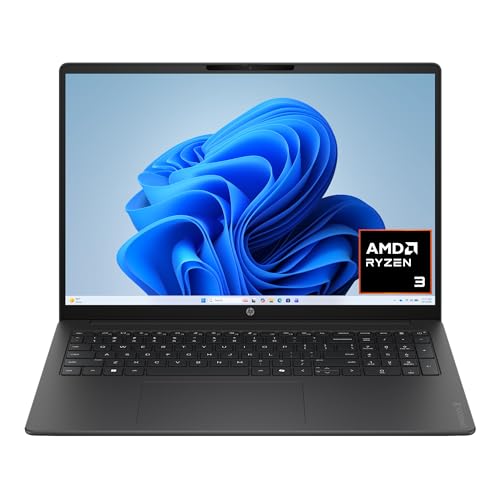
- HP OmniBook 3 16-inch – best for a large screen, not for the lightest bag.
Specs side by side
| Model | Type | Key specs as stated in the title | Best for |
|---|---|---|---|
| Surface Laptop | 13.8-inch, touch | Snapdragon X2 Elite, 16GB, 1TB SSD, Copilot+ PC | Premium portability |
| Dell Latitude 5420 | 14-inch, renewed | i5-1145G7, 16GB DDR4, 256GB SSD, Windows 11 Pro | Business carry |
| HP 14-inch N150 | 14-inch | Intel N150, 4GB, 128GB UFS, Windows 11 Home | Basic tasks |
| HP Everyday | Size: check the listing | Intel CPU, 128GB; RAM: check the listing | Light study |
| WISESWAN | 15.6-inch | i3 (2 cores, 4 threads), 12GB, 256GB SSD | Memory on a budget |
| NIAKUN | 15.6-inch | Pentium, 8GB, 256GB SSD, Windows 11 Pro | Pro on a budget |
| Phatom | 15.6-inch | 4GB, 128GB SSD, FHD IPS, 3.46 lb claimed | Weight-conscious budget |
| PADIX | 15.6-inch | N4020, 4GB DDR4, 128GB eMMC, TF slot | Entry-level use |
| Dell 11-inch | 11-inch convertible, renewed | Pentium, 8GB, 128GB SSD, touch | Compact travel |
| HP OmniBook 3 | 16-inch, touch | Ryzen 3, 8GB, 512GB SSD, Radeon 610M, 2K | Big-screen work |
Ten laptops, read one at a time
Microsoft Surface Laptop 13.8-inch (Snapdragon X2 Elite)
This is the premium entry, with a 13.8-inch touchscreen, a Snapdragon X2 Elite processor, 16GB of RAM and a 1TB SSD, sold as a Copilot+ PC. The Snapdragon chip is an Arm design, and Windows on Arm runs many x86 apps through emulation, while some drivers and specialist programs do not work. The title gives no weight, so confirm it on the page.
With 16GB of RAM and a 1TB SSD stated, memory and storage are unlikely to be the limit for years, though check whether either can be upgraded, because thin premium laptops frequently solder both. The touchscreen is useful for note-taking but invites fingerprints and is worth a glance at the warranty terms. If you rely on printer drivers, VPN clients or older business software, confirm compatibility with each vendor before ordering rather than after.
Pros
- 13.8-inch body is among the smaller screens here.
- 16GB and 1TB are generous for the category.
Cons
- Highest tier in the group.
- Arm compatibility needs checking against your apps.
Who it’s for: frequent travelers who want one machine for everything. Who should skip it: anyone running niche x86-only software or watching the budget.
Dell Latitude 5420 14-inch (Renewed)
A 14-inch Full HD business laptop with a quad-core Core i5-1145G7, 16GB of DDR4 RAM, a 256GB SSD, a camera, HDMI and Windows 11 Pro, sold renewed. It offers the best memory-to-size ratio in the list, though the title does not give a weight. Renewed units vary in battery wear, so treat the warranty terms as part of the spec.
Business-class laptops of this type are often built for travel, with a sturdier chassis than consumer models, though the title makes no such claim, so treat that as general background. Windows 11 Pro on an 11th-generation Core chip also settles the operating-system support question. The practical risks are a battery that may have lost capacity and a charger that may be a third-party unit, so ask the seller about both.
Pros
- 16GB of RAM in a 14-inch frame.
- Windows 11 Pro is stated.
Cons
- Renewed condition and unknown battery health.
- 256GB fills quickly.
Who it’s for: commuters who need Office and video calls. Who should skip it: buyers who want a new-unit warranty.
HP 14-inch Laptop (Intel N150, 14-dq6199nr)
A 14-inch HD display, Intel N150, 4GB of RAM, 128GB of UFS storage and Windows 11 Home, with a one-year Microsoft 365 Personal subscription. The model number in the title makes it easy to look up the exact spec sheet and weight. The 4GB and the soldered-style UFS storage keep it to light work.
Because the model number is in the title, you can pull the manufacturer’s spec sheet for weight, ports and upgrade options, which the title does not list. That makes it the easiest listing here to verify. The one-year subscription is time-limited, so budget for renewal if you like it. For a light-use machine this size, the question is whether 4GB and 128GB will still feel acceptable after two years of updates and downloads.
Pros
- Compact 14-inch screen.
- Model number helps verification.
Cons
- 4GB limits multitasking.
- HD, not Full HD, display.
Who it’s for: students and casual users who mostly browse. Who should skip it: anyone running many tabs or editing photos.
HP Everyday Laptop (Pale Rose Gold)
The title stresses lightweight and portable, long battery life, fast charge, Wi-Fi 6, Copilot AI, Office 365 and 1TB of cloud storage, with 128GB of storage on the device. It does not state RAM, screen size or CPU model, which are the three numbers a portable buyer most needs. The cloud storage is a subscription, not extra disk space.
Missing numbers are the real story here. A buyer comparing portability needs the screen size and the weight, and the title offers adjectives instead. Before ordering, find the model number in the product details and cross-check it on the manufacturer’s page. The colour and the bundled subscription are pleasant extras, but they should not decide the purchase while the RAM is unknown.
Pros
- Fast charge and Wi-Fi 6 are named.
- Colour option and Office bundle suit study use.
Cons
- RAM, display size and CPU model are missing.
- 128GB leaves little room.
Who it’s for: light everyday use once the missing specs are confirmed. Who should skip it: anyone who cannot verify the specs.
WISESWAN Windows 11 Laptop (Core i3, 12GB / 256GB)
This 15.6-inch listing states an i3 with 2 cores and 4 threads up to 3.4GHz, 12GB of RAM, a 256GB SSD, a backlit keyboard, Wi-Fi 6 and a TF slot for expansion up to 2TB. The i3 generation is not named, so the Windows 11 support list is worth checking. Twelve gigabytes is unusual and should be double-checked, as is whether it is upgradeable.
Two more details deserve a second look. “2 cores, 4 threads” describes a modest processor, so expect it to handle documents and video but to slow down when many tasks pile up. The brand is also little known, so the return policy and warranty are part of the purchase. The TF card slot is handy for photos, but a card is slower than the internal SSD.
Pros
- 12GB is generous for this tier.
- Backlit keyboard.
Cons
- Only two cores.
- 15.6-inch body is not the smallest.
Who it’s for: students who want memory headroom. Who should skip it: buyers who want the lightest bag.
NIAKUN 15.6-inch Laptop (Pentium, 8GB / 256GB)
The title calls it a portable thin laptop with Windows 11 Pro, Office 365 included, 8GB of RAM, 256GB of SSD, mini HDMI, a camera and microphone, and a 6H battery claim. The CPU is described only as an Intel Pentium. Mini HDMI needs a mini-to-full-size cable or an adapter.
Pairing Windows 11 Pro with a Pentium is slightly unusual, and “Office 365 included” does not say for how long. The “thin” claim has no thickness or weight attached, so it cannot be compared with other listings. If portability is your priority, ask the seller for the weight in writing or find it in the product details. Otherwise 8GB and 256GB is a reasonable midpoint for light work.
Pros
- 8GB and 256GB beat the entry tier.
- Windows 11 Pro is named.
Cons
- Pentium model not given.
- 6H battery claim is unverified.
Who it’s for: students and light office users. Who should skip it: anyone who wants proven brand support.
Phatom 15.6-inch FHD Laptop (3.46 lb claim)
This is the only title with a stated weight, 3.46 lb, plus a cooling fan, HDMI, a 2MP webcam, Wi-Fi and a 1080p IPS display. It lists 4GB of RAM and a 128GB SSD with “Windows 11 Compatible” wording, so confirm the preinstalled operating system. The weight is the seller’s number.
Weight is only part of the story, because a 15.6-inch frame still takes more bag space than a 14-inch one. The title mentions a cooling fan, which points to active cooling, and an IPS panel, which generally gives wider viewing angles than basic panels. Neither point comes with numbers. The 4GB of RAM is the limiting spec, so the machine suits a student who works in one or two windows at a time.
Pros
- Weight is stated openly.
- FHD IPS display.
Cons
- 4GB of RAM.
- CPU model is not given.
Who it’s for: low-budget buyers who care about a light 15.6-inch frame. Who should skip it: multitaskers.
PADIX 15.6-inch Laptop (N4020, 4GB / 128GB eMMC)
The listing names an N4020 processor, 4GB of DDR4 RAM and 128GB of eMMC, with a TF card slot for up to 1TB of extra storage and a Full HD display. eMMC is slower than an SSD, and the title does not say whether the RAM is upgradeable. This is an entry machine for simple tasks.
The N4020 is a low-power Intel chip in the Celeron class, so expect modest speed. The eMMC drive and 4GB of RAM will shape daily use: installs, updates and large downloads take longer on eMMC than on an SSD. The TF slot helps with space, but cards are slower than internal drives, so keep apps on the internal drive and media files on the card.
Pros
- Low entry cost.
- TF slot for extra storage.
Cons
- eMMC storage is slower.
- 4GB limits multitasking.
Who it’s for: a second laptop for browsing and video. Who should skip it: anyone with demanding apps.
Dell 11-inch Convertible Touchscreen (Renewed)
This renewed 11-inch IPS touchscreen convertible lists an Intel Pentium up to 3.3GHz, 8GB of RAM, a 128GB SSD, Wi-Fi 6 and Windows 11. An 11-inch screen is small for long sessions. The “2027” in the title is a seller label. Check the renewed grade and the battery.
Convertible means the screen folds back for tablet or stand use, a handy format for a train seat or a small desk, but the hinge is a wear point on used units, so inspect it as soon as the package arrives. With 8GB of RAM it has more headroom than the 4GB entries, even though the Pentium is a low-power chip. Confirm that the Wi-Fi 6 and Windows 11 claims match the product details.
Pros
- Small footprint and touch.
- 8GB of RAM for the size.
Cons
- Small screen.
- Renewed condition.
Who it’s for: travelers who value size above all. Who should skip it: long-document writers.
HP OmniBook 3 16-inch (2K Touchscreen, Ryzen 3)
Not a typical lightweight pick, but its 16-inch 2K touchscreen, Radeon 610M graphics, 8GB of RAM and 512GB SSD make it the roomiest machine here. The title writes “AMD Ryzen 3 30” and does not claim a low weight. It is included for readers who prefer screen space over carry weight.
This is the odd one out. A 16-inch laptop is usually among the heavier body sizes, and the title says nothing about weight, so it should not be bought with a light bag in mind. In exchange you get the largest screen here, a 512GB SSD and Radeon 610M integrated graphics, which suits video and casual use rather than demanding games. Eight gigabytes of RAM is the main limit.
Pros
- 16-inch 2K touchscreen.
- 512GB SSD.
Cons
- Large body; check the weight.
- 8GB of RAM.
Who it’s for: home users who rarely travel. Who should skip it: commuters.
How we picked these
We collected ten Windows laptop listings whose titles stress portability, thin builds or small screens, and compared the numbers each one states. Our basis is published specifications, manufacturer documentation and buyer reviews. Nobody on the team used or measured these units. Where a title omits a weight, RAM or screen size, we say to check the listing. We keep renewed units and seller claims clearly labelled, and we use relative tiers rather than prices.
Buying a light laptop: what to weigh
Screen size is the biggest lever on weight
A 13 to 14-inch body is usually lighter than a 15.6-inch one, and a 16-inch machine is heavier again. Because the title seldom gives a weight, pick the screen size first, then confirm the grams or pounds on the live page. Do not trust adjectives such as ultra light or thin on their own, because neither has a definition, and save the weight line from each page so you can compare them later.
RAM and storage
Aim for 8GB or more. Thin laptops often solder memory to the board, so what you buy is what you keep. UFS and eMMC storage are slower than a typical SSD, and a TF card slot is a cheap supplement, not a substitute. With only 4GB, Windows 11 and its background apps take a large share before you open a browser, which is why 8GB is a better floor for anyone planning to keep the laptop for years.
CPU class and Windows 11
Intel N-series, Pentium and Core i3 chips suit email, documents and streaming. Core i5, Ryzen 5 and Snapdragon X2 Elite classes serve heavier multitasking. Intel chips older than 8th generation are not on Microsoft’s supported list, so confirm the exact processor on any renewed unit. Windows 11 needs TPM 2.0 and a supported processor, which our TPM 2.0 and Windows 11 guide explains. A 4GB machine boots faster with a trimmed startup list, which helps lightweight models too.
| Use | Spec to look for | Listings that state it |
|---|---|---|
| Email, web, streaming | 8GB, 128GB or more | NIAKUN, Dell 11-inch, WISESWAN |
| Office plus video calls | 16GB, Core i5 class | Dell Latitude 5420, Surface Laptop |
| Many tabs and photo edits | 16GB, 512GB or more | Surface Laptop |
Battery, charging and ports
Treat claims such as “long battery life” or “6H” as unverified. Check the listing for USB-C charging, since a small charger saves weight. Fast charge is a plus for travel, but the title does not give a wattage.
Display and keyboard on the move
Smaller laptops sometimes use a lower-resolution panel to save cost. HD panels are commonly 1366×768, which looks coarse next to Full HD, and an IPS label usually points to better viewing angles. A backlit keyboard helps on planes and in cafes, and the WISESWAN title mentions one. Touchscreens add convenience on convertibles but can add weight and drain the battery faster.
Warning signs inside a title
Several listings here use wording worth reading closely: “Windows 11 Compatible” is not the same as preinstalled, “Pentium Process” gives no model, a “2027” label is not a hardware generation, and “Office 365 included” has no term. Save a copy of the page on the day you buy so you can compare what arrives with what was advertised.
Worksheet: your real carry weight
| Item | What to enter | Why it matters |
|---|---|---|
| Laptop weight | From the listing | The headline figure |
| Charger and cable | Weigh yours; add it | Adds weight in a bag |
| Sleeve or case | Weigh yours | Often forgotten |
| Total | Sum of the above | What you carry daily |
Mistakes buyers make
Believing “lightweight” without a number. Only one title here gives a weight. Ignoring the charger. A bulky adapter can undo a light body. Buying 4GB. It runs, but slowly. Skipping the CPU model. “Pentium” and “Intel CPU” tell you little. Confusing cloud storage with disk space. A 1TB cloud plan is a subscription. Forgetting Arm compatibility. Snapdragon laptops run Windows on Arm, so check your apps. Buying by colour or bundle. Earphones, cloud storage and finishes do not make a laptop faster. Overlooking screen resolution. An HD panel on a 15.6-inch laptop looks coarse. Ignoring the warranty on renewed units. The battery is usually the first part to fade.
Verdict
For the best mix of size and specs, the renewed Dell Latitude 5420 stands out if you accept used-unit terms, and the Surface Laptop is the clean premium choice if your apps run on Arm. On a tight budget, the HP N150 is the simplest 14-inch option. Use the 15.6-inch and 16-inch listings only if screen space beats portability, and verify weights first. If you are choosing between a new low-cost listing and a renewed business laptop, weigh the extra RAM against the shorter warranty.
Related guides
- Windows Macos Linux Gaming Performance Comparison Strengths Weaknesses
- Desktop Operating Systems Gaming Performance Strengths Weaknesses
- 5G Home Internet Wifi Modem Settings Low Latency Gaming
Frequently asked questions
What counts as a lightweight Windows laptop?
There is no official cutoff. Many buyers treat anything near or under three pounds as light, and screens of 13 to 14 inches usually make that easier than 15.6 inches or larger. Only one title in this group states a weight, so check the weight line on each live listing and add the charger before you compare.
Does a lighter laptop mean less battery life?
Not always, but a smaller body often leaves less room for battery cells. Several titles here say long battery life without a number, and one says 6H. Those are seller claims, and real runtime depends on screen brightness, apps and Wi-Fi use. Look for independent buyer feedback on battery after a few months of use.
Is 4GB of RAM enough for Windows 11?
Windows 11 lists 4GB as its minimum, which is not the same as a comfortable experience. With a browser and a few tabs, a 4GB machine will often slow down. If your listing has 4GB, check whether the memory is soldered, since many thin laptops do not allow an upgrade.
Are renewed lightweight laptops worth considering?
They can be, especially business-class models such as the Dell Latitude 5420 here. The risks are battery wear, scratches and a shorter warranty. Read the renewed grade, return window and warranty length, and ask whether the battery is covered before you rely on the machine for daily commutes.
What is a Copilot+ PC and does it matter for portability?
Copilot+ PC is a Microsoft label for laptops with a dedicated AI processor, and the Surface Laptop title uses it. It does not itself make a laptop lighter. The Snapdragon chip in that listing is an Arm design, so check that your must-have apps run on Windows on Arm before you pay premium money.


