When people search for “best rated work laptops,” they usually mean something specific: a machine that office workers keep praising because it does not get in the way. Praise for a work laptop rarely comes from raw speed. It comes from a screen that is easy on the eyes after eight hours, a keyboard that does not tire the wrists, enough memory that video calls and spreadsheets coexist, and a design that survives a commute. This guide turns that idea into checkable specs instead of repeating anyone’s score.
The six laptops below cover the main work styles: a roomy 17-inch desk machine, a classic 15.6-inch office workhorse, a premium MacBook, two Lenovo business models and a touchscreen Dell. We judge them only from the details in each listing title, so where something important is cut off, we tell you to confirm it on the product page. Think of it as a short list for a 2026 purchase, sorted by who each laptop helps most.
Our Top Picks
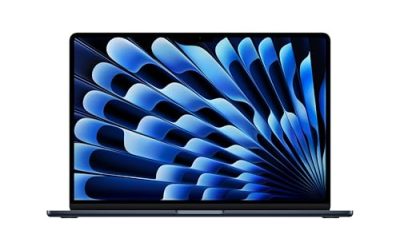
 Apple 2026 MacBook Neo 13-inch Laptop with A18256GB8.12 x 11.71 x 0.5 inches2.7 PoundsCheck on Amazon




Top 3 picks at a glance
Quick Picks
As an Amazon Associate we earn from qualifying purchases at no extra cost to you.






| Product | Best for | Key spec from the title |
|---|---|---|
| HP 17 Business Laptop (Ryzen 5) | Long hours at a desk | 17.3-inch FHD, 16GB RAM, 512GB SSD, numeric keypad |
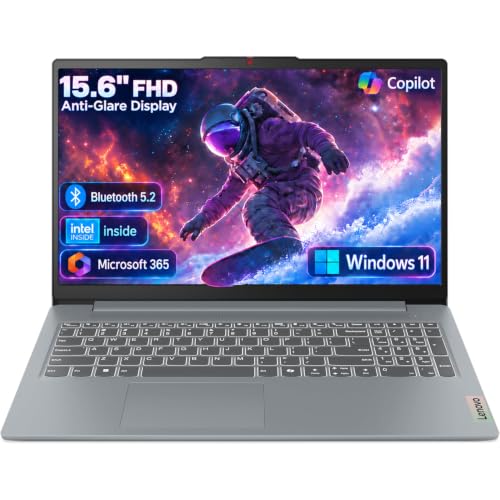
| Dell 15.6 (Core 3 100U) | Simple, anti-glare office use | Anti-glare IPS, 250 nits, 8GB RAM, 512GB SSD |
| MacBook Neo 13-inch | Mobile professionals on macOS | A18 Pro chip, 8GB unified memory, 256GB SSD |
| Lenovo V15 (Ryzen 5 5500U) | Ports and keypad on a budget | 15.6-inch FHD, 16GB RAM, 512GB SSD, RJ45, HDMI |
| Lenovo V14 G5 (Core 7 240H) | Compact power for travelers | 14-inch FHD anti-glare, 16GB DDR5, 512GB PCIe |
| Dell Inspiron 15.6 Touchscreen | Multitasking with touch | Ryzen 7 7730U, 16GB RAM, 512GB PCIe SSD |
How to Choose
Screen comfort comes before speed
Work laptops spend most of their life on documents, so the panel decides how you feel at 5 p.m. Aim for Full HD (1920 x 1080) at the least, and favor anti-glare coatings if you sit near windows or under office lights. A listed brightness of 250 nits works indoors; 300 nits or more is better in bright rooms. Touchscreens are glossy and can reflect light, so decide whether touch is worth that trade. If you cannot see the brightness in a listing, treat that as a gap and check the specifications page before buying.
Memory and storage targets
Sixteen gigabytes of RAM is the number to look for if you run video meetings, a browser with many tabs and office apps at the same time. Eight gigabytes survives lighter days. A 512GB SSD gives breathing room, while 256GB, as on the MacBook Neo here, suits people who keep files in the cloud. Budget laptops cut corners on both, so read these numbers before looking at the processor. A fast chip cannot make up for a drive that is full or memory that is constantly swapping.
Size, ports and keyboard
A 14-inch body is easy to carry; a 15.6-inch body gives a numeric keypad and more room; a 17.3-inch body suits a fixed desk. Ports matter for work: HDMI for presentations, USB-C for charging and docks, and RJ45 for wired networks in offices with weak Wi-Fi. Business lines often include these, while thin consumer machines may drop them.
Operating system and security
If your employer uses managed Windows devices, check whether the laptop ships with Windows 11 Pro or Home, since Pro adds encryption and management tools. macOS suits creative and general work but may not run niche Windows-only programs. A fingerprint reader or camera shutter adds convenience and privacy, but neither is a reason to overpay. Ignore generic claims about an “AI” feature set unless you know a specific app you will use.
The 6 Best Options
HP 17 Business Laptop (Ryzen 5)
This one features a 17.3-inch FHD display, a Ryzen 5 processor, 16GB of RAM, a 512GB SSD and a numeric keypad, with a long-battery claim in the title. It suits people who work from the same desk daily and appreciate the extra display area for spreadsheets or planning documents. Anyone who juggles a calendar, a chat window and a report at once will notice how much more fits on screen compared with a 13 or 14-inch model.
- Strength: large screen with a numeric keypad makes data work faster.
- Strength: 16GB and 512GB match the comfortable office baseline.
- Trade-off: the size makes it a poor fit for frequent travel.
Skip it if you carry your laptop to client sites every day or work in cramped spaces.
Dell 15.6 (Core 3 100U)
A traditional workhorse with a 15.6-inch FHD anti-glare IPS panel at 250 nits, an Intel Core 3 100U, Intel UHD graphics, 8GB of RAM and a 512GB SSD, plus Wi-Fi 6. It suits administrative staff, remote workers and anyone doing documents, email and video calls without heavy software. Nothing in the spec list is exciting, and that is exactly why it works as a dependable pick for a shared office or a home workstation that just needs to run every day.
- Strength: anti-glare panel is easier on the eyes under office lights.
- Strength: 512GB storage at an accessible tier.
- Trade-off: 8GB of RAM limits heavy multitasking.
Skip it if your day involves large files, many open apps or creative software. In that case the 16GB models in this list give much more room.
MacBook Neo 13-inch
The MacBook Neo runs an A18 Pro chip with 8GB of unified memory and a 256GB SSD, behind a 13-inch Liquid Retina display. It is aimed at professionals who value a compact, polished machine for writing, email and calls, especially if they already use an iPhone. The 13-inch size and Apple’s chip make it more of a mobile companion than a desk workstation, and it will appeal to people who prize portability over port selection.
- Strength: compact 13-inch form is easy to carry.
- Strength: Liquid Retina display and Apple Intelligence features are named in the title.
- Trade-off: 8GB of memory and 256GB of storage are modest, and neither can be upgraded later.
Skip it if you rely on Windows-only software or keep large local files.
Lenovo V15 (Ryzen 5 5500U)
Lenovo’s V-series is built for office buyers. This one lists a 15.6-inch FHD display, a hexa-core Ryzen 5 5500U, 16GB of RAM, a 512GB SSD, HDMI, RJ45 and a numeric keypad. It is a good match for small businesses that want wired networking and a classic layout without paying a premium. For a small shop, clinic or accounting office, the combination of a wired port, an HDMI output and a full keyboard means fewer adapters in the drawer.
- Strength: RJ45 and HDMI are rare in thinner laptops.
- Strength: 16GB of RAM and 512GB of storage at a business-oriented tier.
- Trade-off: the Ryzen 5500U is an older chip, so efficiency lags newer generations.
Skip it if you prioritize a thin body or the latest processor, since this chip belongs to an earlier generation.
Lenovo V14 G5 (Core 7 240H)
The V14 G5 offers an Intel Core 7 240H with ten cores and sixteen threads, a 14-inch FHD anti-glare display, 16GB of DDR5 memory, a 512GB PCIe SSD and Wi-Fi 6. It is aimed at travelers and consultants who want strong processing in a smaller frame. The anti-glare screen and compact body suit someone who works from client offices, trains and airport lounges where lighting is unpredictable.
- Strength: newer processor with 16GB of DDR5 and a PCIe SSD.
- Strength: anti-glare 14-inch panel is a good travel companion.
- Trade-off: no numeric keypad is mentioned on a 14-inch body.
Skip it if you want a big screen or do heavy data entry. The 15.6 and 17.3-inch picks are better suited to long data sessions.
Dell Inspiron 15.6 Touchscreen
This Inspiron combines a 15.6-inch FHD touchscreen with an eight-core Ryzen 7 7730U, 16GB of RAM and a 512GB PCIe SSD on Windows 11. It targets multitaskers and creative professionals who like to annotate or tap through documents and presentations. If your day involves marking up PDFs, signing forms or drawing diagrams, touch input can replace a surprising number of mouse clicks.
- Strength: Ryzen 7 and 16GB of RAM give strong multitasking headroom.
- Strength: touchscreen helps with markup and presentations.
- Trade-off: glossy touch panels can show reflections, and the listing does not state brightness.
Skip it if you work near windows and prefer anti-glare screens, or if you rarely touch the display at all.
Which One Fits Your Situation
You work from a desk in the same place daily
The HP 17 Business Laptop gives you the biggest display and a numeric keypad, so spreadsheets and long documents are easier.
You commute or travel between offices
The Lenovo V14 G5 keeps the body compact while offering 16GB of DDR5 memory. If you prefer macOS and light tasks, the MacBook Neo is the more portable alternative.
You need wired networking and ports
The Lenovo V15 includes RJ45 and HDMI, which suits offices with unreliable Wi-Fi or frequent projector use.
You run many apps at once
The Dell Inspiron with the Ryzen 7 7730U and 16GB of memory offers the strongest multitasking base in this list, and its touchscreen helps when you flip between documents and presentation slides.
You want the lowest-risk office standard
The Dell 15.6 with the anti-glare IPS panel is the plain, predictable choice. It lacks excitement, but its screen, 512GB drive and Wi-Fi 6 cover the daily basics for a front desk or a home office.
Common Mistakes
- Choosing by a popularity label instead of by memory, storage and screen quality.
- Buying 8GB of RAM for a day of meetings and spreadsheets.
- Ignoring anti-glare coatings if you sit near windows.
- Forgetting about ports such as HDMI or RJ45 until the first presentation.
- Selecting a 17-inch laptop for a job that involves daily travel.
Related guides
- Windows Macos Linux Gaming Performance Comparison Strengths Weaknesses
- Desktop Operating Systems Gaming Performance Strengths Weaknesses
- 5G Home Internet Wifi Modem Settings Low Latency Gaming
Frequently Asked Questions
What makes a work laptop good?
Comfort and reliability matter most: a clear screen, a good keyboard, enough memory and a design that fits your routine. Raw speed is secondary for most office tasks, which is why this guide weighs screen, memory and ports before processor names.
Is 8GB of RAM enough for work?
It handles light office use, but 16GB is safer for video meetings and many browser tabs together. If the memory is soldered, you cannot add more later.
Is a MacBook good for office work?
Yes, if your applications run on macOS and you are comfortable with 256GB of storage and 8GB of memory in this model. Windows-only tools would push you toward another pick, such as the Lenovo V14 G5 for travel or the Dell Inspiron for heavier multitasking.
Do I need a touchscreen for work?
No. It is helpful for markup and presentations but is not essential for most office tasks. If you do want it, remember that a glossy touch panel shows reflections more than an anti-glare one.