This review analyzes published product information. We have not performed detailed research of this unit.
As an Amazon Associate, we earn from qualifying purchases.
A materially different K671 configuration
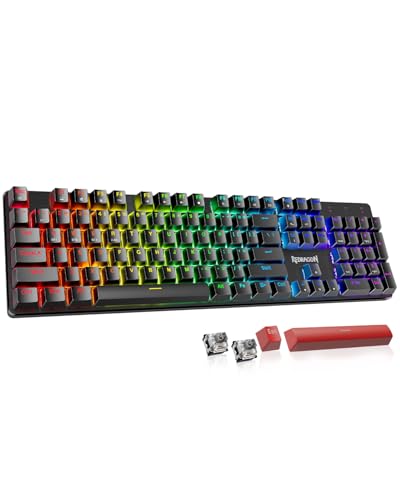
The Redragon K671KS targets buyers who want one mechanical keyboard to serve a wired computer setup and wireless devices. Its main attraction is connection flexibility: the listing specifies USB-C wired operation, Bluetooth 3.0/5.0, and 2.4GHz wireless, with support for up to five devices. This review evaluates the supplied specifications rather than detailed research, so connection reliability, typing feel, and battery endurance remain unverified.
This is a distinct configuration within the K671 family, not a new family created by a different listing name. The previously covered K671 is wired, with linear red switches and ABS keycaps. The K671KS adds tri-mode connectivity, PBT keycaps, and what Redragon describes as custom switches. Those differences create a separate installation decision, particularly for users moving between computers and tablets. They do not, by themselves, establish better gaming performance.
Listed hardware and configuration
| Model designation | Redragon K671KS, K671 family |
|---|---|
| Connections | USB-C wired, Bluetooth 3.0/5.0, and 2.4GHz wireless |
| Device support | Up to five devices, according to the listing |
| Connection control | Physical switch on the back |
| Keycaps | Double-injection PBT |
| Switches | Hot-swappable custom switches; exact switch specification not supplied |
| Included replacements | Eight spare switches and two red keycaps |
| Lighting | RGB, 16 presets, speed adjustment, and five brightness levels |
| Programming | Key remapping, shortcuts, macros, and individual per-key RGB adjustment |
| Construction | Metal panel design |
| Advertised platforms | PC, tablet, and Mac; detailed compatibility requirements not supplied |
Plan the connection before rearranging your desk
For a stationary computer, wired operation is the simplest starting point to evaluate because it avoids Bluetooth pairing. The keyboard-side wired interface is listed as USB-C, but the supplied evidence does not identify the included cable, its host-side connector, or its length. Check those details against your computer’s available ports rather than assuming the product name guarantees an entirely USB-C-to-USB-C setup.
Bluetooth is the connection option to investigate for a tablet or a computer where you want to avoid occupying a USB port. Your host must support a compatible Bluetooth connection. Redragon advertises up to five devices across the tri-mode arrangement, but does not explain how those slots are divided between connection types. That statement should not be read as five simultaneous active inputs, nor does it establish how quickly device switching occurs.
The separate 2.4GHz mode is useful to consider when planning a wireless desktop setup, but its supporting hardware needs clarification. The evidence does not explicitly confirm an included receiver, its connector, or replacement-receiver pairing procedures. Verify those points before reserving a hub port. A rear physical switch is listed, although the complete pairing and device-selection sequence is not provided.
If ports are already occupied by other peripherals, our gaming laptop USB-C hub guide can help frame the expansion decision. A hub is not established as a requirement for this keyboard; the relevant question is whether your chosen connection needs a port your system can spare.
Customization needs more than a hot-swap label
Hot-swappable switches and eight included spares give the K671KS a practical maintenance feature: replacement switches are part of the advertised package. However, the listing does not identify the switch manufacturer, actuation force, travel, or socket pin compatibility. Do not order a separate switch set solely because it is marketed for mechanical keyboards. Confirm the supported switch format first.
The description presents these custom switches as an upgrade over the K671’s red switches, including a comfort claim. Without a defined switch specification or hands-on evaluation, that is not enough to predict feel or reduced fatigue. Buyers who specifically prefer linear red switches should not assume this configuration preserves that behavior.
Double-injection PBT keycaps are a documented material change from the previously reviewed wired model. They are a concrete configuration distinction, but the evidence does not establish texture, thickness, key sizes, or replacement-set compatibility. Likewise, a metal panel should not be mistaken for confirmation of an all-metal enclosure. Dimensions and weight are absent, leaving desk fit and portability unresolved.
Programming and wireless details to verify
Redragon lists key remapping, shortcut assignment, macros, and individual per-key RGB adjustment. These could suit a shared work-and-gaming setup, but advertised PC, tablet, and Mac support does not prove that every platform supports the same configuration tools. The published listing information omits software requirements, onboard profile storage, and whether custom settings persist across connection modes. Mac and tablet users should verify those details if programming is central to the purchase.
Lighting offers 16 presets plus brightness and speed controls. Wireless runtime, battery capacity, charging time, and polling rates are not supplied. Consequently, neither charging frequency nor competitive-gaming responsiveness can be assessed here. These omissions matter more to someone replacing an always-connected wired keyboard than to someone merely seeking an additional connection option.
Frequently asked questions
Is the K671KS a completely new keyboard family?
No. The K671KS is described as a distinct configuration within the K671 family, not a new family. Compared with the previously covered wired K671, it adds tri-mode connectivity, PBT keycaps, and custom switches. The earlier K671 is described as wired, with linear red switches and ABS keycaps.
Can the K671KS connect to several devices at the same time?
The listing says the K671KS supports up to five devices, but the article does not establish that they can be active simultaneously. It also does not explain how those device slots are divided among USB-C wired, Bluetooth 3.0/5.0, and 2.4GHz connections, or how quickly switching occurs.
Does the K671KS include a 2.4GHz wireless receiver?
The supplied evidence does not explicitly confirm whether a 2.4GHz receiver is included. It also does not identify the receiver’s connector or explain replacement-receiver pairing procedures. Buyers planning a wireless desktop setup should verify those details before reserving a hub port or relying on a particular connection arrangement.
Are the included switches compatible with any replacement mechanical switches?
No compatibility with any general replacement switch set is established. The K671KS is listed with hot-swappable custom switches and eight spare switches, but the manufacturer, actuation force, travel, and socket pin compatibility are not supplied. Confirm the supported switch format before ordering separate switches marketed for mechanical keyboards.
Will the same programming features work on PC, tablet, and Mac?
That is not confirmed. The listing advertises PC, tablet, and Mac support alongside key remapping, shortcut assignment, macros, and individual per-key RGB adjustment. However, the published listing information does not specify software requirements, onboard profile storage, or whether settings persist across connection modes, so platform-specific support should be verified.
Verdict: upgrade for flexibility, not assumed speed
The K671KS is worth considering when the wired K671’s single connection is the actual limitation. Tri-mode operation, PBT keycaps, programming features, and supplied spare switches make this configuration meaningfully different. Keep an existing wired keyboard if it already meets your needs and your hoped-for improvement is lower latency or a particular switch feel: neither is established by these specifications. Before choosing the K671KS, confirm receiver and cable contents, switch compatibility, software support, and battery details.
Sources: Redragon K671KS retailer listing. Specifications and advertised capabilities above come from the supplied listing evidence, not independent measurements.
Check the exact product and current offer on Amazon