
Most people buy case fans the same way they buy anything else: they look at a photo, check the price, and grab whatever has decent reviews. That works fine for a desk lamp. For case fans, it’s how you end up with a build that sounds like a wind tunnel or, worse, a PC that runs hot and loud at the same time. The two most common mistakes are buying the highest RPM fan available (noise scales brutally with speed) and mixing fans randomly across the case so they fight each other for air instead of moving it in one direction.
The good news is that quiet gaming airflow isn’t expensive. A $12 fan from a brand that engineers for silence will beat a $40 RGB fan with flashy marketing almost every time. What matters is airflow rating, static pressure, PWM control, and bearing type — not blade color. This guide walks through the decisions in the order that actually affects the outcome.
As an Amazon Associate we earn from qualifying purchases at no extra cost to you.



Our Top Picks
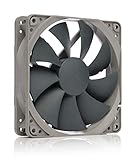
 be quiet! Pure Wings 3 120mm PWM High-Speed120mm PWM high-speed4.7 x 4.7 x 1 inches0.4 PoundsCheck on Amazon


Top 3 picks at a glance
Decide These 3 Things First
Before you look at a single product, answer these questions. Every pick below flows from them.
1. Which fans are you replacing? Count your case’s included fan mounts. A typical mid-tower has three front intakes, two top mounts, and one rear exhaust. Front intake fans matter most for GPU temperatures; the rear exhaust matters least. If your budget only covers two or three fans, spend it on the front intakes.
2. Air-cooled or liquid-cooled? Air coolers and radiator-mounted fans need static pressure to push air through dense fins. Case-only airflow positions (front mesh, rear exhaust) do better with high raw airflow. Fans designed for one job perform mediocrely at the other.
3. What’s your actual noise target? A quiet gaming PC under load should sit around 30–35 dB(A) at one meter. That means most fans running at roughly 800–1,200 RPM in-game, with headroom to spike during demanding scenes. If you plan to run fans at 100% constantly, no quiet fan exists for you — PWM control is non-negotiable.
Size: 120mm Is the Default, and That’s Fine
The 120mm fan is the standard for a reason. Nearly every mid-tower case supports it on all mounts, replacement parts and filters are ubiquitous, and the performance-per-noise sweet spot is well documented. Typical dimensions are 120 x 120 x 25 mm, mounting holes spaced 105 mm apart.
140mm fans move more air at lower RPM — a 140mm fan at 1,000 RPM often matches a 120mm at 1,400 RPM, and lower speed means less blade-pass noise. If your case supports 140mm front intakes, they’re worth considering for a quiet build. The tradeoffs: fewer 140mm options, some top mounts only fit 120mm, and 140mm fans can interfere with tall RAM or motherboard VRM heatsinks in tight cases.
Practical rule: use 120mm everywhere unless your case explicitly lists 140mm front support and you’re chasing every last decibel. Standard thickness is 25mm; check clearance if your case lists 38mm “thick fan” mounts only.
Construction: Bearings, Blades, and Frame Quality
Bearing type is the single biggest predictor of long-term noise and lifespan. Here’s what to look for:
Rifle or fluid-dynamic bearings dominate the quality tier. Fluid dynamic bearings (FDB) use a sealed oil layer, run near-silent, and typically last 150,000–300,000 hours. Cheap sleeve bearings wear out in 20,000–40,000 hours and develop a rising whine as the oil degrades — avoid them for anything you’ll keep past two years.
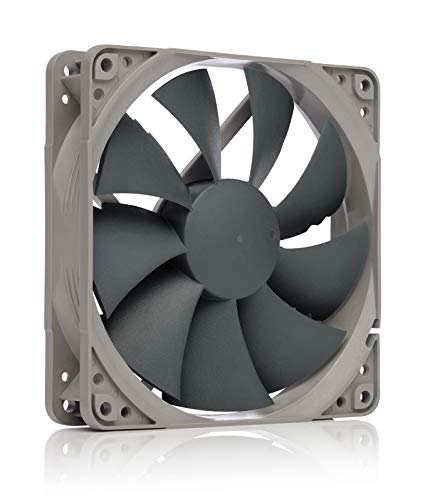
Blade design matters more than blade count. Look for nine-blade or similar designs with rifled or airflow-focused leading edges — these reduce turbulence at the blade tips, which is where most of the tonal noise originates. The be quiet! Pure Wings 3 line, for example, uses a nine-blade impeller engineered specifically for noise reduction, and it shows in real-world use.
Frame quality shows up as vibration damping. Look for rubberized corner pads or anti-vibration mounts included in the box (quality fans include four rubber bolts). A fan that’s acoustically excellent but transmits case-panel vibration will hum at certain RPMs regardless of its spec sheet.
Performance: Airflow, Static Pressure, and PWM
Three numbers define a fan’s performance. Learn to read them and the marketing stops mattering.
Airflow (CFM): Volume of air moved at open testing. For quiet gaming, aim for 50–70 CFM at maximum speed on intake fans. Anything under 40 CFM struggles to feed a modern GPU; over 90 CFM usually signals a high-speed design you won’t want to run at full tilt anyway.
Static pressure (mmH₂O): Resistance to airflow through obstructions. Case grilles and dust filters need roughly 1.0–1.5 mmH₂O; radiators want 2.0+ mmH₂O. For open front mesh, airflow rating matters more than pressure.
Noise (dB[A]): Manufacturers measure at max speed, so use it for comparison, not as a promise. A fan rated 25 dB(A) max, run at 50% PWM, will be inaudible in most rooms — roughly 15–18 dB(A) in practice.
PWM is mandatory. 4-pin PWM fans let the motherboard adjust speed 20–30 times per second based on CPU/GPU temperature. 3-pin DC fans offer cruder voltage-based control and often idle noisier. A Noctua NF-P12 redux-1700 PWM, for instance, is rated at 25.1 dB(A) max, but because its 1,700 RPM ceiling gives the motherboard headroom, it spends most of a gaming session under 1,100 RPM and effectively silent.
The speed/noise relationship: noise roughly doubles perceived volume with each +10 dB(A), and fan noise rises with the cube of RPM in many designs. Halving speed saves enormous noise. This is why a 1,700 RPM PWM fan that idles at 600 RPM beats a 1,200 RPM fixed-speed fan — control beats a low ceiling.
Price Tiers: What Each Dollar Buys
Budget ($3–10 per fan): The DARKROCK 3-pack at around $8 total ($3 per fan) represents this tier — basic sleeve or rifle bearings, hydraulic bearings if you’re lucky, decent blade designs borrowed from bigger brands. Expect 2–4 years of service and slightly audible bearing noise by year three. Fine for a first build on a strict budget, less fine for a long-term quiet PC.
Mid-range ($11–18 per fan): The sweet spot for most buyers. The be quiet! Pure Wings 3 120mm Silent PWM at around $11 and the Noctua NF-P12 redux-1700 PWM at around $16 both live here, and both deliver fluid-dynamic or rifle bearings, PWM control, and 6-year warranty coverage (Noctua offers 6 years; be quiet! offers 3+ on this line). At this tier you’re paying for acoustics engineering, not RGB.
Premium ($20–35 per fan): You get incrementally better blades, included low-noise adapters, fancy swap-mount corners, and quieter high-speed variants like the be quiet! Pure Wings 3 120mm PWM High-Speed at around $13 — which technically sits in mid-range pricing but delivers high-speed performance. Past $25 per fan, returns diminish sharply unless you’re building a reference-grade silent PC.
Realistic budgets: a 3-fan refresh at mid-range pricing runs $35–50. A full 5-fan setup runs $60–90. That’s less than one premium GPU cooler upgrade and often delivers a bigger subjective improvement in how the PC feels.
Warranty and Support
Fans fail eventually — a bearing seizes or a cable frays — so warranty length tells you how confident the manufacturer is. Noctua’s 6-year warranty is the class benchmark, and the company is known for shipping replacement fans internationally with minimal hassle. be quiet! backs most lines with 3 years. Budget brands typically offer 1 year or none, which is another reason the $3-per-fan tier is a gamble for long-term builds.
Also check cable length and connector quality: quality fans ship with 400mm+ sleeved cables and both PWM (4-pin) headers plus daisy-chain capability on some models, which cuts down cable clutter in small cases.
Delivery and Installation Notes
Fans are light (typically 150–200g each) and ship safely, so delivery damage is rare. What matters more at install:
Orientation: front and bottom mounts should blow air in (intake), rear and top mounts blow out (exhaust). Arrows molded into the fan frame’s side show airflow direction and rotation. A single fan reversed can undermine the whole airflow path.
Screw choice matters for noise: use the included rubber anti-vibration mounts on intakes where possible. Metal screws transmit panel vibration directly — it’s a five-minute swap that audibly lowers resonance.
Budget 10–15 minutes per fan including cable routing to the motherboard’s fan headers. If your motherboard lacks enough 4-pin headers for your fan count, a $10–15 PWM hub solves it without added noise.
Spec Checklist
| Spec | Budget (under $10) | Mid-range ($11–18) | Premium ($20+) |
|---|---|---|---|
| Bearing type | Sleeve / basic hydraulic, 20–40k hr lifespan | Rifle / FDB, 150k+ hr lifespan | FDB, 300k hr lifespan |
| PWM control | Often 3-pin DC only | 4-pin PWM standard | 4-pin PWM + low-noise adapters |
| Max airflow (120mm) | 40–55 CFM | 50–70 CFM | 60–80 CFM |
| Max noise rating | 28–35 dB(A) | 22–26 dB(A) | 20–24 dB(A) |
| Warranty | 0–1 year | 3–6 years | 6 years |
| Extras | None | Anti-vibration mounts | Mounts, adapters, extension cables |
Red Flags
No PWM connector. A 3-pin-only fan gives you coarse voltage control and poor idle behavior. Skip it for a quiet build.
No stated noise rating. If a listing omits dB(A), the manufacturer is hiding something. Every reputable brand publishes it.
“Silent” claims with no bearing spec. Silence comes from bearing and blade engineering, not the word “silent” on the box.
Unbranded fans above $8. At that price, a name-brand mid-range fan is a small step up in cost and a large step up in lifespan and acoustics.
Sleeve bearings on vertical mounts. Sleeve bearings wear faster when the shaft is horizontal. Fine for top exhaust, poor for front intake over years.
Suspiciously high CFM with no pressure spec. Numbers like “110 CFM” on a $4 fan are usually measured without a frame or grille and don’t reflect real installed performance.
FAQ
Are more expensive fans actually quieter?
Up to about $18 per fan, yes — you’re paying for fluid-dynamic bearings, better blade profiles, and PWM tuning that directly reduce noise. Above that, gains shrink. A $12 be quiet! Silent PWM fan and a $25 premium fan in the same case at the same RPM are close enough that most people can’t hear the difference.
How many case fans do I need for a gaming PC?
Two or three well-placed fans beat five mediocre ones. Start with two front intakes and one rear exhaust. If GPU temperatures stay under about 80°C under load, you’re done. Adding more fans past that point increases noise faster than it lowers temperature.
Should intake or exhaust fans be stronger?
Slightly positive pressure — more intake than exhaust — is ideal for a quiet build. It keeps dust out of every gap in the case, meaning you clean filters instead of the whole interior. Match three intakes to two exhausts, and set intakes to run marginally faster in your fan curve.
What RPM should case fans run at while gaming?
Aim for 800–1,200 RPM under gaming load, spiking only when the CPU exceeds 80°C. Set a gentle fan curve in your motherboard BIOS: roughly 40% up to 50°C, scaling to 70–80% at 80°C. This keeps noise at conversational levels — most quality fans are effectively inaudible below 1,000 RPM — while maintaining safe temperatures through the longest sessions.









