A label printer pays for itself the moment you stop taping handwritten addresses to boxes. For a small shop shipping a dozen parcels a day, the 4×6 thermal printer has become the standard tool: it prints directly onto adhesive sheets using heat, so there is no ink or toner to buy, only labels. The questions that matter are how it connects, which label size it takes, and whether it ties you to one brand of label stock.
That framing makes this a different shopping problem from a document printer. This 2026 guide covers eight options: six Bluetooth 4×6 shipping printers, one Wi-Fi model with AirPrint, and one desktop printer from the long-running DYMO family. Each is judged on the facts in its listing, so use the notes below to match connection type, operating system, and workload to your own packing bench.
Our Top Picks
 Thermal Shipping Label Printer 4x6 Bluetooth Label Makerthermal printer labels1.17 poundsCheck on Amazon
 Omezizy Bluetooth Shipping Label Printer with Built-in LabelCompact7.3 x 6.3 x 5.35 inches2.1 poundsCheck on Amazon


Top 3 picks at a glance
Quick Picks
As an Amazon Associate we earn from qualifying purchases at no extra cost to you.




| Product | Best for | Key spec from the title |
|---|---|---|
| KNAON Bluetooth Printer | Mobile-first sellers | 4×6 portable, iPhone, Android, Windows |
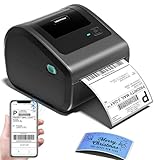
| Generic Bluetooth 4×6 Printer | Basic shipping on a budget | 4×6, Bluetooth, USPS and UPS labels |
| Nelko Bluetooth Printer | Quick setup and fast output | 4×6, quick setup, iPhone and Android |
| JADENS Bluetooth Printer | Mixed phone and computer use | 4×6, Android, iPhone, Windows and Mac |
| Rongta Bluetooth Printer | Sticker and package labels | 4×6, Bluetooth, wireless |
| Omezizy D450BT | Tidy desks and starter kits | Built-in label bin, 30 labels included |
| Rollo Wireless Printer | High-volume Wi-Fi shipping | Wi-Fi, 4×6, AirPrint |
| DYMO LabelWriter 550 | Office and mailing desks | Automatic label recognition, low waste |
How to Choose
Pick the connection that matches your workflow
Bluetooth printers pair with a phone or computer and keep the cable clutter down, but they print one device at a time and range is short. Wi-Fi printers join your network, so any computer or phone on it can print, which suits a shared packing station. A listing that mentions AirPrint lets iPhones and iPads print without a driver. If your shipping software runs on Windows or Mac, confirm that the printer lists support for that system, not just phones.
Understand label size and stock
The 4×6 inch format is the standard shipping label size for carriers such as USPS and UPS, and most printers in this guide use it. Check whether the printer accepts generic rolls or fan-folded stacks, because proprietary labels cost more over time. Some desktop models recognize their own branded labels automatically, which makes loading simpler but ties you to that supply. Estimate your labels per week, then compare ongoing supply cost to the cost of the printer itself, because a cheap printer with expensive labels can be the more costly choice over a year.
Think about speed and volume
A seller shipping a handful of orders a day will be happy with almost any thermal printer. At fifty or more labels a day, speed, a sturdy feed path, and easy roll loading start to matter. Look for a printer that fits the size of your workflow, and ignore claims of “crisp” or “fast” that come without a number, because they do not tell you how long a batch of orders will take.
Check the extras that save time
A built-in label bin keeps printed sheets from sliding to the floor. Starter labels included in the box let you start immediately. Quick-setup apps matter if you are not comfortable with drivers. Meanwhile, features such as automatic label recognition and low waste printing reduce stalls and wasted labels on desktop models. Skip features you will not use, such as a wide range of label sizes, if you only ship one format.
The 8 Best Options
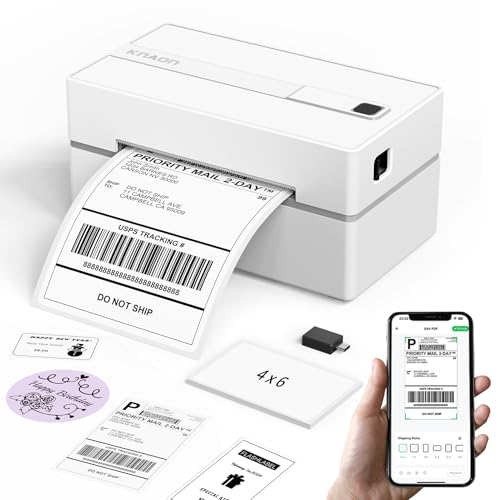
KNAON Bluetooth Thermal Label Printer
A portable 4×6 printer for small businesses. The title lists a Bluetooth connection, a thermal address label design, and compatibility with iPhone, Android, and Windows. It suits sellers who print from a phone at a kitchen table, a market stall, or a spare room.
- Strength: compatibility with phones and Windows covers most setups.
- Strength: a portable design fits a small workspace.
- Trade-off: Bluetooth pairs with one device at a time, so it is less convenient for a shared workstation.
Skip it if several people need to print from different computers at once. A solo seller working from one phone or laptop is the person this design serves best, since pairing is quick and the footprint is small enough to tuck on a shelf between orders.
Thermal Shipping Label Printer 4×6 Bluetooth
A no-frills Bluetooth label maker. The title lists 4×6 labels, Bluetooth wireless connection, and use with USPS, UPS, and major selling platforms such as Shopify and Etsy. It suits casual sellers who want a simple, low-cost printer for occasional parcels.
- Strength: it explicitly targets common carriers and selling platforms.
- Strength: wireless operation keeps the desk tidy.
- Trade-off: the title does not name a brand, so support and software quality are harder to judge.
Skip it if you want a known brand with proven software support and clear after-sale help. Because the listing carries no brand name, buyers should read the return policy carefully and make sure their shipping software can actually drive it before committing.
Nelko Bluetooth Thermal Label Printer
A 4×6 printer that emphasizes ease. The title lists quick setup, fast speed, crisp print quality, and compatibility with iPhone and Android. It suits first-time sellers who do not want to wrestle with configuration.
- Strength: quick setup is a useful feature for beginners.
- Strength: it lists both iPhone and Android compatibility.
- Trade-off: speed and quality are described in words with no figures, so expect the usual thermal-printer behavior.
Skip it if you need a network printer or have a high daily volume. Heavier shippers will want a shared Wi-Fi unit so a second person can print without re-pairing a phone every time the packing shift changes.
JADENS Bluetooth Thermal Label Printer
A wireless 4×6 printer with broad device support. The title lists compatibility with Android, iPhone, Windows, and Mac. It suits sellers who switch between a phone and a computer.
- Strength: support for both phone and desktop operating systems is the widest of the Bluetooth models here.
- Strength: wireless printing keeps the packing bench uncluttered.
- Trade-off: like the other Bluetooth units, it connects to one device at a time.
Skip it if you need to share one printer across several computers on a network. Teams that pack in shifts usually run into the one-device-at-a-time limit within a week, and a network printer avoids that friction.
Rongta Bluetooth Thermal Label Printer
A 4×6 sticker label maker for packages. The title lists a Bluetooth connection, wireless operation, and compatibility with a range of systems. It suits small businesses that mainly ship parcels and want straightforward wireless printing.
- Strength: it is positioned for packaging and sticker labels.
- Strength: Bluetooth removes the need for a cable to the computer.
- Trade-off: the listing is cut off before the full compatibility list, so confirm your operating system.
Skip it if you want a Wi-Fi printer or a built-in label bin. Anyone on a less common computer setup should verify the system list on the product page, because the title is truncated before it finishes naming supported platforms.
Omezizy D450BT
A beginner-friendly bundle. The title lists a built-in label bin, a 4×6 thermal design, Bluetooth, and 30 starter labels. It suits a new seller who wants to print the same day and keep output tidy.
- Strength: the built-in bin catches finished labels.
- Strength: included starter labels let you begin immediately.
- Trade-off: only 30 labels are included, so you will need to buy a roll or stack soon.
Skip it if you already own supplies or ship in large batches. Someone with a stack of labels on hand gets less out of the bundle, and a high-volume seller will prefer a model built around network printing.
Rollo Wireless Shipping Label Printer
A Wi-Fi 4×6 printer. The title lists wireless Wi-Fi connection, high-speed printing, and AirPrint from iPhone and iPad. It suits a shared packing station where several devices need to print.
- Strength: Wi-Fi lets multiple devices on the network print.
- Strength: AirPrint support reduces driver hassle on Apple devices.
- Trade-off: it relies on a stable network, and the listing is cut off before a full compatibility list.
Skip it if you want a pocketable printer or work somewhere without reliable Wi-Fi. It fits a permanent bench better than a market stall, and a home network that drops out will interrupt printing mid-batch.
DYMO LabelWriter 550
A desktop office printer. The title lists automatic recognition of DYMO-branded labels, low waste, and optimized direct thermal printing. It suits mailing, filing, and name-badge duties at a front desk or small office.
- Strength: automatic label recognition simplifies loading.
- Strength: low waste printing reduces stalled or discarded labels.
- Trade-off: DYMO-branded label compatibility ties you to a specific supply line, and the title does not mention the 4×6 format.
Skip it if your main need is full-size shipping labels for carriers. Check the label sizes it supports before assuming it will print the format your carrier expects, and treat it as an office tool first.
Which One Fits Your Situation
You sell part-time and ship a few parcels a week
The Omezizy D450BT with its label bin and starter labels gets you going quickly, while the Nelko printer is a good match if ease of setup is the priority.
You print from a laptop at a packing table
The JADENS printer lists Windows and Mac support alongside phones, making it flexible for a desk with a computer.
Several people share one printer
The Rollo Wi-Fi printer lets multiple devices print on the network, with AirPrint for Apple devices. That combination is a good match for a small warehouse corner where a phone, a tablet, and a laptop all send jobs during the day.
You label shelves, files, and mail rather than parcels
The DYMO LabelWriter 550 suits office work with its automatic label recognition and low waste design. It keeps a front desk or mailroom running smoothly, provided you are happy to buy DYMO-compatible label stock.
Common Mistakes
- Buying proprietary labels without checking the ongoing supply cost.
- Assuming Bluetooth printers can be shared across several computers.
- Skipping operating system compatibility, especially for Mac or Windows software.
- Choosing a printer by speed adjectives rather than your daily volume.
- Using a desktop office label printer for full-size carrier labels.
Related guides
- Windows Macos Linux Gaming Performance Comparison Strengths Weaknesses
- Desktop Operating Systems Gaming Performance Strengths Weaknesses
- 5G Home Internet Wifi Modem Settings Low Latency Gaming
Frequently Asked Questions
Do thermal label printers need ink?
No. They use heat on specially coated label paper, so your running cost is the label stock alone. The labels can fade with heat and light over time, so a thermal label is a poor choice for anything that must stay legible for years, such as long-term archive tags kept in a sunny window.
Is Bluetooth good enough for shipping?
For a single seller printing from one device, yes. For a team, a Wi-Fi printer is more practical because several people can share it.
What size label should I buy?
Most carrier labels are printed at 4×6 inches, so a 4×6 thermal printer is the usual choice. Smaller desktop printers suit address, file, and barcode labels.
Can these printers work with online selling platforms?
Many list support for common carriers and selling platforms, but check that your shipping software supports the printer, since the connection is only half the equation.