Brother has built its printer reputation on a simple idea: laser and ink machines that do ordinary office and home jobs without drama. Shopping the brand is still confusing, because the model names read like license plates. HL means a print-only laser, DCP is a printer-scanner-copier, MFC adds a fax, and the letters at the end tell you about wireless, duplex, and color. Anyone searching for the best Brother printer is really asking which letter combination matches the paperwork they actually produce.
This guide sorts eight current Brother models by that question. It is written for home offices, small businesses, parents handling school forms, and students who print a few pages a week but cannot afford a printer that clogs after two months of sitting idle. Every comparison below sticks to what the product titles state, such as monochrome versus color, duplex printing, fax, tray capacity, and connectivity. Because 2026 pricing and subscription offers change quickly, tiers are described as budget, mid-range, or premium instead of exact figures.
Our Top Picks
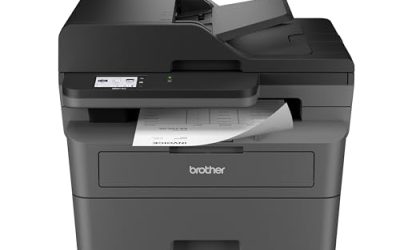
 Brother DCP-L2640DW Wireless Compact Monochrome Multi-Function PrinterStandard15.7 x 16.1 x 12.5 inches25 poundsCheck on Amazon
 Brother HL-L2405W Wireless Compact Monochrome Laser Printer withStandard14.2 x 14 x 7.2 inches15.1 PoundsCheck on Amazon
 Brother MFC-L2820DW Wireless Compact Monochrome All-in-One Laser PrinterStandard15.7 x 16.1 x 12.5 inches22.5 poundsCheck on Amazon
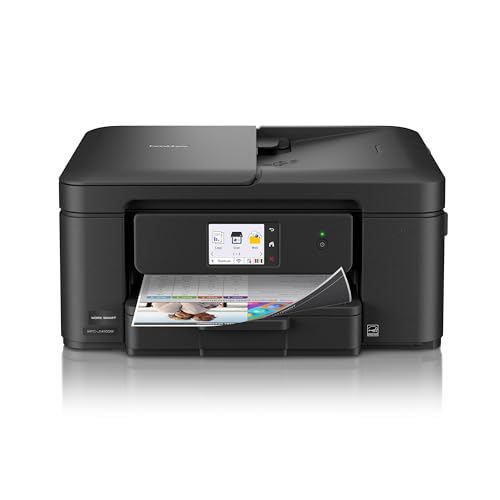 Brother Work Smart 1410 Wireless Color Inkjet All-in-OneStandard13.5 x 15.4 x 7.2 inches16.8 poundsCheck on Amazon
 Brother MFC-L3720CDW Wireless Color Laser PrinterStandard16.1 x 17.5 x 15.8 inches44 PoundsCheck on Amazon

Top 3 picks at a glance
Quick Picks
As an Amazon Associate we earn from qualifying purchases at no extra cost to you.


| Product | Best for | Key spec from the title |
|---|---|---|
| Brother DCP-L2640DW | Home office needing copy and scan | Wireless monochrome multifunction, duplex, mobile printing |
| Brother HL-L2405W | Plain text printing on a budget | Wireless compact monochrome laser, mobile printing |
| Brother MFC-L2820DW | Small offices that still fax | Mono all-in-one laser with copy, scan, fax, duplex |
| Brother MFC-L8930CDW | Busy teams with color needs | Business color laser all-in-one, duplex, advanced security |
| Brother Work Smart 1410 | Light color and photo-style use | Color inkjet all-in-one, 2.7-inch touchscreen, auto duplex |
| Brother HL-L2460DW | Print-only desk with duplex | Wireless monochrome laser with duplex |
| Brother MFC-L3720CDW | Color laser with fax | Wireless color laser, 250-sheet capacity, auto duplex |
| Brother MFC-L3780CDW | Fast color for small teams | 31 ppm color laser, single-pass duplex scan, dual-band Wi-Fi |
How to Choose
Decide on monochrome or color first
If your pages are contracts, essays, shipping labels, and invoices, a monochrome laser is the cheaper and tidier option over time, because toner stays usable through long gaps in printing. Color matters for brochures, school projects, and marketing flyers. A color laser such as the L3-series machines prints crisp text and solid graphics, while an inkjet like the Work Smart suits occasional color but can dry out if left alone for weeks.
Print-only, scanner, or full multifunction
An HL model prints and does nothing else, which makes it simple and compact. A DCP adds copying and scanning, which covers most home needs. An MFC adds fax, and a few offices genuinely still need it for medical, legal, or government paperwork. Paying for a fax function you will never connect is a classic waste, while lacking a scanner when a mortgage form arrives is an annoying surprise.
Duplex, speed, and tray capacity
Duplex printing, meaning automatic two-sided pages, saves paper and makes reports look professional. Check for it by name, since the HL-L2405W title does not mention it. Speeds such as 31 pages per minute help a small team, but a household printing five pages a day will not notice. A 250-sheet tray means less refilling for busy offices; compact home units often hold fewer sheets.
Connectivity, security, and running costs
Wireless printing and mobile printing are standard here, but dual-band Wi-Fi and gigabit Ethernet matter for shared office networks. Business models mention advanced security features, which are worth having if sensitive documents move through the device. Ignore the trial subscription offers in some titles until you have compared toner and ink running costs; that, more than the sticker tier, determines what a printer costs over three years.
The 8 Best Options
Brother DCP-L2640DW
This wireless compact monochrome multifunction printer handles copy, scan, duplex, and mobile printing. It is the practical middle path for a home office: more capable than a print-only laser, without paying for a fax module. A freelancer who scans receipts, signs contracts, and prints the occasional invoice will find the feature list lines up with a normal week.
- Copy and scan functions cover most paperwork needs.
- Duplex printing saves paper on longer documents.
- Trade-off: monochrome only, so color flyers need another solution.
Skip it if you print school posters, color charts, or brochures regularly. A color laser or inkjet is a better fit for that kind of work, and the DCP would simply frustrate you with its black-and-white output.
Brother HL-L2405W
A wireless compact monochrome laser printer with mobile printing and a refresh subscription trial named in the title. It is the plain, no-extras option for a desk where all that is needed is text pages from a laptop or phone. Since lasers keep toner dry and ready, it also suits households that print in bursts around tax season or exam week and leave the machine idle in between.
- Compact size suits a shelf or small desk.
- Wireless and mobile printing keep cables off the desk.
- Trade-off: the title mentions no duplex, scanner, or copier.
Skip it if you need to scan documents or print on both sides of the page automatically. Students who only print essays and reading packets are the ideal owner, while anyone filing paperwork should look higher up the list.
Brother MFC-L2820DW
A wireless compact monochrome all-in-one laser with copy, scan, fax, and duplex. It targets small offices and home businesses that still receive faxes or want a single machine to cover every black-and-white task. Medical practices, real estate agents, and local contractors are common examples of workplaces where a fax line remains part of daily paperwork.
- Fax, copy, scan, and print in one box.
- Duplex printing is included.
- Trade-off: it costs more than print-only models and gives no color.
Skip it if you have never needed a fax line. In that case the DCP-L2640DW covers the rest of the feature list at a lighter tier, and you avoid paying for hardware you will not connect.
Brother MFC-L8930CDW
The business-grade option in the list: a color laser all-in-one with duplex printing, scanning, copying, low-cost printing, and advanced security features. It is aimed at departments and busy small companies where several people print every day. If client records, payroll sheets, or legal files pass through the machine, the security language in the title is a meaningful reason to consider it over a home model.
- Business-oriented security features are named in the title.
- Low-cost printing is a stated focus, which helps heavy users.
- Trade-off: it sits in the premium tier and is geared toward heavier office use than most households need.
Skip it if you print a handful of pages a week at home. The extra capability would go unused, and a compact model would take less room.
Brother Work Smart 1410
A wireless color inkjet all-in-one with a 2.7-inch touchscreen and automatic duplex printing, plus a refresh subscription trial in the title. It suits households that want occasional color prints and a friendly interface without stepping up to a laser. A parent who prints a birthday invitation, a permission slip, and a recipe in the same week will appreciate being able to do it all from the front panel.
- Touchscreen makes copy and scan jobs easy to start.
- Automatic duplex printing is included.
- Trade-off: inkjets can waste ink if they sit unused between jobs.
Skip it if you print mostly text in large batches or leave the printer idle for weeks. A monochrome laser is the calmer option for that pattern.
Brother HL-L2460DW
A wireless compact monochrome laser printer with duplex and mobile printing. Compared with the HL-L2405W, the title adds automatic two-sided printing, which is the feature most students and home offices end up wanting. Over a semester of reading packets and lab reports, two-sided pages add up to a noticeably smaller ream of paper.
- Duplex support cuts paper use.
- Compact monochrome laser design suits small spaces.
- Trade-off: it prints only, with no scan or copy functions.
Skip it if your workflow includes signing, scanning, or copying documents. The DCP-L2640DW is a better match for that kind of paperwork.
Brother MFC-L3720CDW
A wireless color laser printer, scanner, copier, and fax with automatic duplex and a 250-sheet capacity. It is a good step up for a small office that needs color documents and a tray that does not require constant refilling. Because it also copies, scans, and faxes, a reception desk can run its whole paper workflow from a single device.
- Color laser output with copy, scan, and fax.
- The 250-sheet capacity suits busier use.
- Trade-off: color laser machines are larger than compact monochrome units.
Skip it if you only need black-and-white pages; a monochrome multifunction would cost less and take up less desk space.
Brother MFC-L3780CDW
A wireless digital color all-in-one laser rated at 31 ppm, with single-pass duplex copy and scan, dual-band Wi-Fi, and Gigabit Ethernet. It is the speed-focused choice for a small team that shares a printer on a network. Dual-band Wi-Fi gives flexibility for wireless clients, while the wired Ethernet connection suits desks that are plugged straight into the router.
- A stated 31 ppm speed helps in shared offices.
- Single-pass duplex scanning speeds up two-sided originals.
- Trade-off: it belongs to a higher tier than home-oriented models.
Skip it if the printer will be used by one person at home. The speed and network features will not matter, and a smaller model would be easier to live with.
Which One Fits Your Situation
A student printing essays and readings
Take the Brother HL-L2460DW. It adds duplex to a simple compact laser, saving paper on long reading packets.
A home office that scans and copies paperwork
Pick the Brother DCP-L2640DW. It handles copying and scanning with duplex, and skips fax hardware you probably do not need.
A small business that faxes and prints in color
The Brother MFC-L3720CDW offers color laser output, fax, and a 250-sheet capacity, which covers the typical front-desk workload.
A shared office with several daily users
Choose the MFC-L3780CDW for its 31 ppm rating and network features, or the MFC-L8930CDW if security features and heavy-duty printing are priorities.
Common Mistakes
- Buying an MFC model for the fax function and never connecting a phone line.
- Choosing an inkjet for infrequent printing, then finding the ink has dried out.
- Assuming every wireless laser has duplex; the HL-L2405W title does not mention it.
- Comparing only the purchase tier and ignoring toner or ink running costs.
- Overbuying a business color laser for a household that prints five pages a week.
Related guides
- Windows Macos Linux Gaming Performance Comparison Strengths Weaknesses
- Desktop Operating Systems Gaming Performance Strengths Weaknesses
- 5G Home Internet Wifi Modem Settings Low Latency Gaming
Frequently Asked Questions
What do the letters HL, DCP, and MFC mean?
HL models are print-only lasers, DCP models add copying and scanning, and MFC models add fax as well. The final letters often indicate wireless, duplex, and color capability.
Is a laser or inkjet better for occasional printing?
A laser tolerates long idle periods better, since toner does not dry out the way ink can. The inkjet in this list suits households that want color and a touchscreen.
Do I need a color laser?
Only if you regularly print graphics, charts, flyers, or presentation handouts. For text documents, a monochrome model saves money and space.
What does the refresh subscription mean?
Several titles mention a trial of a subscription service tied to supplies. Read the terms and compare against regular toner or ink costs before relying on it.