
Buying a laptop for a small business is not the same as buying one for yourself. A single machine often serves the owner, the part-time bookkeeper, and whoever covers the front desk on a busy Friday, so it has to survive shared use, run a point-of-sale or accounting package, and join a company network without surprises. The keyword implies a practical question: which models give you business-grade features such as Windows 11 Pro, a numeric keypad, wired networking, and a webcam privacy shutter without a corporate-sized invoice?
This guide is for owners and office managers who are outfitting two to ten workstations in 2026 and want a clear way to compare cheap-looking listings. Every pick below is judged only on the specifications stated in its title, which means some confident-sounding marketing claims get ignored. The group spans 15.6-inch and 17.3-inch screens, entry-level and mid-range processors, and a range of memory sizes, so you can match the machine to the job rather than buy one configuration for everyone.
Our Top Picks


Top 3 picks at a glance
Quick Picks
As an Amazon Associate we earn from qualifying purchases at no extra cost to you.



| Product | Best for | Key spec from the listing |
|---|---|---|
| HP 17 Business Laptop (Ryzen 5) | Owner or admin desk | Ryzen 5, 16GB RAM, 512GB SSD, 17.3-inch FHD, numeric keypad |
| HP 17 FHD Ryzen 5 7430U | Multitasking and records | 32GB RAM, 1TB SSD, 17.3-inch FHD IPS, Windows 11 Pro |
| HP 255 G10 | Managed office fleets | AMD quad-core, 16GB RAM, 512GB SSD, Windows 11 Pro, 15.6-inch FHD |
| HP 15.6 Intel N200 | Basic shared tasks | Intel 4-core N200, 4GB RAM, 128GB SSD, Windows 11 Home in S mode |
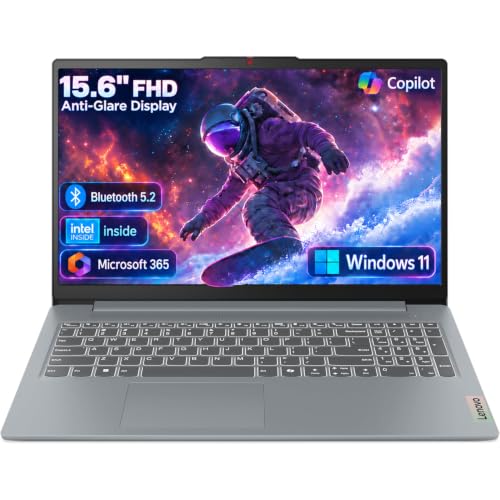
| Lenovo Business 15.6 FHD | Front-desk and light office | 8GB DDR5, 128GB storage, Office 365, Wi-Fi 6, USB-C |
| Lenovo V15 Gen 4 | Wired office with ports | Core i5-13420H, HDMI, RJ45 Ethernet, Windows 11 Pro |
How to Choose
Operating system edition is a business decision
Windows 11 Pro supports domain join, BitLocker drive encryption, and remote management, which is why it appears in several listings here. Windows 11 Home in S mode, by contrast, only installs apps from the Microsoft Store, and that can block your accounting software or printer utilities. If a laptop will hold customer data, favor Pro and confirm that the operating system line is spelled out.
Memory and storage that match office software
Four gigabytes of RAM is too little for modern browsers plus a few business applications. Eight gigabytes is the practical floor, 16GB is comfortable, and 32GB is only worthwhile for large spreadsheets or heavy multitasking. For storage, 256GB or more of SSD is a safe choice, while 128GB fills quickly once updates, Office, and local files accumulate. Be careful with models that list “storage” using combined numbers, because cloud storage and external drives do not replace internal capacity.
Ports, networking, and security features
Offices still depend on cables. An RJ45 Ethernet port makes a stable connection to a wired network, HDMI drives a second monitor or projector, and USB-C adds flexibility for docks and chargers. A webcam shutter and fingerprint reader are small details that help with privacy and sign-in. A numeric keypad is worth demanding if anyone enters invoices or inventory counts all day.
Where budget models cut corners
Entry-level business laptops usually cut the processor tier, the memory, and the storage first, then the display brightness and build quality. Titles that stuff in words such as “gaming” or “traditional” are often a sign of generic listings, while a recognized business line name suggests better support and parts availability. Ignore claims that a processor “beats” another, and read the actual model number instead.
The 6 Best Options
HP 17 Business Laptop (Ryzen 5)
This HP is a 17.3-inch full HD laptop with a Ryzen 5 processor, 16GB of RAM, a 512GB SSD, and a numeric keypad. It suits an owner or manager who spends long hours in spreadsheets and email and prefers a large, readable screen on the desk. The memory and storage figures meet the practical floor for most office tasks without needing a premium budget.
- Strength: full HD 17.3-inch screen with a numeric keypad suits data entry.
- Strength: 16GB of RAM and a 512GB SSD are a healthy mid-range baseline.
- Trade-off: a large chassis is less convenient for travel or cramped counters.
Skip it if staff carry laptops between sites daily, or if you need confirmation of Windows Pro features, since the listing excerpt does not name the edition.
HP 17 FHD Ryzen 5 7430U
The second HP 17 steps up to 32GB of RAM and a 1TB SSD with an AMD Ryzen 5 7430U, a 17.3-inch FHD IPS display, and Windows 11 Pro. It is the strongest memory configuration in this group and works well for a bookkeeper who keeps accounting software, a browser full of tabs, and large spreadsheets open together.
- Strength: 32GB of RAM and 1TB of storage give long-term headroom.
- Strength: Windows 11 Pro with an FHD IPS display suits managed, all-day office use.
- Trade-off: it is more machine than a basic reception role needs.
Skip it if the job is simple browsing and email, because the extra memory adds cost that a lighter task will never use. It also shares the large 17.3-inch footprint with its sibling, so check desk space before you commit.
HP 255 G10
The HP 255 G10 is a clear business-line laptop: an AMD quad-core processor, 16GB of RAM, a 512GB SSD, Windows 11 Pro, and a 15.6-inch Full HD display, plus a webcam with a shutter and a numeric keypad. The named model number matters, because business lines tend to have clearer documentation, driver downloads, and replacement parts.
- Strength: business-line model with Windows 11 Pro, webcam shutter, and numeric keypad.
- Strength: 15.6-inch size balances screen space and portability.
- Trade-off: a quad-core AMD processor offers less headroom than higher-tier chips.
Skip it if you need a premium, thin travel machine or lots of processor power for demanding applications. Owners who want one standard model they can buy several times over, and describe plainly to an outside IT contractor, will find this the easiest profile to support.
HP 15.6 Intel N200
This HP is the stripped-down option, using an Intel four-core N200 processor, 4GB of RAM, a 128GB SSD, and Windows 11 Home in S mode. It can handle web-based tools and light document work, which makes it a candidate for a shared kiosk or a seasonal helper.
- Strength: low-cost entry point for basic web and document tasks.
- Strength: portable 15.6-inch size with a stated long battery life.
- Trade-off: 4GB of RAM and S mode restrict software and multitasking.
Skip it if you need desktop accounting or point-of-sale software, since S mode limits installable programs and 4GB of memory is tight. Switching out of S mode is possible, but memory cannot be fixed afterward, so treat this as a disposable helper machine rather than a core workstation.
Lenovo Business 15.6 FHD
This Lenovo pairs a 15.6-inch FHD anti-glare display with 8GB of DDR5 memory, 128GB of storage, Office 365, Wi-Fi 6, and USB-C. The anti-glare screen and Wi-Fi 6 are sensible features for a bright shop floor or a busy front office, and the memory type is current.
- Strength: anti-glare FHD screen and Wi-Fi 6 suit bright, busy spaces.
- Strength: 8GB of DDR5 memory meets the practical floor for office work.
- Trade-off: only 128GB of storage fills fast, and the processor is not specified beyond Intel.
Skip it if you store many local files, or if you want a clearly named processor model before you buy. A seller that leaves the chip unnamed gives you less to compare, so ask for the exact model number first.
Lenovo V15 Gen 4
The Lenovo V15 Gen 4 carries an Intel Core i5-13420H, a 15.6-inch FHD display, HDMI, RJ45 Ethernet, a webcam, a numeric keypad, and Windows 11 Pro. For an office with wired desks and shared monitors, the combination of Ethernet and HDMI on a named business line is very practical.
- Strength: RJ45 Ethernet and HDMI ports are built in for wired desks.
- Strength: Core i5-13420H with Windows 11 Pro is a solid mid-range pairing.
- Trade-off: the title leaves memory and storage unclear, so confirm both.
Skip it if you need to see exact RAM and SSD figures printed up front, or if you want the lightest possible laptop. Because the listing leaves memory and storage open, buyers should only order a version where those numbers are shown clearly.
Which One Fits Your Situation
You manage the books and records
The HP 17 FHD Ryzen 5 7430U is the better match. With 32GB of RAM and 1TB of storage, it can handle accounting software, a payroll portal, and a stack of reference documents at the same time.
You are setting up several wired desks
Choose the Lenovo V15 Gen 4. Its Ethernet and HDMI ports, along with Windows 11 Pro, fit an office where staff plug into a dock or monitor each morning.
You need a dependable standard issue machine
The HP 255 G10 gives you a business-line model with a quad-core chip, 16GB of RAM, and a 512GB SSD. It is easy to replicate across several desks.
You are covering a shared counter on a tight budget
The Lenovo Business 15.6 FHD is the more flexible entry-level machine, while the HP 15.6 with the N200 only suits web-only work.
A useful rule of thumb for owners is to pick the role first and the model second. A person who lives in spreadsheets needs memory and a big screen, a person who answers phones and checks email needs reliability and a decent webcam, and a person who works at a counter needs durability and the right ports. Writing those three profiles on paper before browsing listings keeps you from overpaying for one and underbuying for another.
Common Mistakes
- Buying Windows 11 Home in S mode and then discovering the accounting package will not install.
- Counting cloud storage or an external drive as part of the internal SSD.
- Choosing a single configuration for every employee instead of matching roles.
- Skipping the numeric keypad for data-entry staff who need it all day.
- Ignoring ports, then paying for adapters to reach Ethernet and a second monitor.
Related guides
- Windows Macos Linux Gaming Performance Comparison Strengths Weaknesses
- Desktop Operating Systems Gaming Performance Strengths Weaknesses
- 5G Home Internet Wifi Modem Settings Low Latency Gaming
Frequently Asked Questions
Is Windows 11 Pro really necessary for a small business?
It is strongly worth having if you manage multiple laptops or hold customer data. Pro adds drive encryption and domain features that Home lacks.
How much RAM does an office laptop need?
Eight gigabytes is the minimum for current software, and 16GB is the comfortable target. Choose 32GB only for heavy spreadsheets or many applications open together.
Should I buy the same laptop for everyone?
Standardizing makes support simpler, but a front-desk role rarely needs the same specification as a bookkeeper. Two tiers is often the sensible compromise.
Are 17-inch laptops practical for business?
They are excellent for desk-bound roles because of the large screen and numeric keypad. Staff who move between locations will find a 15.6-inch model easier to carry.









