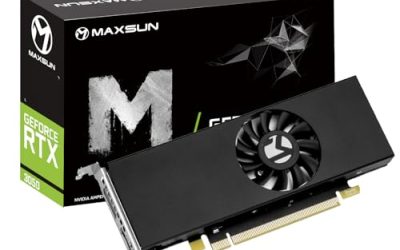
A budget cap of under 500 dollars sounds like mid-range territory, yet the graphics cards in this budget tier are a surprisingly mixed bag. Depending on the listing, that cap can buy a capable 12GB card from the last generation, an older 8GB Radeon with plenty of video memory but dated efficiency, or a tiny low-profile card whose only job is to drive several monitors. The word “graphics card” covers all of them, so the first decision is not brand or boost clock but what you actually need the card to do.
This guide treats the cap as a ceiling, not a target. It covers five distinct cards that appear in the listings: two GeForce RTX 3060 12GB models, a Radeon RX 5500 XT, a Radeon RX 580, and a low-profile GT 740 for multi-monitor setups. Everything is judged from the titles alone, so the advice is about fit rather than measured speed. If you are building or upgrading in 2026, think first about your monitor, your power supply, and your case, because those decide which of these cards will work for you at all.
Our Top Picks


Top 3 picks at a glance
Quick Picks
As an Amazon Associate we earn from qualifying purchases at no extra cost to you.



| Product | Best for | Key spec from the title |
|---|---|---|
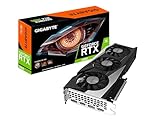
| GIGABYTE GeForce RTX 3060 Gaming OC 12G | Best all-around 1080p card | 12GB 192-bit GDDR6, 3X WINDFORCE fans |
| MSI Gaming GeForce RTX 3060 12GB | Compact twin-fan alternative | 12GB 15 Gbps GDDR6, 192-bit, Torx twin fan, PCIe 4 |
| AISURIX RX 5500 XT 8GB | Lower-power 1080p | 8GB GDDR6, 128-bit, PCIe 4.0 x8, 8-pin, 3 DisplayPorts |
| MOUGOL Radeon RX 580 8GB | Legacy upgrade, ample memory | 8GB GDDR5, 256-bit, 2048SP, HDMI/DP/DVI |
| ARDIYES GT 740 4GB Low Profile | Multi-monitor office PCs | 4GB GDDR5, low profile, 4 HDMI ports, PCIe 3.0 x16 |
The 5 Best Options
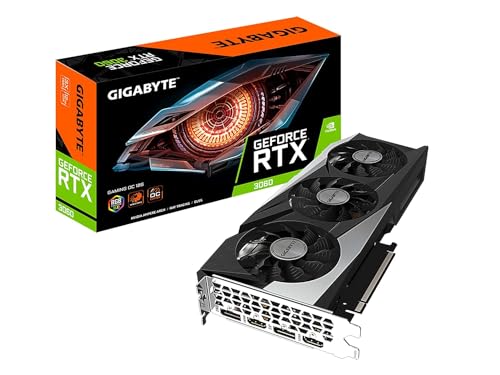
GIGABYTE GeForce RTX 3060 Gaming OC 12G
This is the strongest all-around card in the group and the easiest recommendation for a general gaming build. The title lists a GeForce RTX 3060 with 12GB of 192-bit GDDR6, three WINDFORCE fans, and the REV2.0 board revision. A 12GB capacity is unusually generous for this tier, and it gives the card room for high-resolution textures and creative software that hungry cards with 8GB often struggle with. The triple-fan cooler is built to keep temperatures and noise down under sustained load, which is useful in a case that already has limited airflow.
- 12GB of GDDR6 on a 192-bit bus gives more memory headroom than the 8GB cards in this list.
- Three WINDFORCE fans point to a cooler designed for quiet, sustained operation.
- A current-generation NVIDIA architecture means broad driver and software support, including for creative and AI tools.
- It is physically larger than a twin-fan design, so small cases need a length check.
- The title does not state power connector layout, so buyers should confirm that their power supply provides what the card needs.
Skip it if you have a compact case, a low-wattage office power supply, or only need to light up extra monitors. Compared with the MSI RTX 3060 that follows, the two share the same GPU class and memory, so the choice comes down to cooler size, brand preference, and which fits your case better. A triple-fan card usually runs quieter at the same load, while the twin-fan MSI trades some of that for a shorter body. Buyers coming from a card with only 4GB or 6GB will notice the extra memory most in modern open-world games and in video-editing timelines, where textures and effects stack up quickly.
MSI Gaming GeForce RTX 3060 12GB
The MSI card brings the same core promise in a more compact package. The title lists a Gaming GeForce RTX 3060 with 12GB of 15 Gbps GDDR6 on a 192-bit interface, HDMI and DisplayPort outputs, PCIe 4, a Torx twin fan cooler, and Ampere architecture with an OC factory-tuned model name. Two fans instead of three usually mean a shorter and lighter card, which matters if you are working in a small or mid-sized tower. The 12GB buffer is the same headline advantage as the Gigabyte, and the OC branding indicates a factory-tuned boost clock.
- 12GB of GDDR6 at 15 Gbps matches the Gigabyte card for memory capacity.
- A Torx twin-fan cooler suggests a compact design with a strong reputation among builders.
- HDMI and DisplayPort outputs cover modern monitors and televisions.
- Twin fans can run louder than a triple-fan cooler at the same sustained load.
- The title offers no dimensions or power connector detail, so a case and power supply check is essential.
Skip it if quietness is your top priority and your case has room for a larger card. Next to the AISURIX RX 5500 XT, the MSI offers a larger memory pool and a more modern feature set, while the AISURIX appeals to buyers who prefer Radeon hardware and a lower power draw. For many shoppers, the choice between the two RTX 3060 cards will be settled by which one is easier to fit and which brand they trust. The MSI listing is also the one that spells out the 15 Gbps memory speed and the Ampere architecture, which makes it simple to compare against other cards in the same family. Anyone building a compact living-room gaming PC, or a machine that will run for long sessions in a small room, should favor the shorter body and confirm that the case has intake airflow near the card.
AISURIX Radeon RX 5500 XT 8GB
The RX 5500 XT is the Radeon alternative aimed at 1080p play. The listing describes an 8GB GDDR6 card with a 128-bit bus, three DisplayPort outputs plus HDMI, a PCI Express 4.0 x8 interface, an 8-pin power connector, and an intelligent fan system. Eight gigabytes of GDDR6 is a healthy amount for a card in this tier, and the single 8-pin power requirement means most modern power supplies can feed it without trouble. It makes sense for a buyer who wants a straightforward upgrade from integrated graphics or an older card.
- 8GB of GDDR6 provides a reasonable buffer for 1080p textures.
- A single 8-pin connector is easy to satisfy on most power supplies.
- Multiple display outputs, including three DisplayPorts, support multi-monitor desks.
- The x8 PCIe link and 128-bit memory bus are more modest than the RTX 3060 designs.
- AISURIX is a lesser-known brand, so warranty and driver support details deserve a careful read.
Skip it if you want newer features such as ray tracing hardware or broad creative-software support, since the RTX 3060 cards are better positioned there. Against the MOUGOL RX 580 that follows, the 5500 XT is the newer and more efficient design with faster memory, while the RX 580 offers a wider bus and a long history in budget builds. If your motherboard only has PCIe 3.0, the x8 link will still work, but you should expect a small bandwidth reduction. The intelligent fan system in the title suggests a card that stops or slows its fans at idle, which is nice for a quiet desktop, though the listing gives no noise figures to confirm it. For a first upgrade from integrated graphics, the 5500 XT is a sensible and approachable step that does not demand a large power supply.
MOUGOL Radeon RX 580 8GB
The RX 580 is the legacy option and it is honest about it. The title lists an AMD Radeon RX 580 with 8GB of GDDR5, a 256-bit bus, the 2048SP designation, a PCIe x16 3.0 interface, HDMI, DisplayPort, and DVI outputs, and a dual fan cooler in white. The 2048SP label signals a particular shader configuration, and the DVI output is useful for older monitors that other cards have dropped. For a person reviving an older PC or building a very low-cost 1080p machine, 8GB of memory on a wide bus is attractive.
- 8GB of GDDR5 on a 256-bit bus offers a lot of memory bandwidth for the class.
- HDMI, DisplayPort, and DVI outputs cover almost any monitor, new or old.
- A dual-fan design and white finish suit lighter-colored builds.
- It is the oldest architecture in the group, so power efficiency and features lag the others.
- The title does not state a power connector, and cards of this design can draw noticeable power, so check your supply.
Skip it if you want modern features, low power draw, or the best long-term driver outlook, because older Radeon families receive less attention over time. Compared with the ARDIYES GT 740, the RX 580 is a true gaming card and the GT 740 is a display-output card, so the two serve entirely different buyers. This pick rewards someone with a limited plan and a spare power connector. It is also the card to consider for a retro or secondary PC, where DVI output and a wide memory bus matter more than efficiency. Anyone choosing it should read the listing carefully, because the 2048SP naming means it is not a standard RX 580 configuration, and expectations should be set to match.
ARDIYES GT 740 4GB Low Profile
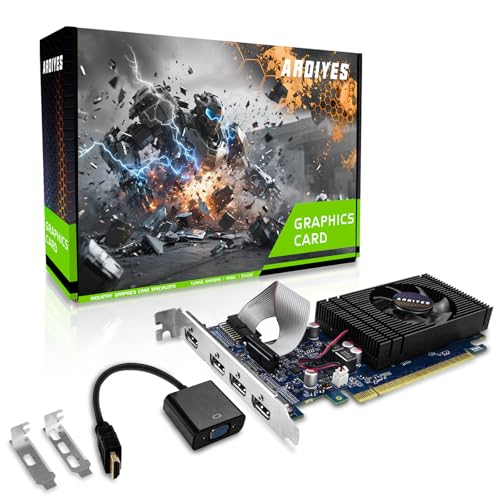
The GT 740 is a very different product from the rest. The title lists a 4GB GDDR5 low profile card with four HDMI ports for a quad multi-monitor setup, a PCI Express 3.0 x16 interface, and silent cooling, aimed at office use. It is built to drive displays, not to run modern games, and it fits small form factor desktops that cannot take a full-height card. For a front desk, a trading screen wall, or a digital signage player, this is a practical and inexpensive tool.
- Four HDMI ports allow a quad-monitor desk from a single card.
- A low-profile design fits compact and slim office PCs.
- Silent cooling suits quiet workspaces.
- It is not suited to modern gaming, creative acceleration, or machine learning.
- An older GT 700-series architecture may lack driver updates and newer codec support.
Skip it if you want to play anything demanding or edit video, because the card is built for display output rather than performance. It is the odd pick in this roundup, but it matters, because many buyers searching under 500 dollars are actually trying to add monitors to an office machine, and for that task a modest card is the right answer. Anyone who wants to game should go back to the RTX 3060 options at the top of the list. The GT 740 also needs the right bracket for a slim case and a free full-length slot, and it is worth checking that your operating system still has current drivers for this older family before ordering. For an office, though, reliability and quiet operation matter more than speed, and this class of card delivers both.
Who Needs a Graphics Card in This Bracket
This bracket serves three groups: gamers building a 1080p machine, upgraders replacing a failing or outdated card, and office users who need more display outputs. The right pick depends on which group you belong to, and it is worth being honest about that before comparing specs. A budget graphics card is also a sensible purchase for anyone whose integrated graphics have become the weak point in an otherwise healthy desktop, since the processor, memory, and storage may be fine while only the graphics are holding the system back. It is a poorer fit for laptops and small all-in-one machines, which cannot take a desktop card.
1080p and light 1440p gamers
The two RTX 3060 12GB cards are the natural choice, because 12GB of memory and a modern architecture handle current games at 1080p and many at 1440p with sensible settings. The RX 5500 XT and RX 580 cover tighter plans where a lower-power or older card fits the rest of the system.
Upgraders from integrated or older graphics
If you are replacing integrated graphics, any gaming card here is a large jump. Check your power supply, since an older office unit may lack the connectors a gaming card needs. A new supply is sometimes the real cost of the upgrade. Players coming from a decade-old card will also notice faster load times and smoother frame pacing, and may find that their monitor, rather than the card, becomes the next limit.
Office and multi-monitor users
Spreadsheets, dashboards, and signage do not need gaming performance. The ARDIYES GT 740 offers four HDMI ports in a low-profile body, which solves the problem without a big power draw or a new case. Teams that run dashboards all day, or small shops that show menus and signage, will value the simplicity and low heat. If you need more than four screens, plan for a second card or a different class of hardware.
How to Choose
Video memory and bus width
For gaming at 1080p, treat 8GB as a floor and 12GB as comfortable, because newer titles use more texture memory. Bus width affects bandwidth: the 256-bit RX 580 and the 192-bit RTX 3060 move data faster than the 128-bit RX 5500 XT on paper. Do not judge a card by memory size alone; the architecture and memory type matter too. Ignore sticker claims that compare cards across different generations. As working thresholds, 8GB suits most 1080p play today, 12GB gives breathing room for higher texture settings and creative work, and 4GB or less is only appropriate for display or light tasks. Also be wary of very high memory numbers on very old chips, because the chip may be too slow to use the memory in a meaningful way.
GPU generation and features
Newer architectures bring better efficiency, updated video encoding, and ray tracing support on RTX cards. Older families like the RX 580 and GT 740 cost less to own but receive fewer driver improvements. If you edit video or use creative software, favor an NVIDIA RTX card for wider support, and verify codec needs if you stream. A newer architecture also tends to hold its usefulness longer. Look for a card that supports the video codecs you use, such as hardware decoding for streaming services, and check whether the vendor still publishes drivers for your operating system. When two cards look similar, favor the family that is still receiving regular driver updates.
Power supply and connectors
Check your power supply wattage and available connectors before you buy. A typical mid-range card like the RTX 3060 works well with a quality 550W to 650W supply, while the RX 5500 XT lists a single 8-pin connector. Weak or very old supplies are the most common cause of black screens and crashes after an upgrade. Never rely on cheap splitters for a card that draws sustained power. Look at the label on your supply for the amperage of the 12V rail, since a high total wattage can hide a weak rail. If the supply is more than seven or eight years old, treat replacement as part of the upgrade plan, because aging capacitors reduce stability under load.
Size, cooling, and case fit
Measure the available length and slot width in your case, and leave at least a centimeter of clearance. Triple-fan cards cool well but are long, twin-fan cards are shorter, and low-profile cards fit slim cases. Good airflow matters more than fan count, so make sure the case has intake and exhaust fans. Dust filters keep a gaming card healthy over years of use. Check that the card does not block neighboring slots you need for storage or network cards, and that the cables from the supply can reach without sharp bends. In small cases, a short card with a good cooler beats a long card that traps heat.
Outputs and monitors
Count the displays you plan to use and match them to the outputs. HDMI and DisplayPort cover modern monitors, DVI covers older ones, and the quad-HDMI GT 740 targets multi-screen desks. Adapters work but add cost and potential problems, so choose native ports where you can. If you use a high-refresh monitor, confirm the card supports your resolution and refresh rate over the connector you plan to use. DisplayPort is usually the best choice for high refresh rates, while HDMI is convenient for televisions. Ignore claims of unlimited display support, and count the actual ports in the listing.
Brand, warranty, and where corners are cut
Unfamiliar brands sometimes cut corners on cooling, power delivery, and driver support. Prefer listings with clear warranty terms, authentic packaging, and a return window. Be skeptical of cards with unusually specific marketing language and few verifiable details. Buying from established board partners usually costs a little more but reduces the risk of early failures. Keep the receipt and the packaging for the first month, run a demanding game or stress program soon after installation, and watch temperatures so that a problem shows up while returns are still easy.
12GB Modern Midrange or 8GB Legacy Radeon
The central trade in this budget tier is between a newer card with more memory and an older card that costs less to own. The RTX 3060 models and the Radeon cards represent two very different philosophies, and the table summarizes how they differ in the listings. Shoppers often assume the cheaper, older card is the smart value choice, but the real cost includes power draw, driver longevity, and how soon you will want to replace it. A card you keep for five years can be cheaper per year than one you replace in two, even if the purchase amount is higher.
| Factor | RTX 3060 12GB (Gigabyte, MSI) | Radeon 8GB (RX 5500 XT, RX 580) |
|---|---|---|
| Memory | 12GB GDDR6, 192-bit | 8GB GDDR6 or GDDR5, 128-bit or 256-bit |
| Architecture | Ampere | Older RDNA 1 or Polaris class |
| Software support | Broad, including creative tools | Gaming focus, older drivers |
| Power connector | Check listing | 8-pin listed on the RX 5500 XT |
| Best fit | Longer-term gaming builds | Tight plans and older systems |
Choose the RTX 3060 for a longer horizon
If you want a card that stays useful for years, the 12GB RTX 3060 models are the safer investment. They handle current games well, support modern features, and give creative software enough memory to be comfortable. They also pair well with a mid-range processor and a 1080p or 1440p monitor, which is where most buyers in this tier end up.
Choose a Radeon card for a tight plan
If the card must fit an older system or a tight plan, the RX 5500 XT and RX 580 can still deliver solid 1080p play. Verify power requirements and expect to rely on fewer new features. The RX 580 also helps with legacy monitors through its DVI output. Just be realistic: these cards will not run the newest titles at high settings, and some modern games may not support them at all, so keep expectations modest and confirm the minimum requirements of the games you play.
Setup, Compatibility and Upgrade Tips
What to check before buying
Verify your motherboard slot, power supply wattage, connectors, and case dimensions. Confirm that your monitor’s inputs match the card’s outputs, and that your processor will not limit the new card badly. A very old processor can bottleneck even a mid-range card, so check your whole system, not just the graphics card. Ask whether the card ships with any adapters or brackets, particularly for low-profile models. Photograph the inside of your case before you start, so you remember where each cable goes, and make sure you have the right screwdriver for the bracket. If your motherboard has two x16-shaped slots, use the top one for the best lane allocation.
What to upgrade first
If your power supply is old or low-wattage, it is the first thing to replace before installing a gaming card. After that, more system memory and an SSD help games load faster. Updating the motherboard BIOS can also fix compatibility quirks with newer cards. Improved case airflow is a cheap upgrade that extends the life of the card. If your monitor is still 60Hz and 1080p, spend on the card first and the monitor later, because a stronger card gives smoother results at that resolution and leaves room for a future display upgrade.
Common compatibility traps
A card that needs an 8-pin connector will not work with an unpopulated power supply, and adapter cables can be risky. Low-profile cards need the correct bracket for slim cases. Older drivers may remove support for aging cards, so confirm that current drivers support your operating system. Finally, clean out any leftover drivers from your previous card to avoid conflicts, and run a long stress session to confirm stability. Make sure the monitor cable is plugged into the new card, not the motherboard, because the motherboard port will silently use the older integrated graphics and waste the upgrade.
Which One Fits Your Situation
A first gaming PC at 1080p
The GIGABYTE GeForce RTX 3060 Gaming OC 12G offers the memory and cooling to grow with your library, and its triple-fan cooler suits a quiet build. It is the card to buy once and keep through several upgrades of the rest of the system.
A compact mid-tower
The MSI Gaming GeForce RTX 3060 12GB gives the same GPU class in a twin-fan design that is easier to fit in tighter cases. Measure the length first and compare it with the manufacturer’s specification page.
An older PC on a tight plan
The MOUGOL Radeon RX 580 8GB adds a gaming-capable card with DVI output to an older system, provided the power supply is up to it. The AISURIX RX 5500 XT is the lower-power alternative if the supply is modest.
A front desk with four screens
The ARDIYES GT 740 4GB Low Profile drives four HDMI displays from a slim office PC without a big power draw, which suits dashboards and reception screens.
Common Mistakes
- Assuming the budget cap means every card in the bracket is a good gaming card.
- Ignoring the power supply wattage and connectors before buying.
- Choosing a long triple-fan card without measuring the case.
- Buying a display-only card and expecting gaming performance.
- Treating the color or brand of the card as more important than its memory and architecture.
- Skipping warranty and seller checks on unfamiliar brands, then discovering a problem after the return window has closed.
Frequently Asked Questions
Is 12GB of video memory better than 8GB?
Often yes, because newer games and creative software use more memory. However, architecture and bandwidth also matter, so a newer 8GB card can beat an older 12GB one in some cases.
Can I use these cards in an older PC?
Usually, if the motherboard has a PCIe x16 slot and the power supply provides enough wattage and connectors. Check clearance and make sure the processor does not hold the card back.
Do I need a new power supply?
Sometimes. An older office power supply may lack the connectors or wattage a gaming card needs, so check before buying. A quality 550W to 650W unit is a common recommendation for mid-range cards, and replacing a very old supply is also a safety upgrade.
Is the RX 580 still worth buying?
It can be, for a tight plan or a legacy system, thanks to 8GB of memory and multiple outputs. Buyers should accept older features and drivers and check the power requirements. It is not a card to buy if you want the newest features or long driver support.
What is a low-profile graphics card?
It is a shorter card designed for slim cases, often with a smaller bracket. The ARDIYES GT 740 is a low-profile model aimed at multi-monitor office desks.
Do these cards support multiple monitors?
Yes, and the number of outputs varies. The AISURIX lists three DisplayPorts plus HDMI, and the ARDIYES lists four HDMI ports.
Final Words
For most buyers shopping for graphics cards under 500 dollars, the RTX 3060 12GB cards from Gigabyte and MSI are the clear starting point, offering memory and features that the older Radeon and GT cards cannot match. The RX 5500 XT and RX 580 serve tight plans and older systems, and the GT 740 solves a different problem entirely by driving multiple screens. Decide what the card must do, check your power supply and case, and choose the model that fits your whole system, not just the headline spec. A card that fits and runs quietly will please you for years, while the highest number on a box rarely will. If you are still unsure, start with the Gigabyte or MSI RTX 3060 and spend what remains on a better power supply or storage.