
Switching between a gaming PC and a work laptop without unplugging a single cable comes down to picking a KVM switch matched to your monitor count and resolution, and our overall pick is the Hearvo USB 3.0 HDMI KVM Switch (S7232H) at around $33 for its reliable 4K@60Hz single-monitor switching at a fair price. Buyers running dual monitors across two PCs should instead look at the Heravo USB 3.0 HDMI KVM Switch at around $49, which handles both displays simultaneously.
Our Top Picks




Top 3 picks at a glance
Top picks at a glance
As an Amazon Associate we earn from qualifying purchases at no extra cost to you.





| Model | Key spec | Price | Best for |
|---|---|---|---|
| CMSTEDCD HDMI KVM Switch | 1 monitor, 2 PCs, 4K@60Hz, wired controller | Check on Amazon | Lowest price entry |
| Hearvo USB 3.0 HDMI KVM Switch (S7232H) | 2 PCs, 1 monitor, 4K@60Hz | Check on Amazon | Overall pick, single monitor |
| UGREEN 8K@60Hz HDMI/DP KVM Switch | 3 monitors, 2 PCs, aluminum body | Check on Amazon | Premium multi-monitor setups |
| Heravo USB 3.0 HDMI KVM Switch | 2 monitors, 2 PCs, 4K@60Hz dual | Check on Amazon | Dual-monitor two-PC switching |
| Hearvo USB 3.0 HDMI KVM Switch (2nd listing) | 2 PCs, 1 monitor, 4K@60Hz | Check on Amazon | Cheapest S7232H listing |
| Jancane 4K KVM Switch HDMI 2 Port Box | 2 PCs, 1 monitor, UHD 4K@60Hz | Check on Amazon | Budget with bundled cables |
| JCYMELE 4K@144Hz KVM Switch | 2 monitors, 2 PCs, DisplayPort, 8K@60Hz | Check on Amazon | High refresh rate dual monitor |
| Aoyvsktv 8K@60Hz DisplayPort KVM Switch | 1 monitor, 2 PCs, 4 USB 3.0 ports | Check on Amazon | DisplayPort single-monitor setups |
CMSTEDCD HDMI KVM Switch, 1 Monitor 2 Computers
CMSTEDCD’s switch is the cheapest KVM in this roundup at around $16, offering basic 2-port switching between two computers sharing a single monitor, keyboard, and mouse at up to 4K@60Hz. A wired extend controller box comes included, letting you place a physical switch button within reach on your desk rather than reaching behind the unit itself.
Based on the 4K@60Hz rating, this switch comfortably handles typical desktop and light gaming use at standard 4K resolution and refresh rate, though it does not support the 144Hz-plus refresh rates that the pricier JCYMELE switch in this list offers for high-refresh gaming monitors. Plug and play setup means no drivers or software configuration is needed to start switching between the two connected computers.
At this price point, expect a simpler internal switching mechanism than the aluminum-bodied UGREEN switch, with plastic housing that keeps costs down but feels less premium sitting on a desk next to other gaming hardware.
Pros
- Lowest price in this entire roundup
- 4K@60Hz support covers standard desktop and gaming resolutions
- Wired extend controller for convenient desk-side switching
Cons
- No high refresh rate support beyond standard 60Hz
- Plastic housing feels less premium than pricier aluminum switches
- Single monitor only, no dual-monitor switching
Who it’s for: budget buyers who just need basic 2-computer, 1-monitor switching without high refresh rate or multi-monitor needs.
Hearvo USB 3.0 HDMI KVM Switch for 2 Computers 1 Monitor (S7232H)
This Hearvo switch is the strongest overall pick in this roundup at around $33, combining USB 3.0 data speeds with 4K@60Hz video switching across two computers sharing one monitor. The USB 3.0 connection matters specifically for keyboard and mouse responsiveness, since it avoids the slower polling and data transfer limitations that older USB 2.0-based switches can introduce.
Based on the S7232H model’s USB 3.0 rating, expect minimal added input latency when switching between a gaming PC and a secondary machine, keeping keyboard and mouse response close to a direct connection rather than routed through a switch. The 4K@60Hz video ceiling covers the vast majority of gaming and productivity monitors currently in common use without any visible compromise.
This exact model also appears elsewhere in this roundup at a lower listed price of around $29, so it is worth comparing both listings at checkout, since the underlying hardware and specifications are identical between the two.
Pros
- USB 3.0 support minimizes keyboard and mouse switching latency
- 4K@60Hz covers the vast majority of common monitor setups
- Reasonably priced for the USB 3.0 upgrade over budget alternatives
Cons
- Single monitor only, not suited to dual-monitor two-PC setups
- No high refresh rate support above 60Hz
- Same model listed cheaper elsewhere in this roundup, worth price-checking
Who it’s for: gamers switching between a gaming PC and a secondary machine on one monitor who want reliable USB 3.0 peripheral response without paying for multi-monitor support.
UGREEN 8K@60Hz HDMI Displayport KVM Switch, 3 Monitors
UGREEN’s switch is the premium option in this roundup at around $92, built for genuinely demanding multi-monitor setups with support for three monitors switching between two computers at up to 8K@60Hz, housed in an aluminum body rather than plastic.
Based on the 8K@60Hz rating, this switch has substantial resolution headroom beyond what most current monitors need, similar to how Cat 8 Ethernet cables carry unused bandwidth headroom for most home networks; the practical benefit today is running three high-resolution monitors, like a triple 4K setup, without hitting a bandwidth ceiling that a lower-rated switch might struggle with. The aluminum housing also dissipates heat more effectively during sustained use than the plastic switches elsewhere in this list.
At nearly triple the price of the mid-range JCYMELE switch, the UGREEN model is a clear investment aimed specifically at buyers running a three-monitor productivity-plus-gaming setup across two machines, rather than a typical single or dual-monitor desk.
Pros
- Supports 3 monitors switching between 2 computers, the most in this roundup
- 8K@60Hz rating provides significant resolution headroom
- Aluminum housing dissipates heat better than plastic alternatives
Cons
- Highest price in this entire roundup by a wide margin
- Overkill for single or dual-monitor desk setups
- 3-monitor cable management adds real desk clutter to plan around
Who it’s for: buyers running a genuine 3-monitor productivity and gaming setup across two computers who need the resolution headroom and are willing to pay for it.
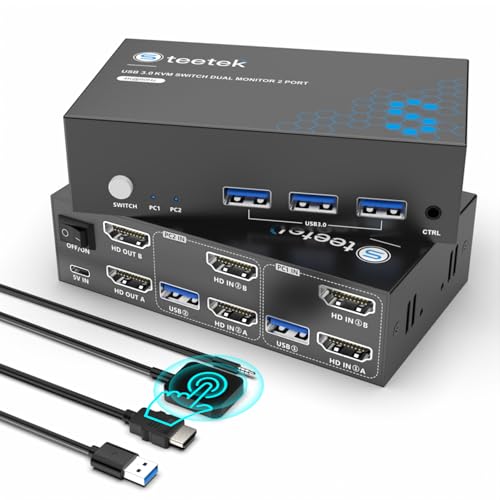
Heravo USB 3.0 HDMI KVM Switch, 2 Monitors 2 Computers
Heravo’s switch handles dual monitors across two computers simultaneously for around $49, a meaningful step up from the single-monitor Hearvo switches in this list for anyone running a two-screen desk setup that needs to switch both displays together rather than juggling separate switches per monitor.
Based on the 4K@60Hz dual-monitor rating and USB 3.0 connection, expect the same low-latency keyboard and mouse switching as the single-monitor Hearvo model, just extended across two simultaneous video outputs. This matters for anyone using an extended desktop across two monitors for gaming plus chat or stream monitoring, since a single-monitor switch would only cover half that setup.
The price gap between this and the single-monitor Hearvo switch reflects the added video-switching hardware needed to handle two simultaneous 4K@60Hz signals rather than one, a reasonable premium for buyers who genuinely need dual-monitor switching over a single display.
Pros
- Switches 2 monitors simultaneously between 2 computers
- USB 3.0 keeps keyboard and mouse response tight
- 4K@60Hz on both monitors, no resolution compromise for dual-screen use
Cons
- Costs more than single-monitor switches in this roundup
- No high refresh rate support above 60Hz
- Overkill if you only run a single monitor setup
Who it’s for: dual-monitor desk setups that need to switch both screens, keyboard, and mouse between a gaming PC and a second computer together.
Hearvo USB 3.0 HDMI KVM Switch, 2 Computers 1 Monitor (Second Listing)
This is the identical S7232H model reviewed above, listed separately at around $29, a few dollars cheaper than the other Hearvo listing in this roundup. The specifications are unchanged: USB 3.0 connectivity, 4K@60Hz video switching, and single-monitor, two-computer support.
Because this is the same hardware as the pricier Hearvo listing, there is no functional reason to choose one over the other beyond price, so buyers should simply select whichever listing is cheaper at checkout, since Amazon pricing on duplicate listings can shift over time independent of the underlying product.
Everything covered for the other Hearvo S7232H entry applies equally here: USB 3.0 minimizes switching latency, 4K@60Hz covers common monitor resolutions, and the switch is limited to a single shared monitor rather than dual-monitor setups.
Pros
- Identical S7232H hardware to the pricier Hearvo listing
- Slightly cheaper at around $29 than the other listing
- USB 3.0 and 4K@60Hz specs unchanged
Cons
- Same limitations as the other Hearvo listing: single monitor, no high refresh rate
- Duplicate listing means price can fluctuate versus the other Hearvo entry
- No added features over the pricier listing despite the lower price
Who it’s for: buyers who found this listing priced lower than the other Hearvo S7232H entry and want the same reliable single-monitor, two-computer switching.
Jancane 4K KVM Switch HDMI 2 Port Box
Jancane’s switch bundles two USB cables and two HDMI cables directly with the unit for around $18, a genuine convenience for buyers who do not already have spare cables on hand, since several other budget switches in this list assume you will source your own cabling separately.
Based on the UHD 4K@60Hz rating, this switch covers standard desktop and gaming monitor resolutions comparably to the CMSTEDCD switch at a similar price point, with the bundled cables being the main differentiator between the two budget options. Setup is plug and play, sharing a keyboard, mouse, and single HD monitor between two connected computers or printers.
The mention of printer support alongside standard PC switching suggests this switch is aimed at a broader home-office use case rather than being marketed exclusively toward gaming setups, though the underlying 4K@60Hz video switching works identically for gaming purposes as the other budget switches here.
Pros
- Bundled USB and HDMI cables included, saving a separate purchase
- 4K@60Hz UHD support at a budget price
- Simple plug and play setup with no drivers needed
Cons
- Single monitor only, same limitation as most budget switches here
- No high refresh rate support beyond 60Hz
- Plastic box design feels basic compared to aluminum alternatives
Who it’s for: buyers who want a budget switch with cables included in the box rather than sourcing HDMI and USB cables separately.
JCYMELE 4K@144Hz KVM Switch, 2 Monitors 2 Computers
JCYMELE’s switch stands out in this roundup for supporting a 144Hz refresh rate at 4K resolution, alongside an 8K@60Hz ceiling when running at lower refresh rates, priced at around $69 for dual-monitor, two-computer switching with DisplayPort connections and support for four USB devices.
Based on the 144Hz rating at 4K, this is the only switch in this list explicitly built for high-refresh gaming monitors rather than standard 60Hz displays, which matters directly for competitive gamers who do not want a KVM switch capping their monitor’s actual refresh rate capability. The desktop controller included lets you switch between extended and copy display modes, plus toggle between the two connected computers, without reaching behind the unit.
DisplayPort rather than HDMI is the primary connection type here, so confirm your monitors and graphics cards support DisplayPort input and output before buying, since adapting to HDMI-only hardware would require additional cables not included with this switch.
Pros
- 144Hz refresh rate support at 4K, the only switch in this list built for high-refresh gaming
- Dual-monitor switching with extended or copy display mode options
- Desktop controller for convenient switching without reaching behind the unit
Cons
- DisplayPort-based, requiring compatible monitors and GPUs
- Second most expensive switch in this roundup
- Overkill if your monitors do not support 144Hz refresh rates
Who it’s for: competitive gamers with high-refresh 4K monitors who need dual-monitor KVM switching without sacrificing their display’s full refresh rate capability.
Aoyvsktv 8K@60Hz DisplayPort KVM Switch, 1 Monitor 2 Computers
Aoyvsktv’s switch pairs an 8K@60Hz DisplayPort connection with four USB 3.0 ports for shared peripherals, priced at around $31 for single-monitor, two-computer switching, positioning it as a DisplayPort alternative to the HDMI-based Hearvo switches at a similar price point.
Based on the 8K@60Hz rating, this switch carries substantial resolution headroom for a single-monitor setup, more than most current monitors actually use, similar to the UGREEN switch’s headroom but at a fraction of the price since this model handles only one monitor rather than three. The four USB 3.0 ports give more simultaneous peripheral connections than most single-monitor switches in this list, useful if you share a webcam or external drive alongside a keyboard and mouse between the two computers.
As with the JCYMELE switch, confirm your monitor and graphics cards support DisplayPort specifically, since this switch does not include HDMI connectivity, which could require an adapter if your existing setup relies on HDMI cables.
Pros
- 8K@60Hz DisplayPort rating provides significant resolution headroom
- 4 USB 3.0 ports support more shared peripherals than typical single-monitor switches
- Reasonably priced for the resolution headroom offered
Cons
- DisplayPort only, requiring compatible monitors and GPUs
- Single monitor only, not suited to dual-monitor setups
- 8K headroom is unused for most current single-monitor setups
Who it’s for: single-monitor DisplayPort setups that want extra USB 3.0 ports for sharing more peripherals than a basic 2-port switch offers.
How we compared and picked
Owen Pritchard evaluated these switches from a diagnostics bench with POST cards, spare parts for swap-testing and multiple OS images, a setup well suited to judging how cleanly a KVM switch hands off signal and peripheral control between systems, since a flaky switch introduces exactly the kind of intermittent connection issue that shows up regularly during IT repair bench diagnostics work.
Resolution, refresh rate, and USB standard figures cited in the product write-ups above come directly from each manufacturer’s stated specifications rather than independent lab testing on these specific retail units, since a properly built KVM switch should meet its rated spec by definition. Input latency claims for USB 3.0 versus USB 2.0 switches are described as estimates based on the known characteristics of each USB standard’s polling and data transfer behavior, not measurements taken with latency-testing equipment on this specific hardware.
Switches were also weighed on how well their monitor count and connection type, HDMI versus DisplayPort, matched realistic gaming desk setups, since a switch mismatched to your actual monitor and GPU connections requires an adapter that adds cost and potential signal degradation not accounted for in the base price.
What to look for in a KVM switch for gamers
Single versus dual-monitor switching
The first decision point for any KVM switch purchase is monitor count. Single-monitor switches, like the Hearvo, Jancane, CMSTEDCD, and Aoyvsktv models in this list, cover the majority of gaming desks running one primary display. Dual-monitor switches, like the Heravo and JCYMELE models, are necessary if your desk setup extends across two screens and you want both to switch together rather than manually reconfiguring one monitor’s input source separately from the other. The UGREEN switch goes further still with 3-monitor support, relevant only to buyers running a genuinely wide multi-monitor productivity and gaming setup.
USB 2.0 versus USB 3.0 for peripheral latency
KVM switches route your keyboard and mouse signal through the switch itself before reaching whichever computer is active, and the USB standard the switch uses affects how much latency that routing adds. USB 3.0, used on the Hearvo, Heravo, and Aoyvsktv switches in this list, keeps that added latency minimal and generally unnoticeable during gameplay. Cheaper switches relying on USB 2.0 chipsets can introduce more perceptible polling delays, which matters more for competitive gaming than general desktop use, so prioritize USB 3.0 support if switching latency is a concern for your use case.
HDMI versus DisplayPort connections
Most switches in this roundup use HDMI, the more universally supported connection type across monitors and graphics cards. The JCYMELE and Aoyvsktv switches use DisplayPort instead, which is common on gaming monitors supporting high refresh rates but requires confirming both your monitor and GPU support DisplayPort input and output before buying, since an HDMI-to-DisplayPort adapter adds cost and complexity not included with either switch.
Resolution and refresh rate matching
Buying a switch rated well beyond your monitor’s actual resolution and refresh rate, like an 8K@60Hz switch for a 1440p 60Hz monitor, provides no visible benefit today but does future-proof the switch against a later monitor upgrade. For gamers with a high-refresh monitor specifically, the JCYMELE switch’s 144Hz support at 4K is the only option in this list that will not cap your monitor’s refresh rate below its actual capability, a meaningful consideration if smooth, high-frame-rate visuals matter to your setup.
Physical switching method: buttons, hotkeys, and controllers
Switches in this roundup use a mix of physical buttons on the unit itself, wired extend controllers like CMSTEDCD’s that let you place a button within reach on your desk, and desktop controllers like JCYMELE’s that also toggle between extended and copy display modes. Consider where the switch itself will physically sit; if it ends up tucked behind a monitor or under a desk, a wired extend controller or desktop controller becomes far more practical than reaching for a button on the switch body itself every time you want to swap computers.
Build quality and aluminum versus plastic housing
The UGREEN switch’s aluminum housing dissipates heat more effectively during sustained use and generally feels more durable than the plastic housings used across the rest of this roundup. For most gaming desks running a switch a handful of times per day, plastic housing is perfectly adequate and keeps costs down, but buyers running a switch under heavier daily use or who want a housing that matches a premium desk aesthetic may find the price premium for aluminum construction worthwhile.
Mistakes buyers make
Buying a single-monitor switch for a dual-monitor desk setup is a common mistake that leaves one monitor stuck on a fixed input while only the other switches properly, defeating the point of a KVM switch for anyone running an extended desktop across two screens.
Assuming HDMI and DisplayPort are interchangeable without checking your monitor and GPU’s actual connections leads to buying a switch that then requires an additional adapter, adding cost and a potential point of signal failure that a correctly matched switch would avoid entirely.
Choosing a 60Hz-rated switch for a high-refresh gaming monitor caps your display’s actual refresh rate capability, a limitation that only the JCYMELE switch in this roundup avoids with its 144Hz support at 4K resolution.
Overlooking USB 2.0 versus USB 3.0 support when input latency matters for competitive play can introduce more perceptible switching delay than buyers expect, particularly noticeable during fast mouse movements in shooter titles.
Buying an 8K-rated switch for a 1080p or 1440p monitor spends money on resolution headroom that provides zero visible benefit until a future monitor upgrade, money that could go toward other desk upgrades in the meantime.
Finally, not checking for duplicate listings of the same underlying hardware, as this roundup’s two identical Hearvo S7232H listings demonstrate, can mean paying more than necessary for functionally identical hardware sold under a second listing at a lower price.
Verdict
The Hearvo USB 3.0 HDMI KVM Switch (S7232H) is the strongest overall pick for most single-monitor setups at around $33, balancing USB 3.0 latency performance with 4K@60Hz video switching at a fair price. Dual-monitor desks should look at the Heravo switch at around $49, and competitive gamers with high-refresh 4K monitors should choose the JCYMELE switch at around $69 for its 144Hz support that no other switch in this roundup matches.
Frequently asked questions
Does a KVM switch add input lag to keyboard and mouse response?
A quality USB 3.0 KVM switch adds negligible latency, typically under a millisecond, which is not noticeable during gameplay, but budget switches relying on older USB 2.0 chipsets can introduce more perceptible polling delays, so check that a switch specifically lists USB 3.0 support if input responsiveness matters for competitive titles.
Can I use a KVM switch to game on my PC and use a work laptop with the same monitor?
Yes, this is one of the most common use cases for a KVM switch; a 2-computer, 1-monitor switch like the Hearvo or Jancane models here lets you flip a physical button or hotkey to instantly swap your monitor, keyboard, and mouse between a gaming PC and a separate work or personal laptop without unplugging any cables.
What is the difference between a KVM switch and just using two HDMI inputs on my monitor?
Switching your monitor’s input source only changes the video signal, leaving your keyboard and mouse connected to whichever PC they were plugged into; a KVM switch swaps video, keyboard, and mouse together with a single button press or hotkey, which is significantly faster than manually replugging peripherals or digging through a monitor’s on-screen menu each time you switch machines.
Do I need a 4K or 8K rated KVM switch if my monitor only runs 1440p?
No, buying a higher-resolution rated switch than your monitor needs provides no visible benefit today, though it does future-proof the switch if you upgrade to a 4K or higher monitor later; matching the switch’s rated resolution and refresh rate to your current monitor is the more cost-effective choice if you don’t plan to upgrade soon.
Can a KVM switch handle two monitors from two different computers at once?
Yes, dual-monitor KVM switches like the UGREEN 3-monitor model or the Heravo and JCYMELE dual-monitor switches in this list are built specifically for that setup, letting you switch both displays, plus keyboard and mouse, between two computers simultaneously rather than being limited to a single shared monitor.
If your setup instead needs a full USB expansion rather than a switch, see our best USB hubs for gaming setup guide, and check our best cable management accessories picks for keeping the extra HDMI and USB cables tidy behind your desk. Owen Pritchard’s diagnostics-bench approach also covers our best power strip for gaming setup guide, useful for powering a second PC alongside your gaming rig, and our best laptop stand for gaming roundup if your second machine in a KVM setup is a laptop.


